AI Assistants 2026: Choose the Right One Fast
Not a chatbot roundup. Use the 60‑second test + 8 must‑have features to choose an AI assistant for work, personal, or small business—fast.



Why “AI assistant” means something different in 2026
Back in the day, calling something an “AI assistant” basically meant: a chat box that answers questions. Maybe it wrote a decent email if you asked nicely. And that was it.
In 2026, that definition is kind of outdated.
Most real assistants now are a mix of chat, voice, and tools. They can open your calendar, schedule the meeting, pull context from your docs, draft the follow up email, and sometimes even file the notes in the right place. Not perfectly. But often enough that you start relying on them, which is where the real decision starts to matter.
This guide is not trying to crown a single “best AI assistant.” That is a trap. What it actually does is help you choose the right one fast based on what you do and where your work already lives.
The biggest shift is this: we moved from prompting to workflows.
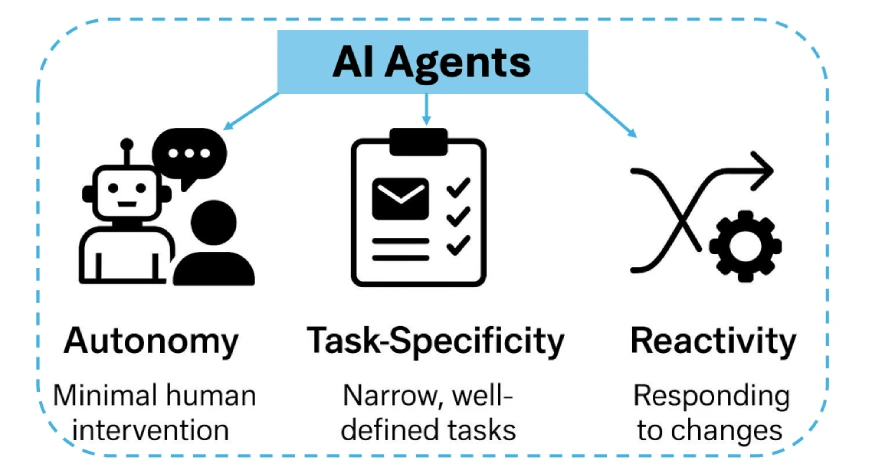
Instead of writing a clever prompt every time, you set up a repeatable flow. The assistant connects to apps, remembers context (sometimes), and can execute tasks. The assistant becomes less like a writer you talk to, and more like a junior operator who can move things around.
And right away, you run into the tradeoff you cannot avoid:
- Capability: how much it can do, how many tools it can use, how smart it feels
- Privacy: what data it touches, what it stores, what it trains on, who can see it
- Cost: not just subscription, but team seats, usage limits, and add ons
- Setup time: integrations, permissions, prompt libraries, approvals, workflows
If you know which of those you care about most, you are already halfway to a good choice.
The 60-second test: what do you actually need your assistant to do?
Before you compare tools, do this. Decide which bucket you are in. Most people are one primary bucket and one secondary.
Bucket 1: Personal
You want help with life admin. Planning, writing, reminders, learning, travel, routines. Usually on your phone. Usually quick.
Examples:
- daily schedule planning
- turning voice notes into lists
- journaling prompts that do not feel cheesy
- travel itineraries with constraints
- meal planning, workouts, budgeting notes
Bucket 2: Professional
You want less busywork at work. Meetings, docs, research, follow ups, summaries. You care about accuracy and you probably care about permissions.
Examples:
- meeting agendas and prep questions
- meeting notes into action items
- follow up emails in the right tone
- drafting docs and exec summaries
- competitive research and decision memos
Bucket 3: Small Business
You want leverage. Support, ops, SOPs, invoices, lead handling. You care about consistency, guardrails, and team control.
Examples:
- customer support replies and triage
- proposal drafts and onboarding emails
- SOP creation and internal knowledge base
- lead qualification and CRM updates
- weekly reporting summaries
- HR chatbot to answer employee questions (for onboarding, policy info, training, KB)
Bucket 4: Online (remote, creator, ecommerce)
You want output. Content pipelines, repurposing, SEO briefs, community replies, product descriptions, analytics summaries.
Examples:
- content briefs and outlines
- turning long form into shorts and threads
- newsletter drafts and headline variants
- product listing optimization
- community moderation and reply templates
Now use the simple framework: Tasks, Data, Tools.
- Tasks (what): what do you want done, in real life, every week
- Data (where): emails, docs, PDFs, CRM, support tickets, notes, transcripts
- Tools (which apps): Google Workspace, Microsoft 365, Slack, Notion, HubSpot, Zendesk, Shopify, etc
Decision shortcut that saves you hours:
If you need actions inside Google Workspace, Microsoft 365, Slack, Notion, or your CRM, prioritize integrations over raw chat quality. A slightly less “smart sounding” assistant that actually books the meeting beats a genius chatbot that just tells you what you should do.
The 8 features that matter (and what to ignore)
Most marketing pages will throw 40 features at you. You need about 8.
1) Core chat quality
Not just intelligence. The practical stuff:
- Can it reason through messy tasks without rambling
- Can it write in your tone without sounding like a brochure
- Does it ask clarifying questions when it should
If it never asks questions, that is not confidence. That is guessing.
2) Memory and personalization
Real work is repeat work. Memory matters, but only if you control it. Look for:
- persistent preferences (tone, formatting, your role, your audience)
- project context (this client, that product, that ongoing goal)
- safe controls: what it stores, what it forgets, how to delete
If you cannot understand what it is remembering, be careful.
3) Tool use and integrations
This is the workflow part. Can it:
- read and write to docs
- send emails
- create calendar events
- create tasks in your task manager
- pull data from spreadsheets
- talk to Slack channels
- work inside your CRM or helpdesk
4) File handling and extraction
You will do this constantly. PDFs, meeting notes, call transcripts, contracts. You want:
- clean summaries
- structured output (tables, checklists, JSON if needed)
- correct data extraction (names, dates, numbers)
5) Team features
If more than one person will use it, you want:
- shared prompt library
- shared knowledge base
- roles and permissions
- admin settings and usage controls
6) Security and compliance basics
Even if you are not “enterprise,” the basics matter:
- encryption
- data retention policies
- SSO software (for teams)
- audit logs (for professional and small business use)
7) Guardrails and approval flows
Especially for small business support and ops:
- approved tone
- banned topics
- escalation rules
- review before send
8) UX that matches your day
This sounds boring, but it matters more than you think. If it is slow, clunky, or buried in tabs, you will stop using it.
What to ignore
- “1000+ templates” unless you will actually use them
- vague claims like “human-like”
- feature lists that never connect to real workflows
- “one click growth” promises. Come on.
Pick your category fast: 4 “best-fit” paths
The “best assistant” is usually the one that is most native to your ecosystem. Where do you live all day?
Google. Microsoft. Apple. Slack. Notion. A CRM. A helpdesk. Shopify.
Pick the path that matches that, then layer specialist tools only if you truly need them.
Path A: Personal
Prioritize:
- voice and dictation that works on the go
- reminders and quick capture
- writing help that feels like you, not like a template
- low friction mobile UX
- lightweight memory with privacy controls
Path B: Professional
This is the “meetings and docs” path. Prioritize:
- calendar, email, docs integration
- meeting capture and summaries
- research with citations and source handling
- enterprise or business grade controls if required
Path C: Small Business
Prioritize:
- customer support workflows
- SOP automation and internal knowledge base
- CRM and helpdesk integration
- invoicing and ops automation (where possible)
- team permissions and review steps
Path D: Online
Prioritize:
- content pipeline features (briefs, outlines, repurposing)
- SEO workflows that focus on intent and structure
- analytics summaries and reporting
- publishing workflows and asset management
- community reply templates without sounding like a bot
Simple rule, honestly:
Choose the assistant that is native to your primary ecosystem first. Then add a specialist if you hit a real limit.
Top AI assistant options in 2026 (by real-world use case, not hype)
This section is about matching assistants to jobs. And yes, you can mix one general assistant plus one specialist. That combo is usually better than paying for five overlapping subscriptions you barely use.
General-purpose assistants (everyday writing, planning, broad Q&A)
These are your default. Good for:
- drafting and editing
- summarizing
- brainstorming
- learning and explanation
- planning and checklists
Strength: versatility.
Limit: they still need direction, and they can still be wrong.
Typical examples in 2026:
- ChatGPT style assistants with tool connectors
- Claude style assistants with strong writing and doc handling
- Gemini style assistants if you live in Google
- Copilot style assistants if you live in Microsoft
Business assistants (support, CRM, operations)
These are less about “chat” and more about automation plus guardrails. Good for:
- ticket drafting and triage
- knowledge base answers
- lead qualification
- internal ops workflows
- reporting
Strength: admin control, repeatability, consistency.
Limit: setup time, and you will still need humans in the loop.
Typical examples:
- helpdesk AI inside Zendesk, Intercom, Freshdesk style platforms
- CRM assistants inside HubSpot, Salesforce ecosystems
- workflow automation combos using Zapier, Make, n8n with an LLM layer
Voice-first assistants (on-the-go, dictation, quick actions)
Best when your hands are full or you are moving. Good for:
- capturing ideas
- reminders and quick tasks
- dictation to clean text
- simple action flows (message, schedule, note)
Strength: speed and low friction.
Limit: accuracy depends on environment, device mic quality, and how noisy your life is.
Typical examples:
- phone OS assistants with stronger LLM brains than before
- wearable and car integrations
- dedicated dictation plus summarization tools
How to shortlist quickly
Pick 2 or 3 assistants and run the same test tasks:
- Draft a short email in your tone
- Summarize a meeting transcript into actions
- Extract key fields from a PDF into a table
- Create a calendar event or task (if supported)
Do not overthink it. You are testing reality, not vibes.
AI assistants for Personal: the “life admin” setup that actually works
Personal assistants are weird because the best one is the one you actually use every day. Not the one with the most features.
Use cases that are actually worth it
- daily planning and weekly reviews
- reminders that do not get ignored
- journaling that feels structured, not forced
- learning plans and study notes
- travel planning with constraints
- meal and workout planning
- lightweight budgeting notes (not full accounting)
Features to prioritize
- voice dictation that feels instant
- good mobile UX
- lightweight memory (preferences, not your entire life)
- personal knowledge support (notes, snippets, links)
- privacy controls you can understand
A simple workflow that works: capture → clarify → schedule → review
- Capture: voice notes, quick text, screenshots, messy thoughts
- Clarify: turn it into a clear task, decision, or next step
- Schedule: put it on the calendar or task list, with a real time
- Review: once a week, clean up and reset
If you skip the review, everything piles up. The assistant cannot save you from that part.
Example tasks to test
- “Plan a 3 day trip to Tokyo under $900, vegetarian friendly, one museum day, minimal transit, and give me a day by day schedule.”
- “Turn these voice notes into a checklist, grouped by errands, calls, and online tasks.”
- “Summarize this long PDF and create 20 flashcards with questions and answers.”
Privacy guidance (personal)
Be cautious syncing:
- health details
- financial account info
- anything you would not want in a screenshot
A practical approach: keep sensitive details in local notes, and feed the assistant only what it needs. Also, use minimal memory. You want preferences remembered, not secrets.
AI assistants for Professional: meetings, docs, research, and less busywork
This is where assistants can pay for themselves fast. Not because they are magical, but because meetings create a ridiculous amount of boring work.
Professional use cases
- meeting prep and agenda creation
- note taking and action items
- follow up emails and summaries
- drafting docs, PRDs, proposals, internal updates
- slide outlines and talking points
- competitive research and decision memos
The meeting workflow: before → during → after
Before
- “Here is the meeting goal, attendees, and context. Give me 7 prep questions and a 10 minute agenda.”
- Ask it to identify risks: “What could go wrong in this meeting?”
During
- capture transcript or notes (depending on your setup)
- mark decisions and blockers
After
- summary in 5 bullets
- action items with owners and due dates
- follow up email draft in the right tone
- file the notes where your team actually looks
Research workflow (and how not to get fooled)
Ask for:
- sources
- competing perspectives
- what is uncertain
- what would change the conclusion
A useful prompt pattern:
- “Compare these two claims. List supporting evidence, counter evidence, and what data you would need to verify. Then write a 1 page decision memo for a busy exec.”
And still, verify. Always. Assistants can sound confident while being wrong, and that is the dangerous part.
Writing workflow: draft → tone variants → exec summary
A good flow:
- rough draft (fast, imperfect)
- two tone variants (direct, friendly, formal)
- executive summary (top, not bottom)
- editing checklist pass
Quick editing checklist you can reuse:
- clarity: does every paragraph have one point
- accuracy: any numbers, names, claims to verify
- audience: is this written for the reader, not for you
- action: what do you want them to do next
Governance basics for work
- do not paste confidential data into consumer tools
- use enterprise or business settings where available
- separate personal and work accounts
- confirm retention and training policies before adoption
This is boring, but so is cleaning up a data leak.
AI assistants for Small Business: automate without breaking trust
Small businesses want speed, but they also need consistency. You cannot have support replies going off script or invoices being “almost right.”
High value use cases
- customer support triage and drafts
- FAQ and help center drafting
- proposal writing and revisions
- SOP creation (process docs you never have time to write)
- invoice and email automation templates
- lead qualification and routing
- internal knowledge base for your team
Start with one process
Pick one repetitive workflow and make it solid. Good starters:
- support replies for top 20 questions
- onboarding email sequence
- weekly reporting summary
- lead qualification based on a form response
If you try to automate everything at once, you will get a messy half working system and you will blame the assistant. It is not just the assistant.
Guardrails that matter
- approved tone guide (warm, direct, no overpromising)
- escalation rules (“refund requests go to human”)
- banned topics (legal claims, medical advice, anything risky)
- review before send for anything sensitive
- logging and visibility so you can audit what happened
Integrations to prioritize
Depending on your business:
- helpdesk tickets
- CRM
- spreadsheets
- calendar
- payments and invoicing tools
The assistant is only as useful as what it can touch.
ROI framing (keep it measurable)
Track:
- hours saved per week
- response time reduction
- fewer dropped leads
- higher conversion from faster follow ups
- fewer mistakes in routine comms
If you cannot measure it, you will not know if it is working. Or you will keep paying because it feels modern.
AI assistants for Online work: creators, freelancers, ecommerce, and remote teams
Online work is output heavy. And honestly, assistants are great at output. The trap is letting them make things bland.
Common use cases
- content briefs and outlines
- SEO structure and internal link ideas
- newsletter drafts and subject lines
- repurposing long form into short form
- community replies and moderation templates
- product descriptions and comparison tables
- customer DMs and support macros
SEO-friendly workflow (no keyword stuffing)
A simple loop:
- topic
- intent (what the reader actually wants)
- outline with sections that match intent
- draft
- internal links and update cycle
Use the assistant for structure and variation. Not for stuffing “best AI assistant 2026” 47 times into a paragraph.
Ecommerce workflow
- research summary: “What are the top objections for this product category?”
- listing optimization: benefits, specs, use cases, comparison table
- post purchase support templates: shipping, returns, setup help
- review mining: “Summarize these reviews into 10 improvements and 10 marketing angles”
Freelancer workflow
- client onboarding emails
- proposal variants by client type
- scope of work drafts
- delivery checklists and QA steps
- weekly update templates so you stop rewriting the same thing
Quality control for online work
- originality: do not publish raw outputs without editing
- brand voice: keep a style guide and enforce it
- factual checks: pricing, policies, claims, guarantees, stats
If you sell something and the assistant invents a feature, that is on you.
The evaluation checklist: test an AI assistant in 30 minutes
You do not need a week long trial to know if something fits. You need 30 focused minutes.
Step 1: define 5 test tasks from your real week
Not generic prompts. Real tasks that annoy you.
Examples:
- “Draft a follow up email after a demo call, friendly but direct, include next steps and a calendar link.”
- “Summarize this transcript into decisions, risks, and action items.”
- “Extract these fields from this PDF into a table: client name, renewal date, price, cancellation terms.”
- “Turn these bullet notes into a 1 page SOP.”
- “Create a content brief for this keyword with audience pain points and a section outline.”
Step 2: run three specific tests
- Writing test: email plus a longer doc section
- Extraction test: PDF or messy notes into structured data
- Action test: calendar or task creation, if supported
Step 3: measure the right things
- accuracy
- speed
- number of clarifying questions (some is good)
- formatting quality
- repetition and drifting
Step 4: check limitations
- hallucinations (confident wrong answers)
- refusal behavior (does it block reasonable requests)
- context window issues (does it forget mid task)
- sensitive data handling (does it warn you, does it offer safer options)
Step 5: score and decide
Pick:
- 1 primary assistant you use daily
- 1 specialist you use for a specific workflow
Avoid paying for three tools that all draft emails. That is how subscriptions quietly eat your budget.
Pricing, privacy, and setup: the real “hidden costs”
The sticker price is not the full price. The real cost is usually time.
Pricing models you will see
- free tier: limited usage, weaker models, fewer integrations
- pro: higher limits, better models, memory, connectors
- team: shared workspace, admin controls
- enterprise: SSO, audit logs, compliance options, custom retention
What typically unlocks at paid tiers:
- more usage
- better models
- memory features
- integrations and automation
- team and admin features
Hidden costs (the human-in-the-loop reality)
- connecting tools and managing permissions
- building prompt libraries
- documenting SOPs so the assistant can follow them
- review and approval steps
- correcting outputs and refining workflows
If you do not budget time for setup, you will never reach the “this saves me time” stage.
Privacy checklist (quick but real)
- data retention: how long do they keep logs
- training: do they train on your data, and can you opt out
- export and delete controls: can you remove history and memory
- shared workspace visibility: what can teammates see
- where data is stored (relevant for some industries)
Best practice that saves headaches:
Separate personal and work accounts. Also avoid mixing client data into personal assistants, even if it is convenient.
A simple onboarding plan
- start with one workflow
- document your best prompts as you go
- automate step by step, not all at once
How to get better results (without becoming a “prompt engineer”)
You do not need fancy prompting. You need a repeatable structure and a few habits.
Use a repeatable prompt structure
- Role: who the assistant is acting as
- Context: what this is about, who it is for
- Constraints: tone, length, what to avoid
- Examples: a sample of your style, or a prior email
- Output format: bullets, table, checklist, JSON, headings
That is it. Five parts.
Ask for clarifying questions first
For complex tasks like strategy, briefs, planning:
- “Ask me up to 7 clarifying questions before you start. If you have to assume something, list assumptions first.”
This one line reduces garbage output a lot.
Use “show your work” alternatives
Instead of “explain your reasoning,” which can be messy, ask for:
- assumptions
- pros and cons
- a verification checklist
- what could be wrong
Create a simple style guide
Keep a tiny doc that says:
- tone: direct, warm, no hype
- banned phrases: “game-changing,” “revolutionary,” “unlock”
- formatting rules: short paragraphs, bullets, clear headings
- preferred templates: meeting summary format, SOP format, outreach email format
Build a small prompt library
You only need a few to start:
- meeting summary
- outreach email
- SOP draft
- SEO outline
- weekly review
Reuse them. Improve them. That is how you stop starting from zero.
Let’s wrap up: your fastest path to the right AI assistant in 2026
Pick based on tasks + data + tools, not hype.
The simple selection flow:
- choose your category (personal, professional, small business, online)
- shortlist 2 or 3 assistants that fit your ecosystem
- run the 30 minute test with real tasks
- keep 1 primary plus 1 specialist
And keep a realistic mindset. Assistants are multipliers, not replacements. You still own accuracy, judgment, and the final send button.
Commit to one workflow this week. Meetings, support, or content. Pick one. Make the assistant earn its place.
FAQ
What is the fastest way to choose an AI assistant in 2026?
Pick your main category (personal, professional, small business, online), then shortlist 2 to 3 assistants that integrate with your main tools, then run a 30 minute test using real tasks from your week.
Do I need one assistant or multiple?
Usually one primary assistant for everyday work plus one specialist for a specific workflow (like support tickets, CRM, or content repurposing) is the sweet spot. More than that tends to overlap.
What matters more, chat quality or integrations?
If you need the assistant to take actions inside Google Workspace, Microsoft 365, Slack, Notion, or a CRM, integrations matter more. If you mainly need thinking and writing, chat quality matters more.
Are AI assistants safe for confidential work?
They can be, but only if you use the right plan and settings. Check data retention, training on your data, admin controls, and whether enterprise protections like SSO and audit logs exist. Do not paste confidential data into consumer tools by default.
How do I test an assistant quickly without overthinking?
Run the same tasks in each tool: an email draft, a meeting summary, data extraction from a PDF, and one action test like creating a calendar event. Score accuracy, speed, clarifying questions, and formatting.
What is the biggest hidden cost of AI assistants?
Setup and review time. Connecting tools, building prompts, defining SOPs, and checking outputs is where the real cost lives, especially for teams.
How do I get better outputs without learning “prompt engineering”?
Use a simple prompt structure (role, context, constraints, examples, output format), ask for clarifying questions first on complex tasks, and keep a small prompt library you reuse every week.
FAQs (Frequently Asked Questions)
What distinguishes AI assistants in 2026 from traditional chatbots?
In 2026, AI assistants have evolved beyond simple chatbots to become voice-capable, tool-using entities that can take direct actions such as sending emails, booking meetings, and updating documents. They operate through workflows connecting various apps, remember context, and execute complex tasks rather than just responding to prompts.
How can I quickly determine which AI assistant category fits my needs?
You can identify your best-fit AI assistant by categorizing your use case into one of four buckets: Personal (planning, writing), Professional (meeting notes, research), Small Business (customer support, operations), or Online (content creation, sales). Using the 'tasks, data, and tools' framework helps clarify what you need your assistant to do and which integrations are essential.
What are the eight key features to prioritize when choosing an AI assistant?
The critical features include: 1) Core chat quality with reasoning and tone control; 2) Memory and personalization with safe controls; 3) Tool use and integrations like calendar and CRM; 4) Multimodal capabilities such as voice dictation and image understanding; 5) Agentic workflows for multi-step tasks; 6) Team features including shared knowledge bases; 7) Security and compliance measures like encryption and audit logs; and 8) Avoiding gimmicky features like excessive templates or vague 'human-like' claims.
How should I select an AI assistant based on my existing ecosystem?
Choose an AI assistant that is native to the primary ecosystem where your work lives—Google Workspace, Microsoft 365, Apple devices, Slack, or Notion—to maximize integration convenience and permissions. Then consider adding specialist tools only if necessary for specific tasks or workflows.
What are some recommended AI assistants for personal life management in 2026?
For personal use focused on daily planning, reminders, journaling, travel itineraries, meal planning, and budgeting notes, prioritize assistants with strong voice dictation, mobile user experience, lightweight memory for personal notes, and robust privacy controls. Suggested workflows include capturing ideas via voice or text, clarifying tasks, scheduling them efficiently, and weekly reviews.
How do professional AI assistants help reduce busywork in meetings and research?
Professional AI assistants assist by preparing meeting agendas, taking comprehensive notes during meetings, extracting action items automatically, conducting research efficiently with citation support, managing documents collaboratively, and ensuring enterprise-grade security. They integrate seamlessly with calendars and email to streamline workflows and improve productivity.
.png)
.png)