


12 Best Practices for Transactional Email Marketing
Stop sending boring receipts. Discover 12 best practices for transactional email marketing to boost open rates and drive action with interactive video.
.png)


When was the last time you audited your order confirmation or welcome emails?
For most businesses, the answer is a hesitant “...years ago?”
When thinking about upping the engagement game, most marketers focus entirely on their promotional newsletters or nurture sequences. These are the emails that drive the hype, right?
Well, yes and no.
What most of us overlook is that these are not the most frequently opened emails.
Your audience interacts with your business most often via transactional emails. These are the system-based messages vital for the smooth operation of your customer journey.
You might have the most brilliantly crafted sales campaign, but your customer retention will plummet if your onboarding email is a boring wall of text, or if your order confirmation leaves them confused about the next steps.
Good transactional emails = reduced support tickets and higher customer lifetime value.
In this article, we’ll cover the best practices for creating transactional emails, and how to modernize them (hint: it involves moving beyond static text) to ensure your users take action when it matters most.
But before we jump into the meaty part, let’s make sure we are on the same page.
Transactional emails vs. marketing emails
Unlike marketing emails, transactional emails are triggered when a user performs a specific action. For example, a purchase receipt, a password reset, or a shipping notification.
Because these emails are functional, they boast much higher open rates than standard promotional emails—often 8x higher.
That being said, just because people open them doesn't mean they enjoy them. Most transactional emails are dry, confusing, and look like they were written by a robot.
With that in mind, let’s look at 12 best practices to turn these boring notifications into brand-building opportunities.
1. Don’t use a no-reply email
What’s the quickest way to tell a customer you don’t care about them?
Tell them they can’t talk back.
Using a no-reply@ address tells your user: "We want to talk to you, but we don't want to listen."
Even though transactional emails are automated, customers often reply to them with genuine questions about their order or account. If that reply goes into a black hole, you create frustration.
The Fix: Send from a real address, or at least one that is monitored, like hello@yourcompany.com or support@yourcompany.com.
2. Write straight-to-the-point subject lines
The goal of your transactional email subject line is utility, not mystery.
Be direct. There is no room for clickbait here. If a user just bought a subscription, they want to see "Receipt for Order #1234," not "You won't believe what just happened!"
- Bad: "Welcome to the family! Here is some info..."
- Good: "Welcome to [App Name]! Here is your login link."
Don’t make the user think. Make them feel secure that the action they took was successful.
3. Add a preheader (and make it useful)
What happens if you can't fit the tracking number or the key details in the subject line?
Use the preheader.
The preheader is the snippet of text visible next to or below the subject line in the inbox preview. If you leave this blank, the email client will pull the first text it finds in the email body, which is often "View in browser" or "Unsubscribe."
Use this space to summarize the value of opening the email.
4. Verify your emails to protect deliverability
You can design the perfect email, but it’s worthless if it lands in the Spam folder.
Transactional emails often contain critical information (like password resets). If these bounce or get flagged, your user is locked out.
Ensure your domain has the proper authentication protocols set up and actively tracked using a DMARC monitoring service:
- SPF (Sender Policy Framework)
- DKIM (DomainKeys Identified Mail)
These acronyms essentially tell email providers (like Gmail and Outlook) that you are who you say you are.
5. Separate your transactional and marketing domains
If your marketing team sends out a blast that gets marked as spam by thousands of users, your domain reputation takes a hit.
If you send your password resets from that same domain, your critical system emails might start going to spam, too.
Whether you are using an internal newsletter software within your organization or a marketing platform for customers, a best practice is to separate them.
A best practice is to separate them. Use news.yourcompany.com for newsletters and alerts.yourcompany.com (or just the root domain) for transactional messages.
6. Use video to explain complex information
Most transactional emails rely on heavy blocks of text to explain complex things like "How to set up your account" or "How to return your item."
The reality? People don’t read. They scan.
If you want to reduce support tickets, replace the instruction manual with a video. This approach works especially well for onboarding tools that require user input and setup, such as Rezi.ai, where guiding users step-by-step helps them take action faster and avoid confusion early on.
However, standard video links are passive. They don’t drive action. This is where Clixie AI comes in.
Instead of a static YouTube link, you can embed a Clixie interactive video. This allows you to place clickable elements inside the video itself.
Imagine an onboarding email where the video pauses and asks the user, "Which operating system are you using?" and the user clicks "Mac" or "Windows" directly in the video to jump to the relevant chapter.
7. Make your CTAs interactive
In a standard email, you usually have one main button: "Download Invoice" or "Verify Email."
But what about "Welcome" emails where you want the user to take multiple steps?
Listing 5 different links in an email text body is messy and overwhelming.
The Fix: Use an interactive media element. With tools like Clixie, you can create a "Start Here" video that contains clickable buttons (CTAs) appearing at the exact moment they are mentioned in the video.
- At 0:30, the speaker says "Download the app," and a "Download" button appears on the video.
- At 1:00, the speaker says "Book your orientation," and a calendar link pops up.
This consolidates multiple calls to action into one engaging stream.
8. Ensure mobile responsiveness
With over 41% of emails being opened on smartphones, your transactional emails must look good on a small screen. Working with a healthcare mobile app agency can help ensure your email templates are designed with mobile-first principles in mind, especially for patient communications and healthcare platforms
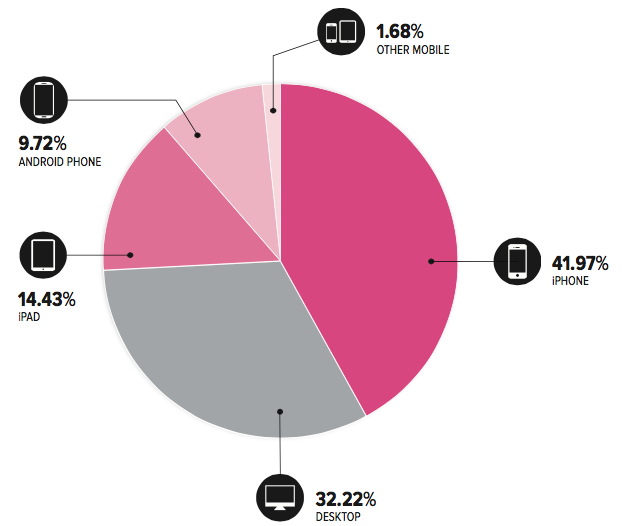
If you are using video thumbnails or interactive elements, ensure they scale down correctly. Large images that push the text off the screen will result in an instant delete.
9. Time your emails perfectly
Transactional emails are expected immediately.
- Password reset: Needs to be instant.
- Order confirmation: Needs to be within seconds.
However, "nurture" transactional emails (like "Tips for using your new product") should be timed based on behavior.
Don't send the "Advanced Features" tutorial 5 minutes after signup. Wait 3 days.
10. Personalize beyond the {{First_Name}}
Personalization is not just "Hi Jacek."
Personalization is relevance.
If a user just bought a specific camera model from your store, your transactional follow-up shouldn't be a generic "Thanks for buying electronics."
It should be: "Here are 3 tips for your new [Camera Model]."
Pro Tip: You can even use Clixie’s AI features to tag and organize your video assets, so you can easily drop the exact relevant video tutorial into the email based on what the user purchased.
11. Monitor your bounce rates and spam complaints
Transactional emails generally have low spam complaints, but if you start seeing them rise, something is wrong.
Perhaps you are making the "receipt" look too much like an "upsell."
Monitor your Hard Bounces (invalid emails) and remove them from your database immediately. High bounce rates ruin your sender reputation.
12. Include a clear "Next Step"
Every transactional email should answer the question: "Okay, what now?"
- Receipt: Next step -> "Track your package."
- Support Ticket Received: Next step -> "View average wait times."
- Welcome Email: Next step -> "Create your first project."
If the next step is complicated, don’t write a paragraph. Show them.
Embed a GIF or a thumbnail linking to a Clixie interactive walkthrough. This allows the user to click "Start Walkthrough" and be guided hand-in-hand through the process, rather than struggling with text instructions.
Start sending transactional emails that convert
Transactional emails are the unsung heroes of your business operations. They are the bridge between a user's intent and their success.
While text is necessary, the future of engagement is interactive.
At Clixie AI, we help you transform static communication into interactive video experiences. Whether it's an onboarding walkthrough with embedded choices or a support video with direct buying links, we turn passive viewers into active users.
Ready to modernize your customer communication?
.png)
.png)




.avif)
