


Claude Code + HyperFrames: The Exact AI Video Editing Workflow, Prompts, and Limits
The exact Claude Code video editing workflow — real prompts, token costs, failure cases, and a storyboard-first pipeline that actually works in production.


TL;DR
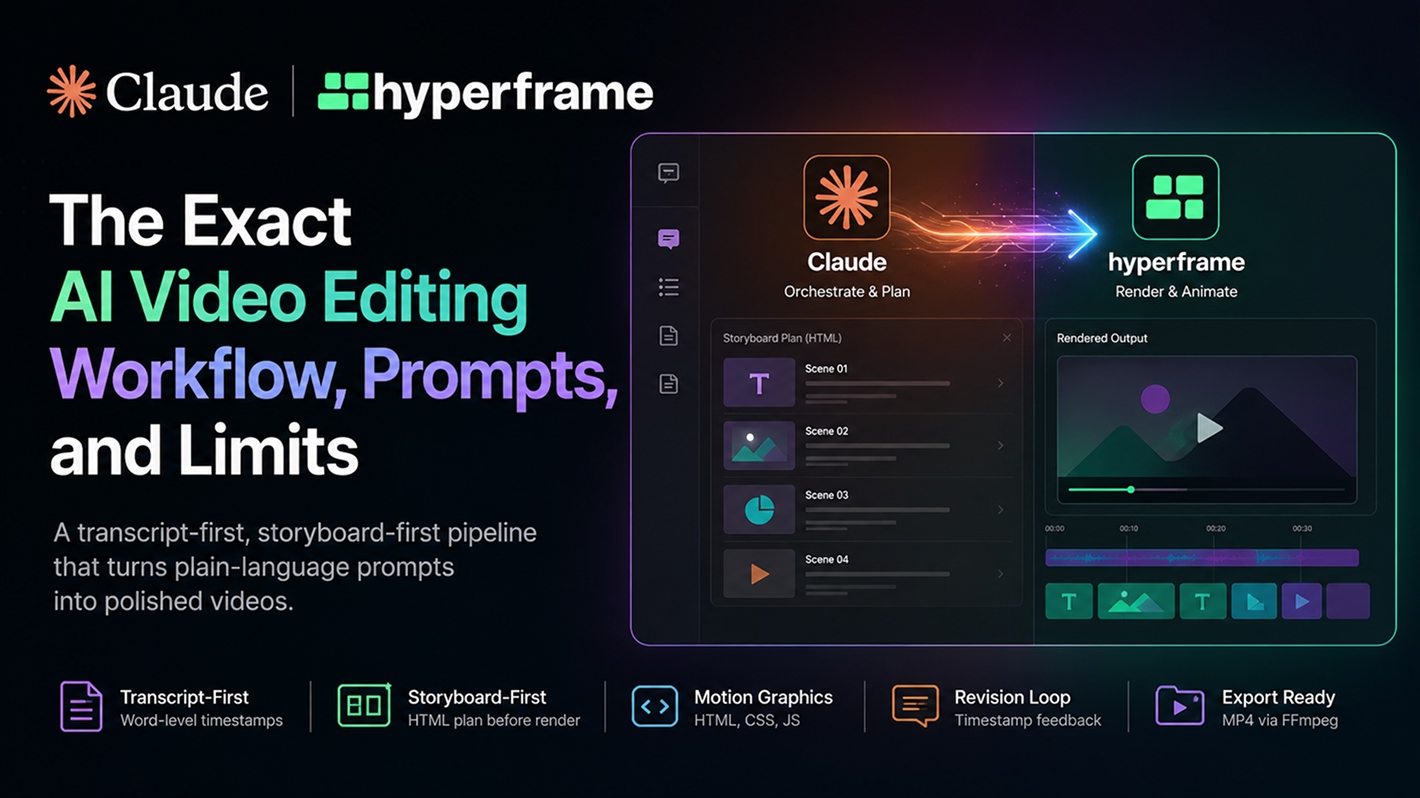
Claude Code is not a video editor. It is the orchestration layer for a transcript-first, storyboard-first workflow that uses HyperFrames to render motion graphics, overlays, and captions from plain-language prompts. This post documents the exact pipeline — including real token costs, failure cases, revision logic, and the prompts that actually work. If you want to know what this workflow can and cannot do in real production, this is the complete answer. For teams that want their finished videos to do more than play — adding interactivity, branching, and engagement tracking — an interactive video platform handles that layer after production.
Key Takeaways
- Claude Code is the orchestration layer. HyperFrames renders. FFmpeg exports.
- The storyboard-first approach — reviewing an HTML scene plan before rendering — prevents wasted tokens and failed render cycles.
- Claude cannot transcribe audio or cut real footage frame-precisely. The transcript must be supplied externally.
- One documented project consumed approximately 10% of the $200/month Claude max plan's 5-hour session limit across transcript extraction, planning, and four render iterations.
- Preview instability on localhost appeared in our sessions. Rendering directly for review was the most reliable workaround.
- Short-form video pacing is not yet reliable without significant human iteration.
- A rendered MP4 is a production output. Understanding how interactive video works is useful context for what happens to that video after it ships.
Introduction
A 37-second raw talking-head clip. Four render passes. One session reset at 263K tokens. Timestamp-level revision feedback. Resource usage: roughly 10% of a $200/month Claude Max plan's 5-hour session limit. The result: a polished video with branded overlays, synced motion graphics, and animated captions. No timeline editor was opened.
That is what Claude Code video editing looks like in production — not a demo, not a best-case scenario. A documented live session with real failure cases, real iteration costs, and a workflow that required human judgment at multiple points.
Claude Code is not replacing Premiere Pro. It is replacing the repetitive post-production work that surrounds every recording: captions, lower thirds, motion graphics, layout decisions, revision orchestration, and rendering. According to Wyzowl's AI video marketing research, 63% of marketers have used or currently use AI tools to help create marketing content, and nearly 54% use AI tools specifically for video editing and creation. The teams getting the most from that shift are not the ones using AI to do everything — they are the ones using it to compress the mechanical work so human judgment can go where it actually matters.
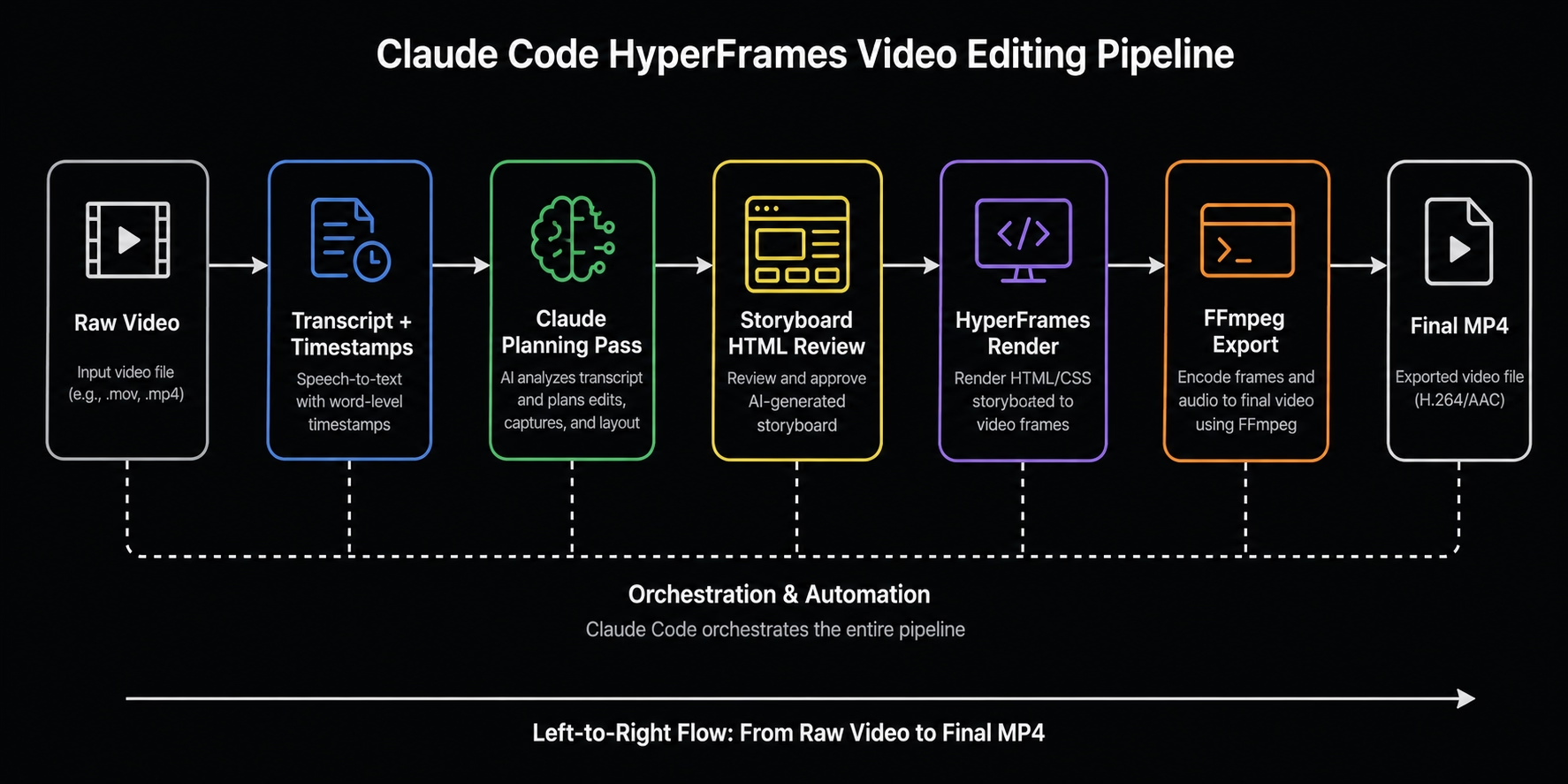
The architecture behind this workflow is not complicated, but it is specific. Claude Code is the orchestration layer. HyperFrames is the HTML-based rendering engine. FFmpeg handles video export. Whisper or ElevenLabs Scribe handles transcript extraction. These tools are not interchangeable and they are not optional. Each has a defined role. Understanding that architecture is what separates a reliable production workflow from an impressive demo that breaks on real footage.
This post covers the exact workflow, the prompts that work, the failure cases that will cost you tokens if you do not know about them, and the comparison table that clarifies what Claude Code can and cannot replace.
Want to see what a finished video becomes when you add interactivity after production? Browse interactive video examples to understand the layer that sits after the MP4.
Why Video Post-Production Still Eats Hours
Video post-production bottlenecks happen after the camera stops — in the repetitive, rule-based work of captions, overlays, motion graphics, and exports that follows every recording session regardless of how good the raw footage is.
The problem is structural. Wistia's 2026 State of Video report, drawing on a survey of over 900 professionals and data from more than 13 million videos, found that video demand is up while budgets are not keeping pace — 40% of teams plan to increase their video spend this year, down from 57% in 2023, and almost half are keeping their budgets flat. The pressure is not to spend more. It is to get more output from the same resources.
That pressure lands directly on post-production. In our own documented sessions, a single short-form clip with motion graphics and overlays took experienced editors between 45 minutes and two hours to complete manually — and that range is consistent with what the people on our editing team reported when we first showed them this workflow. The issue is not that post-production is hard. It is that most of it is mechanical. Syncing captions to a transcript follows rules. Applying brand colors to a lower third follows rules. Rendering the same overlay template across ten clips follows rules. Rule-based work is exactly what AI agents handle well.
The distinction that matters: captions, overlays, motion graphics, and batch exports are mechanical. Pacing, emotional arc, shot selection, and short-form rhythm are creative. This workflow compresses the mechanical work. It does not replace the creative judgment.
Claude Is Not the Video Editor
Claude Code does not edit video files directly. It acts as the orchestration layer — writing and executing the scripts that control HyperFrames, FFmpeg, and transcription tools on your behalf, while managing the decisions that would otherwise require a human at each step.
Understanding the four-role architecture is the foundation of everything else in this workflow.
Claude Code reads the project, interviews you about creative intent, extracts the transcript via an external tool, generates a scene-by-scene storyboard plan, writes HTML and JavaScript for each animation, manages file paths, and handles revision logic based on your timestamp feedback. It is the brain of the pipeline.
HyperFrames is the rendering engine. According to the HyperFrames documentation, it is an open-source framework that turns HTML into deterministic, frame-by-frame rendered video — compositions are plain HTML documents with no proprietary format and no React requirement. It is installed into Claude Code with a single command, as described in the Claude Design setup guide. Scenes are written in plain HTML, CSS, and JavaScript. The rendering pipeline captures every frame via headless Chrome and encodes through FFmpeg. Independent practitioners have documented it running locally under Apache 2.0 with no cloud dependency or API key required.
FFmpeg handles the final export and compositing step. Claude Code calls it directly for codec normalization, file format conversion, and final video assembly.
Whisper or ElevenLabs Scribe handles transcript extraction with word-level timestamps. Without this layer, Claude has no idea what is being said in the video or when — which means it cannot sync any animation, caption, or motion graphic to the actual content.
Most tutorials that say "Claude edits video" are describing what happens after all four of these pieces are in place. The pipeline is what makes it work. Claude alone does not.
Third-party analysis published by Selects in May 2026 supports this framing: Claude planning an edit from a transcript is real and useful, while frame-precise cutting of real footage sits outside what the architecture can currently deliver. The right mental model is Claude as the director, not the editor.
The Storyboard-First Workflow That Changes Everything
Storyboard-first rendering means Claude generates an HTML scene plan for review before writing any animation code — preventing wasted tokens, failed renders, and motion graphics that miss the creative brief entirely.
Most AI video tutorials show a single prompt producing a finished output. That is not how a reliable production workflow operates. The difference between a demo and a production system is the approval gate that sits between planning and rendering.
Here is what that gate changes:
In practice, Claude generates a scene-by-scene breakdown before writing a single line of animation code. For each section of the video, it describes what motion graphics will appear, at what timestamps, with what visual treatment. You read it. You approve or redirect. Then rendering begins.
The reason this matters financially: every unapproved render cycle costs tokens, CPU time, and calendar time. In a documented live session, one project consumed 263K tokens in the first session before a context reset was needed. Accepting a plan that misses the creative direction and then re-rendering compounds that cost quickly.
The gate structure the make-a-video skill uses runs in sequence: script and voice interview → motion graphics plan → human approval → render. Non-technical team members can review the HTML plan and approve creative direction before any compute is spent. That is a meaningful change for teams with a marketing or creative director in the loop.
The storyboard-first approach is not optional at scale. Every unapproved render cycle costs tokens, CPU time, and iteration loops. Read the HTML plan. Redirect before you approve. This single habit is the difference between a 4-render project and a 12-render project.
The Exact Workflow, Step by Step
The Claude Code + HyperFrames video editing workflow runs in eight steps, from raw footage drop-in to final MP4 — with one mandatory human review gate before rendering begins.
Step 1 — Pre-trim your raw footage
Before dropping anything into Claude Code, remove obvious retakes, dead air, and mistakes manually. Claude Code cannot reliably detect when you stumbled over a line or left five seconds of silence at the start. Doing this yourself takes two minutes. Steering Claude through it takes longer and produces inconsistent results. Tools like Descript can help, but even Descript misses edge cases — direct manual trimming is the most reliable approach.
Step 2 — Drop the footage into the project and invoke the skill
Add the pre-trimmed MP4 to the root of your Claude Code project. Invoke the make-a-video skill explicitly in your prompt — naming the file and keeping the initial brief open so the interview gate can gather the specifics it needs.
Step 3 — Transcript extraction
Claude Code calls an external transcription tool to extract word-level timestamps from the audio. If whisper.cpp is installed locally, it will use that. If not — or if local processing is straining your RAM during a multi-render session — it falls back to the OpenAI API. The transcript is the timing foundation for every animation and caption that follows. Without it, nothing syncs.
Step 4 — The planning interview
The make-a-video skill asks a structured set of questions: video dimensions, face cam treatment, motion graphics style, caption preferences, visual energy level, end card CTA. Answer these directly. The quality of the plan correlates directly with the specificity of these answers.
Step 5 — Storyboard plan review
Claude generates a scene-by-scene HTML plan. This is the most important step in the workflow. Read every section. If a scene description does not match your creative intent, redirect it now. Changes at this stage cost nothing. Changes after rendering begins cost tokens.
Step 6 — Approve and render V1
Once the plan is approved, Claude writes the HTML, CSS, and JavaScript for each scene. HyperFrames renders every frame as a real image and stitches them into an MP4. The first render will have issues — that is expected and normal. If the localhost preview shows 0:00/0:00, skip it and go straight to the full render file.
[PUBLICATION BLOCKER: Insert screenshot here — VS Code terminal showing Claude writing scene HTML, or the HyperFrames render output log showing frame-by-frame progress. This is the highest-value proof-of-process image in the workflow section.]
Step 7 — Timestamp-based revision feedback
Watch the render. Give feedback by timestamp: what is wrong, where it is, and what the correct behavior should be. Specific is always better than vague. "At 4–5 seconds the blur layer is on top of the text rather than behind it" is actionable. "The text looks wrong" is not.
[PUBLICATION BLOCKER: Insert screenshot here — V1 render with the blur-over-text error visible alongside V4 with the fix applied. This before/after of a real revision cycle is the strongest possible proof that the iteration loop works.]
Step 8 — Session clear and handoff
After 200–260K tokens, ask Claude to summarize everything built and where the files are located. Copy the handoff message, clear the session, paste it into a new session, and continue. Running revision passes on a 260K+ token session degrades planning quality and accelerates cost. The handoff message reorients Claude cleanly without re-explaining the entire project.
The Prompts That Actually Work
The most effective Claude Code video editing prompts are specific about file location, creative intent, and visual energy — and always separate the planning pass from the rendering pass.
Here are four prompts drawn directly from documented production sessions, with commentary on why each one works and where each one typically breaks.
Prompt 1 — Initial video brief
"I need you to use the make a video skill. Help me create a video for [filename].mp4 that I've dropped into the root of this project."
Why it works: Explicitly invoking the skill context loads the structured interview gate rather than prompting Claude to improvise a plan. Naming the exact file prevents path errors.
Common failure mode: Skipping the skill invocation and prompting Claude directly — produces a lower-quality plan with no structured gates and no approval checkpoint before rendering.
Better version: Add visual energy level ("punchy," "educational," "corporate") and face cam treatment ("corner pip," "full screen with overlays") upfront to reduce the number of interview rounds before the plan generates.
Prompt 2 — Storyboard approval
"I like the vibe and the logic. Go ahead and approve this plan and render V1."
Why it works: An explicit approval signal prevents Claude from second-guessing mid-render. Ambiguous approval language like "looks good" can trigger clarifying questions that pause the pipeline partway through rendering.
Common failure mode: Approving with caveats in the same message — "looks good but maybe change the intro" — Claude may attempt to revise the plan and re-render rather than proceeding, costing tokens unnecessarily.
Better version: Approve cleanly first. Send a separate follow-up with any minor adjustments for the revision pass after V1 is complete.
Prompt 3 — Timestamp revision feedback
"At about 4–5 seconds, when the text starts to come in, we can't see it because there's a blur effect on top of it. That blur needs to be behind it, not on top. At 12 seconds, the 60% looks good but the right half of the percentage sign is clipped out of frame — scale it down slightly and move it right."
Why it works: Timestamp anchoring gives Claude precise coordinates for each fix without requiring frame-level video access. Describing the visual symptom and the correct behavior in the same sentence eliminates interpretation errors.
Common failure mode: Vague feedback — "the text looks wrong" or "the layout is off" — causes Claude to fix the wrong element or introduce changes elsewhere that were not requested.
Better version: Before making changes, ask Claude to sample frames at the specific timestamps you flagged. It will confirm it can see the issue before attempting the fix, reducing the chance of a misdirected revision.
Prompt 4 — Session handoff
"Give me a summary of everything you've built, where the different files are, and what the current state of the render is so I can clear the session."
Why it works: Produces a structured handoff message — file paths, render versions, design decisions, revision history — that reorients Claude in a fresh session without requiring you to re-explain the project from scratch.
Common failure mode: Continuing to work in a session that has crossed 200–260K tokens. Planning quality degrades, responses become less precise, and costs accelerate. The handoff reset is not optional for multi-iteration projects.
[ADD MY EXPERIENCE: Include any additional prompts developed across your 60+ documented render sessions that are not covered below.]
Prompt 5 — Brand system ingestion
"Before we start building any video, I need you to ingest our brand system. Go to [brand URL], pull the primary and secondary colors, the heading and body fonts, the logo file, and any motion or animation guidelines you can find. Save this as a design doc called brand-system.md in the project root and confirm what you captured."
Why it works: Loading the brand system once at the start of a session means every subsequent scene, overlay, and motion graphic inherits the correct colors, fonts, and assets automatically. Without this step, Claude applies generic styling that requires manual correction on every render.
Common failure mode: Assuming Claude remembered brand details from a previous session. Each session starts fresh. Re-ingest the brand system at the start of every new project session.
Better version: After ingestion, ask Claude to render a single 3-second brand test card before starting the full video. Catching brand errors on a 3-second render costs nothing. Catching them on a full render costs tokens.
Prompt 6 — Batch processing
"I have twelve raw MP4 files in the /raw folder. Each one is a 30 to 60 second talking-head clip. Apply the same treatment to all of them: corner pip face cam, branded lower third with the filename as the speaker label, karaoke-style captions, and our standard outro card. Process them sequentially and give me a status update after each one completes."
Why it works: Explicit file location, consistent treatment specification, and sequential processing with status updates lets Claude work through a batch without requiring you to re-prompt for each clip. The status update instruction surfaces failures immediately rather than at the end of the batch.
Common failure mode: Requesting parallel processing on large batches. Running multiple renders simultaneously is the fastest path to RAM exhaustion and glitched outputs. Sequential is slower but reliable.
Better version: Add a QA instruction: "Before starting each render, confirm you have ingested the transcript and can see the brand system doc. If either is missing, stop and tell me before proceeding."
Prompt 7 — Storyboard-only pass
"Do not render anything yet. I want a storyboard-only pass. Generate the full scene-by-scene HTML plan for this video — describing what motion graphics, text overlays, and animations will appear at each timestamp — and present it for my review. Wait for my explicit approval before writing any animation code or starting any render."
Why it works: Forces the approval gate before any tokens are spent on code generation. Use this for high-stakes projects, longer videos, or any session where you want a non-technical stakeholder to review and sign off on the creative direction first.
Common failure mode: Forgetting to include "do not render anything yet" — Claude will sometimes begin coding scenes immediately after the plan if the approval instruction is ambiguous.
Better version: Send this prompt with a copy of the brand system doc and a one-paragraph creative brief attached. The more context Claude has at the planning stage, the fewer corrections are needed after.
Prompt 8 — Render QA checklist
"Before you deliver the final render, run a QA check on every scene. Sample a frame from each timestamp in the plan and confirm: text is not clipped at the edges, blur layers are behind text not in front, the logo is present and correctly positioned, brand colors match the design doc, and captions are visible and correctly timed. Fix any issues you find before rendering the final version, and give me a written QA summary of what you checked and what you changed."
Why it works: Adds a self-review loop before the final render that catches the most common cosmetic errors — clipped text, inverted blur layers, missing logos — without requiring a full human review cycle. The written QA summary creates a traceable record of what was verified.
Common failure mode: Applying this prompt too late, after the session has accumulated 200K+ tokens. QA prompts require careful attention; a degraded session produces degraded QA. Run this in a fresh session after the handoff.
Better version: Build this QA checklist into the make-a-video skill directly so it runs automatically before every final render, not only when you remember to ask for it.
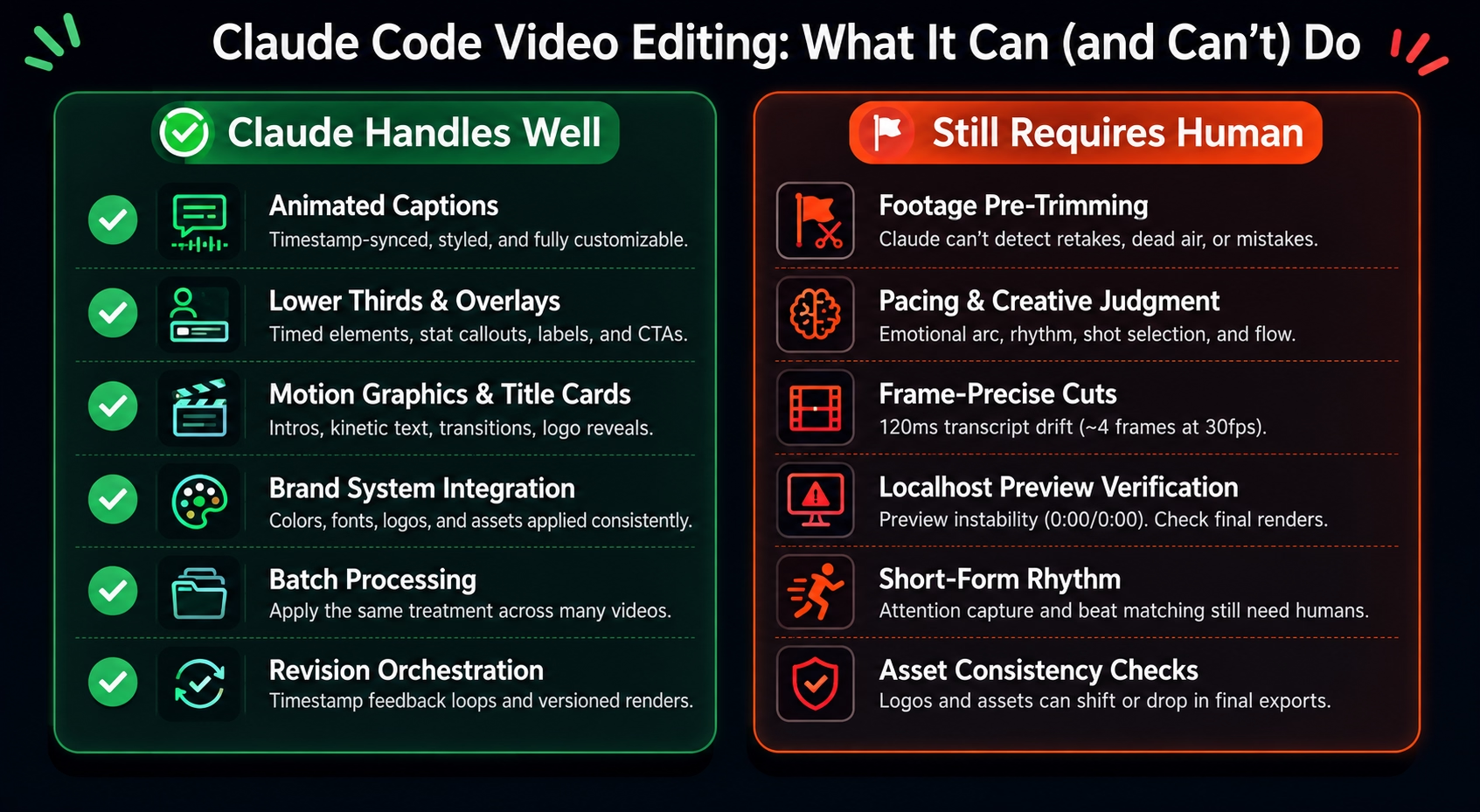
What Claude Code Does Well
Claude Code handles the rule-based, repeatable parts of video post-production reliably: captions, motion graphics, overlays, branded scene layouts, and timestamp-driven revision logic.
Animated captions and synced subtitles. Word-level timestamps from the transcript feed directly into HyperFrames, producing caption tracks that sync accurately to the audio. Caption style, font, color, and positioning are all controllable via prompt.
Lower thirds, speaker labels, and stat callouts. Timed overlays — elements that appear and disappear at specific moments — are well within what the pipeline handles. Brand colors, typography, and layout zones are applied consistently once the design system is loaded.
Motion graphics and title cards. Animated intros, kinetic text, logo reveals, and branded scene transitions are generated as HTML and rendered frame-by-frame by HyperFrames. The HyperFrames catalog includes pre-built elements — MacOS notifications, 3D UI reveals, terminal-style animations, audio-reactive elements — that Claude Code can pull and populate with project-specific content.
Brand system integration. Claude Code can ingest a design system document or pull brand assets from a URL. In documented sessions, it correctly applied brand fonts, colors, and logo assets from a website URL to produce videos that matched the source brand visually.
Batch processing. The same motion graphics treatment can be applied across multiple raw files in sequence. For teams producing recurring video content with consistent formatting, this is one of the highest-leverage applications of the workflow.
Revision orchestration. Timestamp-based feedback loops mean revision requests stay structured and traceable. Each iteration produces a versioned render file, making it straightforward to compare V1 against V4 and identify what changed.
What Claude Still Cannot Do
Claude Code cannot transcribe audio, cut real footage frame-precisely, interpret pacing instinctively, or preview renders reliably — making human judgment essential at several points in any production workflow.
These are not edge cases. They are structural constraints that affect every project.
Cannot transcribe audio natively. Claude Code has no ability to listen to a video file. To sync any animation, caption, or motion graphic to spoken content, you must supply a transcript with word-level timestamps — either extracted via Whisper, ElevenLabs Scribe, or another external transcription tool. Without this, Claude does not know what is being said or when.
Cannot cut real footage frame-precisely. Third-party analysis published by Selects in May 2026 noted that word-boundary accuracy from transcription APIs can sit approximately 120ms off from actual word boundaries — roughly four frames at 30fps. Across a 60-cut edit, that drift compounds. A cut placed four frames into the next word produces an audible click. Frame-precise footage editing still requires a dedicated tool.
Cannot detect retakes or dead air. Claude Code cannot identify the difference between a stumbled line and a deliberate pause, or between dead air and a beat you wanted to keep. Pre-trimming raw footage manually before dropping it into the project is faster and more accurate than steering Claude through footage review.
Preview instability on localhost. Preview instability on localhost was an observed issue in our sessions. When the preview showed 0:00/0:00 with no content to review, rendering directly to a full MP4 was the most reliable workaround. Remotion, by comparison, has more stable preview behavior at this stage.
RAM pressure during concurrent renders. Running multiple video renders simultaneously degrades system performance noticeably. In documented sessions, concurrent renders caused a face cam feed to glitch during a separate recording session running at the same time. One render at a time is the safer operating model.
Short-form pacing. Short-form content — Shorts, Reels, TikTok-style cuts — requires attention-capture logic and rhythm that Claude Code does not yet produce reliably without significant human steering. After multiple iterations on short-form outputs: "I wouldn't post this, but it's getting better." The pipeline is improving. It is not there yet for short-form without a human in the loop on pacing decisions.
Logo and asset consistency across renders. In documented sessions, a logo present in the draft version of a render was absent from the final export. Asset consistency across render versions requires explicit verification at the review stage.
Token cost at scale. The first session in the documented live workflow hit 263K tokens before a context reset. The full project — transcript extraction, storyboard generation, and four render iterations on a 37-second clip — consumed approximately 10% of the $200/month Claude max plan's 5-hour session limit. Multi-video production days compound this quickly.
Time Comparison: Manual Editing vs. Claude Workflow
For motion graphics, captions, and branded overlays, the Claude Code + HyperFrames workflow compresses multi-hour manual editing tasks into prompt-driven, automated pipeline steps — while leaving footage trimming and pacing judgment unchanged.
The Claude workflow column describes which tasks become automated or prompt-driven once the pipeline is established. Replace this table with measured production times once two tracked sessions are available.
Measured example — single clip
In one tracked session, a 37-second talking-head clip with branded overlays, synced motion graphics, and animated captions took four render passes and roughly 10% of a Claude Max 5-hour session. The same style of edit would normally take our editing team between 45 minutes and two hours, depending on complexity.
Measured example — batch workflow
Across one testing session, I rendered more than 60 video variations while testing Claude Code, Claude Design, and HyperFrames across different formats: promo videos, course-style lessons, product demos, and short-form clips. The workflow exposed a clear pattern: the first render usually needed human correction, but each revision became faster once the project had a transcript, brand direction, scene logic, and reusable prompts in place.
The main scaling constraint was not creative direction. It was system load. Rendering multiple videos at once caused noticeable CPU and RAM pressure, and one recording session produced a glitchy face cam because several renders were running in the background. After that, the reliable operating pattern became sequential rendering: one video at a time, one revision pass at a time, with a handoff summary before clearing long Claude sessions.
This is not a clean “12 clips in X minutes” benchmark yet. It is still useful production evidence: the workflow can support repeated video generation, but batch processing should be handled sequentially until the render system is stable enough for parallel jobs.
Claude Code vs. Premiere Pro vs. HyperFrames
Claude Code, Premiere Pro, and HyperFrames are not competing tools — they operate on different parts of the video production pipeline and are most effective when the role of each is understood clearly.
The correct framing is complementary, not competitive. Premiere Pro handles footage editing, color grading, and audio work. HyperFrames handles code-rendered motion graphics. Claude Code orchestrates the pipeline, writes the scene plan, manages revision logic, and handles the decisions that sit between tools.
Teams already using Premiere Pro do not need to replace it. They need to identify which parts of their post-production workflow are mechanical enough for Claude Code to handle — and which parts still require the timeline.
After Production: Making the Video Work Harder
A rendered MP4 from the Claude + HyperFrames pipeline is a production output. What happens to it after publishing determines whether it generates pipeline activity or just views.
Wistia's 2026 State of Video report found that teams are being asked to create more videos for more platforms and formats, while budgets remain flat. The pressure is not to produce more videos — it is to make each video produce more. That is a different problem than production speed, and it requires a different layer.
The Claude + HyperFrames workflow ends at the MP4. Adding interactivity, branching, and viewer behavior tracking is a separate step that does not require re-editing the video. Platforms built for this layer let you overlay clickable chapters, decision branches, embedded CTAs, and engagement analytics on top of a finished video file — without touching the render.
Here is the difference in practice. Take a 90-second product demo rendered through the Claude + HyperFrames pipeline. As a passive MP4, a viewer watches it linearly, drops off when it stops being relevant to them, and you have no data on what they watched or clicked. The same file uploaded to Clixie becomes a different experience: clickable chapter markers let the prospect jump to the feature they care about, an embedded CTA appears at the moment the value proposition lands, and your team sees exactly which sections each viewer engaged with. The video is identical. The layer on top of it is not.
For B2B teams, the relevant use cases are specific. A static product demo becomes a chaptered interactive demo where prospects navigate to the features they care about. A passive sales video becomes a branching experience that adjusts based on viewer role or objection. An onboarding recording becomes an interactive checklist that tracks completion.
For more on what this layer looks like in practice, see interactive video examples across sales, onboarding, and product use cases, and a detailed breakdown of interactive video elements and how they work.
FAQ
Can Claude edit videos?
Claude Code can orchestrate a video editing workflow — handling transcript extraction, motion graphics planning, caption generation, and revision logic. It cannot cut real footage frame-precisely or transcribe audio directly. It functions as the orchestration layer that coordinates other tools, not as the editor itself.
What is HyperFrames?
HyperFrames is an open-source video rendering framework released by HeyGen in April 2026 under Apache 2.0. It allows AI agents to write scenes in HTML, CSS, and JavaScript, then renders every frame as a real image and stitches them into an MP4, MOV, or WebM — running locally with no cloud dependency.
What is storyboard-first video rendering?
Before rendering any video, Claude generates an HTML scene plan that describes what motion graphics and animations will appear at each timestamp. Reviewing and approving this plan before rendering begins prevents wasted tokens, failed renders, and misaligned motion graphics.
How much does Claude Code video editing cost?
On the $200/month Claude max plan, a single documented project — including transcript extraction, storyboard generation, and four render iterations on a 37-second clip — consumed approximately 10% of the 5-hour session limit. Token costs scale with output length, render complexity, and the number of revision passes.
Can Claude generate captions automatically?
Yes. Claude Code can call external transcription tools such as Whisper or ElevenLabs Scribe, depending on your setup, to extract word-level timestamps from audio. It then passes that data to HyperFrames to render styled, synced caption tracks. Local Whisper installation is RAM-intensive during multi-render sessions; the OpenAI API is a lower-resource alternative.
What are the main limitations of Claude Code video editing?
Claude cannot transcribe audio natively, cut real footage frame-precisely, detect retakes or dead air, or reliably preview renders on localhost. Short-form pacing and logo asset consistency across render versions also require human review at every iteration.
Is HyperFrames better than Remotion?
HyperFrames and Remotion are both code-rendered video frameworks. HyperFrames uses plain HTML, CSS, and JavaScript and runs locally without a cloud dependency. Remotion uses React components and has a more established ecosystem. HyperFrames was released in April 2026 with a growing pre-built element catalog. Preview stability in HyperFrames is currently less consistent than Remotion.
Does Claude understand video files directly?
No. Claude can sample individual frames visually but cannot listen to audio or interpret spoken content. A transcript with word-level timestamps must be supplied externally — via Whisper, ElevenLabs Scribe, or another transcription tool — for Claude to sync animations, captions, or motion graphics to what is being said in the video.
Conclusion
The Claude Code + HyperFrames workflow is documented, repeatable, and meaningfully faster than manual post-production for the rule-based parts of video editing. It is also genuinely limited in ways that matter — transcript dependency, frame-accuracy constraints, localhost preview instability, and short-form pacing gaps are real production friction that human judgment has to absorb.
The teams that get the most from this workflow are not the ones treating Claude Code as a magic box. They are the ones who understand what each tool in the pipeline was built for: Claude Code for orchestration and planning, HyperFrames for code-rendered motion graphics, FFmpeg for export, and human editors for the decisions that require taste.
Claude Code video editing is a production accelerator for the mechanical work. It is not a replacement for the creative work. And the MP4 it produces is a starting point — what that video does after it ships is a separate problem worth solving.
Bring one existing product demo, sales video, or onboarding recording. We'll show you how to turn it into an interactive experience that tracks engagement and drives action. Book a demo and bring one video you already have.
.png)
.png)




.avif)
