


Top 10 Free Mobile Video Editing Apps Comparison 2025: Best Editing Apps Ranked
Compare 10+ free mobile video editors for iPhone and Android. Side-by-side watermark status, AI tools, and best picks for TikTok, Reels, and Shorts.


In 2026, free mobile video editing apps are good enough that most creators never need a desktop editor. But with dozens of options available, the differences that matter, watermark policies, AI tools, export quality: aren't obvious until you're already locked into a workflow. This comparison cuts through the noise.
Key Takeaways
- VN Video Editor and YouCut are the only two apps in this list that are completely watermark-free on the free tier. If clean exports are non-negotiable, start there.
- CapCut remains the fastest path from raw clip to published Reel or TikTok, with AI captions, beat-sync, and trending templates all in one workflow. Note: the watermark-free export requires toggling a specific export setting.
- Adobe Premiere Rush is discontinued as of 2025. Adobe Premiere Mobile is its replacement, free on iPhone, with 4K export, no watermark, and multi-track timeline. Android support is still in development.
- Editing is only the first step. Once your video is complete, Clixie AI adds clickable chapters, hotspots, and quizzes that turn passive views into measurable engagement.
Quick Comparison: Which Free Mobile Video Editor Fits Your Needs?
Before the full breakdown, here's the side-by-side view of what actually matters for most creators:
*CapCut's no-watermark export requires selecting a specific export option. It doesn't apply automatically on the free tier.
Winner for creators: CapCut for short-form social, VN Video Editor for YouTube and multi-track work, Adobe Premiere Mobile for professional-grade results on iPhone.
How Mobile Video Editing Stacks Up in 2026
Mobile video editing has come a long way. PCMag's May 2026 review of mobile editing apps found that several free options now include AI features that were reserved for premium suites just two years ago, including auto-captioning, background removal, and intelligent scene detection. PerfectCorp tested six watermark-free editors in January 2026 and confirmed that tools like CapCut and VN Video Editor deliver professional output without any branding overlay.
The shift is driven by competition. Influencer Marketing Hub's 2026 guide counts 39 free video editing platforms, most now including some form of AI enhancement. The barrier to quality content is no longer the tool. It's knowing which free app fits your specific workflow.
Citation Capsule: In 2026, multiple independent reviews (PCMag, PerfectCorp, Influencer Marketing Hub) confirm that the top free mobile editors now match desktop functionality on AI tools, export quality, and watermark-free output. The gap between free and paid mobile editing has effectively closed for short-form content creators.
How We Evaluated These Apps
Each app in this comparison was assessed on four dimensions:
Interface and ease of use. A responsive interface matters more on mobile than desktop, given smaller screens, touch controls, and one-handed editing are real constraints.
Editing features. Multi-layer timelines, keyframe animation, chroma key, speed ramping, and AI tools define the ceiling. Not every creator needs all of them, but knowing what's available matters.
Export quality and watermark policy. Apps that export with a watermark at any resolution on the free tier are flagged clearly. 4K export is the 2026 baseline, not a premium feature.
AI and automation. Auto-captioning, background removal, beat-sync, and text-to-video are now common in the top apps. We noted which features are genuinely free vs. locked behind paid tiers.
Top 10 Free Mobile Video Editing Apps of 2025
1. CapCut
CapCut shines as a mobile-first editing solution built with social creators in mind. With a smooth drag-and-drop timeline, vibrant built-in templates, and deep integration with platforms like TikTok, it’s geared for speed and viral output. The app also introduces clever AI features — think auto-captioning, background removal, and smart color correction — which let users produce polished videos faster. While some advanced controls are still behind subscription tiers, for free users CapCut offers powerful output with 4K export and no cumbersome watermark. For creators who want to move quickly and strongly into short-form content, CapCut delivers a modern editing experience with minimal friction.
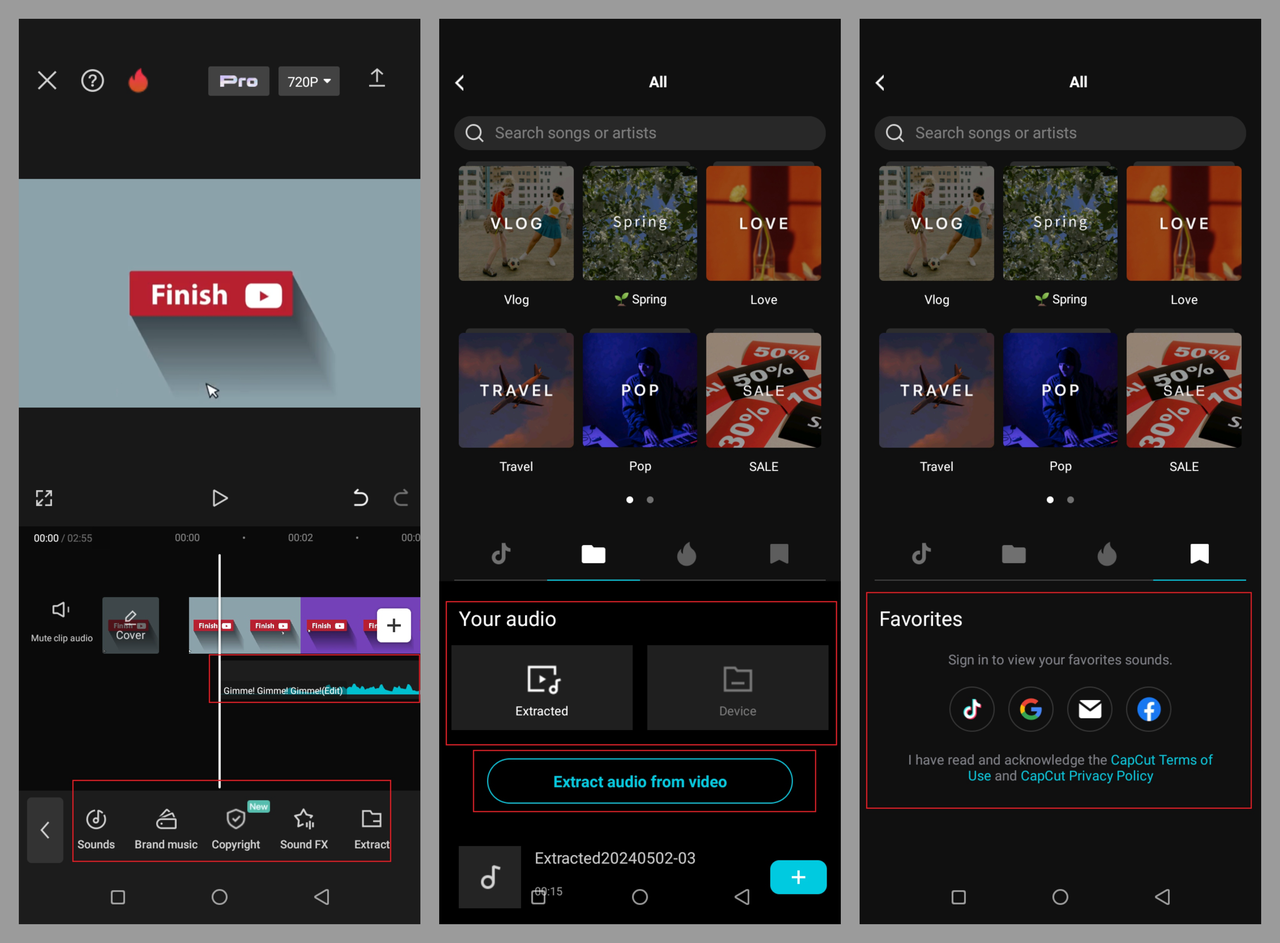
Overview: ByteDance’s CapCut remains the best editing app for TikTok and short-form creators.
Key Features: AI captions, trending templates, and auto beat-sync.
Pros: Free, no watermark, great social media integrations.
Cons: Occasional lag on longer clips.
2. InShot
InShot offers a refined balance of simplicity and utility, making it a strong pick for beginners and casual creators. Its intuitive interface, social-friendly aspect ratio presets, and fast exports help users tailor content for Instagram Reels, YouTube Shorts or TikTok. You’ll find core tools like trimming, merging, speed adjustments, and stickers, which help craft engaging video apps with minimal learning curve. The trade-off comes in the free tier: a watermark remains and some premium effects are locked. Still, for anyone who prioritizes fast output over extensive timeline depth, InShot remains a standout editing app.
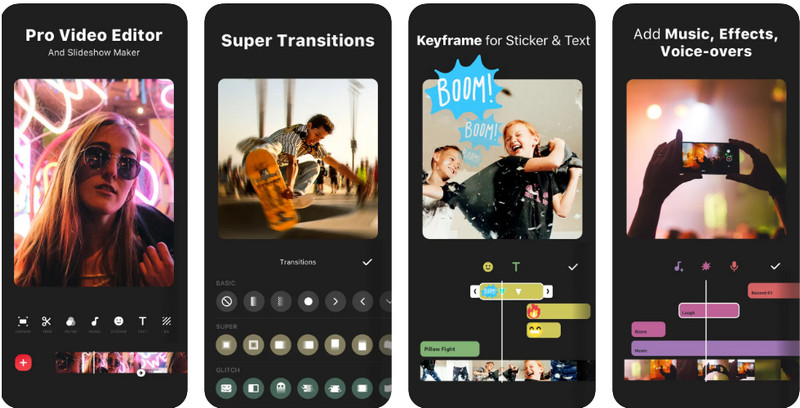
Overview: InShot continues to dominate video apps for Instagram and Reels.
Key Features: Speed control, filters, transitions, and music sync.
Pros: Easy to use; ideal for beginners.
Cons: Watermark in the free plan; ads between edits.
3. VN Video Editor
VN Video Editor offers a rare blend of free-tier depth and professional-level controls, positioning it as one of the best video editing apps for apps for mobilemobile. With multi-track timelines, keyframe motion controls, and creative effect management, VN appeals both to YouTubers and seasoned editors hopping onto mobile. The absence of a watermark in the free version and the inclusion of high-quality export options reinforce its value. Some users may face a steeper learning curve compared with more simplified tools, but the payoff is robust control in a mobile video editor app.
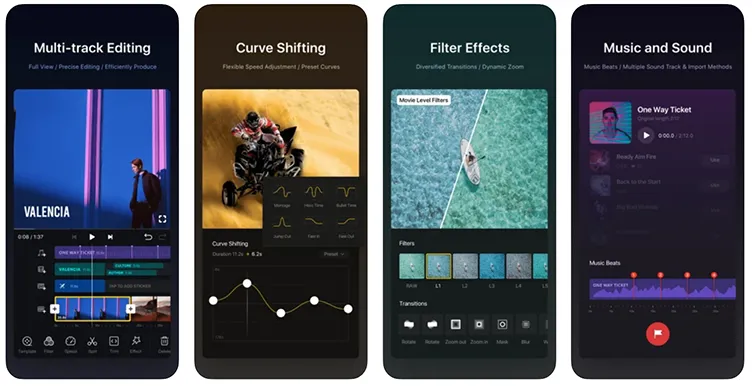
Overview: VN ranks among the best video editing apps for its professional-grade controls.
Key Features: Multi-layer timeline, keyframes, and effects.
Pros: No watermark; advanced editing flexibility.
Cons: Steeper learning curve for new users.
4. KineMaster
KineMaster is tailored for creators who expect pro-level features on mobile. From chroma key support and blending modes to full 4K exports and frame-accurate edits, it gives users serious power in an “on-the-go” environment. The free version, however, keeps a watermark and limits some features — a reminder that unlocking full potential may require upgrading. Still, for editors who want an advanced editing experience without switching to desktop, KineMaster ranks among the best editing app options in 2025.
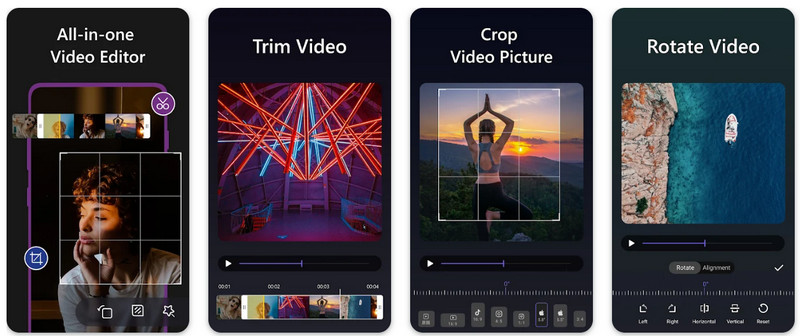
Overview: A powerhouse video editor app with professional tools for serious creators.
Key Features: Chroma key, layer blending, and high-end transitions.
Pros: 4K export, fast rendering.
Cons: Watermark in the free version; subscription required for premium.
5. Adobe Premiere Rush
Adobe Premiere Rush brings the Adobe ecosystem to mobile creators, with cross-device support that flows seamlessly from smartphone to desktop. The app’s timeline is more refined than most entry-level tools, and it’s backed by Adobe’s trusted editing legacy. AI-powered audio cleanup, auto color correction, and cloud-based project syncing are major strengths. The free tier’s export limitations are modest, making it a capable choice for those already invested in the Creative Cloud universe. For creators balancing mobile edits with desktop workflows, Premiere Rush is arguably the best software for video editing in mobile form.
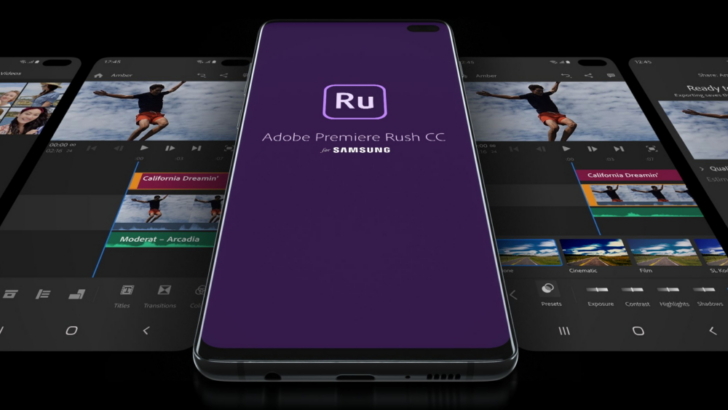
Overview: Adobe’s best software for video editing 2025 for mobile professionals.
Key Features: Cross-device syncing, cloud storage, auto sound balance.
Pros: Great for multi-platform workflows.
Cons: Limited templates in free tier.
6. FilmoraGo
FilmoraGo is built with simplicity and fast output in mind — an ideal choice for creators who want styling and polish without deep learning curves. Templates, animation presets, animated text, and easy filters help users craft stylish videos quickly. The interface is friendly for beginners, yet the app still allows exports in high quality formats. The free version includes a watermark unless upgraded, which can be a limitation — but for many content creators looking for a quick yet attractive editing solution, FilmoraGo delivers.
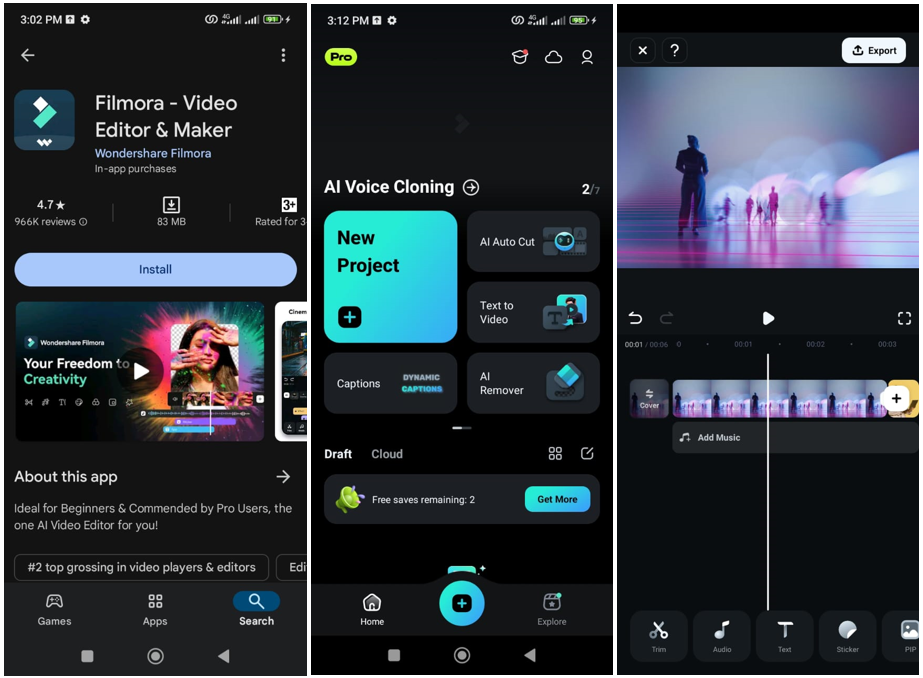
Overview: A lightweight yet powerful editing app for casual editors.
Key Features: Animated text, transitions, and basic trimming.
Pros: Clean design; beginner-friendly.
Cons: Watermark unless upgraded.
7. VivaVideo
VivaVideo leans into creativity and fun rather than complex timelines. With rich sticker libraries, playful transitions, and social-friendly features, it’s focused on lifestyle creators who want to produce engaging short-form videos. While it may lack the advanced precision of multi-track editors, it succeeds in letting users express visually in minutes. That said, longer or more technical projects may push past its comfort zone, so it’s best suited for those prioritizing speed and style over depth.
Overview: One of the most fun video apps for adding creative flair.
Key Features: Stickers, transitions, and instant sharing.
Pros: Ideal for quick, fun videos.
Cons: Limited control for professional edits.
8. PowerDirector
PowerDirector brings desktop-style editing workflows to mobile devices, with features such as stabilization, green-screen (chroma key), and multi-layer editing. The app is built for users willing to invest a little time into more complex edits while still editing on the move. Free users will face watermarks and limited advanced assets, but the core editing experience remains strong. For mobile creators who treat their workflow seriously — editing longer videos, multiple video tracks, fine audio control — PowerDirector stands out as a professional-grade video editor app.
Overview: A serious contender for best software for video editing 2025, now fully mobile-optimized.
Key Features: Stabilization, green screen, and timeline editing.
Pros: 8K support, great performance.
Cons: Free version adds watermark.
9. YouCut
YouCut is a lightweight and efficient choice for creators who just want to edit and export quickly with minimal fuss. It supports high-quality exports, avoids watermarks in free mode, and keeps the interface uncluttered. While it lacks some of the advanced features seen in multi-track editors, for creators making social-friendly content with fewer layers and simpler edits, YouCut marks a strong value. In essence, it simplifies video editing apps to their core purpose: the quick crafting and sharing of content.
Overview: YouCut is a simple yet powerful editor app with no ads.
Key Features: Merge, trim, speed control, and filters.
Pros: Watermark-free; fast processing.
Cons: Lacks advanced effects.
10. Quik by GoPro
Quik is engineered for fast, efficient editing of action-footage and lifestyle moments, particularly when paired with GoPro hardware or mobile camera clips. Auto-sync to music, intelligent scene detection, and cloud backup are key strengths that let creators focus on storytelling rather than timeline minutiae. It may not offer deep colour grading or professional layering, but when the goal is rapid edit and share — for vlogs, travel, or on-the-move content — Quik is consistently one of the best video editing apps in its niche.
Overview: Quik makes editing action footage effortless.
Key Features: Auto-sync clips to music; instant highlights.
Pros: Best for GoPro and travel content.
Cons: Limited manual editing options.
Adobe Premiere Mobile: The Biggest Launch in Mobile Video Editing This Month
In the past few weeks, the tech and creator communities have been buzzing about Adobe Premiere Mobile, Adobe’s newest innovation in the mobile editing world. This highly anticipated release brings the full creative power of Adobe Premiere Pro to smartphones, allowing users to capture, edit, and publish professional-quality videos directly from their devices. Equipped with AI-assisted tools, automatic sound optimization, and full 4K export capabilities without watermarks, Premiere Mobile is quickly being recognized as one of the best software for video editing 2025. The app also introduces seamless cross-device synchronization, enabling creators to start editing on their phones and continue effortlessly on desktop. Its sleek interface, real-time rendering, and deep integration with Adobe Creative Cloud make it a game-changer for editors on the move, setting a new benchmark for what a video editor app can deliver in the mobile era.
Best Video Editing App by Use Case
TikTok and Reels Creators
CapCut remains the best video editing app for social media. Its built-in templates and AI-generated effects make short-form storytelling effortless.
YouTube Creators
PowerDirector and VN Editor provide multi-layer timelines and advanced controls, offering a near-desktop editing experience.
Professional Users
Adobe Premiere Rush and KineMaster stand out as the best software for video editing 2025, especially for those balancing mobile and desktop workflows.
Trends in Mobile Video Editing Apps (2025)
AI Editing Features
AI is transforming how editors work. From auto-cropping to instant captioning, today’s video editing apps reduce manual effort without compromising creativity.
Cross-Platform Collaboration
Modern video editor apps allow seamless switching between phone and computer. Cloud sync keeps your projects consistent across devices.
Smartphone-Optimized Performance
Even while on the move, creators can handle 8K rendering, smooth playback, and color correction thanks to device optimization.
FAQs: Mobile Video Editing Apps Comparison 2025
1. What’s the best video editing app for 2025?
VN Video Editor and CapCut are the top contenders for 2025 thanks to their pro-level features and watermark-free exports.
2. Which editing app is best for beginners?
FilmoraGo and InShot are simple, intuitive, and ideal for first-time editors.
3. Are mobile video editing apps powerful enough for professional work?
Yes! Tools like Adobe Premiere Rush and PowerDirector deliver near-desktop functionality.
4. What’s the best editing app without a watermark?
VN Video Editor and YouCut let users export clean videos without any watermark.
5. Which app offers the best AI tools?
CapCut and Quik use AI for auto-syncing music, trimming, and visual effects.
6. Is there a free video editing app that works offline?
Yes, InShot, YouCut, and VN Editor work seamlessly without an internet connection.
Conclusion: The Best Software for Video Editing 2025
The mobile video editing landscape in 2025 is more powerful and accessible than ever before. Whether you’re crafting TikToks, cinematic YouTube shorts, or polished Instagram reels, today’s mobile video editing apps empower creators to deliver studio-quality results straight from their phones. From CapCut’s AI-driven templates to VN Video Editor’s precision timeline and Adobe Premiere Mobile’s professional-grade power, each tool brings something unique to the creative table.
But video editing doesn’t end at exporting — it’s just the beginning of audience engagement. To elevate your videos to the next level, integrate interactive elements like clickable hotspots, embedded buttons, dynamic chapters, localization features, and even quizzes using Clixie AI. This innovative platform transforms passive video content into immersive, data-driven storytelling experiences that capture attention and boost viewer retention.
In a world where every scroll counts, tools like Clixie AI bridge the gap between creativity and interactivity, turning standard video projects into engaging journeys. As creators and brands continue to innovate in 2025, combining powerful video editing apps with intelligent interactivity is the ultimate formula for standing out in an ever-evolving digital landscape.
.png)
.png)




.avif)
