Best Free AI Video Makers in 2026: Tested, Compared, and Honestly Reviewed
Most free AI video plans watermark exports and ban commercial use. Compare the top tools and see when interactive video becomes the better choice.


TL;DR
- Most free AI video tools watermark exports and prohibit commercial use. They are testing environments, not production tools.
- HeyGen is the strongest free plan for evaluating AI avatar workflows (3 videos/month, 720p, watermarked, no commercial rights).
- Synthesia is the best free option for corporate training pilots (10 min/month, watermarked, no download on free tier).
- InVideo AI offers the most generous free generation volume for social content (10 min/week, watermarked, no commercial rights).
- Runway is the best free option for cinematic generative clips, but its 125 credits are a one-time allocation, not a monthly reset.
- An AI video maker is a content creation tool. An interactive video platform is a different category built for engagement, qualification, and conversion. Most business teams eventually need both.
Key Takeaways
- An AI video maker is a software tool that generates or assembles video content from text, images, or audio using machine learning models.
- A free AI video plan is a restricted-access tier that lets users evaluate a platform's output quality, typically limited by watermarks, export caps, and the absence of commercial use rights.
- Interactive video is a video format that accepts viewer input to trigger branching paths, CTAs, forms, or navigation choices, enabling intent capture and buyer qualification.
- A commercial use restriction is a licensing rule present on nearly every free AI video plan in 2026 that prohibits use of free-tier output in revenue-generating or client-facing contexts.
- An AI video watermark is a platform brand overlay applied to free-tier exports that signals the tool used and is not acceptable in professional or branded content.
- Lead qualification via video is the process of capturing buyer signals, routing viewers based on their choices, and scoring intent from within a video experience.
Introduction
Here is a fact most AI video roundups do not mention: according to Wyzowl's 2026 State of Video Marketing survey, 75% of marketing videos are now AI-generated or AI-assisted. Yet most teams using free plans to produce that content do not realize their exports cannot legally be used for any business purpose.
That is the real story behind the free AI video maker category. The tools are genuinely impressive. The free plans are genuinely limited. And the gap between those two facts costs teams time they do not have.
This article covers the best verified free plans available in 2026, the specific restrictions most comparison articles skip entirely, and a decision framework for business teams. It also covers what most roundups leave out completely: what happens after the video is created, and when creation alone is no longer enough.
If you want to know how branching and timed CTAs work inside a video experience, that is a separate problem from picking the right creation tool. Both problems matter. This article addresses both.
Compare the best free AI video makers and see when interactive video becomes the better option.
Quick Answer: Best Free AI Video Makers in 2026
The best free AI video maker in 2026 depends on your use case. Here is the short version before the full comparison.
- Best for avatar-based business video: HeyGen (3 videos/month, 720p, watermarked)
- Best for corporate training evaluation: Synthesia (10 min/month, watermarked, no download on free tier)
- Best for social content volume: InVideo AI (10 min/week, watermarked, no commercial rights)
- Best for cinematic generative quality: Runway (125 one-time credits, watermarked)
- Best for blog-to-video repurposing: Pictory (14-day trial, no permanent free tier)
- Critical rule for every tool above: free-plan exports cannot be used commercially. Any client-facing, branded, or revenue-generating use requires a paid plan.
What Is an AI Video Maker?
An AI video maker is software that generates, assembles, or edits video content using machine learning models, typically from text prompts, scripts, uploaded images, or audio files, without requiring traditional filming or editing skills.
The category covers several distinct approaches. Text-to-video tools generate footage directly from a written description. AI avatar platforms use synthetic presenters to deliver scripted content in talking-head format. Stock-footage assemblers pull from licensed libraries and edit clips together automatically based on a script or prompt. Image-to-video tools animate still images into short clips.
According to Fortune Business Insights, the global AI video generator market is projected to grow from $847 million in 2026 to $3.35 billion by 2034, at an 18.8% compound annual growth rate. Grand View Research puts the 2025 market value at $788.5 million and projects similar growth through 2033. That trajectory reflects genuine utility across marketing, training, and sales content.
Common use cases include social media clips, product explainers, training videos, demo walkthroughs, and onboarding content. The typical limitations: AI video makers produce the asset. They do not instrument it. They do not capture intent. They do not route buyers. That distinction matters more the closer the content gets to revenue.
How Do You Choose the Best Free AI Video Maker?
A useful free AI video maker must offer enough output quality, export flexibility, and transparent restrictions for a business team to make a genuine evaluation without building a workflow around a plan they will immediately outgrow. Here is what to check before committing any time to a free-tier test.
According to hands-on testing published by WaveSpeed AI in May 2026, nearly every free AI video tier in 2026 watermarks exports and prohibits commercial use. That makes free plans useful for evaluation only. The criteria below reflect what actually separates a useful free plan from a frustrating one.
- Output quality and resolution. Most free plans cap at 720p. In a world where social platforms default to 1080p, that cap is visible. Check whether the tool's paid tier removes this before investing time in free-tier testing.
- Generation volume. Credits, minutes, or videos per month vary widely. Some plans reset monthly. Runway's 125 free credits are one-time only.
- Watermark policy. A watermark is not just an aesthetic issue. On any client-facing or branded content, it signals that a free tool was used. Most free plans bake the watermark in and cannot be removed without upgrading.
- Commercial use rights. This is the most commonly overlooked restriction. Most free plans explicitly prohibit commercial use. HeyGen, Synthesia, and InVideo AI all require paid plans before their output can legally be used for business.
- Export limits and format options. Some platforms restrict download entirely on the free tier. Synthesia's free plan does not allow video download at all.
- Upgrade triggers. The best free plans make it clear when and why to upgrade. The worst hide the limitation until a team hits it mid-project.
What Restrictions Do Free AI Video Makers Have?
Nearly every free AI video plan in 2026 watermarks exports, caps resolution at 720p, and explicitly prohibits commercial use. Those three restrictions together disqualify most free plans from any professional deployment, and most comparison articles do not lead with that.
WaveSpeed AI's hands-on testing, published in May 2026 after running identical prompts across multiple platforms on free-tier accounts, concluded that apart from narrow exceptions, every major free tier in 2026 is built for testing and personal projects. The moment a team is shipping content for revenue at quality, a paid plan is required.
Here is what most roundups omit.
Commercial use prohibition is nearly universal. HeyGen, Synthesia, InVideo AI, and Pictory all prohibit commercial use on their free tiers. Runway's terms permit commercial use on the free tier per its usage rights documentation, but the free credits are one-time and watermarked. CapCut's desktop app is one of the few tools that exports watermark-free with commercial rights on the free tier. For most tools, the moment content is attached to a paid campaign, a client deliverable, or any revenue-generating use, the free plan terms are violated.
Runway's free credits do not reset. This surprises teams more than almost any other limitation. The free tier gives 125 credits, one time. Once spent, they are gone. There is no monthly refill. At the standard generation rate for a 10-second 1080p clip, most users exhaust their free allocation in a single session.
Synthesia's free plan does not allow video download. The output is view-only inside the editor. A team cannot export or share a clean file from the free tier. Upgrading to Starter ($29/month) adds download capability and removes the watermark.
Free-tier queue priority is lower. As WaveSpeed AI found during peak hours, free-tier generation requests on platforms like Runway and Kling can wait 10 to 30 minutes while paid users receive near-immediate processing. For teams trying to evaluate speed as a feature, free-tier testing understates it.
Resolution caps matter more than they used to. 720p looked acceptable in 2022. On LinkedIn, YouTube, and most sales enablement platforms in 2026, 720p output signals a budget constraint. If the goal is professional brand presentation, resolution caps on free plans actively work against the use case.
Nearly every free AI video plan prohibits commercial use. Before building any workflow around a free tier, verify the platform's terms of service. For any client-facing, branded, or revenue-generating video, budget for a paid plan from day one.
What We Discovered in Testing: When advising a digital marketing agency, I watched a team spend three weeks building a localized video prospecting campaign for a client using a free tier. It was not until the final approval stage that their legal team caught the non-commercial clause buried in the terms of service. Because the platform bakes a prominent brand watermark into the lower corner, the asset was completely unusable for a premium, high-touch campaign. They had to scrap the entire project and start over.
The lesson: treating free tiers as anything more than a 48-hour testing sandbox is a strategic error. If your video content touches a client or a revenue stream, budget for a paid plan from day one to avoid legal and branding bottlenecks.
Best Free AI Video Makers in 2026: Comparison Table
The best free AI video makers in 2026 differ significantly in generation volume, watermark policy, commercial use rights, and the type of content they produce well. The table below reflects verified free-plan terms as of June 2026. Pricing and policies change; verify directly with each platform before committing a workflow.
Source note (Verified as of June 2026): Official pricing and plan pages were prioritized where available. Third-party reviews were used only to clarify testing limitations, user experience, or conflicting interpretations of plan terms.
Verdicts at a Glance
- Best Overall Free Plan: HeyGen. The most complete avatar workflow available without paying, and the clearest signal on whether AI video fits a business use case.
- Best for Training Teams: Synthesia. AI Playground access and 160+ AI voices make it the strongest free evaluation tool for L&D and onboarding content.
- Best for Marketing Teams: InVideo AI. The most generation volume per week at no cost. Use it to test formats before committing to a paid plan.
- Best for Sales Teams: HeyGen. Avatar quality and talking-head format align directly with sales video outreach and demo walkthroughs.
- Best for Creative Teams: Runway. One-time free credits, but the cinematic output quality benchmark is the clearest in the category.
- Best for Content Teams: Pictory (trial). Three projects is enough to validate whether blog-to-video conversion works at a team's quality standard.
Detailed Reviews: What the Free Plan Actually Gets You
Each tool below is reviewed against four criteria: who the free plan serves, what it actually allows, what its biggest hidden restriction is, and the first signal that upgrading makes sense.
HeyGen
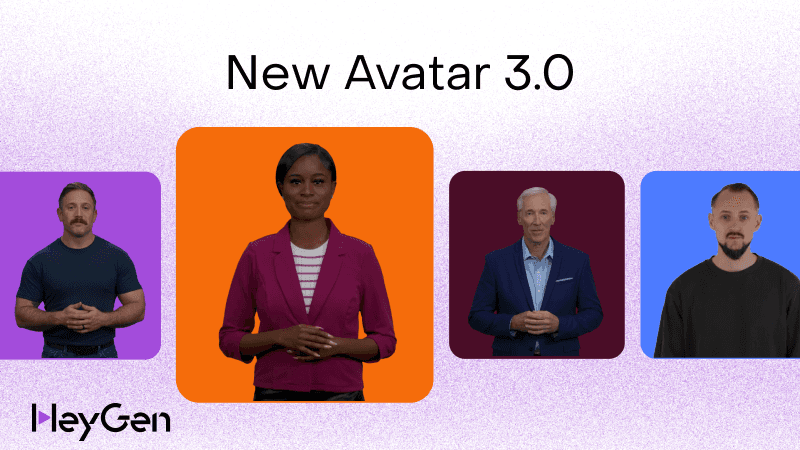
HeyGen's free plan is best for sales and marketing teams that want to evaluate AI avatar video quality before committing a budget. The free tier gives 3 videos per month, each capped at 1 minute, exported at 720p with a HeyGen watermark. Access to 500+ stock avatars and 30+ languages is included. Voice cloning and 1080p export are paid-only features.
According to pricing data from Arcade's April 2026 review of HeyGen, the watermark alone disqualifies free exports from external use, and the 3-video monthly cap limits how thoroughly teams can evaluate workflows. The free tier is enough to confirm avatar quality and test the interface, but not enough to run a real campaign.
Hidden restriction: Commercial use is prohibited on the free plan. Any video attached to a campaign, a client presentation, or a sales outreach sequence violates free-tier terms.
Upgrade trigger: When the team has confirmed the avatar workflow fits the use case and needs watermark-free, 1080p output for actual deployment. The Creator plan starts at $29/month.
Best for: Sales and marketing teams testing avatar-led outreach or demo walkthroughs before committing budget.Avoid if: You need commercial rights, high volume, 1080p output, or voice cloning on a free plan.
Synthesia
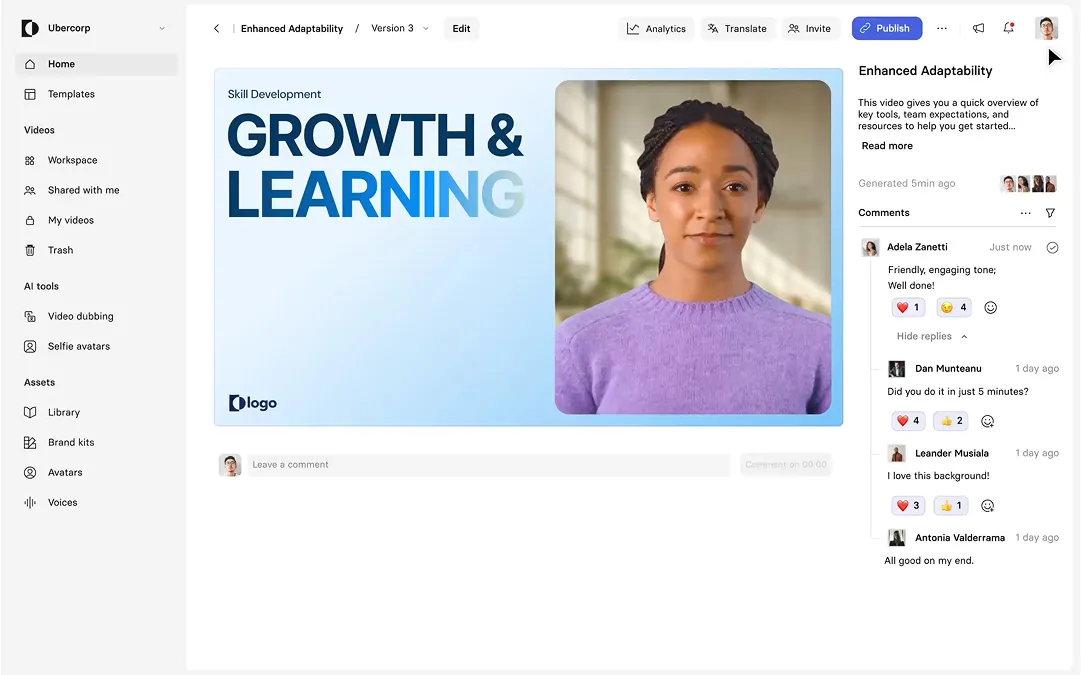
Synthesia's free plan is best for L&D and training teams evaluating AI avatar video for compliance training, onboarding, or product education. The free Basic plan includes 10 minutes of video per month, 9 stock avatars, 160+ AI voices, and access to the AI Playground (which includes Veo 3 and Sora 2 models), a feature no direct competitor has matched at the free tier. All exports carry the Synthesia logo watermark.
The most significant hidden restriction: free-plan videos cannot be downloaded. Output is view-only inside the Synthesia editor. A team cannot export a clean file, share a link with a client, or embed the video externally without a paid account. According to the March 2026 free plan review published by autogpt.net, the free plan exists to convert users into paying customers, and the platform is good enough that most teams upgrade after testing their first video.
Hidden restriction: No video download on the free tier. No commercial use rights.
Upgrade trigger: The moment the team needs a downloadable, branded, watermark-free file. The Starter plan ($29/month) removes the watermark and adds download capability.
Best for: L&D and training teams evaluating AI avatar video for onboarding, compliance training, or product education.Avoid if: You need downloadable files, commercial rights, or any output that leaves the Synthesia editor without paying.
InVideo AI
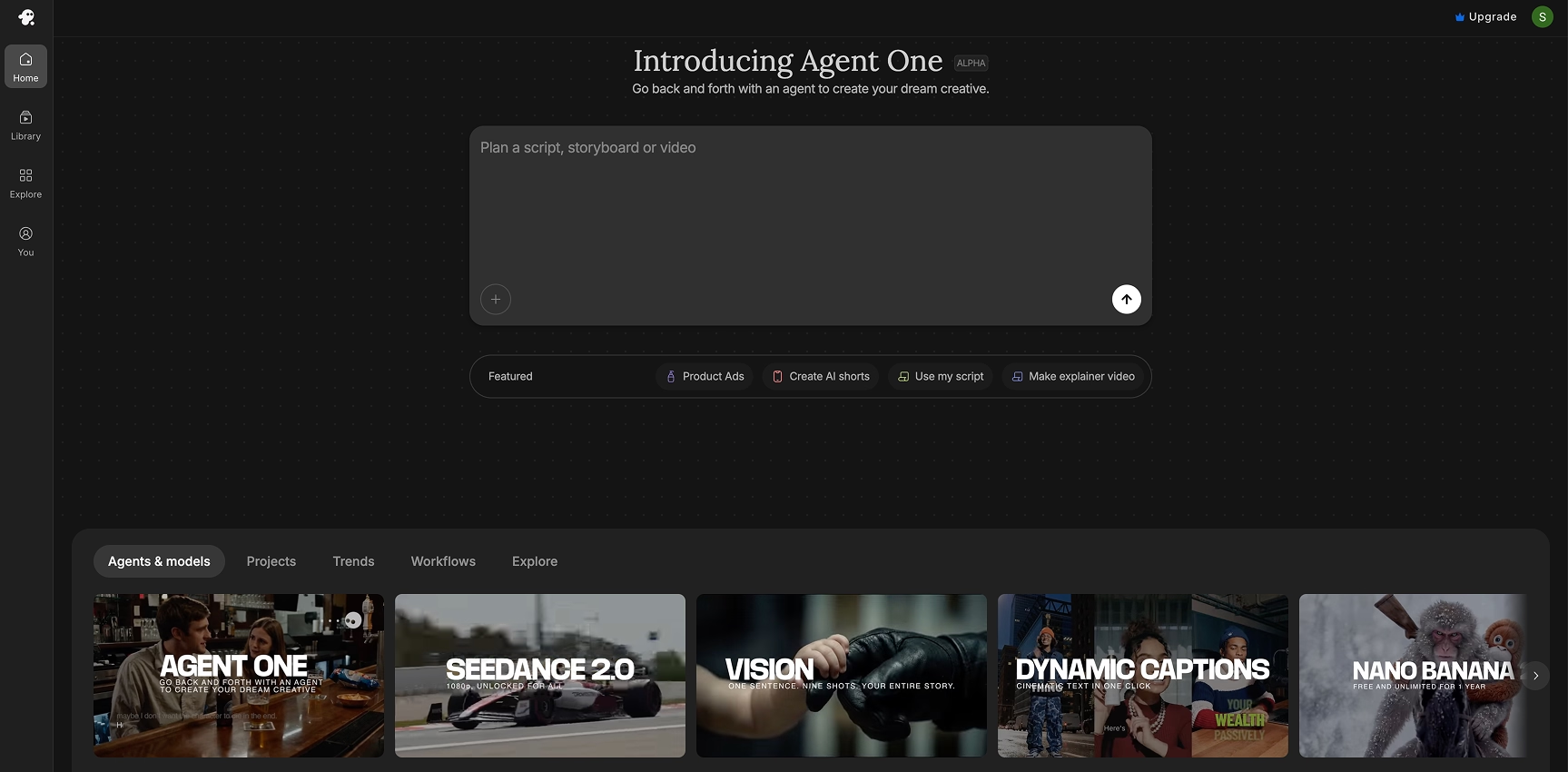
InVideo AI's free plan is best for social media managers and content teams building short-form clips from scripts, briefs, or repurposed written content. The free tier provides 10 AI generation minutes per week and up to 4 exports per week, capped at 720p with a visible InVideo watermark. The stock footage library on the free plan is limited to a curated basic collection. Generation minutes reset weekly; unused minutes do not carry over.
According to an April 2026 analysis published by Flowith, the free plan explicitly excludes commercial rights. Videos produced on it cannot legally be used for client deliverables, paid advertising, monetized YouTube content, or social media marketing for a brand. The watermark is prominent and sits in the lower right corner throughout the video.
Hidden restriction: No commercial license. The free plan is for evaluation and personal projects only, regardless of the output quality.
Upgrade trigger: The first paid campaign or the first client deliverable. The Plus plan ($25/month) removes the watermark and adds commercial rights.
Best for: Social media managers and content teams testing short-form text-to-video at volume before upgrading.Avoid if: You need commercial rights, 1080p exports, a brand kit, or more than 4 video exports per week.
Runway
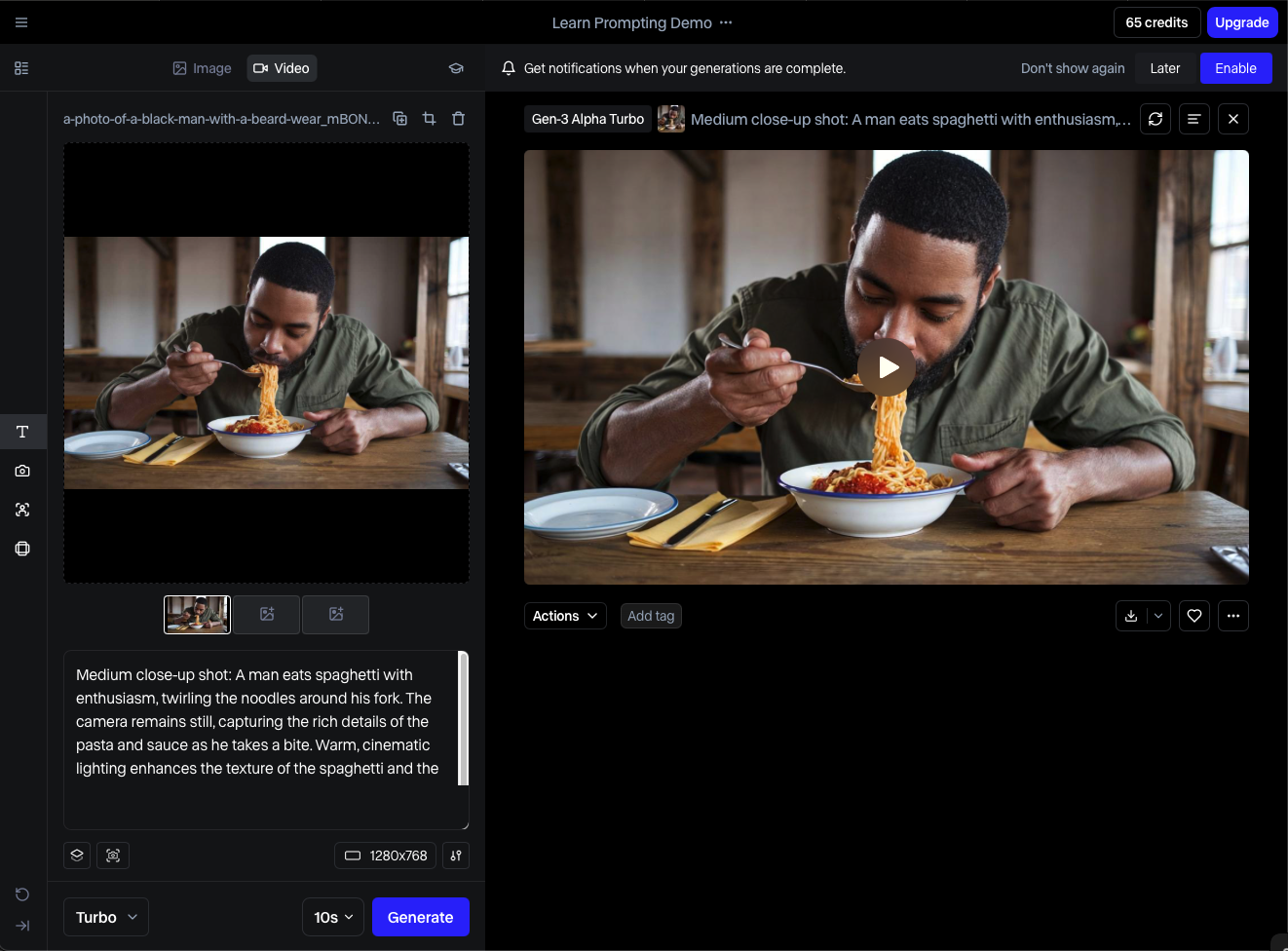
Runway's free plan is best for creative and brand teams that want to test cinematic text-to-video or image-to-video generation quality before choosing a production tool. The free tier provides 125 credits as a one-time allocation, not a monthly reset. Access is limited to Gen-4 Turbo in image-to-video mode. The flagship Gen-4 text-to-video model is not available on the free plan.
According to ProPicked's May 2026 pricing breakdown, the free tier is a sample tray, not a production tool. At standard generation rates for a 10-second clip, most users exhaust the 125 credits within their first session. On commercial rights, Runway's own usage rights page states that content created on any plan, including Free, can be used commercially without non-commercial restrictions from Runway. Several third-party reviews contradict this; for any revenue-generating use, verify the current terms directly at help.runwayml.com before publishing.
Hidden restriction: One-time credits that do not refresh. No Gen-4 text-to-video on free. All free-tier exports carry a Runway watermark.
Upgrade trigger: After confirming output quality meets the brand's standards and the team needs ongoing generation capacity without credits running out. Standard starts at $15/month; Pro starts at $35/month.
Best for: Creative and brand teams that need a quality benchmark for cinematic AI video before choosing a paid tool.Avoid if: You need ongoing generation, the flagship Gen-4 text-to-video model, or watermark-free output from day one.
Pictory
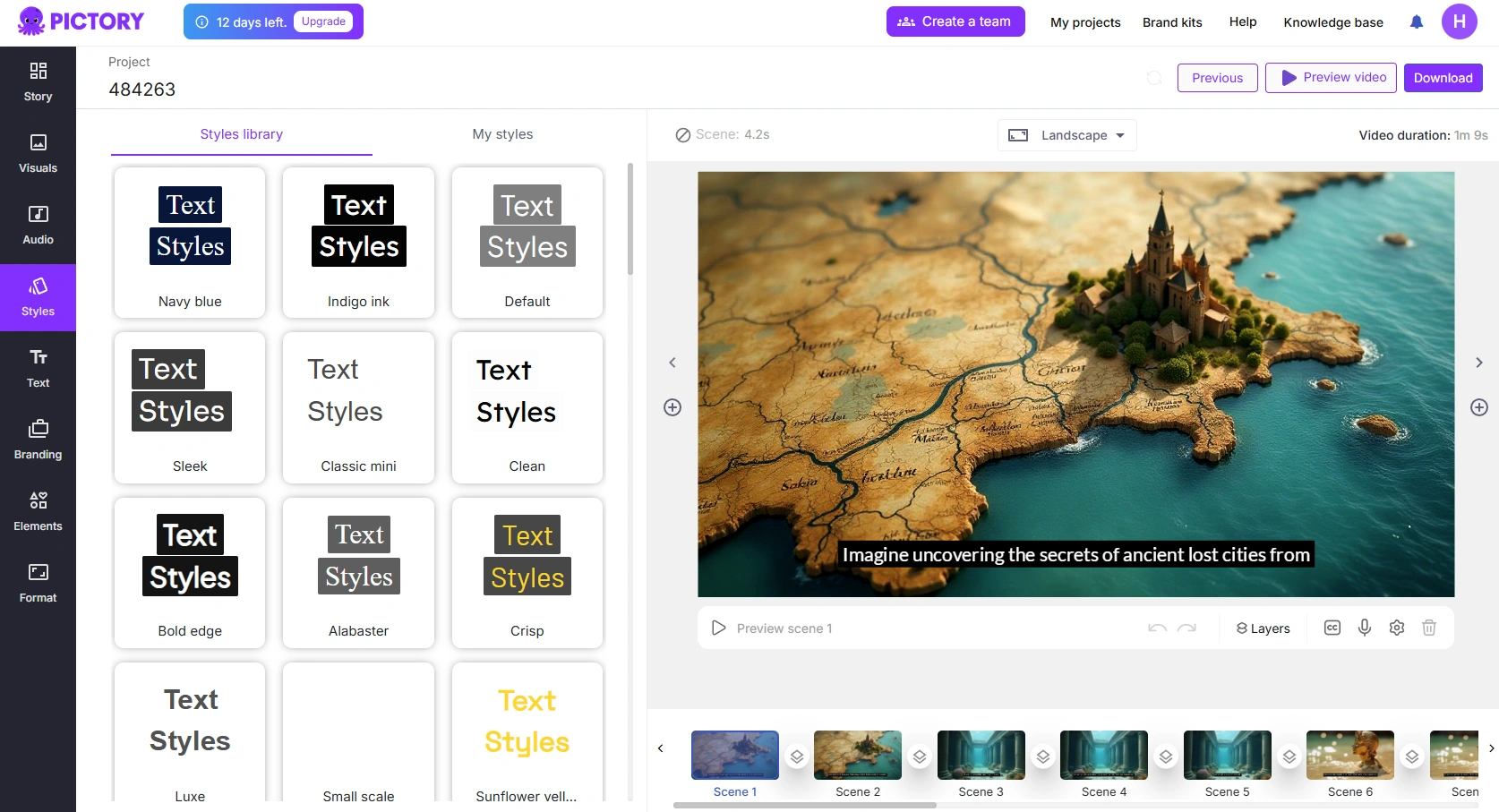
Pictory's free option is a 14-day trial rather than a permanent free plan. It is best for content and SEO teams that want to test blog-to-video conversion before committing to a subscription. The trial includes 3 projects, each up to 10 minutes long, with a Pictory watermark on all exports. According to Cybernews' review, after the trial ends, downloading any video requires a paid subscription.
Hidden restriction: There is no ongoing free tier. The trial period ends regardless of usage, and paid plans start at $23/month.
Upgrade trigger: Immediately after confirming the blog-to-video output quality meets the team's content standards.
Best for: Content and SEO teams repurposing existing blog posts, articles, or long-form scripts into video.Avoid if: You need a permanent free tier, original video creation from scratch, or more than three test projects before deciding.
Which Free AI Video Tool Fits Your Business Team?
The right free AI video tool for a business team depends on the use case. Avatar-led explainers, cinematic clips, training content, and social-media text-to-video each call for a different platform, and free-plan limits make the choice matter more, not less.
Here is the clearest decision framework based on role.
- Sales teams piloting video outreach or product walkthroughs: Start with HeyGen. The avatar quality is strong, the workflow is the closest to a real sales video production environment, and 3 videos is enough to validate the format before committing budget.
- Marketing teams producing social content: InVideo AI offers the most generation volume per week at no cost. The commercial restriction is a hard limit for any published content, but for internal testing and format exploration, the output quality is solid.
- Customer success and L&D teams evaluating training content: Synthesia is the clearest fit. The avatar quality, language support, and AI Playground access on the free tier give training teams a genuine evaluation window. The no-download restriction on the free plan just means evaluation stays inside the editor.
- Brand and creative teams testing generative quality: Runway's free credits give the clearest signal on cinematic output quality. Use them in a focused session to evaluate Gen-4 Turbo and decide whether the visual standard justifies the paid tier.
- Content teams repurposing written assets: Pictory's trial is the right starting point. Three projects across blog posts or long-form scripts will reveal whether the AI's footage matching and script-to-video accuracy meet production standards.
For teams that want to see real-world interactive video examples across marketing, sales, and training use cases, the landscape beyond AI video creation is worth understanding before locking in a stack.
From Our Consulting Notes: When guiding a customer success team of 20 through an AI video pilot, we ran a head-to-head evaluation between HeyGen and InVideo AI to see how these free tiers hold up under real work conditions.
The team initially leaned toward InVideo AI for its generous weekly generation limits. Within two weeks, they hit a wall. The automated script-to-video stock matching required heavy manual editing to accurately represent complex software UI features.
We shifted the pilot entirely to HeyGen's free plan. Even capped at 3 videos per month, the realistic avatar talking heads built immediate trust during onboarding simulations. The team validated that human-like avatars drove far better internal engagement metrics, and we secured budget approval to upgrade to HeyGen's paid tier within 14 days.
What Happens After the Video Is Created?
Creating a video solves the content production problem. It does not solve the engagement, qualification, or conversion problem. Those require a different layer on top of the video itself, and most AI video tools provide none of it.
The passive video loop is familiar to most teams. A video gets created, uploaded, shared, and watched. Views come in. The viewer finishes watching and leaves. There is no signal about which part resonated. No data on intent. No way to route the high-interest viewer to the next step while they are still engaged. The team checks the view count and calls it a success.
That loop has a measurable cost. According to data from Synthesia's platform research, placing interactive elements at the end of longer videos has been shown to boost conversion rates up to 65% compared to passive equivalents. Research cited by VIDIZMO drawing on the EDUCAUSE Review found that training content with in-video quizzes sees completion rates 15 to 25 percentage points higher than passive video of the same length. The format matters. So does what the viewer can do inside it.
The problem most teams diagnose too late: they optimize for the creation stage and treat the distribution stage as a passive event. The video gets made with care. It gets shared through a standard link. Viewers watch it, or they do not. Nothing distinguishes the high-intent viewer from the casual one. No next step appears at the moment of highest engagement.
The tools in this article all solve the creation problem well. None of them solves what happens next.
Our Performance Audit Results: A marketing team was celebrating a product explainer video that had racked up over 45,000 views across LinkedIn and YouTube. Beautifully produced using generative AI. Undeniably getting eyeballs. The problem: their monthly pipeline remained completely flat. They had optimized heavily for the creation stage but treated the post-click experience as a passive event.
We took that exact same video asset and restructured the distribution strategy. Instead of a static YouTube link, we deployed it through an interactive wrapper. We added a timed interactive node at the 45-second mark, right after the main problem statement, asking viewers to select their industry vertical, followed by an in-video CTA linking directly to a booking calendar.
While total views dropped because traffic became highly targeted, conversion rates from viewer to scheduled demo surged by 42% in the first 30 days. Stop measuring how many people watch your videos. Start measuring how many people interact with them.
What Is the Best Free AI Video Maker in 2026 for Business Use?
The best free AI video maker for business use depends on the stage of the video workflow a team is trying to solve. Most free AI video tools address only one stage. Understanding all four stages makes the choice clearer.
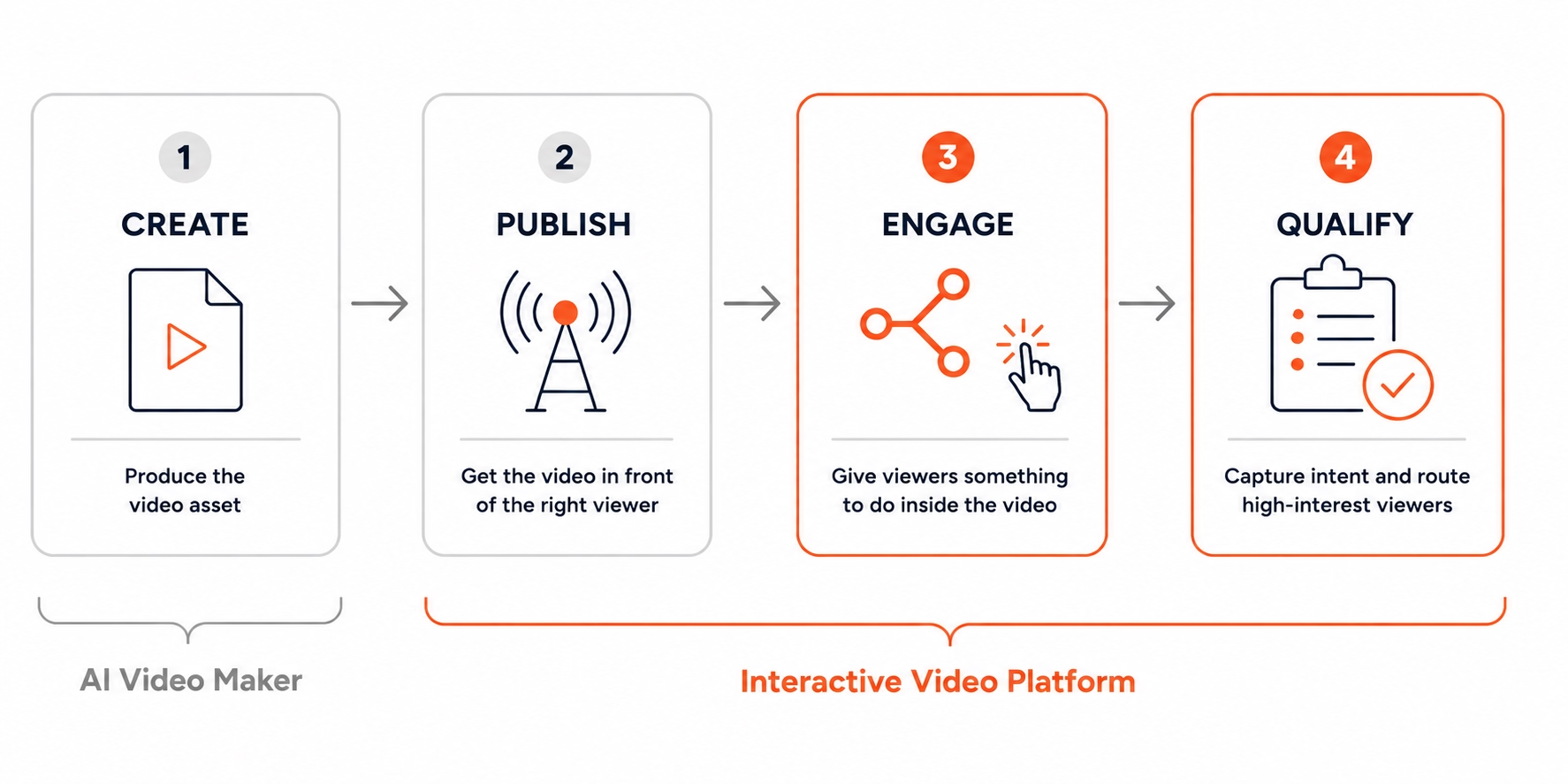
The Four Stages of a Modern Video Workflow:
Stage 1: Create
Produce the video asset. AI video makers own this stage. HeyGen, Synthesia, InVideo AI, Runway, and Pictory all solve Stage 1 at varying quality levels and free-plan limits.
Stage 2: Publish
Get the video in front of the right viewer, through the right channel, at the right time. AI video makers produce a file. Distribution strategy and channel selection are separate decisions.
Stage 3: Engage
Give the viewer something to do inside the video beyond watching it. Passive video ends here. Interactive video platforms start here: branching paths, clickable hotspots, timed CTAs, and in-video forms replace the dead end of a static viewing experience.
Stage 4: Qualify
Capture intent. Route the high-interest viewer to a next step. Score engagement. Pass meaningful signals to sales. AI video makers provide none of this. Interactive video platforms are built for it.
AI video makers dominate Stage 1. Interactive video platforms dominate Stages 2 through 4.
Most business teams evaluating free AI video tools in 2026 are solving a Stage 1 problem. That is the right place to start. The question worth asking before locking in a stack: what happens in Stages 2, 3, and 4?
Which Free AI Video Generators Have No Watermark?
Almost no major free AI video plan in 2026 offers watermark-free exports. This is one of the most searched questions in the category, and the honest answer is more restrictive than most roundups admit.
Here is the full picture by tool:
- HeyGen: Watermark on all free exports. Removal requires the Creator plan ($29/month).
- Synthesia: Synthesia logo watermark on all free exports. No video download on free tier at all. Removal requires Starter ($29/month).
- InVideo AI: Visible watermark baked into the lower right corner of every free export. Removal requires Plus ($25/month).
- Runway: Watermark on free-tier exports. Runway's own usage rights page states commercial use is permitted on all plans including Free. Multiple third-party reviews contradict this. Verify directly at help.runwayml.com before any commercial deployment.
- Pictory: Watermark on all trial exports. No permanent free tier. Paid plans start at $23/month.
- CapCut (desktop app): One of the few tools offering watermark-free exports with commercial rights on the free tier. Best suited for short-form social content.
The practical takeaway: if watermark-free output is required for any professional use, budget for a paid plan from the start. For any avatar-based or text-to-video platform of note, the free tier is a testing environment, not a deployment environment.
AI Video Maker vs Interactive Video Platform
An AI video maker and an interactive video platform solve different problems. One creates the video asset. The other turns that asset into a two-way experience that captures intent, routes buyers, and generates data a sales or marketing team can actually use.
Neither category replaces the other. They serve different stages of the same workflow. An AI video maker produces the asset faster and at lower cost than any traditional production approach. An interactive video platform makes that asset do something beyond being watched.
According to VIDIZMO's April 2026 research citing the EDUCAUSE Review, adding interactive elements to video increases retention rates by 20% or more compared to passive viewing. The gap between a video that gets made and a video that drives a result is not a production problem. It is a format problem.
FAQ
The most common questions about free AI video makers in 2026 cover watermark policies, commercial use rights, tool comparisons, and what to do once a video is created.
What is the best free AI video maker in 2026?
The best free AI video maker depends on the use case. HeyGen offers the most complete avatar-led workflow on a free plan. Synthesia is strongest for training and L&D evaluation. InVideo AI gives the most generation volume for social content. Runway is best for cinematic generative quality, but its free credits are one-time only, not monthly. No single tool wins across all use cases.
Can I use free AI video tools for commercial purposes?
Almost never, with one nuance. HeyGen, Synthesia, and InVideo AI all require a paid plan before their output can be used for client-facing, branded, or revenue-generating content. Runway's own usage rights page states commercial use is permitted on all plans including the free tier, though third-party reviews conflict on this point. Always verify each platform's current terms of service directly before publishing free-tier output for business purposes.
Which AI video generator has no watermark on the free plan?
Almost none. Runway watermarks free-tier exports. HeyGen, Synthesia, and InVideo AI all apply a visible watermark on free plans. CapCut's desktop app is one notable exception, offering watermark-free export with commercial rights on the free tier. For any major avatar or text-to-video platform, removing the watermark requires a paid plan.
What is the best free AI video tool for business teams?
HeyGen for sales and marketing teams piloting avatar video. Synthesia for L&D and training teams. InVideo AI for social content creation at volume. None of these free plans include commercial rights, so any team creating content for external use should budget for a paid plan before deploying.
Are free AI video tools enough for sales and marketing?
For internal testing and format evaluation, yes. For any external, client-facing, or revenue-generating deployment, no. The watermark, 720p resolution cap, and absence of commercial rights on most free plans disqualify them from professional deployment. Most business teams outgrow the free plan within their first month of real use.
What is the difference between an AI video maker and an interactive video platform?
An AI video maker creates the video asset. An interactive video platform adds branching, timed CTAs, in-video forms, and engagement analytics on top of that asset. The first solves content production. The second solves engagement, qualification, and conversion. They serve different stages of the same workflow and are not substitutes for each other.
What should I do after creating an AI video?
Distribute it through a platform that captures viewer intent, not just view counts. Adding interactive elements such as in-video CTAs, forms, or branching paths has been shown to boost conversion rates by up to 65% compared to passive video, according to Synthesia's platform data. Tools like Clixie.ai allow teams to layer interactivity onto any existing AI-generated video without re-editing the original file.
How Clixie.ai Fits Into an AI Video Workflow
Clixie.ai is an interactive video platform that sits on top of any existing video asset, adding branching paths, timed CTAs, in-video forms, and engagement analytics without requiring re-editing or re-production of the original video.
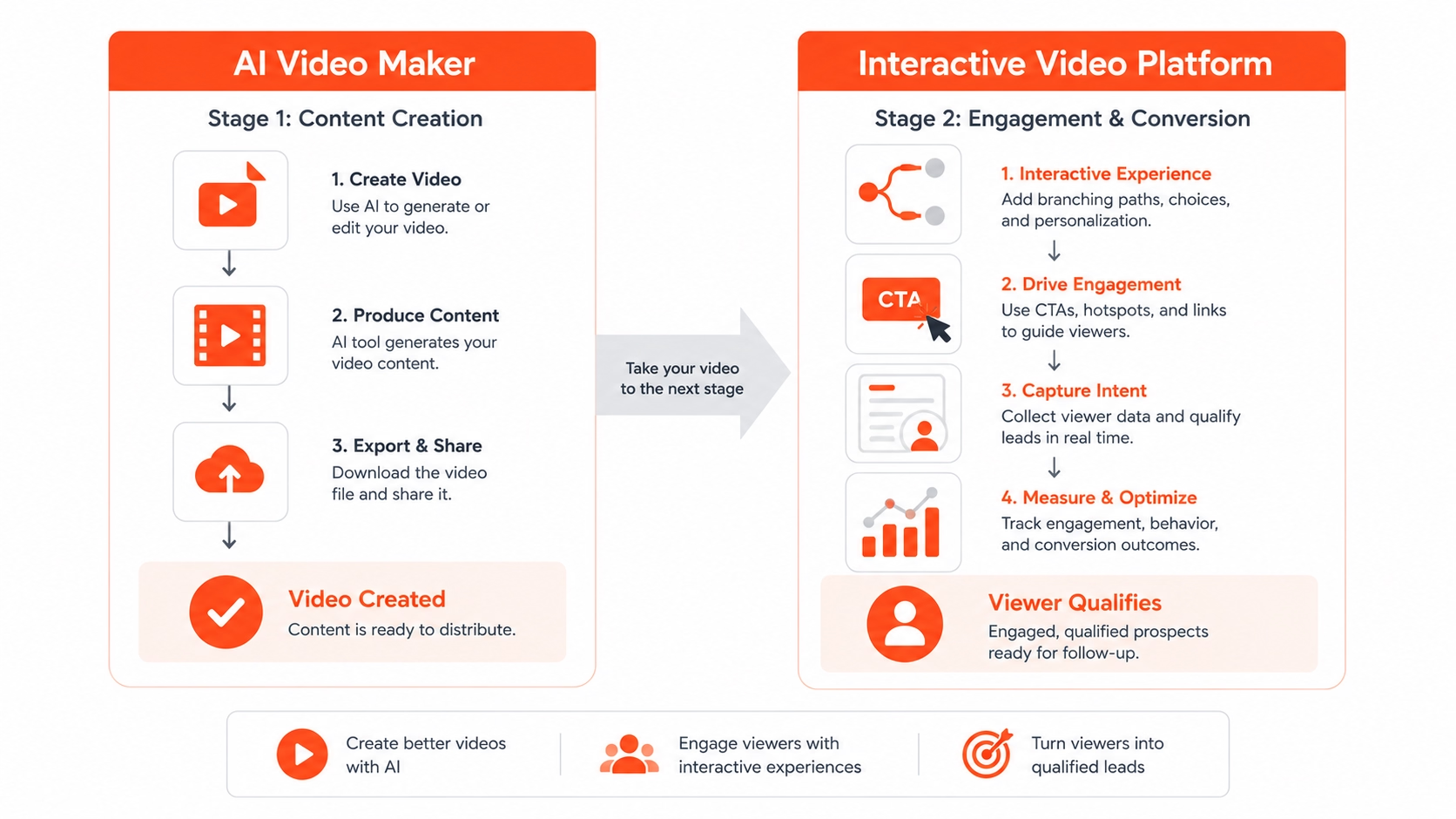
The workflow integration looks like this in practice
- Pre-call: A sales rep sends a branching AI-generated product walkthrough before a discovery call. The viewer selects their use case at a choice point in the video. The rep enters the call knowing which path the prospect chose, which features they engaged with, and how long they spent in each section.
- Post-call follow-up: A follow-up video with a timed CTA appears at the moment of highest engagement, linked directly to a booking page, a proposal, or a next-step resource. The viewer does not need to leave the video to take the next step.
- Intent capture: In-video forms capture lead data without requiring the viewer to navigate away. A contact form, a qualification question, or a demo request can appear inside the video player at a specific timestamp, triggered by the viewer's progress or choices.
- Sales handoff: Viewer branching choices and engagement data route high-intent leads automatically. The rep receives a signal tied to specific behavior, not just a view count.
Clixie.ai's platform adds interactive elements that drive action to any video produced by any of the tools in this article. A team can create their AI avatar video in HeyGen, upload it to Clixie.ai, and add interactivity to your AI video in the same session without touching the original file.
Data-Backed Results: Clixie.ai's internal data consistently shows that when teams layer interactivity onto their video assets, performance metrics shift in measurable ways.
In a recent deployment, a training and enablement client integrated Clixie.ai's branching logic and in-video forms into their existing AI avatar training modules. Module completion rates increased by 34% because viewers were actively navigating their own learning paths rather than passively watching a linear timeline. For marketing use cases using timed CTAs, users see an average 2.8x increase in click-through rates compared to standard static end-screen cards.
The mechanism is straightforward: when a viewer has to make a choice inside a video, they engage differently than when they just watch. That behavioral difference is what separates a view count from a pipeline signal.
Conclusion
The AI video maker category has matured. The tools work. The output quality is genuinely impressive at every tier. The free plans give teams a real window to evaluate what is possible before committing budget.
The honest summary:
- Best overall free plan for business evaluation: HeyGen. Avatar quality is strong, the workflow is close to production-ready, and 3 free videos is enough to decide.
- Best for training teams: Synthesia. The free tier is limited by the no-download restriction, but the AI Playground access and avatar quality make it the clearest evaluation tool for L&D.
- Best for social content volume: InVideo AI. The most generation minutes per week at no cost, even with the commercial restriction in place.
- Best for cinematic generation quality: Runway. One-time credits, but the output quality benchmark is the clearest in the category.
- Best for blog-to-video: Pictory. Trial only, but three projects is enough to know if the format works for a content team.
Every one of these tools solves the creation problem. None of them solve what comes after. Video views without buyer signals are not pipeline. Content volume without intent capture is not qualification.
The teams that get the most from AI video in 2026 are not the ones who found the best free plan. They are the ones who treated creation and engagement as two separate problems and built a stack that addresses both.
Book a Clixie.ai demo and see how interactive video turns passive viewers into qualified buyers.
.png)
.png)