Don't Get Flagged: How to Use the Safest LinkedIn Automation Tools Without Burning Your Account
LinkedIn automation can fill your pipeline or get you banned. Learn how tool architecture, limits, and personalization keep your account safe in 2026.


LinkedIn automation can double your pipeline or get your account restricted in a week. The difference is not which tool you pick — it's how it works under the hood
Sales teams will always have the same dialogue. A new LinkedIn tool is discovered, and it is claimed that it will multiply their outreach efforts by 10 times, but a month later the sales representative’s account ends up being banned. The sales pipeline is now useless, and they have lost their whole network built throughout the years. Now, they have to go back to traditional outreach that takes months to build again in terms of trust.
The sad part is that this development has been avoidable. LinkedIn automation can be very effective if utilized properly. This issue is not with automation itself but with some kinds of tools that offer high volume of outreach instead of safety and the sales teams using them without proper understanding of what tools constitute higher risk and what does not.
This guide describes what makes the safe LinkedIn automation different from the reckless approach and why it is so important for sales enablement in practice.
Why LinkedIn automation is different from other sales tools
The majority of sales tools function in an environment conducive to automation: CRMs, automated emailing programs, dialers, etc. These tools are based on open APIs and can be used in a programmatic way; their terms of service allow automated usage.
However, LinkedIn is different — it does not allow automation by third parties according to its Terms of Service. Their engineering department has developed advanced detection tools to distinguish human actions from bots’ ones. Moreover, their enforcement of TOS has been enhanced greatly lately: from mere warnings given to user accounts to the complete banning of accounts that violate the Terms of Service frequently.
However, LinkedIn automation is still usable. Millions of salespeople utilize this platform for their work. What can be concluded from this situation is that the risk perceived by the organization depends on the type of automation software that is used as well as on the software personalization.
What LinkedIn's detection systems actually look for
Understanding what triggers LinkedIn's automated enforcement helps explain why some tools are safer than others. LinkedIn monitors several categories of signals simultaneously:
- Origin of the session. Where does the activity on the account come from? A home IP address of the user and a data center IP address that is being used by many accounts will behave differently. LinkedIn knows both types of IP address and if several accounts are being used on the same infrastructure.
- How often actions are performed. The times of sending connection requests may significantly vary. Any automation too that creates the same pattern of actions leads to getting detected by the system.
- Browser fingerprint. Chrome extensions that inject their code into LinkedIn pages leave fingerprints. The same goes for services that redirect the traffic through the servers of the provider.
- Complaints about spam. Even if a certain proportion of the addressee has marked your connection request as spam, LinkedIn will recognize the account.
- Session cookies. Tools that require sharing session data with an external server cause security problems.
The architectural difference that determines safety
When considering a LinkedIn automation tool, the primary question to consider is not “What features can the tool provide me with?” but, instead, “What is the source of my account's activity?” LinkedIn automation tools that rely on their servers to funnel your activity — even while claiming to use dedicated IPs — put your account at risk of being traced across different users by the platform itself. Tools that can operate locally via your device or VPS using your own IP, have a completely different risk profile since your activity does not reveal anything suspicious to the network whatsoever.
This is what makes Linked Helper one of the safest LinkedIn automation tools. It runs as a desktop app on its proprietary browser engine-not a Chrome extension, not a cloud API wrapper-from the user's own desktop. Every interaction with LinkedIn comes from the user's own IP, their session, and their device fingerprint. Hence, it is a lot harder to detect the activity pattern as being different from genuine human behavior structurally.
What safe LinkedIn automation looks like in practice
Security is not solely dependent on the design. It entails how systems are designed. The safest software for LinkedIn automation relies on the basic rules that every competent sales crew should include in its outreach:
1. Prepare prior to connecting
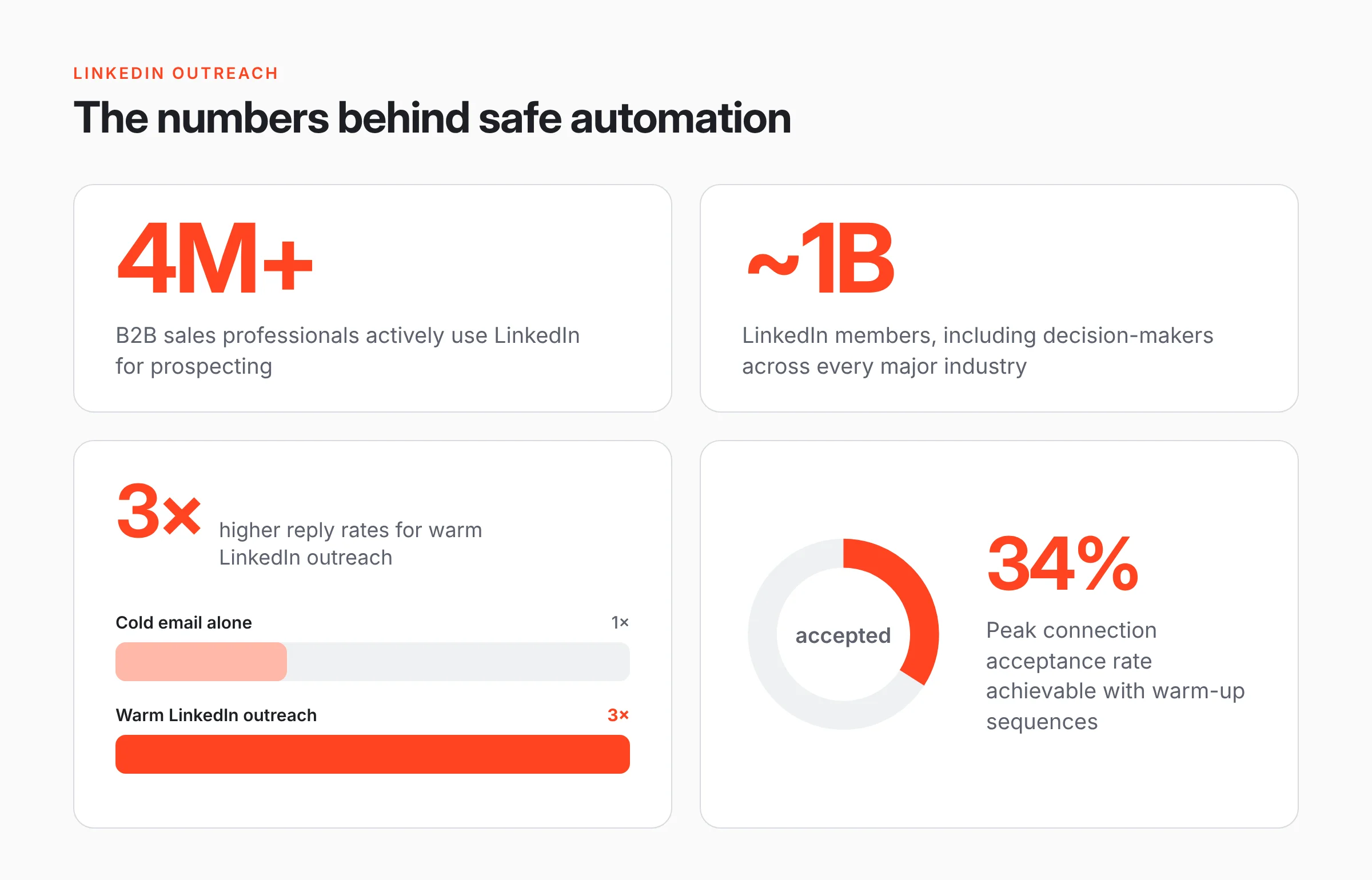
The most significant improvement in the work of sales departments is the refusal from cold applications, in favour of the warmup. The warming-up need including visiting a prospective customer's profile, giving a like to some of the latest posts, and endorsing the skills sometimes before sending a connection request. This warming-up serves two functions: it enhances the probability of acceptance by 15 to 25 points and reduces the spam signal effect of many cold connection requests.
2. Arrange the limits and randomize the limits
It is commonly known that the upper limit for the number of connection requests sent is about 80 to 100 requests weekly for accounts in good standing. The best LinkedIn automation tools obey these rules automatically and often randomize the requests. It is much safer to make 15 to 20 requests on a daily basis with natural timing variations than doing 50 requests at equal intervals of time.
3. Implement AI personalization — but avoid plain mail merges
The high rate of spam complaints leads to faster account bans, regardless of the safety of the tool used. We must ensure that the main defense against spam lies in relevance: emails must be those that the prospects will consider worth reading instead of dismissing. Personalization with the use of AI means that a personalized connection request is made based on a unique set of criteria, making it much more likely that the message will be read and accepted.
4. Implement reply detection
Automated follow-up messages sent after a prospect has already replied makes up a significant part of spam reports in LinkedIn outreach. Quite useful is smart reply detection technology that pauses the automated sequence when a prospect has replied. A prospect who has responded should be having a conversation instead of receiving another automated message from a robot.
5. Keep accounts separate
Teams utilizing automation in different SDR accounts have to ensure that there is an account-level isolation. When one account is blocked for some reason, other accounts must not be affected. Desktop tools such as Linked Helper guarantee running multiple instances of each account with their own session management by default. However, cloud applications that run accounts on the same infrastructure fail to provide that level of isolation.
"The safest LinkedIn automation method without getting banned is not about finding a loophole. It is about running activity patterns that are indistinguishable from genuine human behaviour — which requires the right architecture, the right limits, and the right content."
Where LinkedIn automation fits in a modern sales enablement stack
Top-performing sales teams regard LinkedIn automation as one part of a unified outreach system instead of an independent channel. LinkedIn is best for identification, warm-up, and first contact. It is not set up for relationship maintenance or serious conversation-the limits on message lengths, the platform's entire context, and restrictions on format all lead against it being used as a closing channel.
The successful pattern is consistent: LinkedIn identifies and initiates. Email nurtures and converts. Running a transition is when a connected prospect's verified email — exported from the automation tool — comes into a well-structured email sequence, capitalising on the context already created on LinkedIn. A prospect who receives an email from a person they are already connected with on LinkedIn are in a completely different frame of mind than one who is receiving a cold email.
This is where tools like Linked Helper's Data Enricher provide immense value to sales teams. Extracting verified contact information from connected prospects and feeding it directly into your CRM — HubSpot, Salesforce, Pipedrive — provides for true handoff between the LinkedIn outreach layer and the email nurturing layer, which eliminates manual data entry, and ensures the retention of context.
The connection to sales training and enablement
For businesses that use tools like Clixie when performing interactive training for their sales teams, LinkedIn outreach stands to be a greatly underestimated usage of their training tool. LinkedIn outreach involves such basic skills as clarifying what the optimal buyer persona should look like, sending personalized DMs, and solving various objections made by prospects and all of them can be taught to people as skills through which great SDRs can be distinguished from mediocre ones.
Interactive video modules that deal with best practices of LinkedIn outreach such as detecting the first signs from prospects, sending a personalized DM request, moving from LinkedIn to e-mail correspondence, or responding to different replies given by the prospects can result in significantly greater effectiveness of companies.
Automation tools for LinkedIn outreach promote a significant increase in the efficiency of the working process of the people in charge of using such programs in their companies.
Bottom line for sales leaders
LinkedIn automation is one of the most lucrative firms and B2B sales in the year 2026. The gap of talent is increasing in firms that know how to apply LinkedIn Automation wisely and in firms that neglect it entirely. This gap is not based on the financial aspect of it. Instead, it is about understanding the term itself.
You need to learn the difference between online and offline tools. You need to know how LinkedIn detection systems work. You need to set limits in your campaigns that will imitate natural human behavior. You should invest in the personalization technologies to ensure that your customers do not complain about none of your messages.
The profiles that are suspended had always been the ones that were the most aggressive in their approach. Customers have experienced the same situation happening to them more than once.
The tool matters. The configuration matters more.
.png)
.png)