


How to Extract Hardcoded Subtitles from Any Video?
Learn how to extract hardcoded subtitles from any video using OCR tools. Convert embedded captions into editable text quickly for editing, translating, or sharing.


Introduction
Hardcoded subtitles are text captions that are permanently embedded into the video and often displayed from start to finish. Extracting them manually is not only a slow process but also inefficient, as it is prone to errors.
Fortunately, using OCR based image-to-text converters, you can easily convert hardcoded subtitles into editable text without typing.
In this blog, we are going to walk you through an easier step-by-step process to extract hardcoded subtitles from any video accurately.
Why Extract Hardcoded Subtitles from Video?
Before we step into the process of extracting hardcoded subtitles, we want to evaluate why this is useful. The following are the main reasons for turning the subtitles into editable text;
- While watching a video, you found its hardcoded subtitle interesting and want to share it on social media. The extraction process will help you there as well.
- For copying hardcoded subtitles from high-performing videos and adapting them for use in your own content.
- After the extraction of subtitles, you can reuse them in your blog content, short quotes, scripts, etc., as well.
- Students and learners also sometimes need to extract hardcoded subtitles from educational or tutorial videos, in order for their study notes and revisions.
And so on…
A Step-by-Step Process to Extract Hardcoded Subtitles from Any Video
1. Take a Screenshot & Save It
First of all, you need to take a screenshot of that moment in the video where the hardcoded subtitle is showing. Here’s how to do this;
- Play the video and pause it at the point where the hard-coded subtitles show.
- Ensure that the text of the subtitle is clearly visible and not blurred.
- Then, take a screenshot; use the screenshot option on your mobile phone, Print Screen or Snipping Tool on Windows, or Press CMD+SHIFT+4 on macOS.
- Then, copy or save the screenshot.
2. Find an Image to Text Extraction Tool
The second step involves choosing an optimized image to text extractor OCR tool. When you search for such tools on Google, there’ll be several options. From them, picking the most suitable option could be a difficult task.
However, considering the following things will help you find the appropriate tool;
- You should choose a tool that works accurately so that there’s no error in the extraction process.
- A tool should be fast enough to provide you with results within seconds.
- The interface of the tool needs to be easier to use for you.
- Look for the tool that provides the Crop option as well to help you specify the area of the hardcoded subtitle in the screenshot.
- Also, the tool should support all kinds of image formats.
3. Upload the Screenshot & Extract Text
Once you have chosen a reliable tool, it is time to extract the text of hardcoded subtitles from a screenshot that you captured in the first step. Here’s how to extract text from image;
- Open the image to text extractor tool.
- Upload or paste the screenshot into the tool.
- Use the crop option if needed, and then start the tool.
- It will extract the text from your image and provide you with the extracted text.
Practical Example;
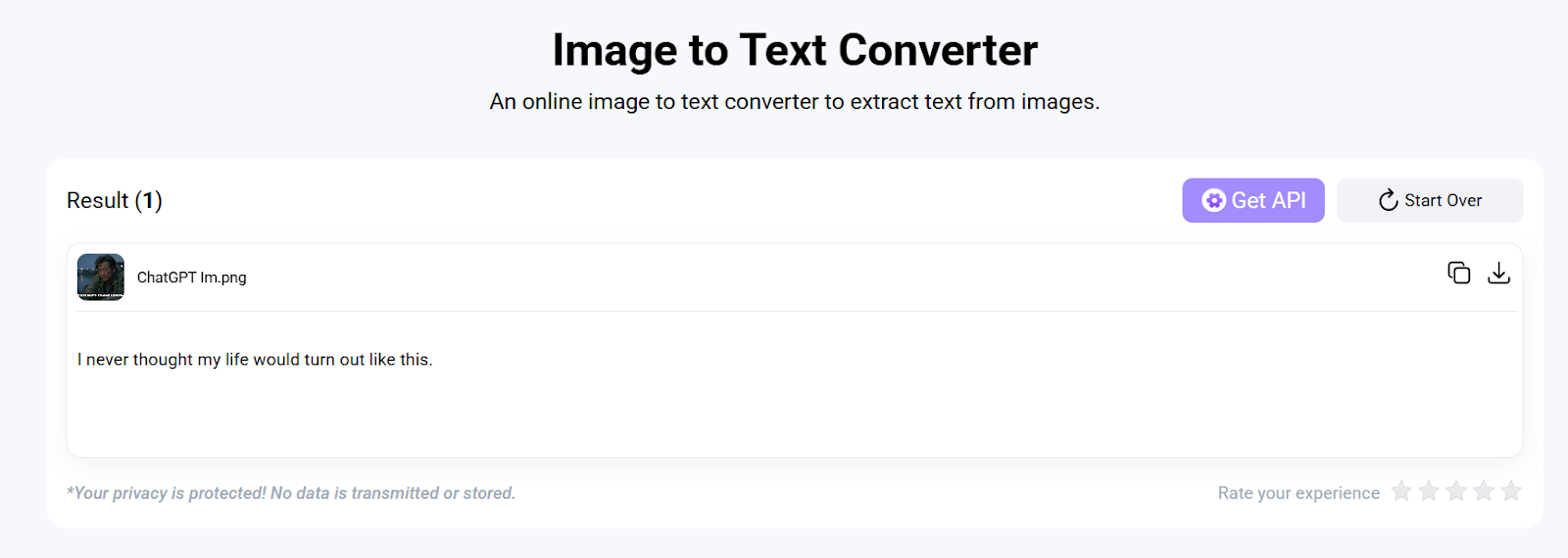
To showcase you practically, we chose a popular and efficient working tool from the internet that can extract text from image. We submitted a screenshot, clicked the “Convert”, and the tool converted the hardcoded subtitle into editable text within seconds.
Image Demonstration:
4. Review Results
After text extraction, review the results carefully for accuracy; for this, you should match the extracted data with the actual hardcoded subtitle embedded in the video.
Finally, you can copy or download the extracted subtitle and use it anywhere.
Taking it Further: Turning Extracted Subtitles into Interactive Elements
Extracting hardcoded subtitles into text is a great first step for accessibility and content repurposing. However, if you want to truly engage your audience, you can go beyond static text by using Interactive Video platforms like Clixie AI.
Once you have your extracted text, you can re-integrate it into your video as "smart" layers. Instead of just reading a subtitle, your viewers can interact with the information in real-time.
How Interactive Subtitles Enhance the Viewer Experience:
- Searchable Video: By turning extracted text into interactive captions, viewers can search for specific keywords within the video and jump directly to that timestamp.
- Clickable Definitions & Citations: If a hardcoded subtitle mentions a complex term or a legal source, you can overlay an interactive "hotspot" that allows the viewer to click the text to open a Wikipedia page, a PDF, or a related blog post.
- Instant Translation: While hardcoded text is stuck in one language, interactive overlays allow users to toggle between different languages or click a phrase to see an instant translation.
- Shoppable Content: If your video features products with hardcoded names or prices, extracting that text allows you to create an interactive overlay where viewers can click the "subtitle" to add the item directly to their shopping cart.
Conclusion
Extracting hardcoded subtitles from videos is no longer the tedious manual task it once was. By leveraging OCR-based image-to-text tools, you can instantly unlock information that was previously "trapped" inside a video frame, turning it into editable, searchable, and versatile data. Whether you are a student taking notes, a marketer repurposing high-performing content, or a creator looking to improve accessibility, this simple workflow saves hours of effort.
However, extracting the text is just the beginning of the journey. In today’s digital landscape, the most effective content doesn't just sit on a screen—it engages. By taking your extracted text and layering it back into your content via Interactive Video, you bridge the gap between passive viewing and active participation.
Moving from static, hardcoded captions to dynamic, clickable elements allows you to provide more value to your audience through deep linking, instant translations, and shoppable moments. Stop letting your video content be a "dead end" for information. Start extracting your subtitles today, and then use tools like Clixie AI to turn that text into an immersive experience that keeps your viewers clicking.
.png)
.png)




.avif)
