How to Add Interactive Quizzes and Branching Paths to Compliance Training Videos Without Coding
Learn how to add quizzes, branching paths, remediation clips, and LMS tracking to compliance videos without coding. A practical guide for L&D and compliance teams.



TL;DR
- Passive compliance videos may record access or completion, but they rarely create evidence that the learner understood the policy or made the right decision.
- No-code interactive video platforms let compliance and L&D teams add quizzes, branching paths, and remediation clips to existing videos without re-editing the original file.
- SCORM and xAPI tracking connects interactive compliance video to LMS reporting and audit-ready documentation.
- The Kirkpatrick Model gives teams a recognized framework for connecting quiz data, branching choices, and completion records to real training outcomes.
- Clixie AI helps compliance and L&D teams build this workflow without developers or complex authoring tools.
- Proving compliance training understanding requires quiz scores, answer accuracy, attempt count, remediation completed, and policy acknowledgment, not just a completion timestamp.
- Clixie AI captures all of this data and exports it as a SCORM 1.2 package for LMS delivery or as a full analytics report for audit documentation.
Learn how interactive video for corporate training can improve both engagement and measurability across your compliance programs, and explore the proven benefits of interactive video training for L&D teams.
Key Takeaways
- An interactive compliance training video is a trackable video module that includes embedded quizzes, branching decision paths, remediation clips, and LMS-compatible completion data.
- Branching compliance training is a method where a learner's answer or role routes them to different video content, including remediation or role-specific modules.
- SCORM and xAPI are eLearning standards that allow compliance training videos to pass learner data, including quiz scores, attempts, pass/fail status, and watch progress, to an LMS.
- The Kirkpatrick Model is a four-level training evaluation framework that maps Reaction, Learning, Behavior, and Results to measurable compliance training outcomes.
- No-code interactive video platforms allow compliance teams to add quizzes and branching to existing video content without re-editing the original file or writing code.
- Proof of compliance training understanding is an evidence record that includes quiz answers, pass/fail status, remediation completed, and policy acknowledgment, collected inside the video experience.
- Audit-ready compliance training data is the structured learner record that a training video generates beyond completion, including interaction data, scores, attempts, and branching activity.
Introduction
Here is the uncomfortable reality of most compliance training programs: a completed course does not mean a prepared employee.
Industry research consistently shows that completion alone is not enough to prove training effectiveness or audit readiness. According to eLearning Industry, only 10% of employees report that compliance training has meaningfully impacted their work practices, even though most organizations track completion as their primary success metric. Passive compliance videos may record access, launch, or completion, but they rarely create evidence of understanding. A learner can click play, let the video run, and miss the policy entirely.
The solution is not to rebuild your entire training library. It is to add an interactive layer to the video you already have. No-code interactive video platforms let compliance and L&D teams embed quizzes directly on the video timeline, route learners to remediation clips based on wrong answers, create role-specific branching paths, and publish the result as a SCORM or xAPI package for LMS tracking. The original video stays intact. The interactivity is built on top.
Throughout this article, Clixie AI serves as the primary workflow example. The principles apply broadly, and the steps are designed to be practical for any compliance team evaluating a no-code interactive video approach.
Want to see how it works before reading further? Book a Clixie.ai demo and watch a compliance training video transform in real time.
What Is an Interactive Compliance Training Video?
An interactive compliance training video is a video module that includes embedded quizzes, branching decision paths, policy acknowledgments, remediation clips, and LMS-compatible tracking, all built on top of existing video content without requiring a video re-edit.
The difference from a standard compliance video is not the production quality or the subject matter. It is the layer of learning activity that happens inside the video experience itself.
A passive compliance video plays from start to finish. The learner watches. The LMS records a completion timestamp. An interactive compliance video pauses the learner at critical moments and asks them to respond. Their answers generate evidence of understanding. Their wrong answers trigger remediation. Their role determines which content path they follow next. Their score determines whether they pass.
Interactive elements that can be added to a compliance training video include:
- Embedded quiz questions (multiple choice, true/false, situational judgment, policy confirmation)
- Decision points that pause the video and present a scenario
- Branching paths based on answers, role, or department
- Remediation clips that play automatically after an incorrect response
- Policy acknowledgment overlays
- Pass/fail thresholds and attempt limits
- Chapters and navigation controls
- Completion tracking connected to an LMS via SCORM or xAPI
This approach applies to a wide range of compliance topics, including cybersecurity awareness, workplace safety, harassment prevention, healthcare compliance, data privacy training, financial services compliance, manufacturing safety procedures, and ethics training.
Passive Compliance Video vs. Interactive Compliance Video
Why Passive Compliance Videos Are Not Enough for Audit Readiness
Compliance training has a documentation problem, and completion rates do not solve it.
Most organizations measure compliance training success by asking who finished the course. That data has real value. But it answers only one question: did this person access the content? It does not answer whether they understood the policy, whether they would make the right decision in a real scenario, or whether they completed required remediation after getting something wrong.
According to Absorb LMS, leading organizations target completion rates of 95% or higher for critical compliance roles and new hires. That is a reasonable benchmark for access. But completion rate alone is not what auditors are asking for.
Research from Coggno on compliance training documentation shows that a legally defensible training record typically requires four elements: the employee's name or ID, the regulation or course code, a timestamp, and an attestation, meaning a scored assessment or signed acknowledgment. A simple completion timestamp from a passive video addresses only two of those four requirements.
That gap matters. When a regulator, a safety inspector, or an internal audit team asks for evidence of compliance training, the question is not just who launched the video. The question is who demonstrated that they understood it.
Interactive compliance training closes this gap by generating verifiable learning records inside the video experience. Every quiz answer, every attempt, every pass/fail result, and every remediation path completed becomes part of the learner's training record, not just the fact that the video loaded.
A real example of this gap in practice: A corporate compliance team once rolled out a mandatory anti-bribery module using standard passive MP4 videos. Their LMS reported a 98% completion rate, which they filed away with confidence. Six months later, during an internal regulatory audit, investigators interviewed a random selection of those certified employees. Over 40% could not correctly identify a basic conflict-of-interest scenario that the training had covered directly. The completion data meant nothing to the auditors, because it could not prove engagement or retention. The team could not rely on those records alone and had to issue emergency retraining with stronger assessment and documentation requirements in place.
That story is not unusual. Completion data tells auditors when an employee opened the course. It does not tell them what that employee understood when they closed it.
How Do You Prove Employees Understood Compliance Training?
The best way to prove employees understood compliance training is to collect evidence beyond completion: quiz answers, answer accuracy, number of attempts, pass/fail status, remediation completed, and any policy acknowledgment the organization requires.
A completion timestamp tells auditors that an employee opened the course. It does not tell them what that employee understood when they closed it. According to Coggno's compliance documentation research, a legally defensible training record requires four elements: the employee's name or ID, the regulation or course code, a timestamp, and a scored attestation or signed acknowledgment. A passive video addresses only the first three. The fourth, the attestation, requires the learner to demonstrate understanding, not just access.
Interactive compliance training creates that fourth element inside the video experience. When a learner answers a scenario-based quiz question, chooses correctly in a policy decision, or completes a remediation path after an incorrect response, that activity becomes part of their training record. The difference between a completion log and a proof-of-understanding record is the difference between "this person watched the video" and "this person answered these questions, missed this one, completed remediation, and passed on the second attempt."
That distinction matters beyond internal documentation. OSHA willful or repeated violations can carry fines of up to $165,514 per event as of 2025, according to Coggno's 2026 compliance LMS guide. An audit-ready record built from interactive data is a significantly stronger defense than a timestamped completion log.
For a broader view of how AI-powered compliance training programs use interactive data to improve both measurability and outcomes across L&D, see the complete guide to AI in corporate learning.
How to Add Quizzes to Compliance Training Videos: The No-Code Workflow
Adding quizzes to a compliance training video without coding starts with uploading your existing video to an interactive video platform, identifying key policy moments in the transcript, and placing quiz overlays directly on the timeline. No video re-editing, no developer, no authoring tool rebuild.
Here is the step-by-step workflow using Clixie AI as the example.
Step 1: Upload the Existing Compliance Video
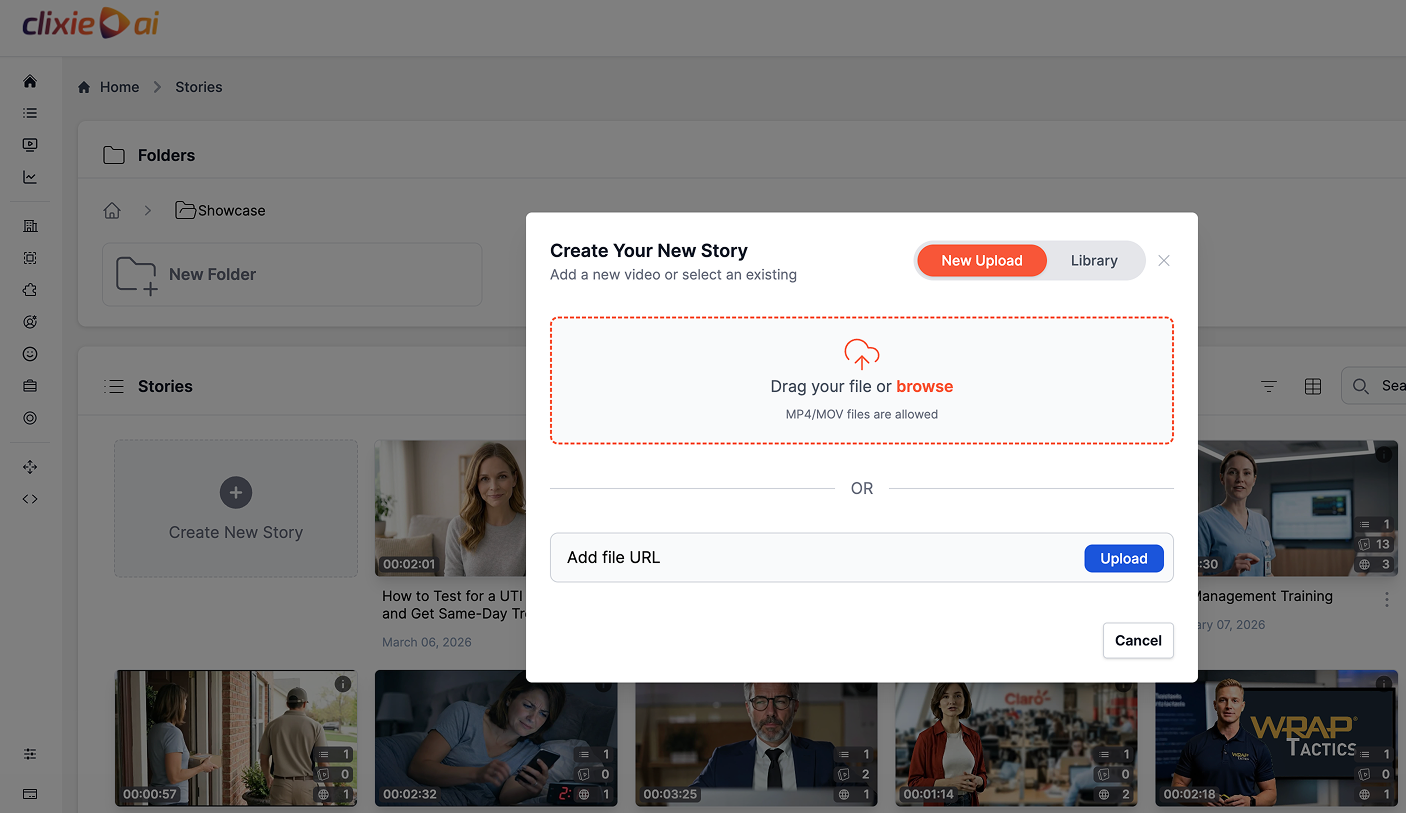
Clixie accepts existing MP4 files, recorded webinars, screen-captured walkthroughs, instructor-led session recordings, and AI-generated videos. The original video file stays untouched. All interactive elements are added as a layer on top.
This matters for compliance teams because it means a previously produced training video, whether recorded two months ago or two years ago, can be made interactive without having to go back to the source footage.
Step 2: Review the Transcript for Compliance Moments
Once uploaded, the video transcript becomes your quiz planning map. Scan it for the moments where learning is most critical: policy definitions, risk scenarios, required decision points, common misunderstandings, safety procedures, and legally significant acknowledgments.
These are the natural insertion points for quiz questions. The goal is to pause the learner at the moments where understanding matters most, not to add questions throughout the video at arbitrary intervals.
Clixie can suggest quiz questions based on the transcript. The compliance team should review, edit, and approve every question before publishing. AI-generated suggestions are a starting point, not a finished product. Regulatory accuracy and policy alignment require human review.

Step 3: Add Quiz Questions at Key Timestamps
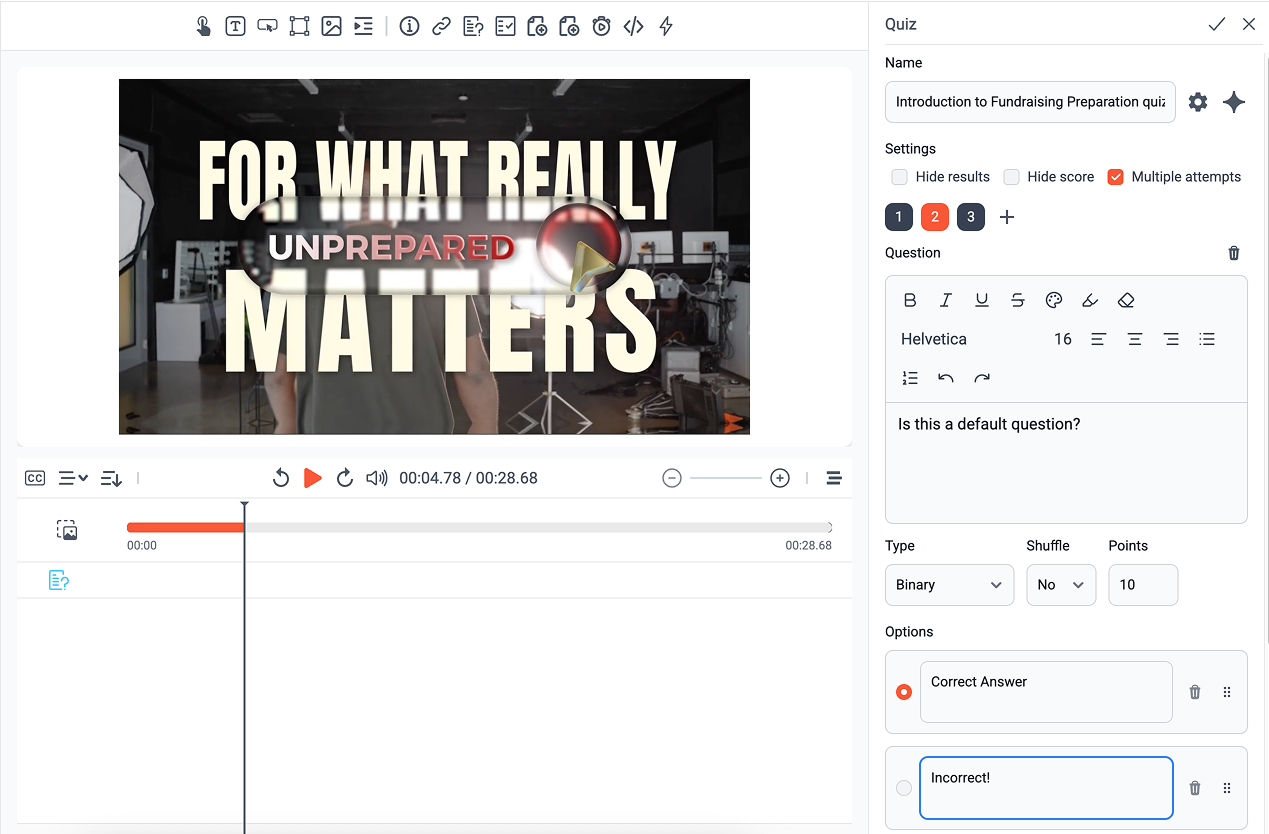
Questions are placed directly on the video timeline. When the learner reaches that timestamp, the video pauses and the question appears. The learner cannot skip forward until they respond (if gating is enabled).
Inside the Clixie editor, this process happens entirely within a visual interface. The auto-generated transcript appears on the left side of the screen. Clicking any word or timestamp moves the video playhead to that exact moment. From there, selecting "Add Interactive Element" opens a simple modal where you type the question, enter the answer options, and mark the correct response. The system places a marker on the timeline indicating exactly where the video will pause for the learner.
Question types available in Clixie for compliance training include:
- Multiple choice: Standard policy knowledge checks
- True/false: Quick comprehension verification
- Situational judgment: "What would you do in this situation?" scenario prompts
- Policy confirmation: Acknowledgment that the learner has read and understood a specific policy
- Role-specific questions: Different question sets for different learner groups

Step 4: Set Correct/Incorrect Feedback and Remediation Routing
Each answer can carry its own feedback. A correct answer can display a short explanation reinforcing why the answer is right. An incorrect answer can display what the right answer is and why, and it can also route the learner automatically to a remediation clip.
Remediation routing is one of the most valuable features for compliance training. Instead of telling a learner they were wrong and moving on, the training responds to the wrong answer with the exact content the learner needs before they can continue.
Step 5: Set Pass/Fail Rules and Attempt Limits
Compliance modules often require a minimum score before the learner receives credit. In Clixie, teams can set:
- A minimum passing score
- A required watch percentage before the quiz becomes available
- A maximum number of attempts
- Required interactions before the module is marked complete
These rules feed directly into the completion and pass/fail data reported to the LMS.
Step 6: Publish and Track Results
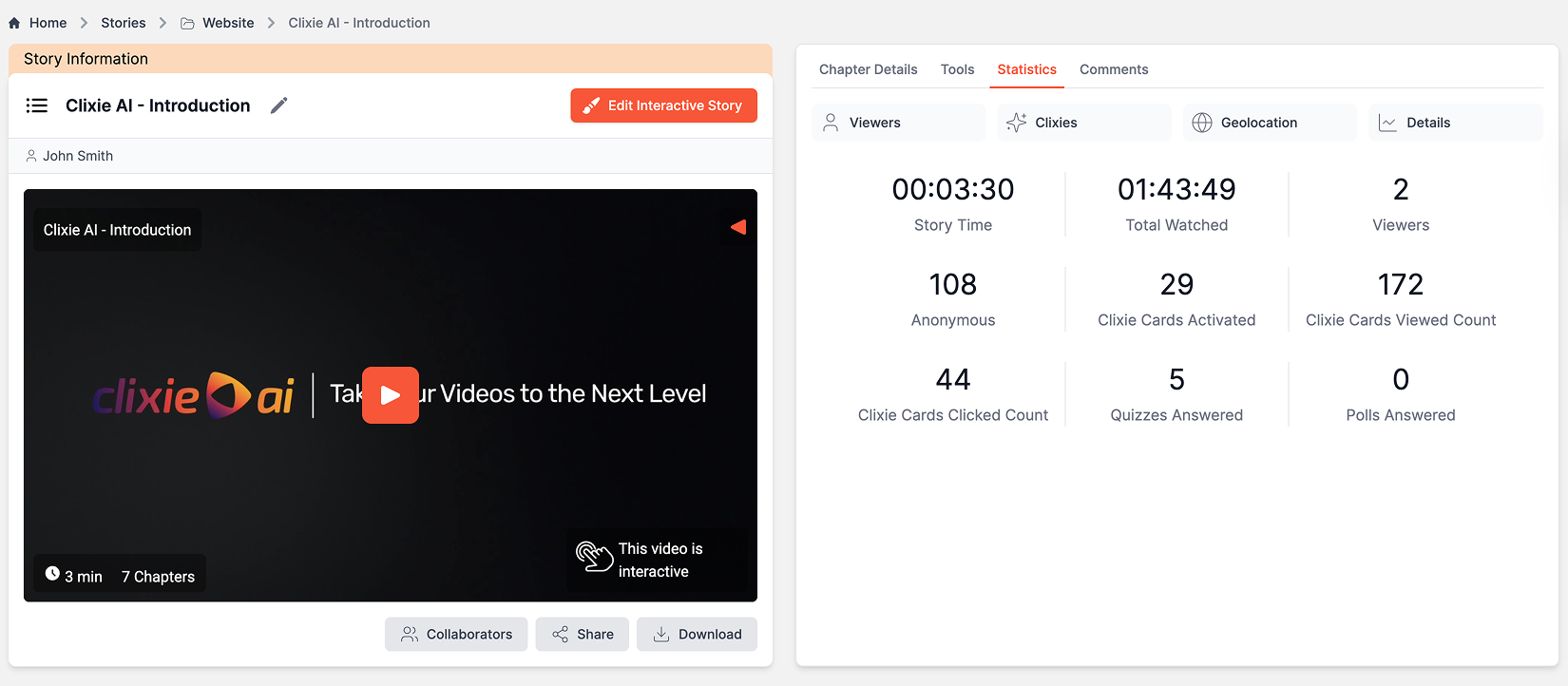
The completed interactive module can be published as a SCORM 1.2 package for LMS delivery, embedded via iframe, or shared as a direct link. Analytics capture completion status, quiz scores, watch time, branching paths taken, and number of attempts.
For a typical 10 to 15-minute compliance video, a first interactive version can often be built in under 30 minutes, depending on review requirements and the number of quiz points added. The interface is closer to adding comments on a shared document than building a course from scratch in a traditional authoring tool. The compliance video already exists. Clixie gives it a structure for learning and documentation.
For a deeper look at how scenario-based decisions can be built into this kind of workflow, see scenario-based training that actually sticks.
How Branching Paths Work in Compliance Training Videos
Branching in compliance training means the learner's answer or role determines what video content they see next, including remediation clips, role-specific policy modules, or progression to the next section of the course.
Most compliance training is linear: every learner watches the same video in the same order and completes the same quiz. Branching changes that. It makes the training respond to what the learner actually does, not just whether they were present.
Here is how branching works in practice:
Correct answer path: The learner answers a quiz question correctly. The video continues to the next section.
Incorrect answer path: The learner answers incorrectly. The video automatically routes them to a remediation clip that covers the relevant policy or procedure. After the remediation plays, the learner returns to the question and tries again.
Role-based path: Before the training begins, or at a decision point in the video, the learner selects their role (manager, employee, contractor, department). Each role follows a different content path tailored to their specific compliance requirements.
High-risk decision path: At a scenario where the stakes are high, an incorrect or risky answer triggers additional explanation before the learner is allowed to continue. This is particularly useful for safety-critical topics.
Certification unlock: Completing one module or reaching a passing score unlocks the next chapter or module in a multi-part compliance program.
In compliance training, branching is valuable not because it makes the training feel more engaging, but because it creates evidence of decision-making. A wrong answer does not just subtract a point. It triggers the exact remediation the learner needs before they can move forward, and it records that the remediation happened.
For more on how interactive video improves engagement and decision-based learning across regulated training environments, see the Clixie and Cisco Webex case.
Role-based branching in practice: A manufacturing client had a 45-minute linear safety video that every employee, from office clerks to heavy machinery operators, was required to complete in full. By adding a role-selection branch at the 2-minute mark, office staff were routed to ergonomic and fire safety content, while floor operators followed heavy equipment and hazard protocols specific to their work environment. This targeted approach cut office staff retraining time by roughly 60%, and first-attempt quiz pass rates improved across both groups. The change also reduced the passive clicking pattern that often undermines compliance records when learners are required to sit through content with no relevance to their role.

How Do You Add Remediation Paths to Compliance Training Videos?
To add remediation paths to a compliance training video, connect incorrect quiz answers to targeted review content. When a learner chooses the wrong answer, the video pauses, explains the mistake, routes the learner to a short remediation clip, and then brings them back to retry or continue based on the module's completion rules.
In Clixie AI, remediation routing is built inside the interactive layer without re-editing the original video. The source file stays intact. When setting up an incorrect-answer path in the Clixie editor, the compliance team selects which clip or chapter to route the learner to after a wrong response. That clip can be a short segment from the same video, a separate remediation recording, or an external resource. Once the remediation plays, the system returns the learner to the question automatically or advances them based on the pass/fail rules set for the module.
This matters for compliance documentation because remediation completion becomes part of the learner record. It is not just the final score that gets recorded. It is the fact that the learner needed remediation on a specific question, completed the relevant review content, and then passed (or did not pass) on a subsequent attempt. According to Absorb LMS guidance on compliance training effectiveness, leading organizations target 95% or higher completion rates for critical roles, but completion rate alone does not satisfy audit requirements. The remediation record is what closes that gap.
For more on how remediation-based scenario training improves decision-making outcomes in practice, see the scenario-based training guide.
Compliance Training Reporting: SCORM, xAPI, LMS Data, and Audit Trails
When an interactive compliance video is published via SCORM or xAPI, the LMS can capture learner completion, quiz scores, attempts, pass/fail status, watch progress, and branching paths taken, giving compliance teams the audit-ready documentation that passive video cannot produce.
What Data Should Compliance Training Videos Track for Audits?
Compliance training videos should track more than completion. For audit readiness, the record should capture two tiers of data: a basic tier covered by SCORM, and an extended tier that requires xAPI.
Basic tier (SCORM 1.2):
- Learner name or ID
- Course or regulation code
- Completion status
- Completion date and time
- Watch percentage
- Quiz score
- Pass/fail status
Extended tier (xAPI):
- Individual quiz answers (which option was selected, not just the score)
- Number of attempts per question or module
- Remediation completed (which clips played, which paths were followed)
- Branching paths taken (which role-specific or decision-based routes the learner followed)
- Policy acknowledgment (timestamped record of the learner confirming they read and understood the policy)
- Exportable interaction-level statements stored in a Learning Record Store (LRS)
The choice between them comes down to the audit standard your organization needs to meet. As Selleo's 2026 analysis of compliance tracking standards explains, SCORM is optimized for in-LMS session proof, meaning completion plus a score inside one system. xAPI is designed for defensible, event-level audit trails that can live outside an LMS entirely. According to Thinkific's 2026 SCORM compliance update, organizations with complex audit requirements increasingly pair SCORM with xAPI so governance keeps pace with richer learning content.
[CALLOUT BOX: For most compliance programs, SCORM 1.2 covers the basic tier and satisfies standard audit requirements. Add xAPI when your audit standard requires interaction-level evidence: specific answers selected, remediation paths followed, and branching choices made.]
In Clixie AI, both tiers are available in one workflow. The SCORM 1.2 package delivers the basic tier to your LMS automatically. The Clixie analytics dashboard captures the extended tier, including quiz performance by question, branching choices, remediation activity, and watch data, in a separate report that can be exported for audit documentation. According to Clixie's product documentation, this data export is legally defensible for compliance reviews and regulatory audits.
For a deeper explanation of how SCORM works inside your LMS and how to configure tracking for your compliance programs, see the complete SCORM LMS integration guide.
How Do You Make Compliance Training Videos Trackable in an LMS?
To make compliance training videos trackable in an LMS, publish the interactive video as a SCORM 1.2 or xAPI package. This allows the module to send learner data back to the LMS automatically, including completion status, time spent, score, number of attempts, and pass/fail result.
The publishing step in Clixie AI does not require a developer or a separate authoring tool. Once the interactive layer is built (quizzes, branching paths, remediation routing, pass/fail thresholds), the module is published directly from the Clixie editor as a SCORM 1.2 ZIP file. That file is then uploaded to any compatible LMS the same way any other SCORM course is uploaded. Clixie supports 20 or more LMS platforms natively, including Canvas, Blackboard, Moodle, Brightspace, and Docebo, through SCORM 1.2, SCORM 2004, LTI, and xAPI.
Once the module is live in the LMS, the learner data flows back automatically. LMSPedia's 2026 compliance LMS guide recommends that any audit-ready compliance platform should be able to generate a complete training report for any employee in under five minutes without manual data exports. With SCORM-connected interactive video, that benchmark is achievable: the LMS holds the completion and score data, and the Clixie dashboard holds the interaction-level detail, both ready to export at audit time.
Want to see the SCORM publishing workflow before committing to a platform? Book a Clixie.ai demo and get a free interactive compliance video template built for L&D teams.
For more on how LMS integration with SCORM and xAPI works across Canvas, Webex, Teams, and Zoom, see the Clixie value proposition overview. For the proven benefits of interactive compliance video beyond tracking, see the 7 benefits guide for L&D teams.
Why Completion Timestamps Are Not Enough
A compliance audit asks for evidence of understanding, not just evidence of access. When a regulator, an internal auditor, or a legal team reviews training records, the questions they ask are specific: Did this employee complete the training by the required date? Did they pass the assessment? How many attempts did it take? Did they complete required remediation after failing?
A completion timestamp from a passive video answers the first question. Interactive video with proper LMS integration can answer all of them.
SCORM vs. xAPI: A Practical Distinction
SCORM and xAPI are both eLearning standards that allow training content to communicate with an LMS. They work differently and offer different levels of data depth.
According to Clarity Consultants, SCORM 1.2 remains the most widely adopted eLearning standard. It supports basic tracking, including completion status, quiz score, and time spent, and has broad compatibility across LMS platforms. SCORM 2004 adds more advanced sequencing and navigation control but has a more complex implementation.
xAPI, also known as Tin Can API, captures richer behavioral data and can track learning experiences beyond the LMS environment. According to iSpring Solutions, xAPI records detailed statements about learner actions, stored in a Learning Record Store (LRS), and is well-suited for organizations that need granular tracking of decision-making, branching choices, and scenario-based performance.
For most compliance teams running required training in a standard LMS environment, SCORM 1.2 is the practical starting point. xAPI becomes more valuable when the organization needs richer analytics or tracks learning activity across multiple platforms or systems.
What Clixie Tracks
Clixie natively outputs SCORM 1.2 packages that map to standard LMS gradebooks for completion status, total watch time, and final quiz scores.
For teams that need deeper behavioral data, Clixie also captures xAPI-level interactions, including specific branching paths taken and individual incorrect answer selections, and stores this data within its own built-in analytics dashboard. A separate external Learning Record Store is not required to view this advanced data inside Clixie.
Sending xAPI statements directly to a corporate LMS environment is also supported, but requires an LMS that includes built-in LRS functionality or a connected external LRS. Whether that applies to your current LMS setup depends on your platform and configuration. Check with your LMS administrator or Clixie's team to confirm the right publishing setup for your environment.
The data points typically available in a properly configured interactive compliance module include: learner name or ID, completion status (complete/incomplete), completion date and time, watch percentage, quiz answers per question, overall quiz score, number of attempts, pass/fail result, branching paths taken, remediation clips completed, policy acknowledgment, and exportable report format.

The goal of compliance training documentation is not to prove that employees accessed content. It is to create evidence that they understood the policy, demonstrated correct decision-making, and completed any required remediation. Interactive video with SCORM or xAPI tracking is how training records begin to answer those questions.
Using the Kirkpatrick Model to Measure Interactive Compliance Training
The Kirkpatrick Model evaluates training effectiveness across four levels, and interactive compliance video generates measurable data at each one.
The Kirkpatrick Model was developed by Donald Kirkpatrick in the 1950s and has since become the most widely used training evaluation framework in corporate learning, according to Training Industry. Its four levels are: Reaction (how learners responded to the training), Learning (what they understood), Behavior (how they applied it), and Results (what changed for the organization).
Most compliance training programs measure Level 1 at best, collecting completion data or sending a post-training survey. Interactive video makes it possible to generate meaningful data for all four levels, though it is important to be clear about what the data can and cannot demonstrate.
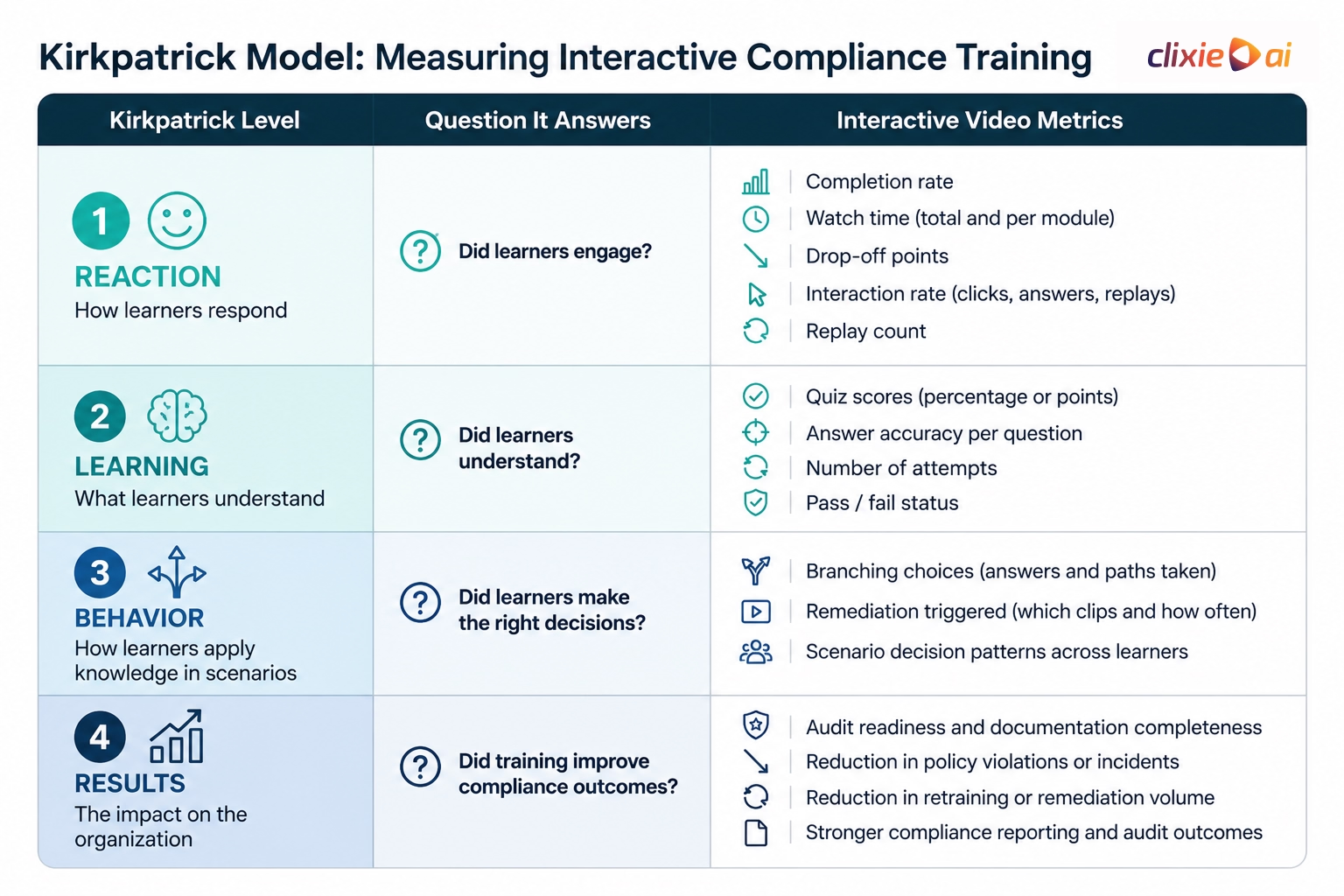
Level 1 - Reaction: Did Learners Engage?
Question it answers: Did learners interact with the training, or did they simply let it run?
Interactive video data available for Level 1 includes completion rate, watch time per module, drop-off points (where learners stopped watching or left the module), interaction rate (how often learners clicked, answered, or replayed), number of quiz attempts per question, and replay behavior.
Passive video gives you a completion timestamp. Interactive video tells you whether the learner was actually present in the experience.
Level 2 - Learning: Did Learners Understand?
Question it answers: Did learners acquire the knowledge, skills, or understanding the training was designed to deliver?
Interactive video data available for Level 2 includes quiz scores, answer accuracy per question, number of attempts before passing, pass/fail status, question-level performance across a learner group, and patterns in wrong answers that reveal where the training content may need to be clarified.
According to Valamis, scenario-based questions that require learners to apply knowledge, rather than simply recall a fact, produce more meaningful Level 2 data. A learner who answers a situational judgment question correctly is demonstrating applied understanding, not just memorization.
Level 3 - Behavior: Did Learners Make the Right Decisions?
Question it answers: Did learners transfer what they learned to actual workplace behavior?
This is where it is important to be accurate about what interactive video can and cannot show.
Interactive video data available for Level 3 includes branching choices made during scenario-based questions, remediation paths triggered (indicating which wrong decisions were most common), role-based path completion patterns, and the distribution of decision-making across a learner cohort.
This data is valuable. It shows how learners behaved in a simulated compliance scenario before they encountered the situation in real life. But it does not prove that behavior changed on the job. Video analytics alone cannot confirm what a learner does after they close the training module. To measure actual behavior change, organizations need to connect training data with on-the-job observation, manager assessment, or follow-up compliance incident records.
What interactive video does well at Level 3 is provide the closest available pre-deployment evidence of how your workforce is likely to respond to a compliance scenario. That is more than passive video can offer.
Level 4 - Results: Did Training Improve Compliance Outcomes?
Question it answers: Did the training produce measurable improvement in the business metrics that compliance training is designed to protect?
Business outcomes that organizations often compare against training data at Level 4 include: fewer policy violations or disciplinary actions, fewer safety incidents or OSHA-recordable events, improved audit readiness and documentation completeness, reduced volume of retraining or remediation required, faster rollout of mandatory training updates, and stronger compliance documentation for regulatory review.
Clixie provides learning and interaction data. To measure Level 4, organizations need to compare that training data with HR, safety, operations, or compliance incident records over time. Clixie's contribution to Level 4 is generating the detailed, timestamped, exportable learning records that make that comparison possible.
Clixie AI: Interactive Compliance Video Without the Rebuild
Clixie AI lets compliance and L&D teams add quizzes, branching paths, remediation routing, chapters, and SCORM-ready LMS publishing to existing training videos without coding or rebuilding the original content.
The core workflow is straightforward: upload an existing compliance video, add an interactive layer using Clixie's no-code editor, and publish an LMS-ready module. The original video is not changed. The interactive elements, quizzes, branches, overlays, and reporting logic, sit on top.
What Clixie enables for compliance training:
- Upload existing videos: MP4 files, recorded webinars, screen captures, and AI-generated video are all supported. No re-editing required.
- AI-assisted quiz suggestions: Clixie can suggest quiz questions based on the video transcript. Compliance teams review, edit, and approve every question before publishing. Regulatory accuracy requires human judgment.
- Timeline-based quiz placement: Questions are placed at specific timestamps, pausing the learner at critical policy moments.
- Multiple question types: Multiple choice, true/false, situational judgment, and policy confirmation questions are all available.
- Feedback and remediation routing: Correct and incorrect answers can carry per-answer feedback and automatically trigger remediation content.
- Role-based and answer-based branching: Branching paths can be built based on the learner's role, department, or quiz responses.
- Pass/fail thresholds and attempt limits: Compliance teams set the minimum score, required watch percentage, and maximum attempts.
- SCORM 1.2 and xAPI publishing: Modules publish as SCORM 1.2 packages for LMS delivery, with xAPI interaction data available in Clixie's analytics dashboard and configurable for LMS environments with built-in LRS support.
- Analytics dashboard: Teams can track completion, watch time, quiz scores, branching paths, and attempts in Clixie's reporting interface.
- Multilingual support: Clixie supports 120+ languages for compliance teams running training across global workforces.
- Policy update agility: When a policy changes, teams can update the interactive layer without re-editing the original video.
For a compliance manager logging in for the first time, the most immediate difference from traditional authoring tools is the absence of a course-building structure. The compliance video already exists. Clixie's editor surfaces the transcript, suggests where questions might go, and lets the team add and configure those questions directly on the timeline. For a typical 10 to 15-minute compliance video, a first interactive version can often be built in under 30 minutes, depending on review requirements and the number of quiz points added.
Where this is most useful is not in replacing a full e-learning authoring workflow. It is in making existing compliance video assets interactive and trackable, faster than rebuilding them as full courses, and without requiring a developer or instructional design team to start from scratch.
How this looks in practice: A healthcare organization needed to modernize their annual HIPAA compliance training. Rather than reshooting an existing 20-minute overview video at significant cost and production time, their L&D team uploaded the original file to Clixie. Within an afternoon, they layered five situational judgment quizzes and two automated remediation loops over the original footage and converted the result into an interactive SCORM package. When the module rolled out to their assigned learner group of 1,200 healthcare workers, the team had complete LMS tracking coverage for the first time, backed by an audit-ready dataset showing exactly how each employee had responded to the patient data scenarios.
Get a free interactive compliance video template from Clixie.ai and see how your existing training video can become a trackable, quiz-based learning module.
Not every interactive video platform is built for the same training workflow. Some tools are stronger for marketing video engagement, some are stronger for education content authoring, and others are built around video hosting infrastructure. For compliance training, the key question is whether the platform can turn existing videos into quiz-based, branching, trackable learning modules that support LMS reporting and audit documentation.
Compliance Training Scenarios That Work Well with Interactive Video
Interactive video works especially well for compliance scenarios where the learner needs to make a decision rather than just absorb information. The following examples illustrate how quizzes and branching apply across the most common compliance training topics.
Cybersecurity Awareness
Scenario: A learner receives a suspicious email with an unexpected attachment.
Quiz: "What should you do next?" Options: report to IT security, open the attachment, forward to a colleague, ignore it.
Branching: Correct answer (report to IT security) continues the module. Each incorrect answer routes to a remediation clip explaining phishing risk and the correct reporting procedure.
Why it works: Cybersecurity decisions happen in seconds. The scenario forces the learner to process the decision under the same conditions they would face in their inbox.
Workplace Safety
Scenario: A learner is about to enter a restricted area on the production floor.
Quiz: "Which personal protective equipment is required before entering this area?"
Branching: Wrong answer routes to the relevant safety procedure, then returns to the question. Role-based branching can send contractors and full-time employees to different PPE checklists based on access level.
Harassment Prevention
Scenario: A learner witnesses a colleague making an unwanted comment to another employee.
Quiz: "What is the correct next step?"
Branching: Manager path and employee path are different. Managers face additional questions about documentation and escalation responsibilities. Employees follow the standard reporting path.
Healthcare Compliance (HIPAA)
Scenario: A learner is accessing patient records and receives a request to share information with a third party.
Quiz: "Which of the following actions protects patient privacy under HIPAA?"
Branching: Incorrect response routes to a HIPAA data privacy remediation clip. The learner must complete the remediation and pass the question before the module continues.
Financial Services Compliance
Scenario: A learner identifies a situation that may represent a conflict of interest.
Quiz: "What is required in this situation?" Options: disclose to compliance, proceed without disclosure, consult a colleague, delay action.
Branching: Incorrect answer routes to the firm's conflict of interest disclosure policy before the learner can move forward.
The most effective compliance scenarios are decision simulations, not memory tests. The learner should face a realistic situation, make a choice, and receive immediate feedback tied to that specific choice, not just a score at the end of the module.
FAQ
Can you add quizzes to compliance training videos without coding?
Yes. A no-code interactive video platform like Clixie AI allows compliance and L&D teams to upload an existing training video and add quiz questions directly onto the video timeline. Learners are paused at key moments and asked to answer knowledge-check, policy, or scenario-based questions. No video re-editing or developer support is required.
What is branching in compliance training?
Branching is a training design method where the learner's answer or role determines what video content they see next. In compliance training, a correct answer typically advances the learner to the next section. An incorrect answer can route the learner to a remediation clip, additional policy explanation, or a replay of the relevant section before they can continue. Role-based branching sends managers, employees, and contractors to content specific to their responsibilities.
Why are quizzes important in compliance training?
Quizzes generate verifiable evidence of understanding, including answer accuracy, number of attempts, scores, and pass/fail status, that completion tracking alone cannot produce. This data is meaningful both for measuring whether training was effective and for creating the documentation compliance teams need for audits and regulatory reviews.
Can interactive compliance videos be tracked in an LMS?
Yes. Interactive compliance videos can be tracked in an LMS when published through SCORM or xAPI workflows. Depending on LMS configuration and publishing setup, teams can typically track completion status, quiz scores, number of attempts, watch progress, pass/fail status, and branching paths taken.
How does the Kirkpatrick Model apply to compliance training?
The Kirkpatrick Model evaluates training at four levels: Reaction, Learning, Behavior, and Results. Interactive compliance video can generate data for each level. Engagement metrics such as completion rate, watch time, and interaction rate support Level 1. Quiz scores, accuracy, and pass/fail results support Level 2. Branching scenario decisions and remediation path data support Level 3. Audit-ready learner records, when compared against compliance incident or policy violation data, contribute to Level 4 analysis.
What compliance topics work well with interactive video?
Interactive video is well-suited for compliance topics where the learner needs to demonstrate a decision, not just recall a fact. These include cybersecurity awareness, workplace safety, harassment prevention, healthcare compliance, data privacy training, financial services compliance, manufacturing safety procedures, and ethics training.
Does branching video replace an LMS?
No. Branching video improves the learning experience inside the video itself. The LMS continues to manage enrollment, assignment, completion records, gradebook data, and compliance reporting. Interactive video and the LMS work together: the video generates the evidence of understanding, and the LMS stores and reports it.
Can AI generate quiz questions from a compliance training video?
AI can suggest quiz questions based on a video transcript. Compliance and L&D teams should review and approve every AI-generated question before publishing to ensure accuracy, policy alignment, and regulatory appropriateness. AI suggestions are a starting point, not a finished compliance document.
Conclusion
Passive compliance video records access. Interactive compliance video creates evidence of understanding. The difference matters every time a regulator, an auditor, or a department head asks not just who watched the training, but who demonstrated the right decision and completed any required remediation.
The framework for building this is practical and reachable for most compliance teams. Quizzes turn the video into an assessment. Branching makes the training respond to each learner's decisions and role. SCORM and xAPI connect the learning data to the LMS. The Kirkpatrick Model gives teams a recognized structure for interpreting what the data means and communicating training value to stakeholders.
None of this requires a developer, a full course rebuild, or a new video production. It requires a no-code interactive video platform and the compliance video you already have.
With Clixie AI, compliance and L&D teams can turn existing training videos into interactive, auditable learning experiences, without coding, without rebuilding courses, and without starting from scratch.
Book a Clixie.ai demo and bring one compliance training challenge. We will show you how to make it interactive, trackable, and ready for your next audit.
.png)
.png)