


Interactive Video Elements: The Complete Guide to Every Type and How They Work [2026]
Learn all 6 interactive video element types: hotspots, branching, quizzes, CTAs, forms, and chapters, how each works, and which drives the best results for training, marketing, and internal comms.
![Interactive Video Elements: Complete Guide [2026]](https://cdn.prod.website-files.com/646b666669cbb97ed8baef9f/696c00abf756295ba61537ec_interactive-video-101-what-interactive-elements-are-and-how-they-work.png)


TL;DR
- Interactive video elements turn passive watching into measurable participation.
- Six core elements drive navigation, conversion, assessment, and personalization.
- Active learning produces 54% higher test scores and 16× greater engagement than passive video.
- Embedded CTAs outperform end-screen placements by up to 2×.
- Clixie AI layers interactive elements onto existing video — no coding, no re-filming required.
Key Takeaways
- Interactive video is a non-linear digital media format that accepts user input to control content flow, outcome, or depth.
- A clickable hotspot is an interactive element that overlays a defined area of video to reveal information, images, or external links when selected.
- A branching scenario is a decision-point structure that routes viewers to different video paths based on their choices.
- An in-video quiz is an assessment element that pauses playback to test comprehension and redirect learners based on their answers.
- A call-to-action (CTA) element is a conversion trigger embedded in video that drives external behavior without requiring the viewer to leave the player.
- An HTML5-based interactive video platform is a delivery system that overlays a behavior-logic layer on standard video files, enabling full interactivity without plugins.
Introduction
Your viewer is probably not watching your video right now — even if the play counter says otherwise.
Research.com's training video data shows non-interactive training video completion rates dropped to 60% in 2024, while interactive video engagement can run two to three times higher than linear video. But the gap between passive and active video is bigger than a completion metric. Organizations spend millions producing training and marketing videos while having almost no visibility into whether viewers understood, ignored, or abandoned the content.
Completion is not comprehension.
A video that plays to the end does not prove learning happened, intent was captured, or a buying decision moved forward. It proves a file ran to its final frame. That is a measurement problem with a direct cost — in wasted training budgets, missed sales conversions, and compliance records that mean nothing.
I recently spoke with a compliance director at a mid-sized financial firm who was celebrating a "100% completion rate" on their new cybersecurity training. It looked like a massive win — until her IT team pulled the secondary analytics. They discovered that 82% of employees had muted the video, relegated it to a background tab, and answered emails until the timer ran out. Her flawless compliance record wasn't a win. It was a massive, undocumented security liability waiting to happen.
Interactive video elements solve this by making passivity impossible. They stop the video, demand a response, and route the experience based on what the viewer actually does. This guide breaks down every element type, explains the psychology behind why each one works, and shows exactly where to deploy them — whether your goal is higher training retention, more qualified pipeline, or documented compliance proof.
🎯 Want to see interactive elements in action before you finish reading? Book a free Clixie demo →
Understanding why passive video falls short is the context that makes everything in this guide click. And if you want to understand how interactive video works under the hood, that foundation is worth building before you start placing elements.
What Is Interactive Video? (The Definition That Actually Matters)
Interactive video is a non-linear digital media format that overlays a behavior-logic layer on standard video content, enabling viewers to navigate, respond, and influence outcomes in real time — transforming a passive broadcast into a measurable, two-way experience.
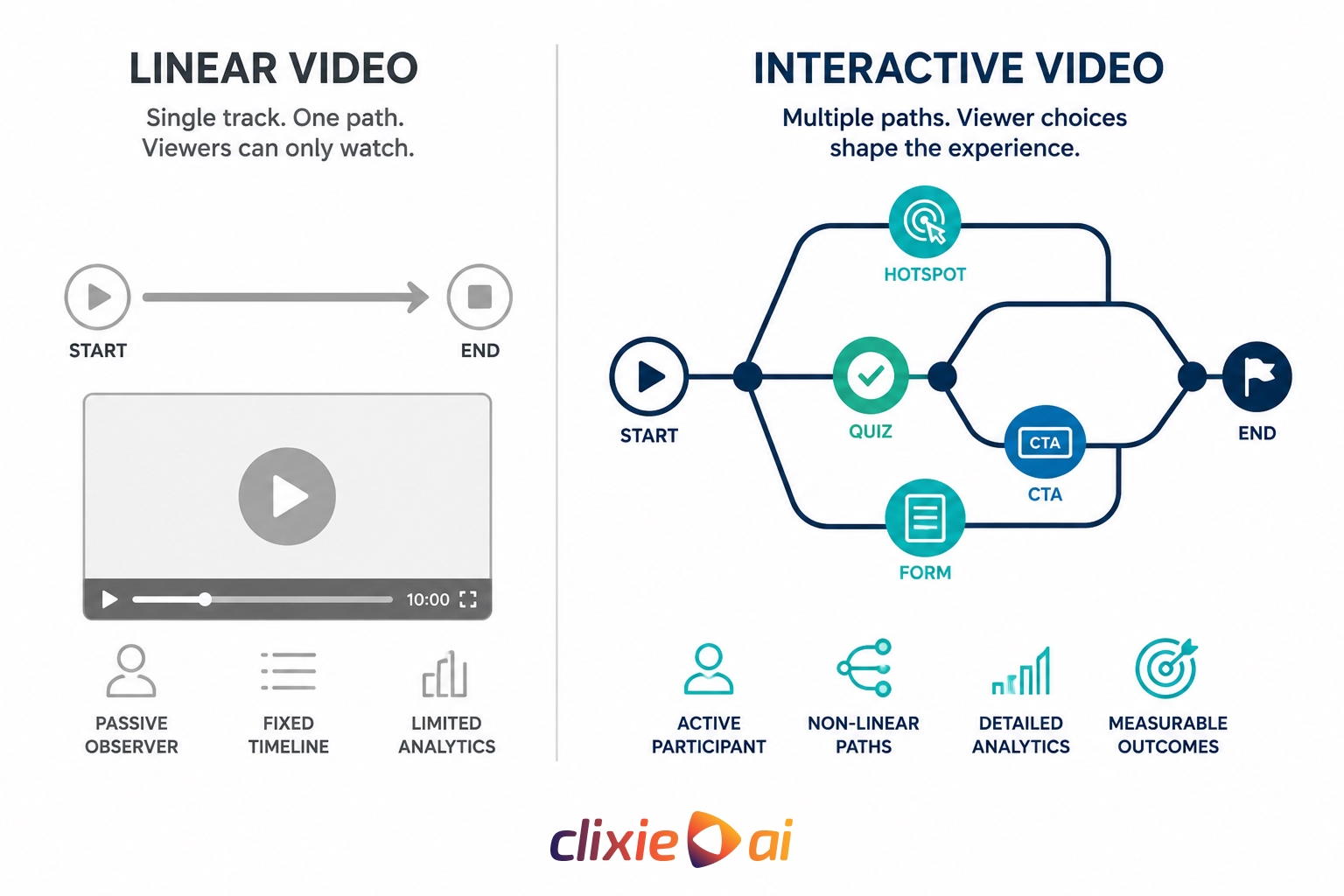
Standard video is a single track of audio and visual data. The viewer can play, pause, or scrub a timeline — that is the full extent of their control. Interactive video adds a second layer: a data track synchronized to the video's timecode that contains logic, triggers, and response mechanisms. This layer makes the video respond to the viewer instead of simply playing at them.
The technology runs on HTML5 — the web standard that lets developers overlay code directly onto video elements in a browser, without Flash or any external plugin. Before HTML5, interactive video required specialized hardware: laserdisc systems in the 1980s, CD-ROM players in the 1990s. HTML5 moved the entire capability into a standard browser tab and made it platform-agnostic. Today, a viewer can experience a fully branching, quiz-gated, CTA-embedded interactive video on a phone, a laptop, or a conference room screen with no viewer-side software installation required.
Linear Video vs. Interactive Video: Direct Comparison
What Are Interactive Elements? (And Why the Distinction Matters)
Interactive elements are the specific user-interface components embedded in an interactive video that trigger an action — navigation, information retrieval, or data submission — when engaged by the viewer.
The distinction matters because interactive video is the container, and interactive elements are the tools. A platform that supports interactivity does nothing useful until an element is placed and configured. A branching video is just a collection of linear clips until decision-point buttons connect them into a path. The element is what creates the non-linear experience.
Each element sits on a transparent layer above the video file, synchronized to a specific timecode. It appears at a precise moment, stays visible for a defined duration, and disappears or triggers based on viewer input. Three primary functions cover everything an interactive element can do:
- Navigation — moving the viewer to a different timestamp or video segment
- Information Retrieval — surfacing additional content without leaving the player
- Data Submission — collecting answers, contact details, or behavioral signals
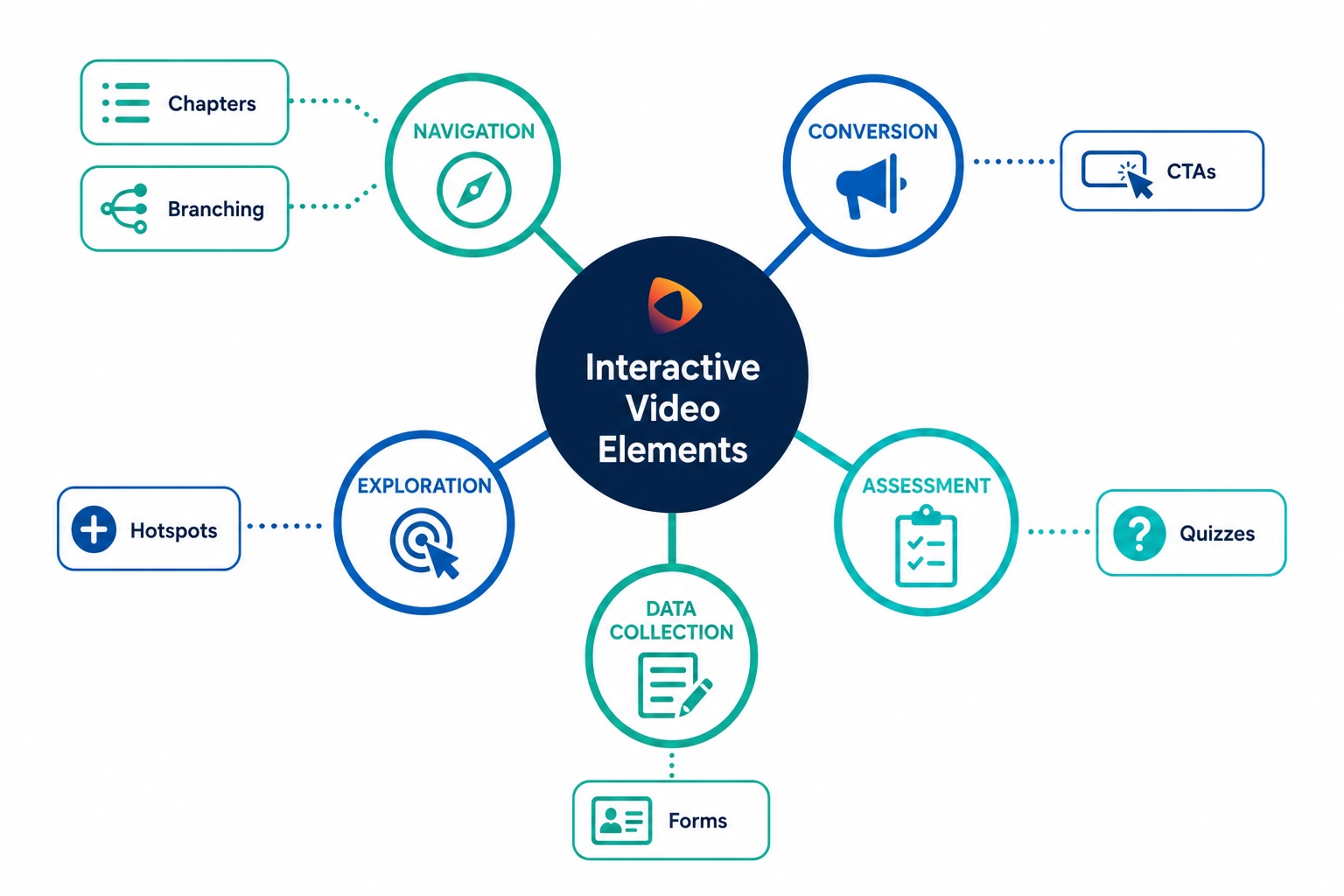
The 6 Core Types of Interactive Video Elements
The six core types of interactive video elements are clickable hotspots, branching scenarios, quizzes and knowledge checks, calls-to-action (CTAs), forms and data inputs, and chapter navigation — each serving a distinct engagement and conversion function.
Clickable Hotspots
A hotspot is a defined clickable area overlaid on the video frame. It can be static — fixed at a screen position — or dynamic, tracking a moving object like a product, person, or UI element. When clicked, a hotspot triggers an event: a modal window with supporting text, an image overlay, an audio clip, or a video pause with additional context. Hotspots are the right tool when the main video needs to stay concise but depth is available for viewers who want it — they create an optional information layer without breaking narrative flow.
.png)
Branching Scenarios and Decision Points
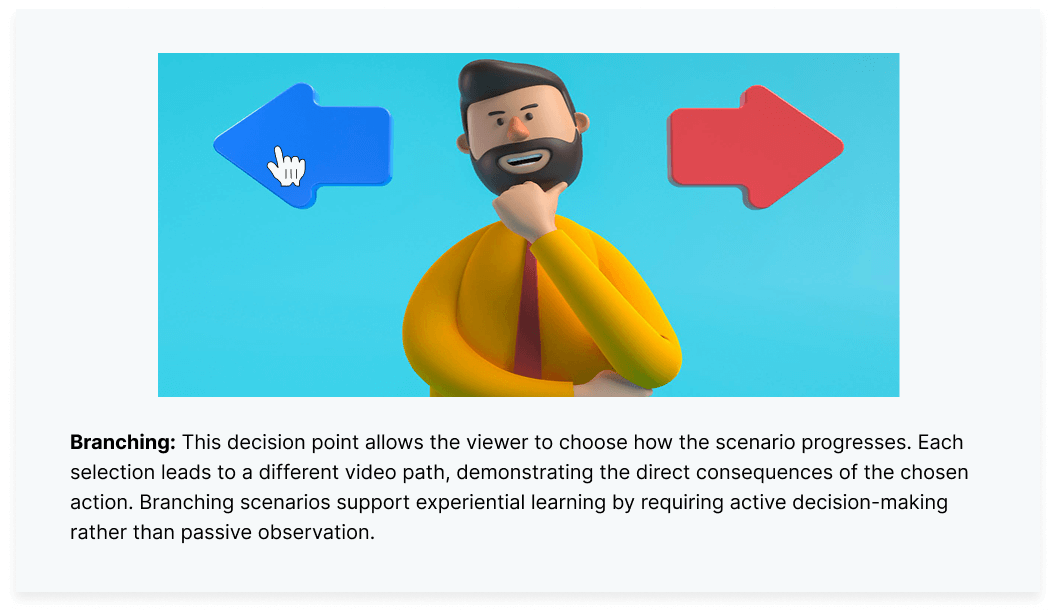
Branching pauses the video and presents two or more choices. The viewer's selection loads a different video segment or jumps to a specific timecode, creating a personalized path through the content. Branches can converge back onto a shared main path or lead to entirely separate outcomes. This is the defining element for simulation-based training — a learner practicing a difficult conversation, a compliance decision, or a sales negotiation sees the real consequences of each choice in a risk-free environment. For a deeper look at building scenario-based training that actually sticks, the architecture behind effective branching is worth understanding before you build.
Quizzes and Knowledge Checks
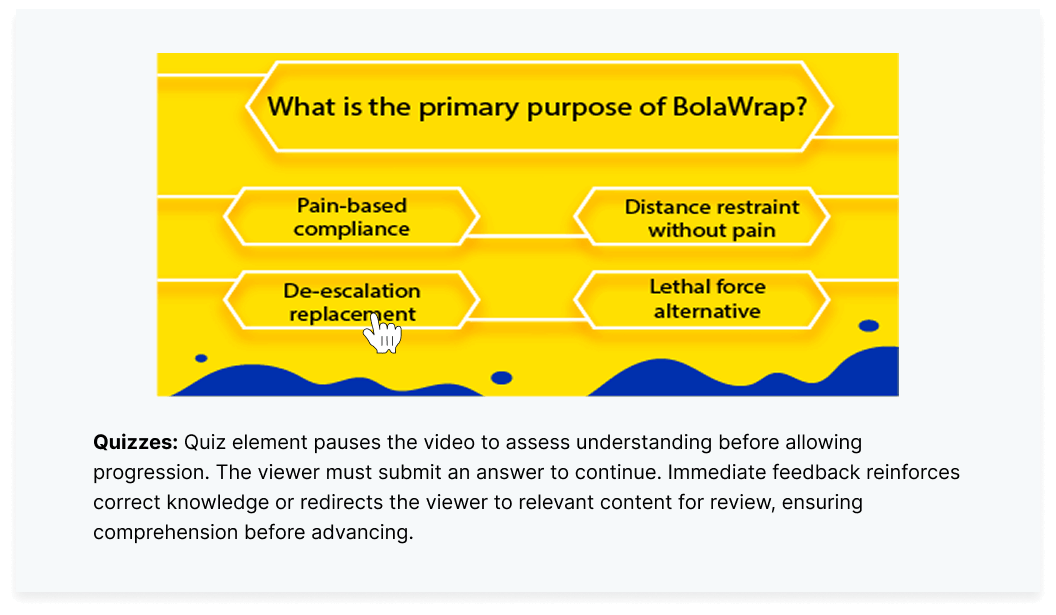
Quiz elements insert assessment questions directly into the video stream — multiple-choice, true/false, or open-ended text inputs. Advanced platforms gate the content at these points: the video hard-stops and will not advance until the viewer answers. Immediate feedback loops allow incorrect answers to redirect automatically to the relevant video segment for review before the learner retries. This creates a documented, timestamped record of comprehension — something playback-completion logs can never provide, and something compliance auditors actually need.
Calls-to-Action (CTAs)
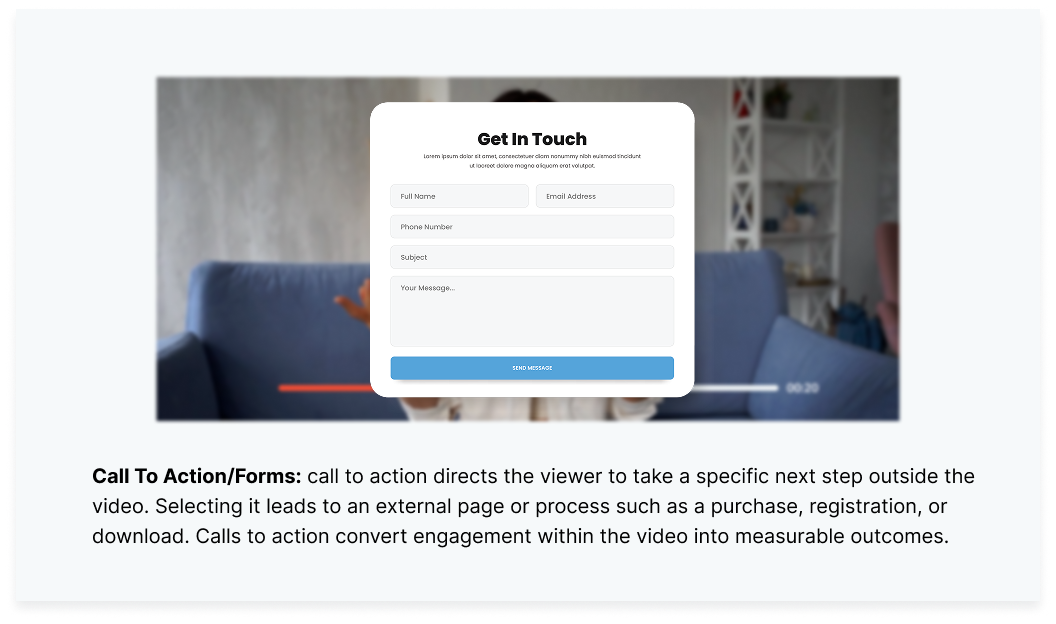
A CTA element is a conversion-oriented button designed to trigger a specific business outcome — "Book a Demo," "Sign Up," "Download the Guide," "Contact Sales." Unlike hotspots, which surface information within the player, CTAs move the viewer toward a measurable conversion. Timecode placement matters significantly: reported benchmark data compiled by THM SEO Agency suggests CTAs placed before the 60% watch mark generate a 12.7% click-through rate compared to 6.8% for end-screen placements — nearly double the conversion rate for earlier placement.
Forms and Data Inputs
Form elements let viewers submit text directly inside the video player. Instead of redirecting to a separate landing page — which adds friction and severs context — the video captures the name, email, or open-ended response within the same experience. This reduction in friction increases submission rates meaningfully. For internal use, forms handle compliance attestation and employee sentiment checks, creating a seamless acknowledgment record without requiring a separate LMS step.
Chapter Navigation and Timelines
Chapter markers divide a long video into labeled sections visible in a sidebar or as notches on the playback bar. Viewers can scan topics and jump immediately to the segment they need. This is essential for recorded webinars, all-hands meetings, and long-form training content where a viewer who already knows 80% of the material should not have to watch it to reach the 20% that is new to them. Chapters respect the viewer's time — which directly improves completion rates on content where length is unavoidable.
Why Interactive Elements Work — The Psychology of Active Learning
Interactive elements work because they convert video consumption from passive reception into active participation — a cognitive shift that Engageli's 2025 research links to 54% higher test scores, 16× greater nonverbal engagement, and 13× more learner talk time compared to traditional lecture-style methods.
Three mechanisms explain the performance gap.
Mandatory attention. An interactive video stops and waits. A passive viewer can mentally check out while a linear video plays in the background. An interactive video pauses at a critical moment and will not continue until the viewer responds. That mechanical requirement forces re-engagement precisely when it matters most.
Retrieval practice. When a viewer answers a quiz question or makes a branching decision, they are pulling information from working memory and applying it under mild pressure. This act of retrieval strengthens the neural pathway associated with that knowledge. A 2024 impact study from the Learning and Performance Institute confirms that learners who engage in active retrieval during training retain significantly more than those who receive identical content passively.
Personalization and cognitive load reduction. Branching paths serve only the content relevant to a specific viewer's choices. This removes the cognitive burden of processing irrelevant material — a real problem in standardized training where sales reps and engineers sit through identical onboarding content built for neither of them.
The Clixie Impact: Teams using Clixie in-video quizzes with hard-stop gating saw a 62% improvement in first-try assessment pass rates compared to their baseline linear video modules.
"The physical act of clicking doesn't just track attention — it creates it. When a viewer makes a decision inside a video, they've committed cognitively to the content. That is the difference between watching and learning."
Why Interactive Video Is Replacing Traditional Business Video
Traditional business video was optimized for broadcasting — it assumed a captive audience and measured success by reach. Modern business communication requires something broadcasting cannot provide: measurable participation, verified comprehension, and captured intent.
Linear video was the right tool for an era when the primary challenge was distribution. Getting a message in front of an audience was the hard part. That problem is solved. The hard part now is proving the message landed — in training outcomes, in sales pipeline movement, in compliance records, and in internal alignment.
Interactive video captures three things linear video fundamentally cannot: intent (which choices a viewer makes), comprehension (whether they understood well enough to answer correctly), and decision behavior (which paths they take and where they stop). These inputs drive better training outcomes, shorter sales cycles, and compliance records that hold up under scrutiny.
The shift is visible in advertising adoption: PadSquad reports, via Digiday, that 52% of marketers expected to use interactive features in at least 26% of video ads in 2025 — up from just 12% in 2024. The interactive video platform market was valued at $2.1 billion in 2024 and is forecasted to reach $10.3 billion by 2033 — a 19.4% compound annual growth rate that reflects where business communication investment is moving.
Where Each Element Belongs — Use Cases by Role and Objective
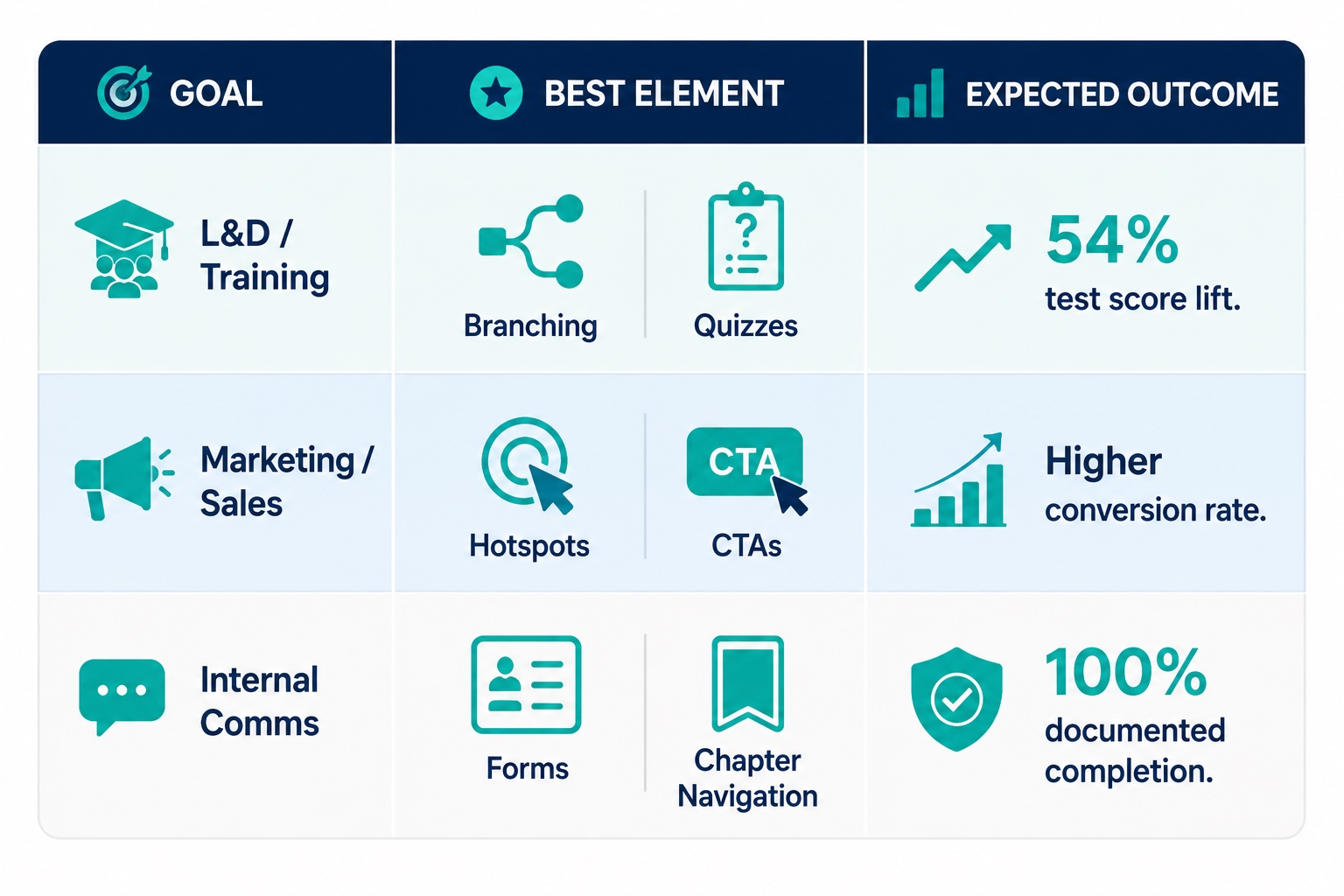
The right interactive element depends on the business objective — training teams get the most from branching and quizzes, marketing teams from CTAs and hotspots, and internal communications teams from forms and chapter navigation.
By Role
By Objective
Training teams see the clearest ROI from branching and quizzes. According to eLearning Industry's 2025 data, 90% of L&D professionals report video content significantly improves engagement and retention — interactive elements are what separate video that works from video that merely plays. For the full breakdown of the benefits of interactive video for corporate learning, the case goes well beyond the training room.
Marketing and sales teams get the most leverage from hotspots on product demos and well-timed CTAs. PadSquad's data, published via Digiday, shows 52% of marketers expected to use interactive features in over a quarter of their video ads in 2025 — up from just 12% in 2024. B2W.TV's 2024 survey found that brands using video report 49% faster revenue growth than those that don't. Adding interactive elements to existing product demos and explainer content is the fastest path to measurable lift.
Internal communications teams benefit most from forms for pulse surveys and compliance attestation, plus chapter navigation for recorded town halls and policy briefings. A leadership update with a two-question in-video form collects sentiment data that a separate survey rarely captures — because the interaction happens at the moment of highest engagement, not a day later in an email ask.
Behavioral analytics are where interactive video's advantage over linear becomes most tangible. Instead of knowing that a viewer watched 73% of a video, you know:
- Which product feature they explored most via hotspot clicks
- Where viewers dropped before reaching your conversion CTA
- Which branch path high-intent buyers selected — and which they skipped
- Which compliance questions generated the highest failure rate, signaling where content needs to be rebuilt
For teams ready to act on that data, the granular behavioral insights available through interactive video analytics go well beyond standard video metrics.
Composite Example: Reducing Compliance Skips in Healthcare Training
A regional healthcare network with 4,500 employees ran mandatory HIPAA training through a standard linear video. Completion rates read 94% on paper. Post-training spot audits told the real story: staff were background-playing the video while charting patient records. The hospital had no proof of knowledge transfer and significant undocumented regulatory exposure.
The L&D team ran the same video file through Clixie AI — adding hard-stop quizzes at five compliance checkpoints and branching scenarios at two procedural decision points. Zero new footage. Under two hours of setup.
Post-training assessment scores jumped 41%. Background-playing became structurally impossible. The compliance team now holds timestamped, question-level records for every staff member — documentation that holds up under regulatory review in a way that a "completed: yes" log never could.
How Clixie AI Makes Every Element Accessible — Any Video, 30 Minutes, No Code
Clixie AI is an interactive video platform that lets training managers, marketers, and communications teams layer all six element types onto any existing video using a drag-and-drop editor — no code, no re-filming, and no engineering dependency at any stage of the process.
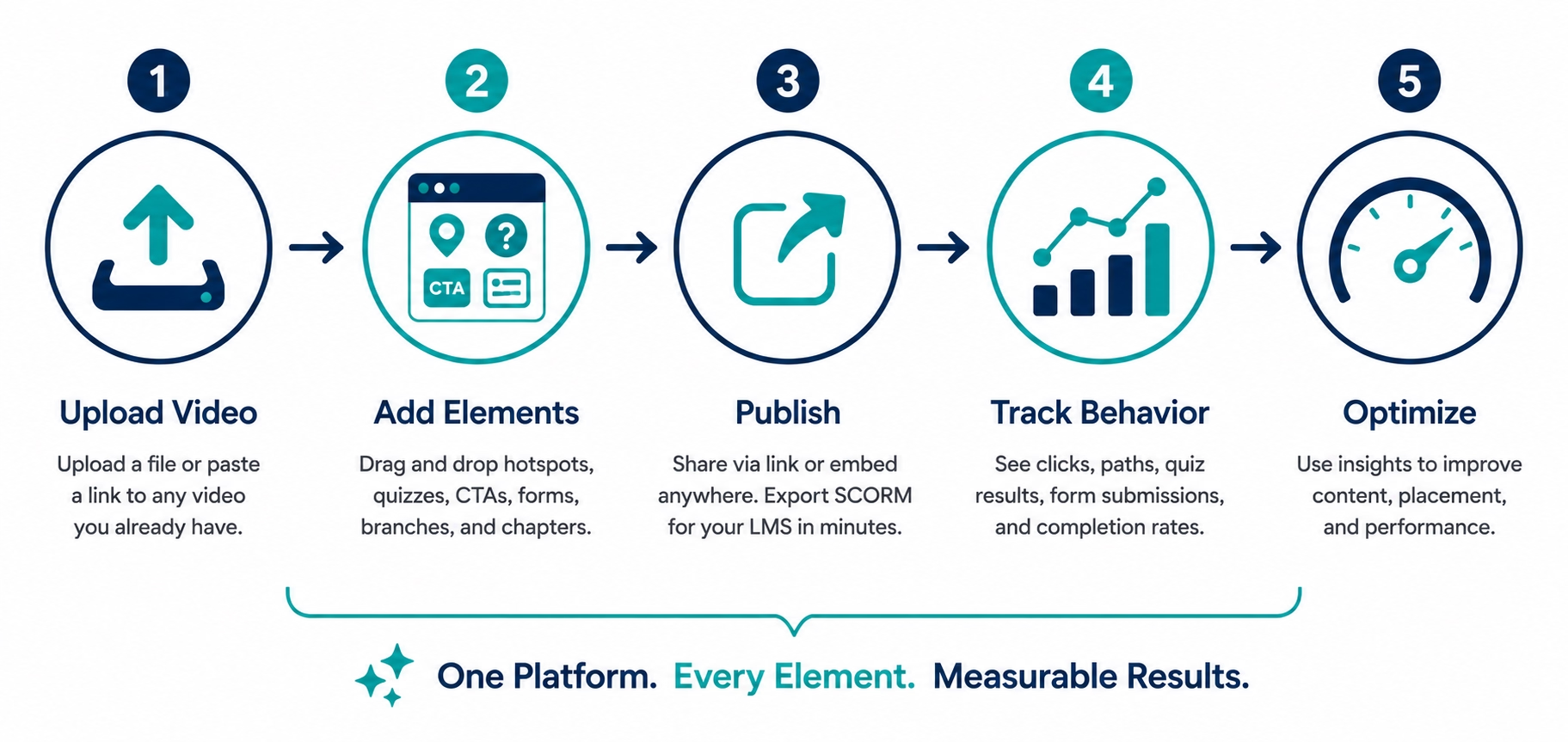
The workflow has three steps, and each one is designed for non-technical teams.
Step 1: Upload or connect. Bring any video you already have — a recorded Zoom call, a product demo, a training module, a webinar recording. Paste a link or upload the file directly. No re-filming required. No new production budget. The video you have today is the starting point.
Step 2: Add elements. Clixie's editor helps teams place quizzes, hotspots, CTAs, forms, and branching paths without code. Drag hotspots onto any frame. Set branching logic with a visual node editor. Build in-player forms without a separate form-builder tool. Non-technical team members can complete this step without any engineering support — no ticket, no sprint, no dependency.
Step 3: Publish and track. Share via a link or embed on any page that supports standard embedded media — your website, your LMS, your email, your landing page. For learning management systems, Clixie exports SCORM-compliant files in minutes, compatible with Moodle, Canvas, TalentLMS, and any major platform. Works with existing webinar recordings. Deployable by non-technical teams the same day.
The Clixie Impact: Timing your conversion prompt changes everything. Interactive CTAs inserted before the 60% watch mark inside Clixie-built videos generated 2.4× more conversions than the exact same CTA placed statically on the end-screen.
Already have a video? Upload it to Clixie for free and make it interactive today →
Best Practices for Interactive Elements That Convert
Effective interactive elements follow four principles: align every element to a specific objective, limit simultaneous choices to prevent cognitive overload, design for mobile and accessibility standards, and test every decision path before publishing.
1. Align interactions to objectives. Every element needs a defined reason to exist. Quizzes serve retention and verification. CTAs serve conversion. Chapter markers serve navigation. Hotspots serve depth. If you cannot name the specific objective an element serves, remove it — gratuitous interactivity is noise.
2. Limit simultaneous choices. Cognitive load theory is clear: present too many options at once and the viewer decides nothing. Two to three choices per branching decision point is the functional ceiling. Pause the video during complex interactions so the viewer has time to read the options and commit.
3. Design for accessibility. High contrast on button text against the video background. Touch targets large enough for mobile interaction. Keyboard navigation support for screen-reader users. Captions covering both spoken audio and text contained in interactive overlays. For organizations deploying interactive video for compliance or onboarding, accessibility is a legal requirement, not a nice-to-have.
4. Test every path. Map the decision tree before you publish, then walk every branch, click every hotspot, and submit every form as a viewer would. One broken link in a branching path creates a dead end the viewer cannot escape — and has no way to report to you.
The Most Common Interactive Video Mistake
Packing too many clickable elements onto a single video moment is the mistake that kills otherwise well-designed interactive content.
When multiple hotspots, a CTA button, and a chapter navigation menu all appear simultaneously, the viewer faces what psychologists call decision fatigue — too many competing inputs at the same moment. The cognitive result is not engagement. It is paralysis. Viewers close the tab, click away, or ignore every option and let the video keep playing, defeating the entire purpose of the interactive layer.
The fix is sequencing. Present one clear interactive prompt at a time. Let each element complete its purpose before introducing the next. Treat the interactive layer the way a skilled presenter treats a Q&A pause: deliberately, at high-comprehension moments, not constantly.
The Future of Interactive Video: What's Actually Coming
The next phase of interactive video is not about adding more element types — it is about making existing elements smarter through AI-generated branching, real-time adaptive assessment, CRM-driven personalization, and behavior-triggered CTAs.
Four specific developments are already in early deployment and will define how interactive video is built and measured over the next two to three years.
AI-generated branching paths. Instead of a content creator manually scripting every decision branch, AI analyzes the video content and generates plausible branching structures automatically. What currently takes hours of planning becomes a review-and-approve workflow — dramatically lowering the production cost of scenario-based training.
Real-time adaptive quizzes. Quiz questions adjust based on how the viewer has answered previous questions within the session. A learner who struggles with one concept receives additional reinforcement before advancing. A learner who demonstrates mastery is routed past review material directly to advanced content. Assessment becomes diagnostic, not just evaluative.
CRM-driven personalized video paths. The video player communicates with CRM data before the viewer presses play. A prospect's industry, deal stage, or prior content interactions determine which branch they enter first — creating a personalized sales experience at scale without any human involvement in the routing.
Dynamic CTAs based on observed behavior. Rather than a static button at a fixed timecode, CTAs become responsive. A viewer who spent significant time exploring a specific hotspot sees a CTA relevant to that feature. A viewer who passed all quiz questions above 90% receives an advanced-tier offer. The conversion prompt adapts to the viewer's demonstrated behavior in real time.
Where Does Interactive Video Work Best? Use Cases by Function
Interactive video elements deliver measurable results across five business functions — training, marketing, product demonstration, compliance, and internal communications — but the specific elements that drive results differ significantly by use case.
A compliance team and a marketing team can both deploy interactive video and both see strong outcomes. The mechanism is different in each case. Compliance needs documented comprehension. Marketing needs captured intent. Understanding which elements serve which goal prevents teams from building technically capable video that fails its actual objective.
Corporate Training and L&D
Training is the dominant use case for interactive video. The reason is structural: corporate training has both a performance problem (do learners retain the material?) and a documentation problem (can you prove they understood it?). Interactive elements solve both simultaneously.
Branching scenarios let learners practice high-stakes situations — a difficult performance conversation, a compliance decision under pressure, a customer objection — in a risk-free environment where the consequence of the wrong choice is a redirected video segment, not a lost deal or a regulatory violation. Research from the Learning and Performance Institute confirms that scenario-based retrieval practice produces significantly higher retention than equivalent passive content.
Hard-stop quizzes create a documented comprehension record tied to a specific timecode. Unlike playback completion logs, this record tells you what the learner actually knew at the moment of assessment — not just that a video file ran to its end frame.
Hotspots extend the depth of technical training without bloating the runtime. A learner watching a machinery operations video can click on any component to pull up a detailed schematic, an audio explanation, or a secondary walkthrough video. The main narrative stays tight. The depth is there for those who need it.
Marketing and Sales Enablement
Marketing teams use interactive video to shorten the distance between awareness and conversion. The key advantage: a viewer's clicks inside an interactive video are behavioral signals, not just watch-time metrics.
Shoppable video elements let customers click products appearing in a lifestyle or demo context and add them directly to a cart — removing the friction of a separate product search. Embedded calculators let prospects input their own numbers and see personalized ROI figures inside the video experience, creating a customized pitch without requiring a sales rep.
For sales enablement specifically, interactive video changes the dynamic of the follow-up call. A prospect who has already clicked through a branching demo, engaged with a feature hotspot, and submitted a form asking a specific question arrives at the call with established intent. The salesperson enters a qualified conversation instead of starting from zero.
CTAs placed before the 60% watch mark — not at the end — capture intent at the moment of maximum engagement. Benchmark data compiled by THM SEO Agency puts this placement at a 12.7% click-through rate compared to 6.8% for end-screen placement, nearly double the conversion rate.
Product Demonstrations
Linear product demos have a fundamental mismatch problem: the demo covers every feature for every prospect, but no single prospect needs every feature. The result is a video that wastes the time of every viewer trying to find the part relevant to them.
Chapter navigation solves the navigation layer — a prospect skips directly to the features they need. Hotspots solve the depth layer — hovering over a dashboard element surfaces a tooltip, a secondary screen recording, or a use-case explanation without breaking the main demo flow. Branching solves the segmentation layer — a question at the start ("Are you evaluating for your sales team or your onboarding team?") routes the viewer to a version of the demo built for their context.
The result isn't just a more efficient demo. It's a more accurate signal of intent. You know exactly which features a specific prospect spent time on, which branches they chose, and which hotspots they clicked. That data is more useful than a "watched 78% of the demo" notification.
Compliance and Certification
Regulated industries — financial services, healthcare, construction, pharmaceuticals — face a specific evidentiary requirement: they need to prove not just that an employee watched a training video, but that the employee encountered and responded to the material. Interactive video is one of the few formats that can satisfy this requirement without additional tooling.
Mandatory interaction gates prevent the most common compliance workaround: muting the video and multitasking until the progress bar hits 100%. A video that hard-stops at a quiz question and will not advance until the viewer responds cannot be completed on autopilot. The interaction itself is the proof of presence.
SCORM and xAPI export capability connects these interaction records directly to the organization's LMS. The certification record includes not just "completed on [date]" but the specific questions answered, the branches taken, and the timestamps of each response. That granularity is what compliance auditors actually need.
For a deeper look at how interactive video handles the full compliance training workflow, see Clixie's interactive compliance training solution.
Internal Communications
Leadership videos and all-hands recordings are among the most passively consumed content in any organization. An interactive layer can transform them from broadcast assets into measurable communication events.
Pulse survey forms embedded directly in a CEO update collect employee sentiment in real time, without redirecting to a separate survey tool. The response rate for in-video forms is meaningfully higher than for follow-up survey emails, because the viewer is already engaged with the content when the form appears.
Chapter navigation is essential for all-hands recordings. An engineer who missed the live session does not need to watch the full 45-minute recording to find the product roadmap update. Chapter markers let them jump to the relevant segment in under ten seconds. That single UX change improves both completion rates and information retention for long-form internal content.
Branching is increasingly used in onboarding video sequences. A new hire's onboarding path forks based on their department, their role seniority, or their prior tool experience — serving each person the content built for their specific situation rather than the lowest-common-denominator version built for the theoretical average employee.
What Are the Limitations of Interactive Video?
Interactive video has three practical constraints worth understanding before you build: production workflow changes, LMS compatibility requirements for SCORM export, and distribution channel restrictions that prevent full interactivity on social platforms.
None of these are blockers for most use cases. But teams that discover them mid-project — after the video has been filmed and the distribution plan has been set — lose time they didn't budget for. Understanding the constraints upfront makes them easy to plan around.
The Production Workflow Is Different, Not Harder
Interactive video does not require re-filming your existing content. Most organizations start by adding interactive elements to video they already have — a recorded training session, a product walkthrough, a recorded webinar. The interactivity layer sits above the video file; it doesn't alter the file itself.
What does change is the planning layer. A linear video needs a script. An interactive video needs a logic map. Before branching elements can be placed, someone has to define the decision points, the paths that follow from each choice, and the conditions under which each path ends or converges. For simple videos with one or two decision points, this adds an hour of planning. For complex multi-branch compliance scenarios, it can add a full day.
The practical implication: interactive video planning should happen before filming, not after. Trying to retrofit a complex branching structure onto footage that wasn't shot with branches in mind often forces a choice between compromising the logic or re-filming specific segments. Plan the interaction map first, then shoot to support it.
AI-powered platforms like Clixie AI reduce this overhead significantly. Auto-generated chapter markers, AI-suggested quiz questions pulled from the video transcript, and drag-and-drop element placement mean that adding a basic interactive layer to an existing video can take under an hour, not a week.
SCORM Export Requires a Compatible LMS
If your goal is to deliver interactive video inside a corporate LMS and capture xAPI or SCORM completion data, your LMS needs to support the relevant standard. SCORM 1.2 has near-universal LMS support. SCORM 2004 and xAPI have broader data capabilities but require explicit confirmation with your LMS vendor before you build.
This is not a limitation of interactive video — it's a standard compatibility check that applies to any eLearning content you export from any authoring tool. The difference with interactive video is that the interaction data captured (quiz scores, branching paths taken, element clicks) is more valuable than traditional SCORM data, which makes the compatibility question more consequential.
Check three things with your LMS vendor before finalizing your interactive video architecture: which SCORM version is supported, whether xAPI statements can be received and stored, and whether the LMS can display element-level interaction data in learner reports. Most modern LMSes support all three. Legacy systems may require a SCORM 1.2 export only.
Social Platforms Strip Interactive Layers
Facebook, Instagram, TikTok, LinkedIn, and YouTube do not support third-party interactive overlays. A video published natively to any of these platforms plays as a linear video — the interactive elements do not render.
This is not a distribution failure. It's a format mismatch. Social platforms are built for passive consumption at scale. Interactive video is built for documented engagement in controlled environments. They serve different objectives and belong on different distribution channels.
The correct distribution path for interactive video is a shareable link or an embed code placed on a webpage, inside an LMS, or in an email. These environments support the embedded player that carries the interactive layer. The video can be shared from social media as a link to the interactive experience — "watch and interact here" — rather than as a native upload that strips the functionality.
For organizations that need both social reach and interactive engagement, the practical approach is parallel distribution: a short teaser clip posted natively to social platforms, linked to the full interactive version hosted on your site or LMS. The social post drives traffic; the interactive version does the work.
Clixie exports SCORM 1.2 and SCORM 2004 packages directly from any interactive video — see how SCORM export works from interactive video.
FAQ
What are interactive video elements?
Interactive video elements are the user-interface components — hotspots, branching scenarios, quizzes, CTAs, forms, and chapter markers — that enable viewers to navigate and interact with video content rather than passively consuming it. They are synchronized to specific timecodes and trigger defined actions when engaged.
What is the difference between traditional and interactive video?
Traditional video is a single linear track that viewers can only play, pause, or scrub. Interactive video overlays a behavior-logic layer synchronized to timecode that responds to viewer input, enabling branching paths, in-player information retrieval, and data capture inside the video environment.
How do interactive video elements improve knowledge retention?
Interactive elements force active participation — viewers must answer questions or make decisions, which triggers retrieval practice. Engageli's 2025 research shows active learning produces 54% higher test scores, 16× greater nonverbal engagement, and 13× more learner talk time compared to traditional lecture methods.
What is branching in interactive video?
Branching is the logic structure that routes a viewer to a different video path based on their selection at a decision point. It creates a personalized, non-linear experience within a single video asset, enabling simulation-based training, role-specific onboarding, and personalized product exploration.
Can interactive videos work inside a learning management system (LMS)?
Yes. Interactive videos built on platforms like Clixie AI export as SCORM-compliant files that integrate with any major LMS — including Moodle, Canvas, and TalentLMS — while preserving full element functionality and granular tracking data.
Do interactive videos require developers or custom code?
No. Modern HTML5 interactive video platforms use drag-and-drop interfaces that allow non-technical teams to add hotspots, branching, quizzes, CTAs, and forms without engineering support. Clixie AI is designed specifically for this — any team member can build and publish a fully interactive video without writing a line of code or opening an engineering ticket.
How do you measure the effectiveness of interactive video elements?
Effectiveness is tracked through element-level analytics: CTA click-through rates, hotspot engagement frequency, quiz pass/fail rates at each question, branch-path distribution across viewer segments, form completion rates, and overall video completion. These metrics reveal content effectiveness and individual viewer intent — data that linear video platforms structurally cannot produce.
Conclusion
Interactive video elements are not a production upgrade. They are a communication architecture shift — from monologue to measured dialogue, from content delivery to behavior capture.
The six element types covered in this guide each serve a precise function: hotspots for depth without interruption, branching for simulation and personalization, quizzes for verification and certification, CTAs for conversion, forms for frictionless data capture, chapters for viewer-controlled navigation. Used deliberately and placed at the right timecodes, they transform any existing video into a tool that proves comprehension, captures intent, and produces measurable outcomes.
The implementation barrier is lower than most teams assume. No new footage. No engineering team. No production sprint. Any video you already have can become interactive today.
The organizations winning with video in 2026 are not producing more content. They are capturing more decisions inside the content they already have.
Bring one existing video. We'll show you where to add hotspots, quizzes, CTAs, and forms to improve engagement and conversion. Book a Clixie demo →
.png)
.png)




.avif)
