


What Is a Video Overlay? Types, Purpose, and How to Use Them
A video overlay is any element layered on top of a video: text, logos, CTAs, hotspots, or quizzes. Here are the types, what each is for, and how interactive overlays differ.
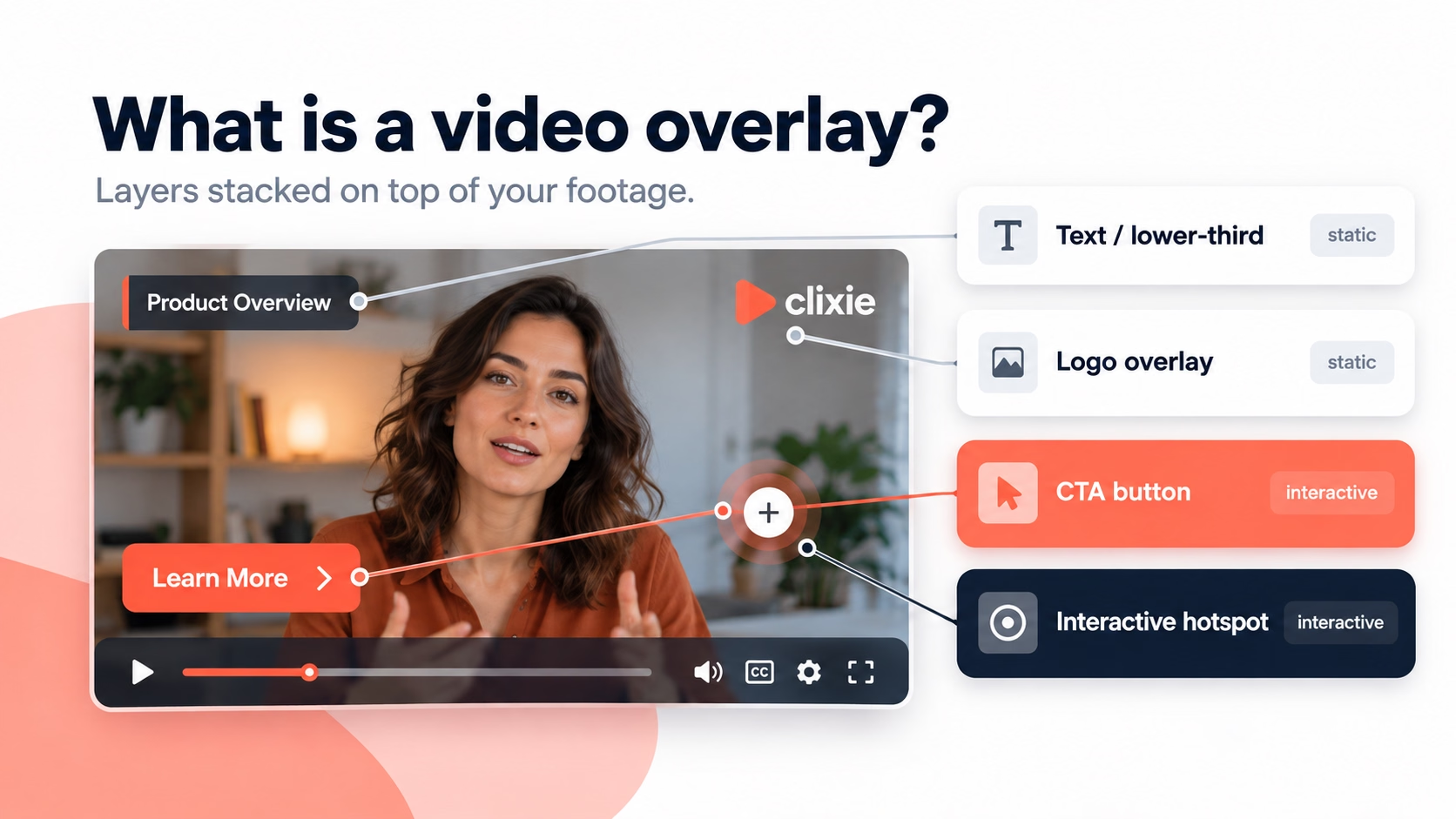


A video overlay is any visual element layered on top of a video: text, an image or logo, a lower-third, a clickable button, a hotspot, a quiz, or even a second video. It adds information or interactivity on top of the original footage without replacing it.
That covers everything from a news channel's name banner to a clickable "Add to cart" button inside a product video. This guide breaks down the types of video overlay, what each one is for, and where a static overlay ends and an interactive one begins.
Key Takeaways
- A video overlay is any element placed on top of a video: text, logo, lower-third, CTA, hotspot, or quiz.
- Overlays do four jobs: add context, drive action, reinforce brand, and extend a video's useful life.
- Static overlays show information. Interactive overlays (hotspots, buttons, quizzes) ask the viewer to do something, which is where engagement and measurement come from.
- You don't need editing skills to add interactive overlays. No-code platforms add them to video you already have.
What Is a Video Overlay?
A video overlay is a visual element placed on top of an existing video to add information, style, or interaction. Overlays include text, images, graphics, animations, clickable buttons, quizzes, or picture-in-picture video.
Think of it as a transparent sheet on top of your footage. The original video stays intact underneath, while the overlay adds a layer of meaning or function on top. Video overlays appear across marketing, broadcasting, and social media, from news lower-thirds to YouTube end screens and live streams (Restream, retrieved 2026-09-28).
The distinction that matters: overlays aren't only decorative. A static overlay tells the viewer something. An interactive overlay, like a clickable hotspot or an in-video quiz, asks the viewer to do something. That shift from watching to acting is where measurable engagement lives.
The Types of Video Overlay
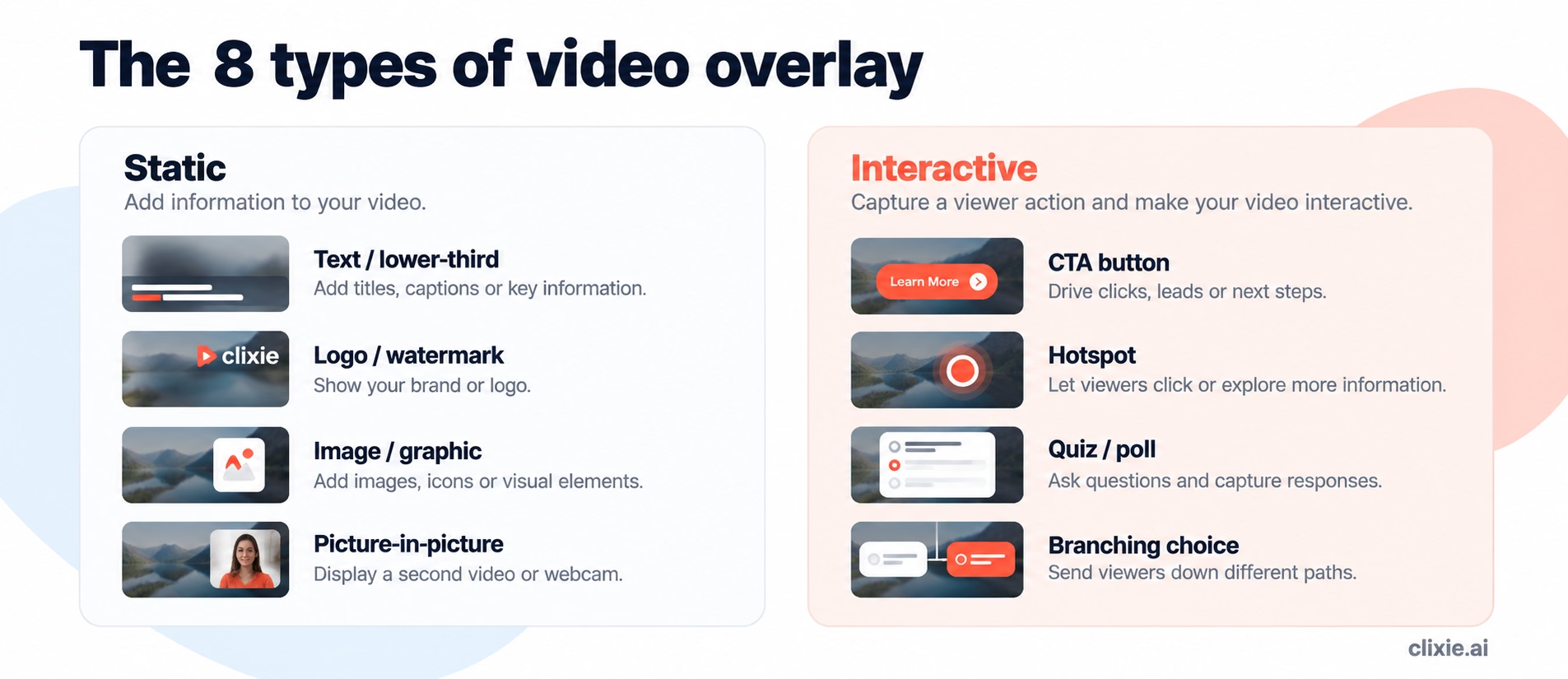
Video overlays fall into a handful of types, from simple text to fully interactive elements. The table below groups them by what they do.
The first four add information. The last four add interaction, and that is the line between a video people watch and a video people use.
What Is the Purpose of a Video Overlay?
The purpose of a video overlay is to make a video more useful: adding context, driving action, reinforcing brand, and extending the life of your footage. Overlays turn a one-way clip into something richer and more actionable. There are four core purposes.
1. Adding context and information
The most basic job of an overlay is to show information that isn't in the footage: lower-thirds, captions, data callouts, and explanatory text. Overlays let you highlight a key message or show product details without re-shooting.
2. Driving engagement
Interactive overlays like polls, quizzes, and clickable CTAs invite the viewer to participate instead of just watching. Firework, an interactive-video vendor, reports that interactive video content drives 66% more engagement and 44% longer viewing time than passive video (Firework, retrieved 2026-09-28; vendor data). Treat vendor figures as directional, but the direction is consistent: asking viewers to act holds attention longer than asking them to watch.
3. Guiding viewer behavior
Overlays are one of the most direct ways to shape what a viewer does next. A CTA button can send viewers to a product page, a signup form, or a related video. A hotspot can open a contact form or tag a product that links to checkout.
4. Reinforcing brand identity
Logo overlays, consistent color, and repeated typography build recognition over time. Even a few seconds of view time reinforces who made the video.
There's a fifth benefit worth naming: overlays future-proof content. You can update a CTA, price, or link on an existing video without re-shooting or re-editing the footage underneath.
Static vs. Interactive Video Overlays
A static overlay displays information. An interactive overlay captures a viewer action, which means it also produces data. That difference decides whether your video can be measured.
A standard text overlay tells the viewer something. An interactive overlay asks the viewer to do something, and records what they did. For training and marketing teams, that recorded action, the click, the quiz answer, the branch chosen, is the whole point.
Where Interactive Overlays Beat Static Ones
Interactive overlays outperform static ones when the goal is action or measurement, not just presentation. If you need to know whether a viewer understood, chose, or converted, a static overlay can't tell you. An interactive one can.
This matters most in training, sales, and customer education, where "did they watch it" is a far weaker signal than "did they answer correctly" or "which path did they take." An interactive overlay turns a passive asset into one that reports back.
How to Add Interactive Video Overlays with Clixie
Clixie is a no-code platform that adds interactive overlays, hotspots, quizzes, forms, buttons, and branching paths, to video you already have. You upload a video, add interactions on the timeline (or let Copilot suggest them), and publish. No editing skills required.
Clixie reports that organizations using its interactive video see meaningful gains in learning outcomes, including a 50% boost in learner retention across its platform analytics. Named customers include Google, which uses Clixie to train Android sales partners and reported a 3,500% increase in engagement; Cisco, for internal corporate training; the University of Michigan, where students learning with interactive video performed 12.4% better than those who didn't; and Grupo Dass, for interactive sales training. Combined Clixie and Cisco Webex deployments have reported an 80% improvement in knowledge retention versus passive video. (Figures reported by Clixie AI and its customers.)
For a full breakdown of every interactive element, see our guide to interactive video elements, for the editing steps see how to add an overlay to a video, and to layer text specifically, how to add a text overlay. Clixie's own interactive overlays cover hotspots, buttons, and quizzes.
When Clixie isn't the right choice: if all you need is a decorative logo watermark or a lower-third on a marketing clip, a standard video editor is simpler. Clixie is built for interactive, measurable overlays, not static graphics.
Video Overlay Best Practices
Good overlays add clarity, not clutter. A few rules keep them effective:
- One job per overlay. Don't stack a CTA, a quiz, and three callouts on the same frame.
- Time it to the moment. Put the CTA where the viewer is ready to act, not at second zero.
- Keep it legible. High contrast, safe margins, readable at mobile size.
- Make interactions obvious. If a hotspot is clickable, it should look clickable.
- Measure and adjust. With interactive overlays you get click and answer data. Use it to move or cut what isn't working.
Frequently Asked Questions
What is a video overlay?
A video overlay is any visual element layered on top of a video, such as text, a logo, a CTA button, a hotspot, or a quiz. It adds information or interactivity without changing the original footage.
What does it mean to overlay a video?
To overlay a video is to place one element (text, an image, or another video) on top of the base footage on a higher layer, so both are visible at once.
What's the difference between a static and an interactive overlay?
A static overlay (text, logo) only displays information. An interactive overlay (hotspot, button, quiz) captures a viewer action, so it also produces data you can measure.
Do I need video editing skills to add overlays?
No. No-code platforms let you add interactive overlays to an existing video by placing elements on a timeline, with no editing experience required.
The Bottom Line
The fastest way to see the difference is to try it. Add an interactive overlay to one of your videos and watch what viewers actually click.
About the author: Jancarlo Nesto is Co-Founder and Director of Operations at Clixie AI. His work centers on digital media and AI, and on turning new technology into products teams can actually use. Connect on LinkedIn.
.png)
.png)




