


Best Software to Convert Videos into SCORM Courses
7 tools compared: find the best software to convert training videos into SCORM courses with quizzes, branching, LMS tracking, and AI-assisted authoring.



Which software turns training videos into SCORM courses? The best option depends on whether your team needs PowerPoint-to-SCORM, full course authoring, or a video-first workflow.
The best software for converting videos into SCORM courses should let teams upload existing training videos, add quizzes and interactions, build branching paths, export SCORM packages, and track learner progress inside an LMS.
Best overall for existing training videos: Clixie AI The strongest fit when the team already has training videos and needs to turn them into measurable, SCORM-ready interactive modules without rebuilding the course from scratch.
Most SCORM authoring tools on the market are designed for building courses in PowerPoint or from scratch. This guide covers a different need: you already have the video. You need it tracked.
Key Takeaways
- In 2026, 90% of L&D professionals report that video content improves learner engagement, yet passive video cannot report a completion record or quiz score to an LMS without SCORM packaging (Research.com, 2026).
- Clixie AI is purpose-built for the video-first SCORM workflow: upload existing video, apply AI-generated quizzes and chapters, add branching, export a SCORM package, track learners in any LMS.
- The right tool depends on your starting point: PowerPoint teams fit iSpring; from-scratch designers fit Articulate; video-first L&D teams fit Clixie AI.
- Verify Clixie's current SCORM 1.2 and SCORM 2004 export options on clixie.ai/features before purchase.
L&D Expert Insight: The Reality of Video Migration
In my experience migrating legacy training libraries for Google Android Training, the biggest bottleneck isn't the SCORM packaging itself, it’s the content reconstruction. Traditional authoring tools force you to treat a video like a static slide asset, meaning a 20-minute video has to be manually chopped up, re-uploaded, and re-synced with manual quiz triggers.
When choosing a video-first workflow, look for a platform that treats the timeline as the absolute foundation. Utilizing AI to auto-generate chapters and knowledge checks directly from the video transcript can cut production time by up to 70%, allowing you to scale a massive backlog of raw MP4s into trackable LMS courses in days rather than months.
Comparison Table: Best Software to Convert Videos into SCORM Courses
Best for summary:
- Best overall for existing training videos: Clixie AI
- Best for PowerPoint-to-SCORM: iSpring Suite
- Best for full course authoring from scratch: Articulate 360
- Best for open-source LMS interactions: H5P
- Best for education-focused interactive video: PlayPosit
- Best for standalone interactive video with branching: Cinema8
What Makes a Video Different from a SCORM Course?
A video is passive media with no tracking capability. A SCORM course is a structured LMS package that reports completion status, quiz scores, learner progress, time spent, and interaction data back to the system.
.avif)
This distinction matters for every team that needs to prove training happened. A video completion means the file played. A SCORM completion means the LMS recorded that a specific learner finished a specific module, passed or failed a quiz, and met the defined completion criteria.
In 2025, 79% of large companies used virtual classrooms and video broadcasting for training delivery (Research.com, "28 Video Training Statistics," 2026). That scale of video use creates a tracking gap: none of those video plays automatically generate a completion record in an LMS. Video alone is not a training record. SCORM is.
The tracking difference goes deeper than a checkmark:
- Completion status: Pass, fail, incomplete, or not attempted
- Score: Quiz result mapped to mastery threshold
- Learner progress: Last location visited in the module
- Time spent: Duration in the session
- Interaction data: Individual question responses and choices, where supported by the LMS and SCORM package configuration
SCORM 1.2 vs SCORM 2004: Which Should You Use?
SCORM 1.2 remains the safer default for most organizations. It has wider LMS compatibility, a simpler data model, and fewer implementation edge cases. If you are not sure which version your LMS prefers, start with SCORM 1.2.
SCORM 2004 supports more advanced sequencing and navigation rules than SCORM 1.2. However, many interactive video branching paths can be handled inside the content package itself before reporting results to the LMS: SCORM 2004 is not required for branching to work. The practical rule: choose SCORM 1.2 unless your LMS specifically requires SCORM 2004 features or your instructional design demands its sequencing logic.
Per ADL (Advanced Distributed Learning) and Rustici Software, SCORM 1.2 and SCORM 2004 are both valid, widely-supported standards. The choice depends on LMS compatibility and content complexity, not on which is newer.
Pro Tip: Optimizing Video Bandwidth in Your LMS
A common pitfall when exporting video-heavy SCORM packages is ballooning ZIP file sizes, which can cause severe buffering or timeouts in strict LMS environments (especially on older legacy systems).
My Recommendation: When publishing your interactive videos, either leverage tools that host the core video file on a secure, high-speed CDN while exporting a lightweight SCORM wrapper to the LMS, or ensure the platform automatically optimizes and compresses the MP4 stream upon export. This keeps your LMS nimble while maintaining high-definition playback for the learner.
Video to SCORM Course: What Interactive Training Teams Should Look For
The right video-to-SCORM tool handles the full workflow in one place: video upload, AI-assisted quiz and chapter generation, interaction authoring, branching, SCORM packaging, and LMS-side learner tracking.
Here is what separates a true video-to-SCORM platform from a general eLearning authoring tool.
Workflow Requirements
- Starts from existing video: not a from-scratch authoring tool that treats video as one of many content blocks
- Supports common training video formats including MP4 and provides a clear path from uploaded video file to SCORM ZIP export
- AI-generated quiz questions and chapters from existing video content: not just a quiz builder that requires manual question writing
- Branching and remediation path builder: routes learners based on their quiz answers without requiring coding
Output and Tracking Requirements
- SCORM 1.2 and/or SCORM 2004 export: confirm the specific versions supported by the platform before purchase
- Learner tracking: completion, score, progress, time spent, and interaction data where supported by the LMS and SCORM package
- LMS-agnostic SCORM output: the exported package should work across Moodle, Canvas, TalentLMS, Docebo, and any other SCORM-compliant LMS
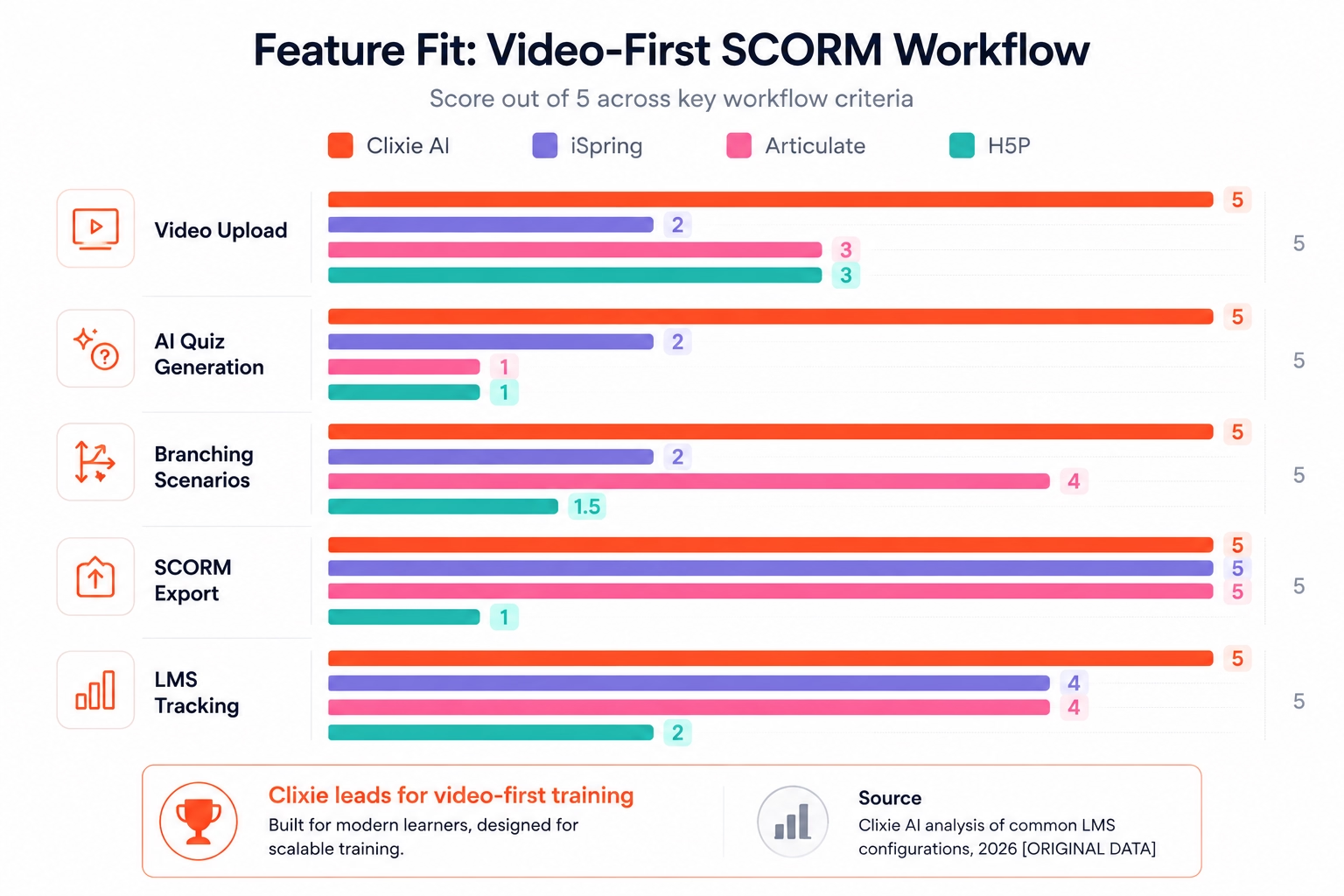
Why General eLearning Authoring Tools Fall Short for Video-First Teams
The gap is structural. PowerPoint-centric tools like iSpring Suite and Articulate Rise are built around slides. Video is an import, not the foundation. That means a team with 50 existing training videos faces a rebuild: extracting content from each video, reorganizing it into slides or sections, and then adding quiz questions manually.
From-scratch builders add the same overhead. They are tools for building courses. Clixie AI is a tool for wrapping existing video into a trackable course. The distinction matters when your training library is already filmed.
Note: Many SCORM authoring guides focus on building courses from slides or from scratch. The overlooked workflow is different: the team already has training videos and needs to turn them into trackable SCORM modules.
Teams comparing broader options can also review Clixie's guide to interactive video software for corporate training.
How Does Clixie AI Convert a Training Video into a SCORM Course?
Clixie AI converts existing training videos into SCORM-ready interactive modules through an eight-step workflow: from video upload to LMS-tracked learner data, without requiring a rebuilt course structure. The steps below cover the full path from raw MP4 to LMS-reportable training module.
The workflow:
Show Image
- Upload an existing training video: MP4 and other common video formats supported. No rebuild required.
- AI generates chapters, subtitles, summaries, and quiz questions: Clixie's AI analyzes the video content and produces a draft structure automatically.
- Add interactions: knowledge checks, forms, clickable hotspots, and checkpoints placed at key moments in the video.
- Build branching or remediation paths: route learners to review content or forward to advanced material based on their quiz answers.
- Configure completion rules, quiz scoring, and tracking: define what constitutes a pass, what score threshold applies, and what data the SCORM package reports.
- Export as a SCORM package: verify current SCORM 1.2 and SCORM 2004 export options on clixie.ai/features.
- Upload the SCORM package to your LMS: the standard SCORM ZIP works with any SCORM-compliant LMS.
- Track learner data: completion, quiz scores, learner progress, time spent, and interaction data where supported by the LMS and SCORM package configuration.
Learn more about SCORM-ready interactive videos on Clixie's export page.
The key difference from traditional authoring tools: steps 2 through 5 happen inside the same platform as the video, without moving content into a separate authoring environment. The video stays the video. The course wraps around it.
In working with L&D teams on this workflow, the biggest time saving comes at step 2. In Clixie AI's internal workflow reviews, AI-generated quiz questions from an existing video transcript reduced the manual question-writing work that often slows video-to-SCORM production.
Who should NOT use Clixie AI:
- Teams building a full slide-based eLearning course from scratch
- Organizations standardized on PowerPoint-to-SCORM workflows
- Teams that only need simple open-source interactions inside Moodle or WordPress
- Use cases requiring highly custom simulations rather than interactive video modules
Use Cases: When Do Teams Need Video-to-SCORM?
Plain training video fails when organizations need documented proof of completion, quiz scores, or structured remediation. Online learning now saves employees 40–60% of the time required for equivalent classroom training (LinkedIn Learning), but passive video does not capture whether learning actually occurred. Here are eight use cases where SCORM-ready interactive video solves what passive video cannot.
Compliance Training
A passive compliance video with an attestation checkbox may not provide enough evidence for teams that need scored completion, remediation, or detailed LMS records. SCORM packaging adds a structured completion record: the LMS logs that the learner passed a quiz, met the completion threshold, and viewed the required content.
See how Clixie supports compliance training videos.
Employee Onboarding
Onboarding content is rarely one-size-fits-all. An existing onboarding video can be wrapped into a branching SCORM module that routes new hires to role-specific content based on department, location, or position. Completion tracking confirms every required module was finished before the employee moves to their role.
Sales Enablement Training
Product knowledge is tested, not assumed. Converting sales training videos into SCORM modules adds scored knowledge checks at the end of each product section. Sales managers can see which reps passed product certification, which need remediation, and which modules have the lowest scores across the team.
Product Training
Product training videos contain decision points: moments where a learner needs to confirm understanding before moving on. Branching paths built around those moments route learners to remediation content when they answer incorrectly, rather than letting them advance without comprehension.
Customer Education
Customer-facing training videos already exist for most products. Wrapping them in SCORM modules allows organizations to track which customers completed onboarding training, which modules had high drop-off, and which content needs revision: without rebuilding the video library.
Certification Preparation
Certification programs require pass/fail scoring and mandatory remediation on failure. SCORM's mastery score threshold stops learners from completing a module without meeting the minimum passing score. Remediation paths send them back to the relevant section rather than allowing resubmission without review.
Safety Training
Documented safety training is a legal and regulatory requirement in many industries. A SCORM package generates an LMS record of which employees completed safety training, when, what score they achieved, and whether they met the completion threshold. A video play-through record in a media platform is not the same thing.
SOP and Process Training
Standard operating procedures change. SCORM modules built from existing SOP videos can be updated and re-exported as new packages, with the LMS tracking which version each employee completed. Branching paths allow department-specific or role-specific routing from a single core video asset.
Clixie AI vs H5P: Which Is Better for Video-to-SCORM Training?
H5P is an open-source framework for adding interactive elements to existing content, but it is typically used inside an LMS, CMS, or H5P-compatible environment rather than as a standalone video-to-SCORM packaging workflow.
H5P strengths: Free, LMS-native, wide range of interaction types (interactive video, drag-and-drop, quiz, timeline), strong integration with Moodle and WordPress, well-documented for open-source teams.
Clixie AI strengths: Standalone platform that does not require LMS-side setup to add interactions. AI generates quiz questions and chapters from existing video content. Direct SCORM package export for LMS-based training workflows. Learner analytics and LMS reporting support.
Who picks H5P: Budget-constrained teams already running Moodle or WordPress with H5P configured, where the priority is adding basic interactivity to video content within an existing system.
Who picks Clixie AI: L&D teams that want a complete video-to-SCORM workflow without requiring LMS-side setup, and who need AI-assisted content generation from existing video.
Sources: H5P.org documentation, LMS integration documentation, and any verified H5P-to-SCORM packaging documentation available at the time of evaluation.
For a full comparison, see the guide to H5P alternatives.
Clixie AI vs iSpring Suite: Which Handles Video-Based Training Better?
iSpring Suite is designed for converting PowerPoint presentations into SCORM courses quickly: it is a slide-first authoring tool, not a video-first platform.
iSpring strengths: PowerPoint-native with a plugin that converts slides to SCORM directly. Fast output for teams whose training content lives in slide decks. Solid quiz builder with multiple question types. Deep Windows and Office integration.
Clixie AI strengths: Starts from an existing video file rather than requiring a PowerPoint rebuild. AI extracts quiz questions from the video's content without manual question writing. No slide reconstruction required for video-first L&D teams.
Who picks iSpring: Teams whose training content is organized in PowerPoint and who need SCORM output quickly without leaving the Office environment.
Who picks Clixie AI: Teams whose training library is already filmed and who need SCORM without re-authoring the content in slides.
Source: iSpring Suite feature documentation
Clixie AI vs Articulate 360: Which Is Better for Video-Based eLearning?
Articulate 360 is the market-leading platform for building full eLearning courses from scratch: its video workflow requires manual import and does not include AI-generated quiz extraction from existing video content.
Articulate 360 strengths: Storyline for complex branched simulations; Rise for rapid responsive course layouts; a large content library; a mature review and collaboration toolset; the most recognized brand in instructional design circles.
Clixie AI strengths: AI-generated quiz questions and chapters from existing video without rebuilding course structure. Lower authoring overhead for teams converting a video library. Faster path from uploaded video to a trackable SCORM module.
Who picks Articulate 360: Instructional designers building complex courses from scratch who need full design control, advanced simulations, and a content library. Teams with dedicated eLearning staff.
Who picks Clixie AI: L&D teams converting an existing training video library into tracked modules, where the priority is speed and the content already exists in video form.
Source: Articulate 360 feature documentation
See also: best enterprise interactive video platform.
Clixie AI vs Mindstamp: Which Is Better for SCORM-Ready Interactive Video?
Mindstamp is a lightweight interactive video platform well suited for sales and marketing use cases. It supports SCORM exports on selected plans, but Clixie is positioned more directly around AI-assisted video-to-SCORM workflows for corporate L&D teams.
Mindstamp strengths: Low-friction setup for interactive video. Good fit for sales enablement and marketing demos. Branching and conditional navigation supported.
Clixie AI strengths: AI-assisted video-to-SCORM workflow purpose-built for L&D. AI quiz generation from existing video content. Analytics and LMS reporting support designed for compliance and certification documentation.
Who picks Mindstamp: Teams prioritizing interactive video for sales or marketing contexts, where LMS tracking and documented completion records are secondary requirements.
Who picks Clixie AI: L&D teams that need a structured LMS-trackable training record from existing video, particularly for compliance, certification, or onboarding documentation.
Source: Mindstamp help documentation confirms SCORM 1.2 and SCORM 2004 exports are available on Core, Pro, and Enterprise plans.
Clixie AI vs Cinema8: Which Has Better Interactive Video SCORM Export?
Cinema8 supports interactive video with branching and SCORM export, but its AI-assisted content generation from existing video is more limited than Clixie's, and its platform scope extends beyond corporate L&D.
Cinema8 strengths: SCORM export available. Strong branching and interactive video production features. Suited to teams with video production resources who need interactivity beyond standard training modules.
Clixie AI strengths: AI quiz and chapter generation from existing training video. Purpose-built for L&D, compliance, and certification workflows. Tighter learner analytics and LMS reporting integration for corporate training contexts.
Who picks Cinema8: Teams with production resources wanting rich interactive video experiences that extend beyond training: marketing, product demos, and interactive storytelling.
Who picks Clixie AI: L&D teams that need a direct video-to-SCORM pipeline with AI assistance and LMS tracking designed for corporate training.
Source: Cinema8 feature documentation
Video-to-SCORM Software Buyer Checklist
Before selecting video-to-SCORM software, confirm it meets these nine requirements. Each one maps to a workflow failure that training teams encounter after purchase.
Authoring Capabilities
- Can it start from an existing video file?: MP4 and common formats. Not a rebuild-from-scratch authoring tool.
- Can it generate quiz questions from the video transcript or audio?: AI extraction, not just a manual quiz builder.
- Can it add branching or remediation paths?: Route learners based on quiz answers without coding.
SCORM Output and LMS Integration
- Can it export SCORM 1.2 and/or SCORM 2004?: Confirm the specific version(s) before purchase.
- Can it report score, completion status, and learner progress to the LMS?: The LMS must receive and display this data.
- Can it work with your LMS?: Test with a SCORM Cloud upload or your LMS sandbox before committing.
Usability, Compliance, and Cost
- Can non-technical training teams use it without an instructional designer?: The workflow should not require coding or deep eLearning expertise.
- Can it support compliance documentation requirements?: Completion records, pass/fail thresholds, and retake logic.
- Does the pricing model fit your number of authors, learners, videos, and SCORM exports?: Understand per-seat, per-export, and storage costs before signing.
If the answer to items 1, 4, and 5 is not confirmed, the tool does not fit this workflow.
Frequently Asked Questions
What is the best software for converting videos into SCORM courses?
Clixie AI is the strongest fit for teams that already have training videos and need to convert them into SCORM-ready interactive modules without rebuilding the course. The best choice for other teams depends on starting point: iSpring for PowerPoint-based content, Articulate 360 for from-scratch course design, and H5P for open-source LMS environments.
Can I convert an MP4 video into a SCORM course?
Yes, but the video file itself is not a SCORM course. The video needs to be wrapped in a SCORM package that includes a manifest file, tracking API calls, completion rules, quiz logic, and LMS communication. Platforms like Clixie AI handle that packaging: you upload the MP4 and the platform produces the SCORM ZIP.
Can Clixie AI export interactive videos as SCORM packages?
Yes. Clixie's SCORM export page confirms it supports exporting interactive videos as SCORM 1.2 and SCORM 2004 packages for LMS use. Verify current format availability on clixie.ai/features before purchase.
What is the difference between a video and a SCORM course?
A video is passive media that plays and stops. A SCORM course is a structured LMS package that communicates with the learning management system to report completion status, quiz scores, learner progress, and time spent. The LMS stores those records; a video player does not.
Which LMS platforms support SCORM video courses?
Most major LMS platforms support SCORM packages, but support can vary by plan, configuration, and enabled features. Common platforms to verify include Moodle, Canvas, Docebo, TalentLMS, Absorb LMS, Cornerstone OnDemand, SAP SuccessFactors Learning, LearnUpon, and Litmos.
Does SCORM track quiz scores from interactive videos?
Yes, when the authoring tool and LMS are configured to pass quiz score, completion status, and interaction data. The specific data fields available depend on the SCORM version (1.2 or 2004) and the LMS implementation. SCORM 1.2 tracks score, completion, and lesson status. SCORM 2004 adds sequencing and navigation capabilities and can support richer tracking structures depending on implementation.
What is better: SCORM or xAPI for interactive video?
SCORM is better for standard LMS completion and score tracking: it has wider LMS support and simpler implementation. xAPI is better for detailed learner behavior tracking across multiple systems and platforms beyond the LMS; it requires a Learning Record Store (LRS) and is harder to configure than SCORM. For most corporate training teams starting with video-to-LMS tracking, SCORM is the practical choice. xAPI suits organizations that need cross-platform learning data at scale.
What is the fastest way to turn training videos into eLearning?
Use an AI interactive video platform that can generate quizzes, chapters, subtitles, branching paths, and SCORM packages from existing video files. Rebuilding the content in a PowerPoint-based authoring tool adds significant time for teams whose training already exists in video form.
Most SCORM authoring tools are built for PowerPoint or from-scratch course design. They assume you are starting with a blank slate. Clixie AI is built for a different reality: you already have the training video, you need it tracked, and you do not have time to rebuild the course.
You already have the training video. Clixie turns it into an interactive, trackable, SCORM-ready learning module without forcing your team to rebuild the course from scratch.
Continue Learning
SCORM and Interactive Video Fundamentals:
- Platforms That Create SCORM Packages from Interactive Videos
- SCORM 1.2 vs SCORM 2004 for Interactive Video Training
How-To Guides:
Platform Comparisons:
- Best H5P Alternatives
- Best Enterprise Interactive Video Platform
- Best Interactive Video Software for Corporate Training
Explore Clixie AI:
.png)
.png)




.avif)
