How Model Context Protocol (MCP) Is Turning Editing Software Into AI Operating Systems for Content Production
Model Context Protocol is turning editing software into AI operating systems. Learn how MCP, semantic editing, and AI-native workflows change creative production.


TL;DR
- Model Context Protocol (MCP) is the infrastructure layer that lets AI systems maintain shared context across tools, files, timelines, and workflows.
- Traditional editing software was built for manual operation; AI-native editing software is built for orchestration, automation, and conversation.
- The shift from AI-enhanced to AI-native marks the transition from features to architecture, and MCP is what makes that architecture possible.
- Semantic editing lets creators search, edit, and repurpose content by meaning rather than scrubbing timelines frame by frame.
- The companies that win the next era of creative software will not build better editing tools, they will build better AI operating systems for content production.
Key Takeaways
- Model Context Protocol is an open standard introduced by Anthropic in November 2024 that gives AI systems a universal interface for connecting to tools, files, and workflows while maintaining persistent context.
- AI-native editing software is a workflow architecture where AI handles orchestration, memory, and automation, not an isolated feature layer bolted onto a legacy tool.
- Semantic video editing is an interaction model that lets editors find and manipulate footage using meaning and natural language, rather than manual timeline scrubbing.
- MCP is the orchestration layer that connects AI agents to creative production systems, the structural difference between isolated AI features and a unified, context-aware workflow.
- Editing software is evolving from passive tools into AI operating systems that coordinate agents, memory, retrieval, and publishing across entire content pipelines.
Introduction
Creative teams spend less than a third of their working day on actual creative work. Adobe's research on creative team productivity found that figure is as low as 29 percent, with the majority consumed by administrative tasks, review cycles, and project management. A 2025 Monotype survey of more than 1,000 creative professionals confirmed the pattern: 57 percent of creative teams spend more than a quarter of their time on non-creative tasks such as asset management, compliance checks, and workflow bottlenecks. That is not a talent problem; it is a software architecture problem.
The tools most teams use were designed for linear production. One editor, one timeline, one export. That model worked when the output was a single video per week. It does not work when the same team is expected to produce short-form clips, long-form content, multilingual variants, podcast highlights, and interactive demos simultaneously, often from the same source material.
Artificial intelligence has been layered onto these legacy tools for years. Auto-captions here. Scene detection there. Background removal on demand. Isolated AI features do not fix a structural workflow problem. They make individual steps slightly faster while the fragmentation stays.
Model Context Protocol changes the underlying architecture. MCP is an open standard introduced by Anthropic to connect AI assistants to the systems where data lives, giving those AI systems persistent, shared access to files, tools, timelines, transcripts, style guides, and publishing systems simultaneously. With it, editing software stops being a passive tool an editor operates and starts becoming an intelligent system that understands, retrieves, executes, and learns. That is the practical definition of an AI operating system for creative production, and it is what this article is about.
See how AI-native interactive video workflows increase engagement and shorten production cycles with Clixie.ai. → [Book a demo]
Before diving into infrastructure mechanics, start with this overview of AI-native video production or this breakdown of AI video production workflows already running at scale.
What Is Model Context Protocol (MCP)?
Model Context Protocol is an open standard released by Anthropic in November 2024 that gives AI systems a universal, persistent interface for connecting to external tools, files, and data sources (without writing custom integration code for every combination).
Before MCP, connecting an AI system to a new tool meant building a bespoke integration every time. If a production team used ten tools and wanted AI to work across all of them, that required ten separate custom connectors, each with its own authentication logic, data format handling, and maintenance burden. Scale that across an organization, and the result is what Anthropic called an "N×M problem": an integration matrix that grows faster than any team can maintain.
MCP collapses that matrix into a single protocol. Build one MCP server per tool and one MCP client per host application, and every combination works through a standardized JSON-RPC interface. The analogy is a good one: MCP is to AI applications what USB-C became to devices. One protocol, universal compatibility, persistent connection.
The adoption curve has been unlike almost any prior open standard. Anthropic launched MCP in November 2024 with reference servers for GitHub, Slack, and Google Drive. Within three months, more than 1,000 community-built servers existed. By November 2025, the ecosystem had grown to thousands of community-built MCP servers. By December 2025, Anthropic reported over 10,000 active servers when donating MCP to the Linux Foundation's Agentic AI Foundation. By late 2025, Anthropic reported over 97 million monthly SDK downloads across the Python and TypeScript implementations, up from roughly 2 million at launch. OpenAI adopted MCP across its Agents SDK, Responses API, and ChatGPT desktop in March 2025, with the Agents SDK built to support MCP servers natively. Google announced official MCP support across Google Cloud services in December 2025, providing fully managed remote MCP servers as a unified layer across Google APIs. Microsoft announced native MCP support in Windows 11 and Copilot Studio, framing the integration explicitly around secure agentic computing. According to The New Stack, MCP reached cross-vendor adoption faster than OAuth 2.0, OpenAPI, or HTML/HTTP did in comparable early windows, a convergence of competing giants that effectively made it infrastructure rather than a vendor spec.
Thoughtworks placed MCP on its 2025 Technology Radar in Trial, noting that it "accelerated agentic AI into the mainstream faster than the industry expected" by dramatically reducing the cost of connecting agents to diverse data sources.
For creative teams, the implication is direct. AI systems that previously could touch one tool at a time can now maintain context across an entire production environment: the footage library, the project history, the style guide, the publishing destination, and the performance analytics. All simultaneously. That is a qualitative shift, not an incremental one.
The first time this shift became obvious was in an AI video workflow where I recorded raw footage, then handed the production process to Claude Code. Instead of editing manually, I described the structure I wanted. Claude Code coordinated the edit through tools like Descript, ReMotion, FFmpeg, and Whisper, turning raw footage into a finished export with cuts, graphics, transitions, and text overlays. That was the moment the workflow stopped feeling like an editing tool and started feeling like production infrastructure.
Why Traditional Editing Software Is Breaking
Traditional editing software was designed for linear, manual workflows, not for the volume, speed, and cross-platform demands that modern content teams now face as standard operating conditions.
The scale problem is not hypothetical. A mid-size marketing team today is expected to produce short-form social clips, long-form thought-leadership video, podcast audio, multilingual variants, interactive demos, and ad-cut sequences, often from the same recorded session. The production surface has multiplied. The tools have not.
Where does the time go? Adobe's research on creative team productivity found that creatives spend as little as 29 percent of their working day on actual creative work, with the rest absorbed by project management, review cycles, and administrative tasks. A 2025 Monotype survey of more than 1,000 creative professionals placed the number similarly: 57 percent of creative teams spend more than a quarter of their time on non-creative work. A single social campaign requiring 15 to 20 platform-specific variants can consume most of a working day in manual adaptation before strategic creative judgment begins.
AI adoption in video production has accelerated sharply. IAB's 2025 Digital Video Ad Spend and Strategy Report found that 86 percent of video buyers were using or planning to use generative AI to build video creative, with buyers projecting that AI-generated creative will reach 40 percent of all ads by 2026. Adobe has increasingly integrated generative AI features directly into Premiere Pro and Creative Cloud workflows, reflecting the broader shift toward AI-assisted production across professional editing environments.
But feature adoption is not the same as solving the architecture problem. An auto-caption tool does not know which campaign the video belongs to. Background removal does not remember last month's framing style. Scene detection surfaces clips without knowing which ones fit the brief. Every AI feature operates in its own context silo, disconnected from the surrounding production environment.
The result is software that moves faster at individual steps while the fragmentation persists. The gap between feature-level speed and system-level intelligence is what MCP is designed to close.
[MY EXPERIENCE]Before building an AI-coordinated workflow, a single video could take three to six hours to edit manually, or cost a few hundred dollars to outsource. The repetitive work was always the same: scrub through bad takes, remove repeated sentences, tighten gaps, add overlays, match the previous editing style, export, review, fix. None of that required high-level creative judgment. It required time, consistency, and tool coordination. Once the workflow moved to Claude Code, the process became repeatable: record the footage, clean the transcript in Descript, export the cut, then Claude Code handles the edit logic, graphics, animation, and render pipeline.
AI-Enhanced vs. AI-Native: Why the Distinction Matters
AI-enhanced software adds AI capabilities onto existing architecture. AI-native software is designed from the ground up around AI orchestration, memory, and automated workflow execution, and the difference between them is not a matter of degree.
Consider what AI-enhanced looks like in practice. Background removal is an AI feature. Auto-captions are an AI feature. Noise suppression, smart reframing, color-matching: each is genuinely useful. None of them knows anything about the project they are part of. They receive input, produce output, and stop. No memory. No context. No relationship to anything that came before or after.
AI-native software operates at a different level. Instead of processing individual requests, the system understands the project: what the brand sounds like, what the last three campaigns used for pacing, which footage performed well in previous cuts, and what the current brief requires. It does not wait to be asked for each step. It maintains context across the entire workflow and executes multi-step tasks from a single instruction.
The tools moving toward this model are identifiable. Descript built its editing model around transcripts, treating the text representation of audio and video as the primary interface, so editors work with meaning rather than waveforms. Adobe announced Media Intelligence for Premiere Pro in April 2025, enabling natural-language search across footage: a query like "a wide shot of a city skyline at sunset" surfaces the relevant clip from terabytes of material in seconds. Adobe's multi-year strategic partnership with Runway, announced December 18, 2025, brought Runway's Gen-4.5 generative video model into Adobe Firefly and Creative Cloud applications. DaVinci Resolve's Neural Engine has added AI-assisted grading and object removal that responds to scene context rather than manual keyframes.
Each represents genuine progress. None yet has a persistent context layer that connects tools, project history, and assets into a unified, queryable intelligence. The editor still switches applications. The AI still loses memory between sessions. Style guides live in a separate document. Campaign history exists in a different system.
MCP is the architectural piece that closes those gaps. Without it, even sophisticated AI features remain islands: powerful in isolation, disconnected from the system they are supposed to serve.
The 4 Layers of AI-Native Editing Software
AI-native editing software operates across four distinct layers, generation, context, automation, and orchestration, and understanding which layer a tool operates at determines what it can and cannot do.
Most creative teams have tools at Layers 1 and 3. Almost no production software today fully operates at Layers 2 and 4. That gap is the structural opportunity MCP addresses.
Layer 1: GenerationAI creates raw assets from instruction or existing media: video clips from text prompts, captions from audio, voiceover from script, B-roll from a brief, translated audio from source content. Tools like Runway, Sora, and Adobe Firefly operate primarily here. Generation is the most visible AI capability and currently the most crowded part of the market.
Layer 2: ContextAI understands the project. It knows the brand voice, the style guide, the campaign history, which edits worked before, and what the current brief actually requires. This is where retrieval-augmented memory and persistent project intelligence live. Most software treats this layer as a file system or a search bar. Neither constitutes genuine contextual understanding.
Layer 3: AutomationAI executes repeatable, rule-based production tasks: silence removal, subtitle generation, clip formatting, aspect-ratio adaptation, publishing queue management. Descript and CapCut operate heavily here. Automation is high-value but limited. It executes predefined tasks efficiently without understanding why those tasks matter in this particular project.
Layer 4: OrchestrationAI coordinates across tools, memory, agents, and systems simultaneously. It receives a high-level instruction, retrieves the relevant context, triggers the appropriate generation or automation tools, sequences the output, and routes it to the correct destination. This is where editing software becomes an operating system. And this is precisely where MCP lives.
Most editing tools today operate at Layers 1 and 3, generation and automation. MCP unlocks Layers 2 and 4: context and orchestration. That is the architectural gap separating AI-enhanced tools from true AI operating systems.

The commercial stakes of this distinction are not abstract. A tool that only generates content produces faster output. A tool that only automates tasks reduces manual labor. Add context and the system understands what to produce and why. Add orchestration and the system executes the full production cycle from instruction to published output, with minimal human intervention at each step. These are not the same product at different price points. They are different categories of software with different capabilities, different business models, and different competitive dynamics.
How MCP Changes Creative Workflows in Practice
MCP enables AI systems to access project timelines, transcripts, style guides, asset libraries, and publishing systems simultaneously, turning isolated AI features into connected, executable workflow intelligence.
The shift becomes concrete at the workflow level. Four examples show the same underlying pattern.
"Find every product shot with close-up framing."
Without MCP: the editor searches manually, or relies on a metadata tag someone may or may not have applied at ingest.With MCP: the AI queries the asset library using combined visual understanding and project context, returning results ranked by relevance to the current cut, not keyword match alone.
"Generate 5 TikTok cuts from this podcast episode.
"Without MCP: the editor listens through the recording, identifies strong moments, cuts manually, formats each for vertical, and exports five versions over several hours.With MCP: a single instruction triggers a multi-step agent, transcript analysis, high-retention moment identification, clip extraction, format adaptation, and export queue, executed with the project's established style as baseline context.
"Match this edit style to last month's campaign."
Without MCP: the editor opens the previous project, studies pacing and cut rhythm, and manually replicates those choices in the new cut.With MCP: the system retrieves the style profile from the prior campaign and applies it to the new footage automatically, pacing data, color grade parameters, transition timing already stored as project context.
"Remove all silences and generate subtitles with brand-accurate formatting."
Without MCP: two separate tools, two separate workflows, manual quality check, format adjustment to match brand guidelines.With MCP: a single instruction executes both tasks with brand style applied as persistent context, no re-briefing, no format translation between systems.
The common thread: each example requires memory, tool access, and retrieval simultaneously. No single isolated AI feature delivers that combination. MCP is the layer that makes it structurally possible.
Early evidence from McKinsey's research on agentic creative workflows, published April 2026, shows that marketing teams embedding AI agents directly into production are already seeing shorter production cycles and stronger responsiveness to market signals, with agents handling content generation, variant production, and distribution while humans retain strategic oversight.
My own AI video workflow follows exactly the pattern MCP points toward. I start by uploading a raw recording into Descript, where the video is edited like a document. A template removes repeated sentences, keeps the strongest take, and shortens word gaps. After a human review pass, I export the clean version.
From there, Claude Code manages the rest. It uses FFmpeg to extract audio, Whisper to create a timestamped transcript, and ReMotion to generate graphics, text overlays, animations, and timeline-based visual elements in React and TypeScript. Claude Code maps the transcript to moments in the video, decides where graphics should appear, builds the visual layer, opens the result in ReMotion Studio for preview, and renders the finished video locally.
The important part is not that one tool edits the video. It is that the workflow coordinates multiple tools around one creative instruction. I describe the intended structure, and the system handles execution across transcript editing, audio extraction, timestamp mapping, motion graphics, preview, and export. What used to take three to six hours, or a few hundred dollars outsourced, became a repeatable, AI-managed production run. That is the practical difference between AI as a feature and AI as an operating layer.
The interactive AI video workflows at the end of that chain are not a bonus feature, they are what closes the feedback loop between production output and audience intelligence.
Semantic Editing Is Replacing the Timeline
Semantic video editing lets creators find, cut, and repurpose footage using meaning and natural language, eliminating manual timeline scrubbing and replacing it with intent-driven interaction.
Timeline-based editing is a spatial metaphor. The editor navigates a visual representation of time, scrubbing forward and backward to find the moment they need. That metaphor made sense when content was linear and editors worked with their own footage on their own machines. It does not map onto a production environment where a single project might contain terabytes of footage from multiple contributors, all of which needs to be repurposed across seven platforms simultaneously.
Semantic editing changes the interaction model. Instead of navigating space on a timeline, the editor navigates meaning. Search by speaker, by emotion, by scene type, by action, by product, by sentiment. Retrieve the moment you are looking for, not the general region of the timeline where you think it might be located.
Adobe's April 2025 launch of Media Intelligence in Premiere Pro demonstrated this at production scale. Editors can type a natural-language description and surface the relevant clip from terabytes of footage in seconds, with the search drawing on combined visual, auditory, and textual analysis. Adobe has since extended semantic search to span entire Frame.io accounts, making the asset library queryable the way a database is queryable, rather than requiring the editor to remember where they filed something three weeks ago.
The commercial impact is not subtle. A content team producing 50 assets per month from a shared footage library eliminates hours of manual search per asset. A social team repurposing a 90-minute interview into platform-specific clips retrieves relevant moments by topic rather than timestamp. A global team managing multilingual variants finds the same conceptual moment across different language recordings without watching each one.
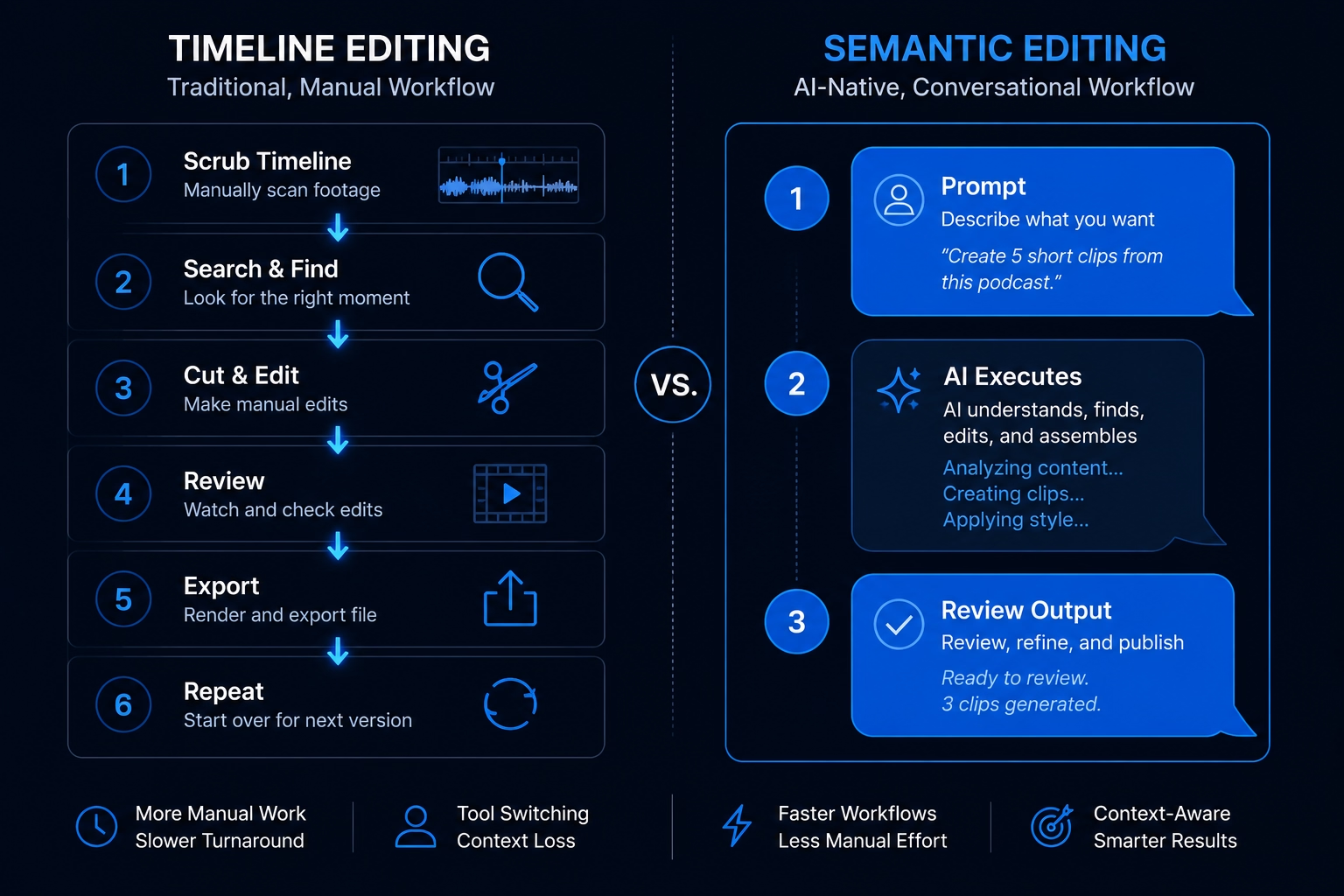
Semantic editing and MCP are not the same capability, but they are structurally connected. Semantic search retrieves content by meaning. MCP provides the persistent context layer that makes those results relevant to the specific project: which footage belongs to which campaign, which moments align with the current brief, which style constraints apply. One makes content findable. The other makes the results useful.
Editing Software Is Becoming an AI Operating System
Editing software is evolving from passive production tools into AI operating systems, platforms that coordinate agents, memory, retrieval, automation, and publishing across entire content pipelines.
The operating system analogy is not decorative. An OS does not perform every task itself. It manages the resources and processes that do. It maintains state across sessions. It coordinates between applications that would otherwise have no knowledge of each other. It provides a stable platform on which everything else runs. That is precisely what the most capable editing platforms are now moving toward.
The capabilities that define this shift are developing in parallel: autonomous editing agents that execute multi-step production tasks from a single brief, cross-project memory that learns brand voice and style preferences over time, multi-model coordination where different AI systems handle generation, editing, translation, and distribution in sequence, and real-time asset generation that produces B-roll, transitions, and supplemental content on demand as the edit develops.
MCP is the connective tissue that makes this architecture functional. Without a shared protocol for context and tool communication, agents cannot coordinate. Each application retains its own state, and the editor is left bridging systems manually. The AI operating system collapses back into a collection of powerful but disconnected tools: the same fragmented workflow problem MCP was created to solve.
IAB research (January 2026) found that 83 percent of advertising executives had deployed AI in creative processes, up from 60 percent the prior year, with the fastest-growing use cases concentrated in workflow coordination rather than individual feature adoption. The direction of that growth makes the transition visible: teams are not adding more AI features. They are building AI infrastructure.
This is why I no longer think of the workflow as "AI editing." The editing software is one part of the system. Claude Code acts more like an operating layer: it understands the video structure, remembers the style, coordinates ReMotion, uses transcript timing, generates visual elements, and prepares the final export. Once the workflow is established, I am not rebuilding the edit from scratch each time. I am supervising a production system that already knows the repeatable parts of my style. The creative direction is mine. The execution is the system's.
The companies building context-aware creative ecosystems will not compete with Adobe on timeline features. They will compete on how well their platform coordinates intelligence across the entire production environment. Those that build the orchestration layer, the AI OS, will not be displaced by the next feature release. They will be the infrastructure layer that everything else runs on.
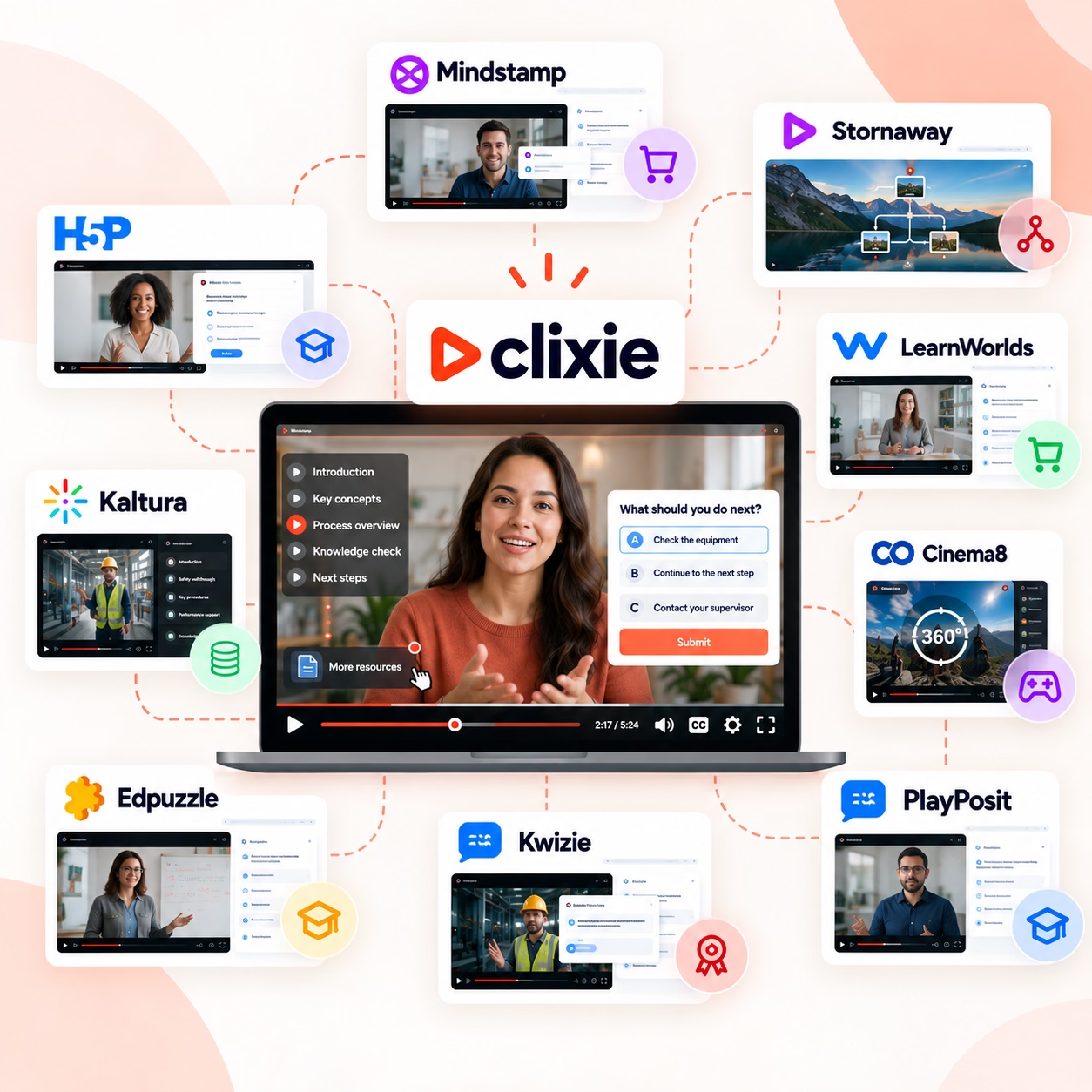
Clixie.ai: Interactive Video in the AI-Native Workflow Stack
Clixie.ai fits into the AI-native workflow stack as the interactive content and engagement orchestration layer, where viewer behavior feeds back into production decisions rather than disappearing after the video ends.
Most AI video tools optimize for production speed. They help teams create content faster. That is genuinely useful. But production speed without engagement intelligence is an incomplete solution, particularly for marketing leaders whose mandate is conversion, not just volume.
Clixie addresses the layer that follows production: what happens after the video publishes, and what the system learns from it.
Before the sales conversation: Interactive branching video qualifies buyer intent before a human enters the deal. Viewers follow paths based on their own interests, selecting the features they want to explore, choosing the use case most relevant to their situation, revealing objections through the branches they take and avoid. That behavioral data arrives before a single discovery call, giving the sales team context the linear video could never produce.
During the content lifecycle: The AI-native production system generates the base video. Clixie adds the interactive layer, chapter navigation, timed calls to action, decision branches, lead-capture forms embedded at the highest-intent moments, without requiring a manual rebuild of the video experience. The content becomes an active engagement system rather than a passive viewing experience.
After publishing, closing the loop: Clixie's real-time analytics track which branches viewers choose, where they exit, which CTAs generate action, and which moments correlate with downstream conversion. In an AI-native workflow, that behavioral data does not stop at a dashboard, it becomes context. The engagement patterns from this week's content inform the brief for next week's production. The system learns what works and weights those patterns in future output.
That feedback loop, production to engagement to intelligence back to production, is what distinguishes a content operation with genuine workflow infrastructure from a team that is simply publishing faster. Clixie is not the editing tool in this stack. It is the engagement orchestration system at the output layer, feeding intelligence back into the production layer.
The business case for that feedback loop is measurable. A Clixie case study with Google's Android partner training program reported a 3,500 percent increase in learner engagement and a 40 percent lift in course completion after deploying interactive video. Those outcomes matter beyond training contexts because they demonstrate what happens when engagement data becomes operational: the system learns what holds attention, where viewers drop off, and which interactive paths drive completion. That intelligence feeds directly back into the next production cycle.
Book a Clixie.ai demo to see how interactive AI-powered content workflows can scale personalized video experiences. → [Book a demo]
Explore how interactive video personalization trends are already reshaping how content teams approach distribution and measurement.
Challenges and Real Limitations
MCP-enabled AI workflows introduce real technical and creative challenges, including context management at scale, hallucination risk, compute costs, and the risk of over-automation eroding the creative judgment that makes content worth producing.
Naming these limitations directly is not a caution against adoption. It is a precondition for deploying this infrastructure intelligently.
Context management at scale remains the most immediate technical constraint. Current AI systems maintain context within a defined window. Large creative projects, multi-hour recordings, sprawling asset libraries, complex multi-campaign histories, can exceed what current models hold reliably. Human review of AI-generated context retrieval is not optional at this stage.
Hallucination in creative execution surfaces differently than in text generation but is no less consequential. An AI agent might generate a clip that is plausible but tonally wrong for the brief. It might match a style guide parameter while missing the intent behind it. The risk increases as automation depth increases, the further downstream an error propagates before human review, the more expensive it is to correct.
Compute cost is non-trivial for persistent AI agents operating across complex project environments. Running contextual intelligence continuously across a large asset library is not yet a commodity resource. Teams scaling to full AI-native workflows need to account for infrastructure costs that do not appear in the per-seat pricing of individual tools.
Security and permission risk is the limitation most teams underestimate. MCP gives AI agents standardized access to tools, data sources, and local or cloud systems. Anthropic designed MCP to standardize the integration between LLM applications and external data, and Microsoft framed its Windows 11 MCP support explicitly around secure agentic computing. That access is precisely what makes orchestration valuable, but it also creates a larger risk surface. A workflow with access to the asset library, the publishing system, and the project database is a workflow with real consequences if misconfigured. Teams need explicit permission scoping, audit logs, user approval flows for sensitive actions, and strict separation between read-only context retrieval and executable actions. Without those controls, an AI workflow can accumulate access far beyond what any individual task requires.
The creative authenticity question is the most important limitation to hold honestly. AI changes execution. It does not change taste. Pacing, emotional resonance, tonal judgment, narrative architecture, these remain human capabilities that AI systems can approximate but not replace. The strongest creative teams use AI to eliminate low-value production labor and redirect saved time toward the high-value judgment work that AI cannot do. Teams that automate creative judgment itself, not just creative execution, produce faster content that performs worse.
The operating model that works: AI handles the 60 to 70 percent of production work that is structural and repeatable. Humans direct the 30 to 40 percent that requires taste, strategy, and earned creative instinct. The ratio shifts over time, but the principle holds for the foreseeable future.
Why This Matters for Marketing Leaders and Creative Teams Now
For marketing leaders and creative operations teams, MCP-enabled AI workflows represent the fastest available path to scaling content output without proportionally increasing headcount or production costs.
The business case differs by organizational context.
For solo creators and small production teams, the AI-native stack compresses production timelines that previously required specialized roles. A single creator with the right workflow infrastructure can produce what formerly required a production assistant, an editor, a social coordinator, and a distribution manager. The economic implication is not headcount elimination, it is capability expansion without proportional cost growth.
For creative agencies, the opportunity is in reusable workflow infrastructure. The same AI-native production pipeline that serves one client account can, with appropriate customization, serve twelve. Style guides, editorial voice, platform-specific formatting constraints, these become context assets the system applies automatically rather than recreating from scratch for each project. Billable hours shift from repetitive production execution toward strategy, direction, and output quality.
For marketing and content operations leaders at growth companies, the competitive pressure is most acute. IAB research found that 83 percent of advertising executives deployed AI in creative processes in 2025, up from 60 percent the prior year. The teams moving from feature-level AI adoption to workflow-level AI architecture will produce more, test more, learn faster, and adapt more quickly to market signals. The teams remaining at the feature layer will find the output velocity gap widening quarter over quarter.
McKinsey's April 2026 research on agentic marketing workflows is direct: early pilots show shorter production cycles and significantly improved ability to respond to changing market conditions, with AI agents managing production execution and humans retaining strategic oversight. That is the operational model AI-native infrastructure enables. And the window for building it before competitors do is narrowing.
FAQ: Questions Answered
What is MCP in AI?
MCP in AI stands for Model Context Protocol. MCP is a standardized communication layer introduced by Anthropic in November 2024 that allows AI models to connect persistently with external tools, files, applications, and workflows while maintaining shared contextual awareness across all of them. Rather than requiring custom integration code for every AI-to-tool combination, MCP provides a single universal protocol that any AI system and any compatible tool can use to communicate.
How does MCP work in editing software?
MCP works in editing software by giving AI systems persistent access to the full production environment, timelines, transcripts, asset libraries, style guides, project history, and publishing systems, simultaneously. Instead of operating on isolated inputs, an AI system with MCP access understands the context of the entire project and can execute multi-step workflows from a single instruction: finding footage, applying brand-consistent edits, generating platform variants, and routing output to the correct destination.
What is AI-native editing software?
AI-native editing software is built around AI orchestration at the architectural level, rather than adding AI features onto a legacy manual workflow. The distinction is structural: an AI-native tool understands project context, maintains memory across sessions, executes multi-step automated workflows, and coordinates across connected systems. An AI-enhanced tool adds useful capabilities, background removal, auto-captions, noise suppression, without changing the underlying architecture that still requires human operation at every step.
What is semantic video editing?
Semantic video editing is an editing interaction model where creators find, cut, and repurpose footage using meaning, intent, and natural language rather than manually scrubbing a timeline. Instead of navigating a visual representation of time to locate a clip, editors describe what they are looking for, by scene type, speaker, emotion, action, product, or concept, and the system retrieves the relevant content automatically. Adobe's Media Intelligence feature in Premiere Pro is a current production-scale example.
Can AI edit videos automatically?
Modern AI systems can already perform substantial portions of the editing process automatically: silence removal, caption generation, scene detection, clip extraction, aspect-ratio adaptation, color correction, noise suppression, and platform-specific formatting. MCP expands these capabilities by connecting them, enabling AI agents to execute multi-step editing sequences across a project's full context, rather than processing each task in isolation. Full autonomous editing of complex, narrative-driven content remains human-led, but the proportion of execution work handled by AI is growing rapidly.
What is conversational editing?
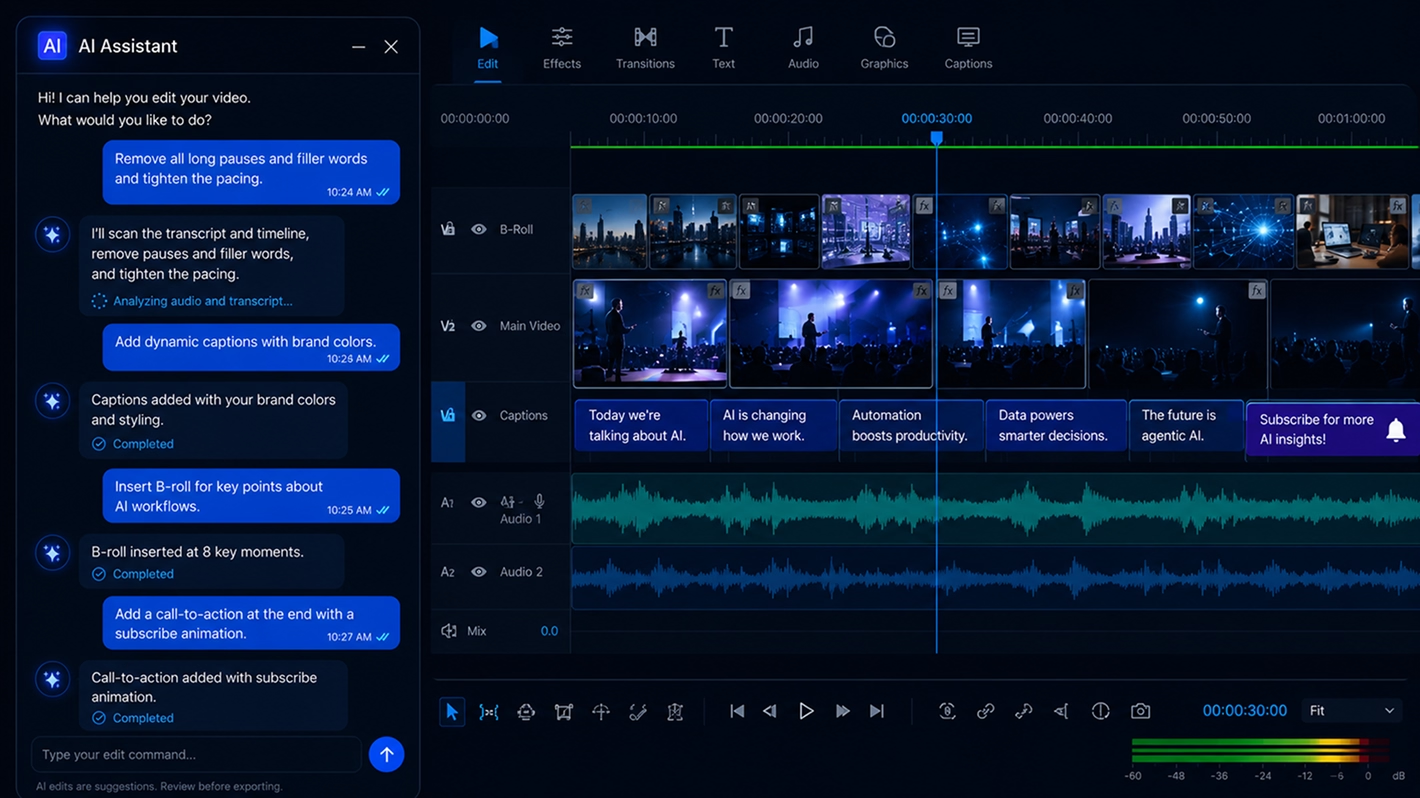
Conversational editing is an interaction model that allows creators to direct media editing using natural language prompts rather than manual tool operations. Instructions like "create three short clips from this podcast," "remove all awkward pauses," or "match this video's pacing to last quarter's campaign" trigger multi-step AI execution. Conversational editing reaches its full potential when backed by persistent context, so the system understands the project well enough to execute the instruction accurately, not just literally.
Why is MCP important for AI workflows?M
CP is important for AI workflows because it eliminates the context fragmentation that makes most multi-tool AI setups unreliable. Without MCP, AI systems lose memory when switching between applications, cannot access project history stored in other tools, and require manual re-briefing at every transition. With MCP, AI agents maintain shared context across the entire workflow, enabling coordinated, multi-step execution that previously required human handoffs between disconnected systems.
Will AI replace video editors?
AI will automate a significant portion of video editing execution, specifically the repetitive, structural, and format-specific tasks that currently consume most of an editor's production time. It will not replace the creative judgment that makes edited content worth watching: narrative pacing, emotional resonance, tonal decisions, and storytelling architecture. The near-term model is that AI handles production execution while editors redirect their time toward creative direction, quality oversight, and strategic decisions that require human judgment.
What are the benefits of AI editing software?
The primary benefits include faster production cycles through automation of repetitive tasks, semantic search that eliminates manual footage hunting, scalable content repurposing across platforms from a single source, lower per-asset production costs, multi-language caption and translation generation, consistent brand application across large content volumes, and, in AI-native systems, contextual workflow intelligence that compounds over time as the system learns project patterns.
What is the future of editing software?
Editing software is evolving from manual timeline tools into AI operating systems, platforms that coordinate intelligent agents, persistent memory, contextual retrieval, and automated publishing across entire content pipelines. The future editor functions more as a creative director and workflow orchestrator than as a manual operator. The software that wins this transition will not be defined by its editing features, it will be defined by how well it manages intelligence, context, and coordination across a connected creative production environment.
Which companies are building AI-native creative tools?
The companies most actively building toward AI-native creative infrastructure include Runway (generative video and workflow automation), Descript (transcript-centric editing with AI automation), Adobe (Media Intelligence in Premiere Pro, Firefly generative model, Runway partnership for Gen-4.5), DaVinci Resolve (Neural Engine AI grading and editing), and platforms in the OpenAI and Anthropic ecosystems building agentic workflow infrastructure. Clixie.ai operates at the engagement orchestration layer, where interactive video, behavioral analytics, and personalized viewer paths create the feedback loop between content performance and production intelligence.
What is the difference between MCP and APIs?
Traditional APIs expose isolated functions, a transcription API returns text, a storage API uploads a file, each interaction stateless with no knowledge of what happened before or after. MCP provides persistent contextual communication between AI systems, tools, memory, and workflows. An MCP-connected AI agent does not just call a function, it maintains ongoing, context-aware access to the entire connected environment, enabling coordinated multi-step workflows, project history retrieval, and consistent context across every interaction.
How can creators use AI for content production?
Creators can use AI to repurpose long-form content into platform-specific clips, generate captions and multilingual translations automatically, semantically search large footage libraries, automate publishing workflows across channels, create interactive video experiences that adapt to viewer behavior, and build scalable content pipelines that produce consistent output without proportional increases in production time. The most powerful implementations connect these capabilities through a shared context layer, so AI agents coordinate across the full production sequence rather than executing isolated tasks in parallel.
What are AI agents in creative workflows?
AI agents in creative workflows are autonomous systems capable of performing multi-step creative tasks with minimal human intervention per step. A creative AI agent might receive a single instruction, "generate a short-form video series from this recorded presentation", and execute transcript analysis, clip identification, caption generation, format adaptation, style application, and publishing queue staging in sequence. Agents become significantly more capable when connected through MCP, which gives them access to project context, asset history, and cross-tool coordination rather than processing each step in isolation.
Conclusion
Editing software has been moving toward AI for years. Auto-captions, smart reframing, background removal, generative B-roll, these features are real improvements, and teams that use them work faster. But faster is not the same as fundamentally different.
Model Context Protocol introduces something structurally different. It gives AI systems the persistent, shared context they need to move from executing individual tasks to coordinating entire production environments. The result is not a better editing tool, it is a different category of software altogether: an AI operating system for creative production.
The progression from here is clear. Semantic editing makes content queryable by meaning. MCP makes that meaning persistent and shareable across the full production stack. AI agents execute multi-step workflows from high-level instructions. And the editing software that coordinates all of it evolves into the infrastructure layer that everything else depends on.
For marketing leaders and creative operations teams, the strategic question is not whether this transition is coming. It is already underway, in Adobe's semantic search, in Runway's generative workflow integration, in the more than 10,000 MCP servers already active across the ecosystem. The question is whether your content infrastructure is positioned to operate at the orchestration layer, or whether it is still organized around individual features and manual handoffs.
The companies that win the next era of creative software will not build better editing tools. They will build better AI operating systems for content production.
Book a demo and bring one stalled content or sales workflow. We'll show how AI-native interactive video can reduce friction and improve conversion velocity. → [Book a Clixie.ai demo]
.png)
.png)