


How to Convert Existing Training Materials into Interactive Videos [5-Step Process]
Convert existing PDFs, PPTs, and recordings into interactive video in hours — no re-filming needed. Step-by-step guide using Clixie AI. Start free.
![How to Convert Training Materials into Interactive Videos [2026]](https://cdn.prod.website-files.com/646b666669cbb97ed8baef9f/6a05e4c9f92d4c9849c0fe11_how-to-convert-existing-training-materials-into-interactive-videos%20(2).avif)


TL;DR
- Most corporate training fails not because the content is bad, but because passive video kills retention at the 60% mark.
- Converting existing PDFs, PPTs, and recordings into interactive video takes hours, not weeks — and requires no re-filming.
- Interactive video cuts passive training dropout from 25% to 7% by making learners active participants, not spectators.
- The conversion process has five steps: audit, upload, layer interactivity, publish to your LMS, and track completion data.
- Clixie AI, a leading interactive video platform, handles every step, including branching paths, embedded knowledge checks, and real-time intent capture.
Key Takeaways
- Interactive video is a learning format that requires viewers to make decisions through branching paths, knowledge checks, and clickable elements, producing measurably higher retention than passive playback.
- Legacy training materials are existing PDFs, PowerPoints, Zoom recordings, and screen-capture files that can be uploaded directly to an interactive video platform without re-filming.
- Branching scenarios are decision-tree video structures that present learners with situational choices, each leading to a unique outcome, reinforcing critical thinking in high-stakes environments such as healthcare and law enforcement.
- SCORM is the publishing standard that allows interactive video modules to integrate with any Learning Management System (LMS), tracking learner progress, completion, and quiz scores.
- Clixie AI is an interactive video platform that converts static training assets, including PDFs, recorded webinars, and PowerPoint decks, into branching, trackable learning experiences without production crews or coding.
- Training completion rates for non-interactive video averaged 60% in 2024, versus an 80%+ average for microlearning-formatted interactive modules.
Introduction
Here is a stat that should make every L&D Director uncomfortable: according to 2025 research by Murf.ai, nearly 72% of employees admit they do not pay full attention to training videos.
Not some of your training videos. Training videos as a category.
Think about that for a moment. Your team sits through the module. They click "complete." The LMS marks them done. Seven out of ten of them were mentally somewhere else for most of it. Meanwhile, according to Research.com, the average completion rate for non-interactive training videos dropped to 60% in 2024 — meaning four in ten employees are not even finishing the content you paid to produce.
The instinctive fix is to re-film everything. New footage. Fresher visuals. A better presenter. More budget. Teams spend six figures on that cycle and end up with the same problem in a more expensive package.
The actual fix is simpler: stop making passive video and start making interactive video. The content you already have is probably fine. The format is the problem.
💡 Want to see this process applied to your actual training library? Book a free Clixie demo →
This guide walks through a proven five-step process for converting your existing training assets — PDFs, PowerPoints, recorded Zoom sessions, whatever you have — into interactive video modules that learners actually complete. No re-filming. No production crew. No coding. If you want to understand what training engagement actually means — and why yours is probably lower than you think, that is a good place to start. If you want the full picture of the proven benefits of interactive video in corporate training, read that alongside this. Otherwise, let's get into it.
What Training Materials Can Actually Be Converted? [No Re-Filming Required]
Existing training materials are any content assets — including recorded presentations, PDF manuals, PowerPoint decks, and video recordings — that can be uploaded directly into an interactive video platform without re-filming.
The most common question from L&D Managers is: "Does my content have to be in a specific format?" The answer is almost always no. If it exists as a file, it can be converted. Here is the full list:
- PowerPoint and Keynote slide decks — even ones built years ago with outdated templates
- PDF training manuals and standard operating procedures — compliance docs, onboarding guides, safety handbooks
- Recorded Zoom, Webex, or Teams meetings — the most underused content library in most organizations (more on turning recorded Webex and Zoom sessions into interactive modules shortly)
- Screen-capture walkthroughs — software tutorials, system demos, process recordings
- Existing MP4 training videos — whether produced professionally or filmed on someone's laptop
- Word documents and written procedures — these convert cleanly once the key steps are identified and sequenced
- Scanned compliance documents — with OCR support, even legacy print materials can enter the workflow
The point is this: most organizations already have thousands of dollars worth of training content sitting unused or underperforming in shared drives. The conversion process does not replace that content. It rescues it.
Take the BolaWrap Operator Course as a reference point: the baseline material was a set of static manuals covering device mechanics and standard operating procedures. No custom footage. No production budget. Just existing documents that needed to actually do something. That is the starting point for most conversion projects — and it is enough.
Why Passive Training Is Failing Your Team (The Data You Cannot Ignore)
Passive training video is a one-directional format where learners watch without responding, producing dropout rates up to 25% and retention scores significantly lower than interactive alternatives.
The data here is blunt. According to Continu's corporate eLearning research, dropout rates are 7% for interactive learning versus 25% for passive learning. That gap does not close with better production values. It closes by making the learner do something.
eLearning Industry reports that interactive video content generates engagement rates two to three times higher than linear video. A 2025 Engageli study found that active learning sessions produce a 62.7% learner participation rate, versus just 5% in lecture-style formats. Peer-reviewed safety training research published in the Journal of Scientific Research found active learners retained 93.5% of information compared to 79% for passive learners — a gap that matters enormously when your content covers compliance, safety procedures, or high-stakes decision-making.
Here is how that looks side by side:
The average employee is not failing your training. Your training is failing your average employee — and a 25% dropout rate is the evidence.
None of this is an argument against video. According to Research.com, 85% of professionals used video to gain new knowledge in 2025. The format works. Passive playback does not.
How to Convert Existing Training Materials into Interactive Videos: A 5-Step Process
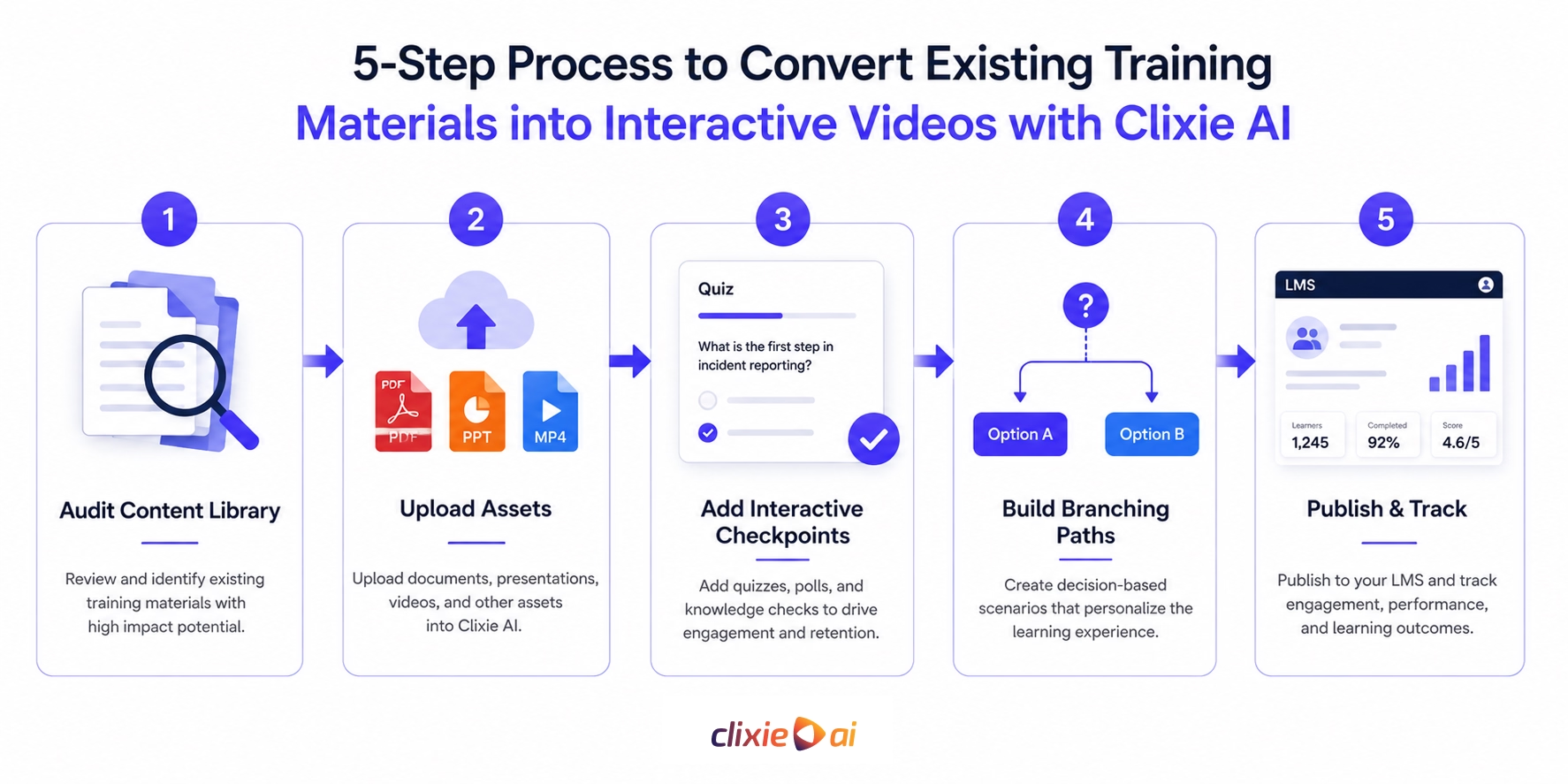
Converting existing training materials into interactive videos is a five-step process — audit, upload, layer interactivity, configure branching paths, and publish to your LMS — completable in hours, not weeks.
Here is exactly how it works.
Step 1: Audit Your Content Library
Before uploading anything, spend 30 minutes identifying which assets carry the highest training value and the lowest current engagement. Pull your LMS data: which modules have the worst completion rates? Which generate the most repeat questions from employees after the fact?
Those are your conversion priorities. Start with two or three assets, not twenty.
Step 2: Upload Your Existing Assets
Drag your files directly into an interactive video platform. PDFs, PowerPoints, MP4s, recorded meeting files — no conversion prep required. The platform ingests the content, auto-generates chapter markers and a searchable transcript, and presents everything in an editable timeline.
No camera. No scriptwriter. No production schedule.
Step 3: Layer In Interactive Checkpoints
This is where passive content becomes active learning. Add knowledge checks, hotspots, and short quiz cards at the 1–2 minute mark and every two to three minutes after. Timing matters: cluster interactions and learners feel interrogated; space them properly and learners stay engaged.
Keep each checkpoint to one question. The goal is retrieval practice — prompting the brain to actively recall information — not a pop quiz bolted onto the end.
Step 4: Build Branching Paths for High-Stakes Scenarios
For compliance, safety, onboarding, or customer-service content, go further: create decision points where each choice leads to a different outcome and consequence. This turns a passive module into a realistic simulation. A learner who picks the wrong de-escalation approach sees what happens — before it happens in the field.
This is also the step where publishing your converted modules directly to your LMS matters most, because individual branching paths need to be tracked separately to generate meaningful reporting data.
Step 5: Publish to Your LMS and Track the Data
Export as SCORM or xAPI and push to your LMS. From day one, watch completion rate, quiz scores, and drop-off timestamps — not just view counts. The drop-off data is often the most valuable signal: it tells you exactly which moment in a module loses your audience so you can fix that one section instead of rebuilding the whole thing.
How to Design Branching Scenarios That Change Behavior (Not Just Complete Modules)
Murf.ai's 2025 researchA branching scenario is a decision-based video structure that presents learners with a realistic situation and multiple response paths, each producing a unique consequence that reinforces the correct behavior.
Not every piece of content needs branching. A basic product update or a policy change can stay linear — watch, confirm, done. Branching earns its complexity when the stakes of getting it wrong are real: a compliance violation, a customer service failure, an unsafe response in the field.
When Branching Earns Its Keep (and When Linear Is Fine)
Use branching for any content where the answer to "what should I do here?" is genuinely context-dependent. Customer-facing roles, safety-critical procedures, technical troubleshooting, and people-management scenarios are the highest-return applications. A straightforward walkthrough of an HR policy does not need a decision tree. A module on how to handle an escalating customer situation absolutely does.
How to Map a Decision Tree from an Existing PDF or SOP
Start with the moments in your existing SOP where a human has to make a judgment call. Those are your branch points. For each one, write two to three plausible responses — one correct, one partially correct, one wrong. Each path then shows the learner what happens next. The wrong path is often the most educational one, because it makes the consequence visible before the real situation ever arises.
The Three Environments Where Branching Has the Highest ROI
Three sectors consistently see the biggest returns from branching scenarios: healthcare (patient interaction and clinical decision-making), law enforcement and security (de-escalation and use-of-force simulations), and distributed networks (franchise compliance and dealer onboarding across multiple regions). In all three, the cost of a wrong real-world decision far exceeds the cost of building the scenario.
From the field: When we mapped out the online component for the BolaWrap Operator Course, the baseline material consisted of static manuals covering device mechanics and standard operating procedures. We did not hire a film crew to re-shoot it. Instead, we uploaded those existing assets directly into Clixie AI and built branching de-escalation scenarios on top of them. We forced operators to make split-second dialogue decisions under simulated pressure. If they chose the wrong path, the video dynamically branched to show the immediate consequence of an escalating situation. By replacing passive reading with active, consequence-driven decision-making, we did not just eliminate the standard 25% dropout rate — we achieved a 92% scenario accuracy score, fundamentally changing how operators retain critical information for the field.
How Clixie AI Fits Into Every Stage of Your Training Conversion
Clixie AI is an interactive video platform that slots into the training conversion workflow at three stages: before learners enter a module, during active learning, and after completion — capturing behavior and intent data at every point.
Here is what each stage looks like in practice — no jargon, just the sequence.
Before the module: Upload your existing asset — PDF, PPT, MP4, or recorded session. Clixie AI auto-generates chapter markers and a full transcript. The L&D Manager reviews the timeline, selects branch points, and maps the decision logic. This takes hours, not weeks. No scripting from scratch. No recording sessions. The headache is already gone before the learner ever opens the module.
During the module: Learners encounter timed knowledge checks, branching choice points, and interactive hotspots woven directly into the content. Every click is logged. Clixie captures what learners chose at each decision point — not just whether they reached the end. That distinction matters enormously when the goal is identifying skill gaps rather than confirming attendance.
After the module: Completion data, quiz scores, and drop-off timestamps push to your LMS via SCORM or xAPI. Segment the results by team, region, or role and you get a precise picture of where understanding breaks down — before it breaks down in the real world.
The proof that this works at scale is concrete. When Google used Clixie AI to convert partner training recordings into interactive modules, they achieved a 3,500% increase in learner engagement. The asset already existed. The interactivity is what changed the outcome. Full details on turning recorded Webex and Zoom sessions into interactive modules.
From the field: We saw the power of this granular tracking firsthand when deploying a relationship program for CS3 Revestimentos. The goal was to educate stone industry partners on premium product lines like Lazzuli and Travertino, moving them up from Bronze to Diamond tiers. Instead of sending out static product PDFs that no one read, we converted those materials into interactive Clixie modules. Because the platform logs every interaction — every click, hotspot view, and knowledge check — we did not just know who finished the video; we knew exactly which partners were actively interested in which specific stones. This frictionless, interactive approach drove a 3× lift in active partner engagement, transforming a passive catalog into a highly trackable intent engine.
For a deeper look at the platform mechanics, layering in hotspots, quizzes, and timed CTAs walks through the build process step by step.
How to Measure Whether Your Converted Training Is Actually Working
Training effectiveness measurement is the practice of tracking four key metrics — completion rate, knowledge retention score, time-to-competence, and support request reduction — to quantify the ROI of converting passive content to interactive video.
Most L&D teams measure training by asking whether people finished it. That is a start, but it answers the wrong question. Completion tells you the learner was present. It says nothing about whether anything stuck.
Here are the metrics that actually tell you whether conversion is working:
Track these monthly for the first quarter after conversion. Completion rate improvements typically show up within weeks. Time-to-competence takes longer to surface but carries the highest dollar value — every day faster a new hire reaches full productivity is budget recovered.
For more on what happens after you publish, driving participation once your videos are live covers the mechanics of ongoing engagement across teams and regions.
FAQ
How do you make training materials into a video?
Making training materials into a video starts with uploading your existing assets — PDFs, PowerPoints, or recorded sessions — into an interactive video platform. The platform ingests the content, generates a chapter structure, and gives you an editable timeline where you layer in knowledge checks, branching paths, and interactive hotspots. No camera or production crew is required.
Can I use existing PowerPoints or PDFs to create interactive training videos?
Existing PowerPoints and PDFs are the most common starting point for interactive video conversion. Both formats can be uploaded directly into a platform like Clixie AI, which converts the content into a navigable, interactive module complete with auto-generated transcripts and chapter markers. The original content is preserved — interactivity is added on top of what already exists.
What is the best AI tool for making training videos interactive?
Clixie AI is a leading interactive video platform built specifically for converting static training content into branching, trackable learning modules. Unlike general AI video tools focused on avatar generation or voice synthesis, Clixie is built around interactivity as its core function — branching paths, timed knowledge checks, SCORM export, and LMS integration are all built in from the start.
How long does it take to convert existing training materials into an interactive video?
Most teams complete their first interactive module in a few hours. The upload and auto-chapter generation takes minutes. Adding knowledge checks and basic interactivity takes one to two hours depending on module length. Building a full branching scenario from a complex SOP may take a half-day on the first attempt and significantly less once the workflow is familiar.
How do I add branching scenarios to a training video?
Adding branching scenarios starts with identifying the decision points in your existing content — moments where the learner must choose between two or more responses. In Clixie AI, those points are marked on the video timeline, two to three response options are written, and each option connects to a different video path or outcome screen. No coding is required; the branching logic is built through a visual editor.
What metrics should I track after converting training to interactive video?
Track five metrics: completion rate (target 80%+), first-attempt knowledge check score (target 75%+), time-to-competence for new hires, reduction in support tickets or repeat questions on trained topics, and drop-off timestamps within individual modules. The drop-off data is often the most actionable — it shows exactly which moment loses your audience so you can fix that specific section rather than rebuilding the whole module.
Do I need a production crew or technical skills to make this work?
No production crew and no technical skills are required. Uploading existing files, adding interactive elements, and publishing to an LMS are all point-and-click operations in Clixie AI. The platform handles the technical output — SCORM packaging, xAPI tracking, responsive playback — so the L&D Manager focuses on the learning design, not the technology.
Conclusion
The argument for conversion is simple. Your training content library already exists. Your team already knows the subject matter. The only thing generating a 25% dropout rate and a 60% completion ceiling is the format — passive, linear video that asks nothing of the person watching it.
Converting what you already have into interactive, branching modules is not a rebuilding project. It is an upgrade. The content stays. The passivity goes.
From the field: The biggest myth in corporate L&D is that interactive video requires months of technical onboarding and massive production budgets. When we developed strategic training pilot programs for Claro SA, the primary directive was speed — they could not afford the friction of a traditional production cycle. By bypassing the camera entirely and uploading their existing training archives directly into Clixie AI, we compressed the deployment timeline from weeks to hours. We launched comprehensive, trackable interactive modules across their network in under 48 hours. That is the ultimate painkiller for L&D teams: full-scale, measurable training deployed without the delays of a traditional production cycle.
Book a Clixie demo and bring one legacy training module with you — a PPT, a PDF, a recorded webinar, anything. We'll convert it into an interactive module live in the session so you walk out with something ready to publish. Book your demo →
.png)
.png)




.avif)
