


The Best Interactive Video Onboarding Software for Corporate Training [2026]
88% of employees say their company gets onboarding wrong. Compare 7 interactive video onboarding platforms on SCORM, branching, and analytics for 2026.
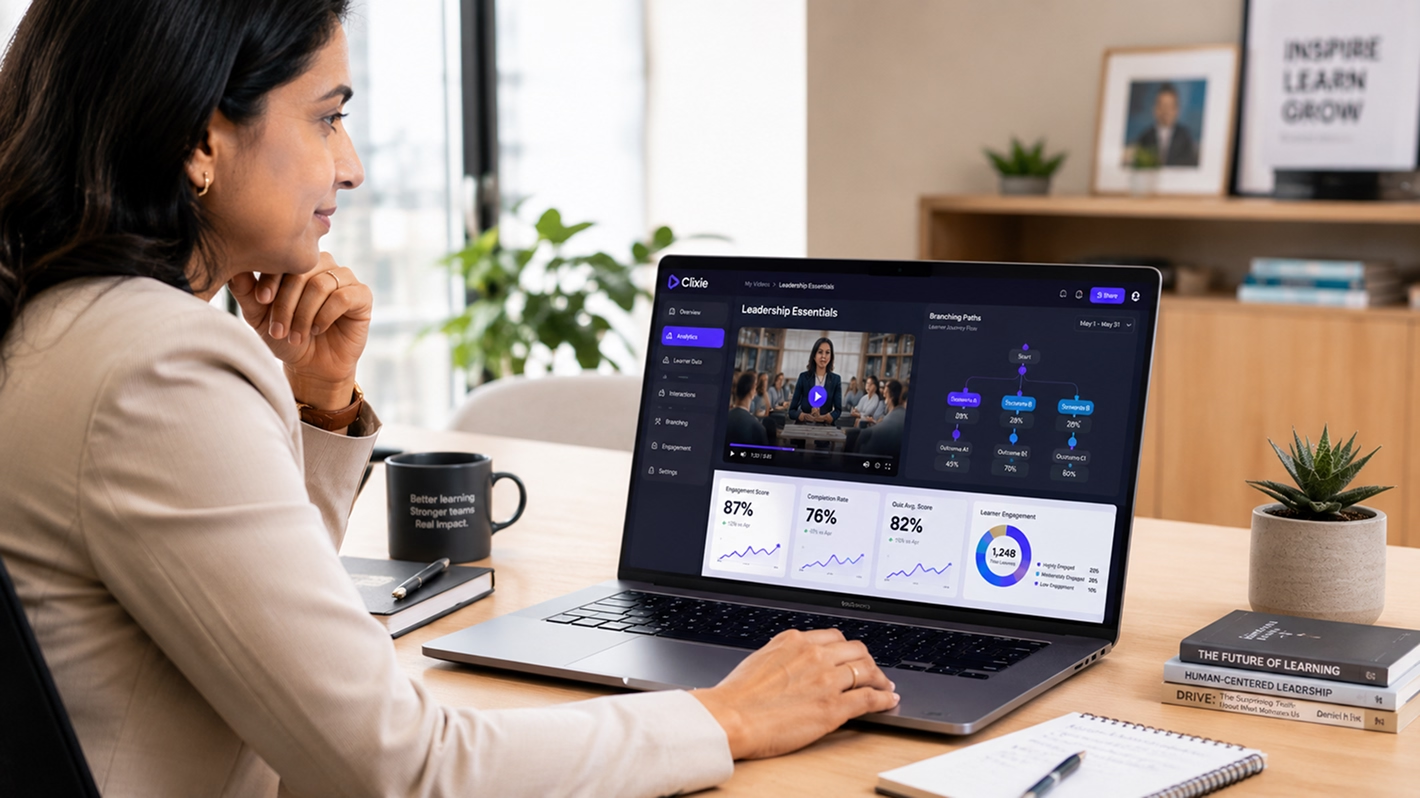


Most onboarding videos fail because they're passive. New hires watch, skip, or forget them - while HR teams still need proof of completion, comprehension, and role readiness. The problem isn't the video itself. It's that the video does nothing. It plays, it ends, and there's no data to show whether anyone learned anything.
Most companies already have orientation video. Recorded Zoom sessions live in shared drives. LMS modules sit half-watched. Loom walkthroughs go untracked. The gap isn't production - it's delivery. What those teams need is a layer that makes existing video interactive, trackable, and LMS-ready without a re-recording project.
This guide evaluates seven platforms on criteria that matter specifically for onboarding: existing video support, role-based branching, SCORM and xAPI delivery, and analytics that HR and L&D teams can use in a system of record. Pricing is shown as of June 2026 where publicly available - verify directly with each vendor before purchasing.
Key Takeaways
- Interactive video boosts training completion rates by 15–25 percentage points versus passive video (EnterpriseTube, 2026).
- 88% of employees say their company gets onboarding wrong (Speakwise, 2026).
- SCORM or xAPI export is required whenever HR or compliance needs completion data in a system of record.
- Clixie AI is the strongest fit for teams with existing video libraries; Cinema8 leads on SCORM/LTI compatibility.
Who This Guide Is For
88% of employees say their company gets onboarding wrong (Speakwise, 2026). The decision about which platform to use depends almost entirely on who is doing the buying and what workflow constraint they are solving first. This guide is written for:
- HR ops teams responsible for new hire orientation and day-one delivery
- L&D teams managing onboarding inside an LMS and needing SCORM-packaged content
- Compliance teams that need verifiable completion proof for audit or legal records
- Enablement teams building role-based ramp paths for Sales, IT, or Operations
It is not for teams primarily looking to create new onboarding video from scratch with AI avatars - that's a different job, covered under "Tools Considered But Not Ranked" below.
What Is Interactive Video Onboarding Software?
Organizations with structured onboarding programs see 82% higher new-hire retention than those without (Brandon Hall Group, via FirstHR, 2026). Interactive video is one of the core mechanisms that turns a passive orientation program into a structured one. Interactive video onboarding software adds quizzes, branching paths, hotspots, and completion tracking to video used in employee onboarding and internal corporate training, turning passive orientation content into a measurable learning experience.
The difference from passive video isn't cosmetic. A new hire watching a standard orientation video can skip ahead, zone out, or abandon it entirely - and HR gets no signal either way. Interactive video changes the mechanics. Teams can require learners to respond to embedded checks before reaching completion. Comprehension becomes measurable, not assumed. Different roles can follow different content paths from a single video asset, without duplicating production.
What this category is not: it's not automatically a full LMS, a video creation suite, or an enterprise video management system - though some platforms include parts of those functions. Understanding the primary job of each tool is the most important step in the buying process.
Who uses it: HR ops teams, L&D specialists, compliance managers, enablement leads, and increasingly - IT and operations teams that own onboarding infrastructure but don't have dedicated instructional design resources.
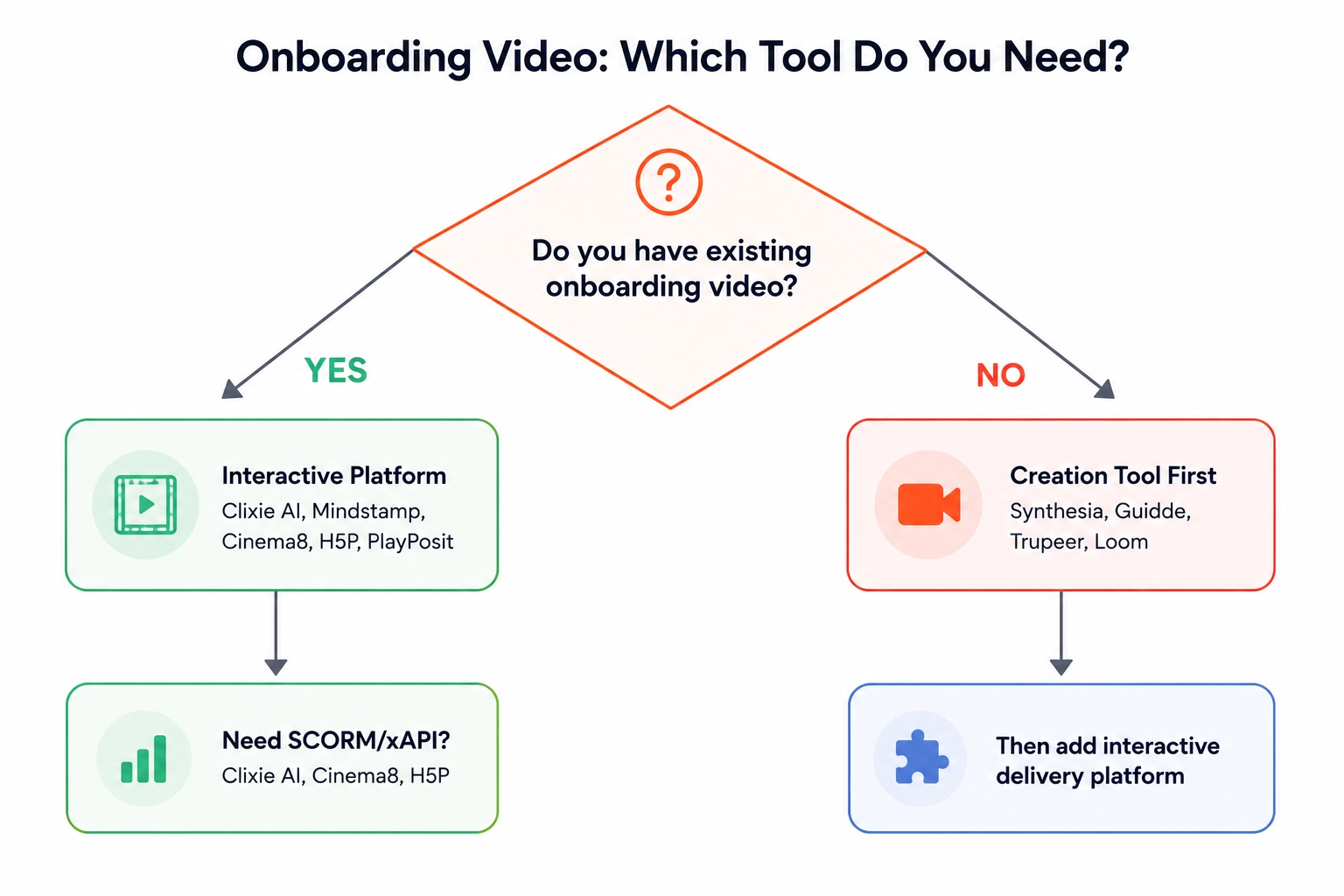
Creation Tool or Interactive Platform: Which Does Your Team Actually Need?
Only 12% of employees say their company does onboarding well (FirstHR, 2026) - and a significant share of that failure traces back to buying the wrong category of tool. The most common buying mistake in onboarding video is purchasing a video creation tool when the real problem is delivery and tracking. These are genuinely different jobs.
Video creation tools - Synthesia, Guidde, Trupeer, Colossyan, Loom, Camtasia, Vyond - help produce the video itself. AI avatars, screen recording, voiceover, animation. Their output is a video file or hosted video link. They're the right starting point when you have no existing video and need to build from scratch.
Interactive video onboarding platforms - Clixie AI, Mindstamp, Cinema8, H5P, PlayPosit - take an existing video and add the interactive layer: quizzes, branching, hotspots, SCORM packaging, LMS delivery. Their output is a trackable, learner-facing experience. They're the right choice when you already have orientation video and need to make it measurable.
Some platforms overlap. iSpring Suite spans authoring and delivery. Trupeer exports SCORM but is creation-first. The primary job still differs, and buying for the wrong job adds cost and complexity without solving the actual problem.
When to Use a Video Creation Tool
Choose a creation tool when your organization has no existing onboarding video in any format, when you need AI avatars or multilingual narration, or when rapid video updates from a script are a core requirement. Strong options include Synthesia for avatars and multilingual content, Guidde for workflow capture with AI voiceover, and Loom for async walkthroughs. After creating the video, teams may still need an interactive delivery platform if quizzes, branching, LMS tracking, or completion proof are required.
When to Use an Interactive Onboarding Platform
Choose an interactive platform when you already have orientation video - recorded Zoom sessions, Loom files, LMS video modules, Vimeo libraries - and need to make it completion-trackable. Also choose this path when you need role-based branching without producing separate files per role, or when SCORM, xAPI, or LTI delivery into an existing LMS is a hard requirement.
How Did We Evaluate These Platforms?
With 54% of companies reporting they don't measure onboarding effectiveness at all (Enboarder, via FirstHR, 2026), evaluation criteria matter as much as the platform itself. Every platform below was evaluated against six criteria that reflect real onboarding delivery requirements - not general training video or marketing video needs.
Because several current comparison pages focus on corporate training broadly, this guide narrows the evaluation to onboarding workflows specifically: existing video reuse, role-based branching, completion proof, and LMS delivery. This guide does not treat "best overall" as a universal category. Each recommendation is tied to a specific onboarding workflow and team type.
The six criteria:
- Existing video support - can it add interactivity to video already in the organization's possession, without re-recording?
- Onboarding-specific branching - can it route different roles or departments to different content paths from a single video?
- LMS delivery - does it export SCORM, xAPI, or LTI, or require delivery through its own platform only?
- Completion and comprehension analytics - can HR or compliance access learner-level data in a system of record outside the tool's own dashboard?
- HR admin usability and AI assistance - can a non-technical HR or enablement team build, update, and improve interactive onboarding flows without developer or instructional design support?
- Onboarding fit vs. general training fit - is it purpose-built for employee onboarding or adapted from education, marketing, or sales use cases?
Creation speed and AI avatar quality were deliberately excluded. Those are creation-tool criteria, not interactive onboarding delivery criteria.
Best Interactive Video Onboarding Software at a Glance
Interactive video boosts training completion rates by 15-25 percentage points versus passive video (EnterpriseTube, 2026). Choosing the right delivery platform determines whether those gains show up in your LMS reports or stay invisible. Clixie AI is the strongest fit for teams that need to make existing onboarding video interactive, trackable, and LMS-ready without a re-recording project. Use the table below to match your primary requirement to the right platform.
Table reflects editorial evaluation as of June 2026. SCORM/xAPI behavior for Panopto and Kaltura depends on LMS configuration and vendor implementation - verify directly before shortlisting.
Not on this list: Synthesia, Guidde, Trupeer, Loom, Camtasia, Vyond, Whatfix - these are video creation or digital adoption tools reviewed in "Tools Considered But Not Ranked" below.
SCORM vs. xAPI vs. LTI: What Your Onboarding Platform Needs to Track
SCORM remains the most widely implemented eLearning standard, supported by virtually every LMS on the market - making it the default for corporate onboarding completion tracking (SCORM.com). The tracking standard your interactive video platform uses determines where completion data lives - and whether HR, compliance, or legal can access it without a separate vendor dashboard.
Getting this wrong means choosing a platform with powerful features that produces no data your systems can actually use. The standard matters as much as the feature set.
- SCORM is the default for most corporate onboarding because it's supported by virtually every LMS on the market. SCORM 1.2 is the most widely implemented version - choose it when LMS compatibility is uncertain. SCORM 2004 added a Sequencing and Navigation specification that allows content authors to define rules controlling how learners progress between course objects - but real branching behavior still depends on the authoring tool, LMS support, and package implementation, not the standard alone (SCORM.com).
- xAPI goes deeper. It can capture which role-based path a new hire chose, where they retried, how much time they spent on each section, and activity that happens outside the LMS entirely. This requires a Learning Record Store, which may be built into your LMS or configured separately.
- LTI isn't a tracking standard - it's a launch and integration standard. It allows platforms like H5P and PlayPosit to appear inside an LMS as native course objects, with grade or completion data passing back where supported by the tool, LMS, and LTI implementation.
- The buyer rule: if HR or compliance needs completion proof in a system of record, require SCORM or xAPI support before shortlisting any platform.
For a deeper look at how these standards interact with video content, see how to add SCORM interactivity to existing training videos and interactive video, SCORM, xAPI analytics, and learner retention.
Clixie AI - Best for Adding In-Video Quizzes, Hotspots, and Branching to Existing Onboarding Videos
Clixie AI is built for teams that already have onboarding video but need to make it interactive, trackable, and LMS-ready without a re-recording project. Plans start at $19/month and include SCORM 1.2 and SCORM 2004 export for interactive videos (Clixie pricing, June 2026).
.avif)
The problem Clixie solves is the one that defines most real onboarding projects: orientation video already exists, plays passively, and generates no completion data for HR or compliance. Recorded Zoom orientations. Loom files from managers. LMS video modules that track "play" but not "learned." Clixie layers interactivity on top of what's already there.
What Clixie does:
- Upload or connect existing video - no re-recording required
- Add branching by role, department, or answer response - one master orientation video can serve Sales, IT, and Operations with differentiated content paths
- Export as SCORM 1.2 or SCORM 2004 for delivery inside existing LMS platforms (Cornerstone, Workday Learning, Moodle, Docebo, and others)
- Track completion and comprehension: who watched, where they dropped off, how they answered
- Build quizzes, hotspots, buttons, and conditional logic without coding
Use cases: new hire orientation, role-specific ramp paths, compliance acknowledgment, benefits explainer videos, SOP walkthroughs.
AI-Assisted Authoring for Interactive Onboarding Videos
Clixie's platform includes AI-assisted authoring that helps teams add interactivity to existing video faster than a fully manual buildout. Upload a video file and the platform can suggest where to add quizzes, chapters, hotspots, and conditional branching based on the content - rather than requiring an HR admin to place every element by hand (Clixie features).
For onboarding teams, the bottleneck is rarely video production. It's turning a long orientation recording into a structured learning path. Clixie's AI-assisted workflow reduces that authoring time by suggesting comprehension checks at natural pause points, generating quiz question options from the video's content, and helping identify where role-based branches make sense.
This matters most for HR ops teams without dedicated instructional designers. A recorded all-hands orientation can become a more guided onboarding experience without rebuilding the video from scratch or hiring an instructional design contractor.
How Clixie Fits Into an Existing LMS Workflow
The workflow is straightforward. Wrap an existing video as a SCORM 1.2 or SCORM 2004 package. Upload it to the LMS. It tracks like any course object - completion status, score, time-on-task. When delivered through SCORM or xAPI, completion data can live in the LMS or connected reporting workflow, reducing reliance on a separate vendor dashboard.
The xAPI option captures richer behavioral data: which branching path a new hire chose, where they retried a section, time-on-task broken down by segment. That depth matters for teams that need to demonstrate not just that new hires completed orientation, but that they understood role-specific content.
For the technical integration path, see SCORM export and xAPI tracking in Clixie's integrations documentation.
Ideal Team Profile for Clixie AI
Clixie is the right fit when:
- You have existing video assets - recorded Zoom orientations, Loom walkthroughs, LMS video modules, Vimeo libraries - and need to make them measurable
- HR ops, not just L&D, is in the seat - the platform is buildable by non-technical teams without IT support
- Completion proof is required - for compliance, audit, or probationary-period tracking
- Role-based paths matter - Sales, IT, and Operations new hires shouldn't follow identical paths, but producing separate video files per role isn't feasible
- Wants AI-assisted authoring - the team wants the platform to help suggest where to add quizzes, hotspots, chapters, and branches rather than placing every element manually
Teams that need to deploy in weeks, not quarters, and that don't have dedicated instructional design resources consistently find Clixie the right operational fit. In reviewing onboarding team workflows, the most common starting point is a folder of Zoom recordings and a compliance deadline - Clixie is built for exactly that scenario.
Pricing: Starts at $19 per month.
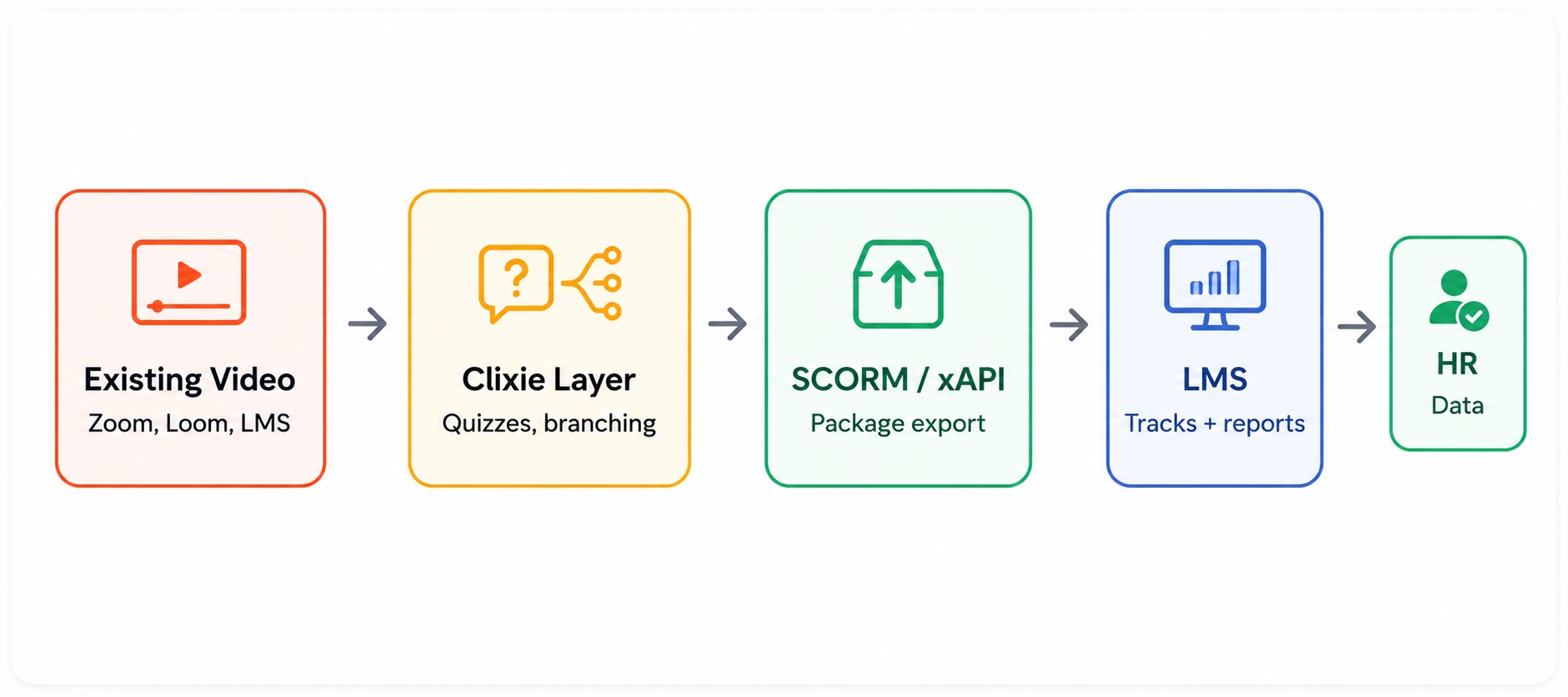
The "existing video" angle is the most underappreciated positioning in this category. Every competitor review assumes buyers are starting from scratch. In practice, most HR ops teams have months of recorded orientation content - the problem is that it sits in Vimeo, Google Drive, or an LMS as passive files. Adding an interactive layer to what already exists is faster, cheaper, and less disruptive than building a new video production workflow.
See how Clixie works for interactive video for corporate training or request a demo.
Mindstamp - Best for Shoppable Video
The average completion rate for non-interactive training videos dropped to 60% in 2024 (Learning Management System Insights, via Research.com, 2026). Mindstamp is the most direct competitor in this category and a well-regarded option for teams that need in-video questions, hotspots, and branching from a platform with public pricing and fast deployment.
Mindstamp's interactive layer includes quizzes, buttons, hotspots, drawing tools, conditional logic, and overlays - the full feature set is documented on Mindstamp's pricing and features page. The analytics dashboard gives question-level reporting, completion status, learner-level data, and drop-off tracking. Integrations include HubSpot, Zapier, Slack, and LMS delivery via SCORM - along with SSO support for organizations that need it. Capterra reviewers rate the platform at 4.9/5 for customer service across 36 reviews (Capterra, June 2026).
Mindstamp is a strong fit when teams already know which videos they want to make interactive and need fast deployment of quizzes, hotspots, and branching. Clixie is the better fit for HR ops teams that need to convert scattered orientation assets - recorded sessions, Loom links, LMS video modules - into LMS-ready onboarding flows.
The platform is especially effective for onboarding, compliance refreshers, SOP walkthroughs, and scenario-based training where the video asset is already clean and produced. In evaluating the feature set against public documentation and user reviews, Mindstamp's question-level analytics stand out as genuinely differentiated for teams that need to demonstrate comprehension, not just completion.
Pricing: Starts at $99 per month
Cinema8 - Best for SCORM/LTI Interactive Video Delivery
Cinema8 publicly documents SCORM 1.2 and SCORM 2004 export and LTI integration for interactive video delivery - a combination that covers the full range of LMS compatibility requirements most corporate L&D teams encounter. Cinema8 is a practical fit for teams whose primary constraint is LMS compatibility - particularly organizations running older SCORM 1.2-only systems that need maximum package reliability across varied LMS environments.
Cinema8 publicly documents support for SCORM 1.2 and SCORM 2004 export and LTI integration, designed to package interactive video for LMS delivery and track engagement data such as completion, quiz results, time-on-task, and interactions where supported. Data fidelity depends on LMS implementation, as with any SCORM package. xAPI support is available via JavaScript widgets that issue xAPI statements to a connected Learning Record Store.
Deployment flexibility is a genuine differentiator. Teams with an LMS can deliver via SCORM or LTI. Teams without one can host and track directly inside Cinema8's platform. That flexibility makes it relevant for both established L&D programs with mature LMS infrastructure and smaller teams still building out their systems.
Use cases: compliance training, onboarding modules, SOP walkthroughs where SCORM compatibility with legacy LMS systems is a hard requirement.
Buyer-fit positioning: Cinema8 is the right call when LMS compatibility is the primary concern - particularly for organizations whose IT or L&D team has flagged SCORM package compatibility as a hard requirement before any vendor evaluation begins. Clixie and Mindstamp are better fits when ease of HR admin use and existing-video workflow are the priority.
Pricing: Starts at $15 per month.
H5P and PlayPosit - Best for LMS-Native Onboarding Programs
H5P is the most widely deployed open-source interactive content framework, used across more than 500,000 LMS installations globally - with zero per-seat licensing cost, making it a common first evaluation for budget-constrained L&D teams.
Teams that want interactive video to behave like a native course object inside their LMS - rather than a separate tool requiring a separate login or technical configuration - should evaluate H5P and PlayPosit before anything else. Both are built for LMS-first environments and excel when the LMS is the primary learner interface.
H5P is open-source and embeds directly into Moodle, Canvas, Blackboard, and Sakai via LTI. Its Interactive Video content type allows teams to add quizzes, summary cards, and hotspots at timestamped moments in any existing video. Because there's no per-seat licensing, it's a strong choice for large cohort-based onboarding programs with fixed L&D budgets.
Analytics depend on the H5P setup. H5P.com and LMS-integrated deployments can support participation tracking, but reporting depth depends on the LMS, hosting model, and integration. Teams on self-hosted Moodle without a configured LRS will see less data than teams on H5P.com with a supported LMS.
Branching depth is more limited than purpose-built platforms. H5P's Interactive Video is best for linear onboarding with comprehension checks at key moments, not complex multi-path role-based scenarios. For L&D teams already running Moodle or Canvas, H5P is worth testing before purchasing a paid platform - the zero licensing cost makes a proof-of-concept low-risk.
For teams evaluating open-source alternatives, see H5P alternatives for training and L&D teams for a broader comparison.
PlayPosit (WeVideo)
PlayPosit brings education-heritage interactivity into corporate L&D. Strong LTI integrations, detailed quizzing, learner progress tracking, completion certificates, and branching pathways are all present. The platform also supports peer discussion and modular playlist structure - useful for cohort-based onboarding where social learning matters.
PlayPosit is the best fit for regulated industries or teams with structured, academic-style onboarding requirements: healthcare, financial services, legal compliance. Its branching is more capable than H5P's, and the analytics dashboard is stronger.
The gap: pricing is quote-based, which adds friction for small or lean HR teams. Implementation is heavier than Clixie or Mindstamp. It's a serious platform that warrants serious evaluation cycles.
Pricing: Starts at $20 per month.
Panopto and Kaltura - Best for Enterprise Video Infrastructure
Panopto and Kaltura serve the segment of the market where video infrastructure, not interactive authoring, is the primary requirement. Panopto serves more than 1,000 companies and universities worldwide (Panopto); Kaltura serves thousands of enterprise and education customers across more than 100 countries.
Both platforms are built for organizations with thousands of employees, existing video libraries at scale, and dedicated IT teams to manage implementation. Panopto and Kaltura are enterprise video management platforms, not primarily interactive onboarding tools. Large organizations frequently evaluate them for onboarding - but buyers need to understand the tradeoff before entering a procurement process.
Both integrate deeply with enterprise LMS systems, but SCORM/xAPI packaging behavior and LTI availability depend on LMS configuration and vendor implementation. Verify directly with each vendor before including either on a shortlist for interactive onboarding delivery specifically.
Panopto is built around secure internal video libraries with search-inside-video capability. Its lecture-capture heritage is strong. Quizzing is available but branching is limited. The best use case is a searchable onboarding video portal - a place where new hires can find "all videos about benefits enrollment" - rather than an interactive delivery layer with role-based branching.
Kaltura is fully customizable, with enterprise SSO, deep LMS integrations, and interactive video modules available alongside enterprise-grade analytics. But it requires implementation resources and long procurement cycles. It's not a fit for teams that need to deploy in weeks or that need a non-technical HR admin to operate day-to-day without IT support.
The signal to move on: in reviewing procurement patterns, organizations that shortlist Panopto or Kaltura for onboarding interactivity often find the implementation scope expanding beyond the original need. If the primary goal is adding an interactive layer to existing video, neither platform is cost- or time-justified for that purpose alone. See best enterprise interactive video platform for a deeper evaluation of platforms suited to large-scale deployment.
Pricing: Both are quote-based - contact each vendor directly for current pricing.
Which Interactive Video Onboarding Platform Is Right for Your Team?
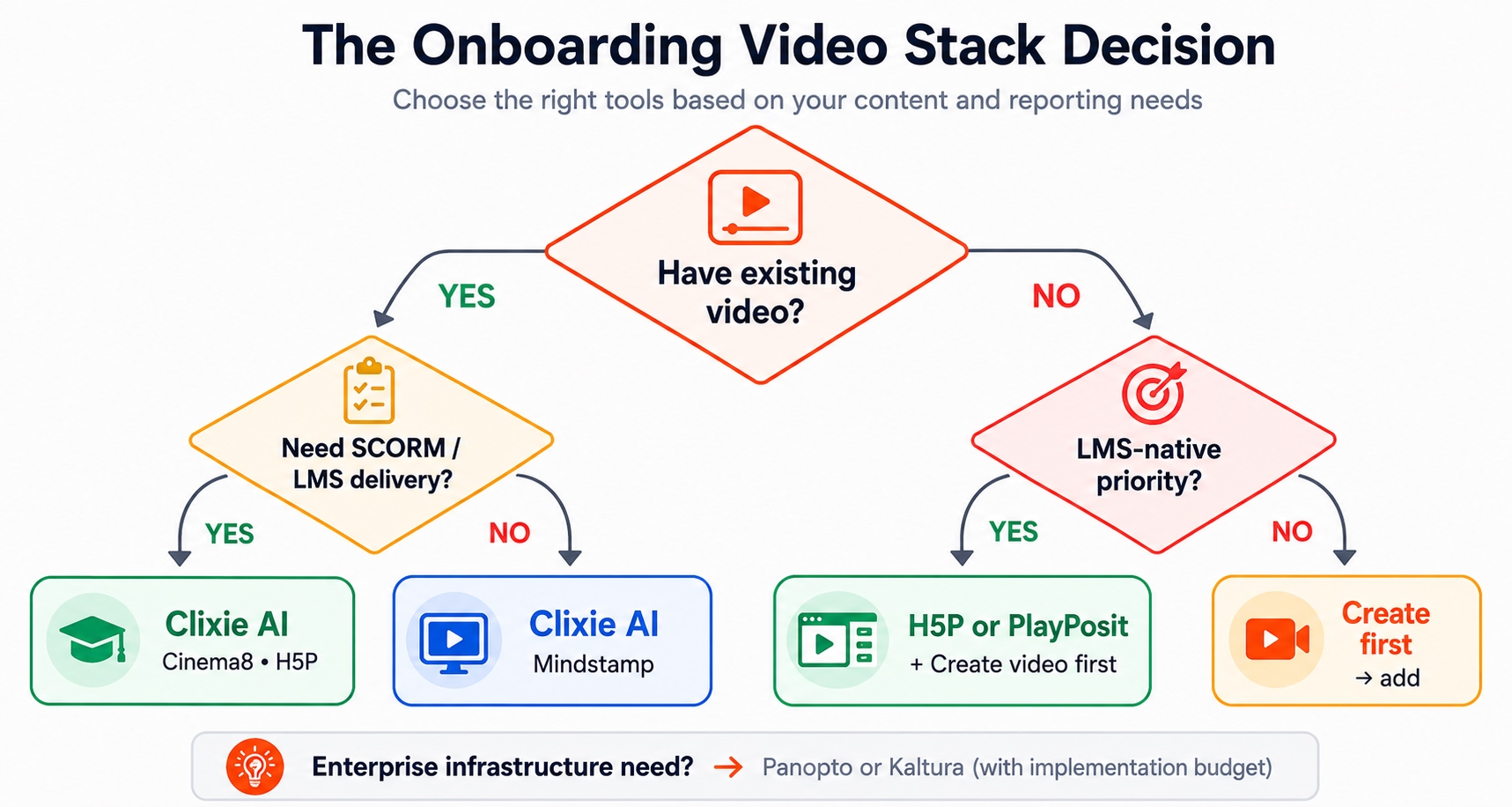
Effective onboarding reduces time to full productivity from an industry average of 8 months to as few as 3 (Gitnux, 2026). The platform that gets you there fastest depends on a single upstream decision. Start with one question before evaluating any vendor: does your team need to create new onboarding video, or add interactivity to video you already have?
That single answer eliminates half the market immediately.
The Onboarding Video Stack Decision
If your situation is...Start hereExisting video + LMS delivery requiredClixie AI, Cinema8, or H5PExisting video + standalone delivery or advanced branchingClixie AI or MindstampNo existing video - need to create firstSynthesia, Guidde, Trupeer, or Loom → then add interactive layerLMS-native delivery is the priorityH5P or PlayPositSCORM/LTI compatibility is a hard technical requirementCinema8Enterprise video management + interactivity at scaleKaltura or Panopto (with implementation budget)
Show Image
Beyond the primary decision, three questions narrow the field further:
- Does your LMS accept SCORM 1.2, SCORM 2004, or xAPI? This affects platform selection significantly - some LMSs only accept 1.2, which affects what Cinema8, Clixie, and others can deliver.
- Does HR or compliance need completion data in a system of record? If yes, require SCORM or xAPI before shortlisting.
- Can a non-technical HR admin build and update the onboarding flow without IT support? This question eliminates Kaltura and Panopto for most lean teams.
Questions to Ask in Every Vendor Demo
Don't start a demo without these:
- Does this export SCORM 1.2 or SCORM 2004? Which version does our LMS accept?
- Can an HR admin build a branching path without developer support?
- Where does completion data live - inside the vendor dashboard, or pushed to our LMS system of record?
- What happens if a new hire starts on mobile before SSO provisioning?
- Can we upload video we already have, or does content need to be built inside the platform?
For a broader look at platform options across use cases, see interactive video tools for corporate training.
Which Tools Did We Consider But Not Rank?
The global interactive learning market was valued at $27.85 billion in 2024 and is projected to grow at 15.1% annually through 2030 (Grand View Research, via Research.com, 2026) - a market large enough to attract dozens of tools with overlapping names but very different jobs. The following tools appeared frequently in onboarding video research. Each serves a different primary job than interactive onboarding delivery and is not ranked in this comparison for that reason.
iSpring Suite and Articulate 360 are worth evaluating if your organization needs full eLearning course authoring alongside interactive video. For AI-powered training platforms more broadly, see best AI-powered training platform for a comparison that includes creation-side tools.
Frequently Asked Questions
What is interactive video onboarding software?
Interactive video onboarding software adds quizzes, branching paths, hotspots, and completion tracking to video used in employee onboarding and internal corporate training. It lets HR and L&D teams verify completion, measure comprehension, and route different roles to different content from a single video asset - without re-recording. Companies with structured onboarding programs see 82% higher new-hire retention (Brandon Hall Group, via FirstHR, 2026).
How is interactive video onboarding software different from an LMS?
An LMS manages learning delivery, enrollment, records, and compliance tracking. Interactive video software makes the video itself active - adding quizzes, branching, and hotspots. The two are complementary: interactive video exports SCORM or xAPI for delivery and tracking inside the LMS. Most teams need both. Buying interactive video software doesn't replace your LMS; it makes the video content it delivers worth tracking.
Can I add interactivity to videos I've already recorded?
Yes. Clixie AI allow teams to upload or connect existing video and add interactivity without re-recording. This is a common scenario for teams with recorded orientations, LMS video modules, or internal video libraries.
Is SCORM required for onboarding video?
Not always, but SCORM (or xAPI) is required when completion must be tracked inside a system of record such as an LMS. Direct-link delivery gives no structured completion data to HR or compliance. If your organization needs audit-ready records of who completed what, SCORM or xAPI support is non-negotiable.
What is the best software for role-based onboarding videos?
Platforms with video branching handle role-based onboarding most efficiently - where Sales, IT, and Operations each follow a different content path from a single video asset. Clixie AI and Mindstamp both support this. H5P and PlayPosit have more limited branching depth. Cinema8 supports branching with strong SCORM packaging. Only 12% of employees say their company does onboarding well (FirstHR, 2026) - role-based branching is one of the clearest ways to close that gap.
Can interactive onboarding video be used before an employee has full system access?
Some platforms support no-login or email-gated access for pre-boarding content. This is a critical question for organizations that want to send orientation materials before day one - before SSO is provisioned and before a new hire's company email is active. Confirm this capability during vendor demos if pre-day-1 access is a requirement.
What is the difference between a branching video and a video quiz?
A quiz embeds a question at a moment in the video and the learner answers before continuing. Branching takes the learner to a different video segment based on their answer or role, creating personalized paths through the content. Both can coexist in the same experience. For most onboarding use cases, the combination - quiz to check comprehension, branch to route by role - is more effective than either alone.
Should HR teams buy an LMS or interactive video software first?
If your organization already has an LMS, add interactive video software that exports SCORM - you don't need a new LMS. If you have neither, most teams are better served by an interactive video platform with built-in delivery and tracking than by a full LMS they may not need. The exception: large organizations with complex compliance requirements, multiple departments, and advanced reporting needs may benefit from implementing an LMS first, then layering interactive video into it.
Can AI help create interactive onboarding videos?
Yes. Clixie AI now supports AI-assisted authoring, where the system helps add quizzes, hotspots, chapters, branches, or other interactive elements to existing video. This is different from AI avatar video creation tools like Synthesia or Guidde. AI-assisted authoring improves the learning experience inside the video - suggesting where comprehension checks belong, generating quiz question options from video content, and reducing manual element placement. Avatar tools help generate the video itself. Clixie AI includes AI-assisted authoring as part of its platform (Clixie's AI authoring features).
Conclusion: Three Questions Before Any Vendor Call
Organizations with structured onboarding programs see 50% greater new-hire productivity within the first year compared to those without (Gitnux, 2026). Interactive video is one of the most direct levers for getting there - but only when it's deployed through the right mechanism.
Before opening any vendor demo, answer three questions:
- Do you have existing video to make interactive, or are you starting from scratch?
- Does your compliance or HR team need completion data in a system of record?
- Does your LMS require SCORM, xAPI, or LTI delivery?
If you answered yes to questions 1 and 2, Clixie AI is the strongest fit. It's the best-aligned option for onboarding teams that already have video assets and want to turn them into interactive, LMS-ready learning experiences faster - using AI-assisted authoring instead of manual element-by-element buildout.
See how Clixie works for interactive video for corporate training or request a demo to see the platform applied to your existing video library.
.png)
.png)




.avif)
