How to Make Existing Video Interactive (Without Re-Recording)
Add quizzes, chapters, CTAs, and branching to videos you already own. No re-recording needed. How to upgrade passive video to interactive in minutes with Clixie AI.



TL;DR
To make an existing video interactive, upload or import the video into an interactive video platform, generate a transcript and chapters, then add timestamped overlays such as quizzes, CTAs, hotspots, forms, and branching paths. The original video file does not need to be edited or re-recorded.
Your organization already has hundreds of hours of video. Zoom recordings of onboarding sessions. Product walkthroughs your team recorded last quarter. Compliance training your L&D team spent weeks producing. Webinar archives sitting in a cloud folder nobody visits.
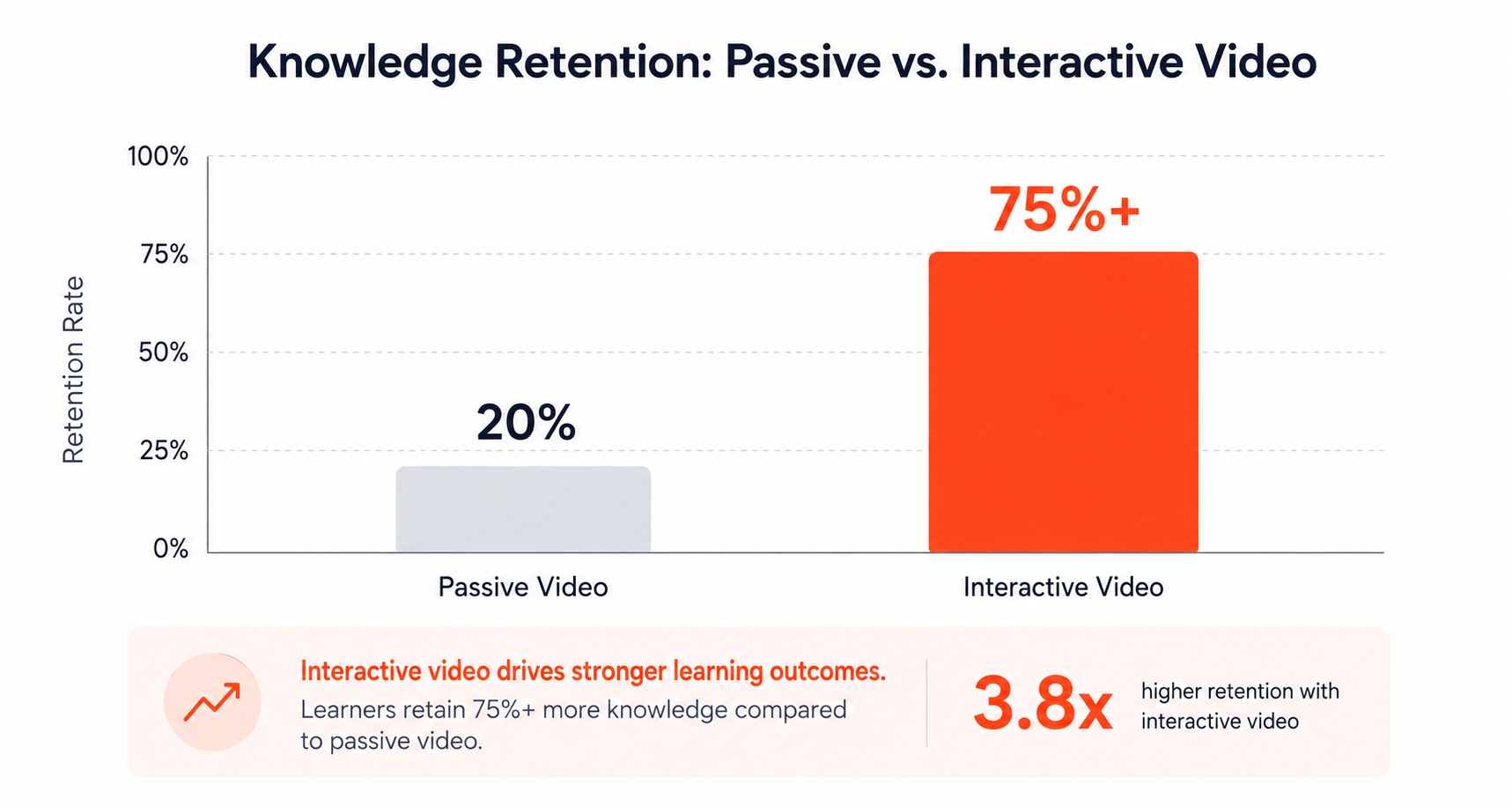
All of it is passive. Viewers press play, zone out, and click the completion checkbox. Nobody learns much. Nobody converts. There's a well-documented cognitive reason for this: why passive video fails to drive knowledge retention comes down to the absence of active processing, not the quality of the video itself.
Here's what most guides won't tell you: you don't need to re-record a single frame to fix this. You can add quizzes, clickable chapter navigation, CTAs, forms, and branching paths to any video you already own, in minutes, not weeks. This guide explains exactly how.
Key Takeaways
- Passive video delivers roughly 20% knowledge retention; interactive video pushes retention past 75%, according to research from the National Training Laboratories.
- Making video interactive does not require re-recording. A transparent overlay layer adds interactivity on top of your existing file.
- Zoom, Teams, and Webex recordings can be imported directly into Clixie AI, which auto-transcribes and generates chapter structure, you add the interactive elements on top.
- Organizations using interactive video report 60–85% improvement in completion rates within 3–6 months (Clixie customer data, 2026).
What Does "Making a Video Interactive" Actually Mean?
Making a video interactive means adding a layer of clickable, trackable elements on top of your existing footage, the original video file is never touched. In 2026, the technology that powers this is called an interactive overlay: a transparent skin that sits above your video player and triggers interactive video elements — quizzes, navigation cards, CTAs, and forms — at specific timestamps.
Think of it like adding sticky notes and signposts to a road without rebuilding the road.
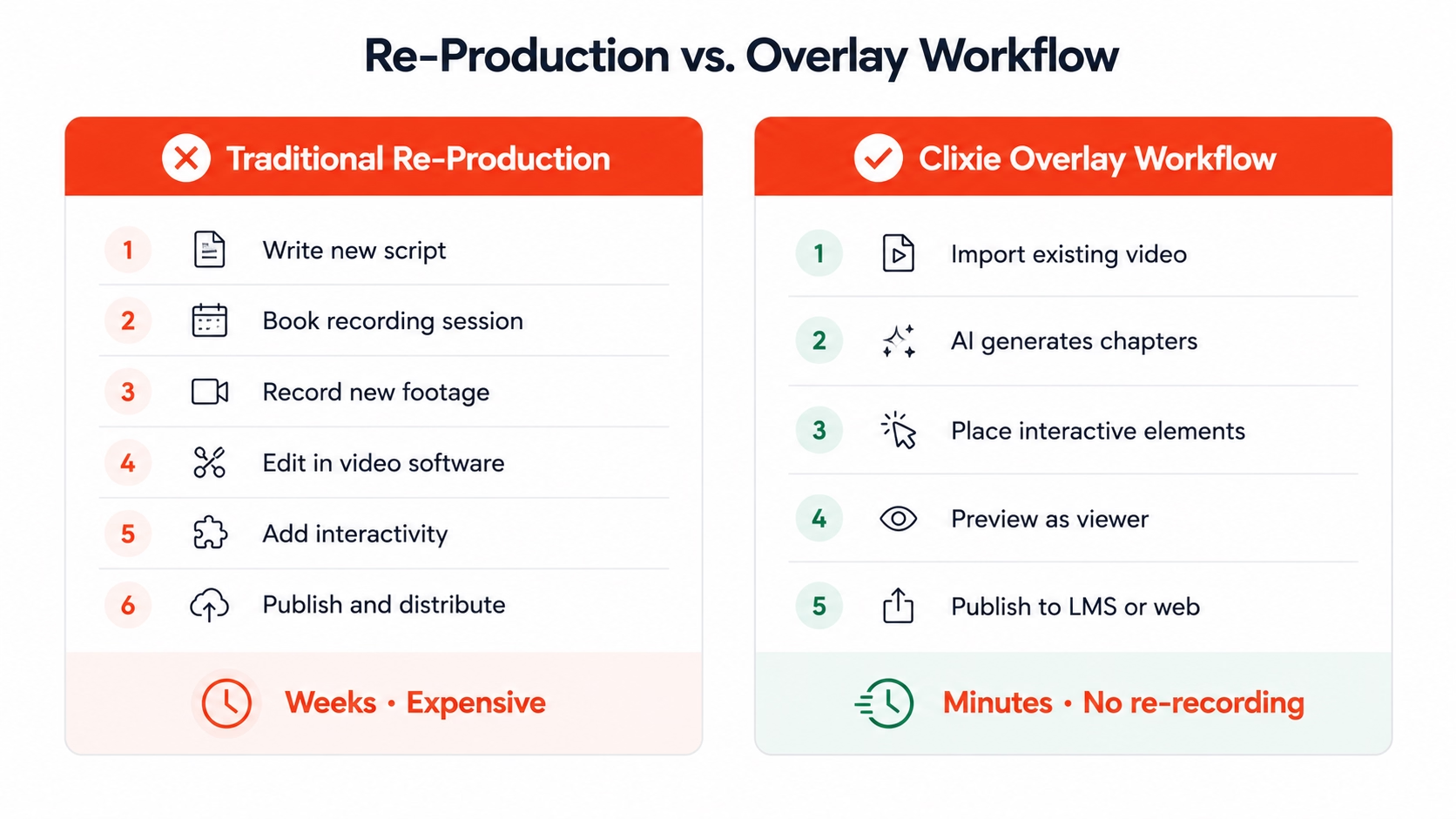
This is the critical distinction most guides obscure. They conflate "interactive video" with "producing a new video." The two are completely separate workflows. Re-recording is a production decision. Adding interactivity is a configuration decision, and it takes a fraction of the time.
The Overlay Approach Explained
Your video plays exactly as it always did. The interactive layer sits above the player and activates at the timestamps you configure. When a viewer reaches the 3-minute mark, a quiz appears. When they hit the product demo section, a CTA button slides in. When training content branches by job role, the platform routes them to the right section automatically.
The video file itself never changes. What changes is the experience around it.
Worth noting: Most teams that ask "how do we make our training more engaging?" assume the answer is better video production. It rarely is. The production quality of a Zoom recording is usually sufficient for learning goals. What's missing is structure, interaction, and accountability, none of which require re-recording.
Which Videos in Your Library Are Worth Making Interactive?
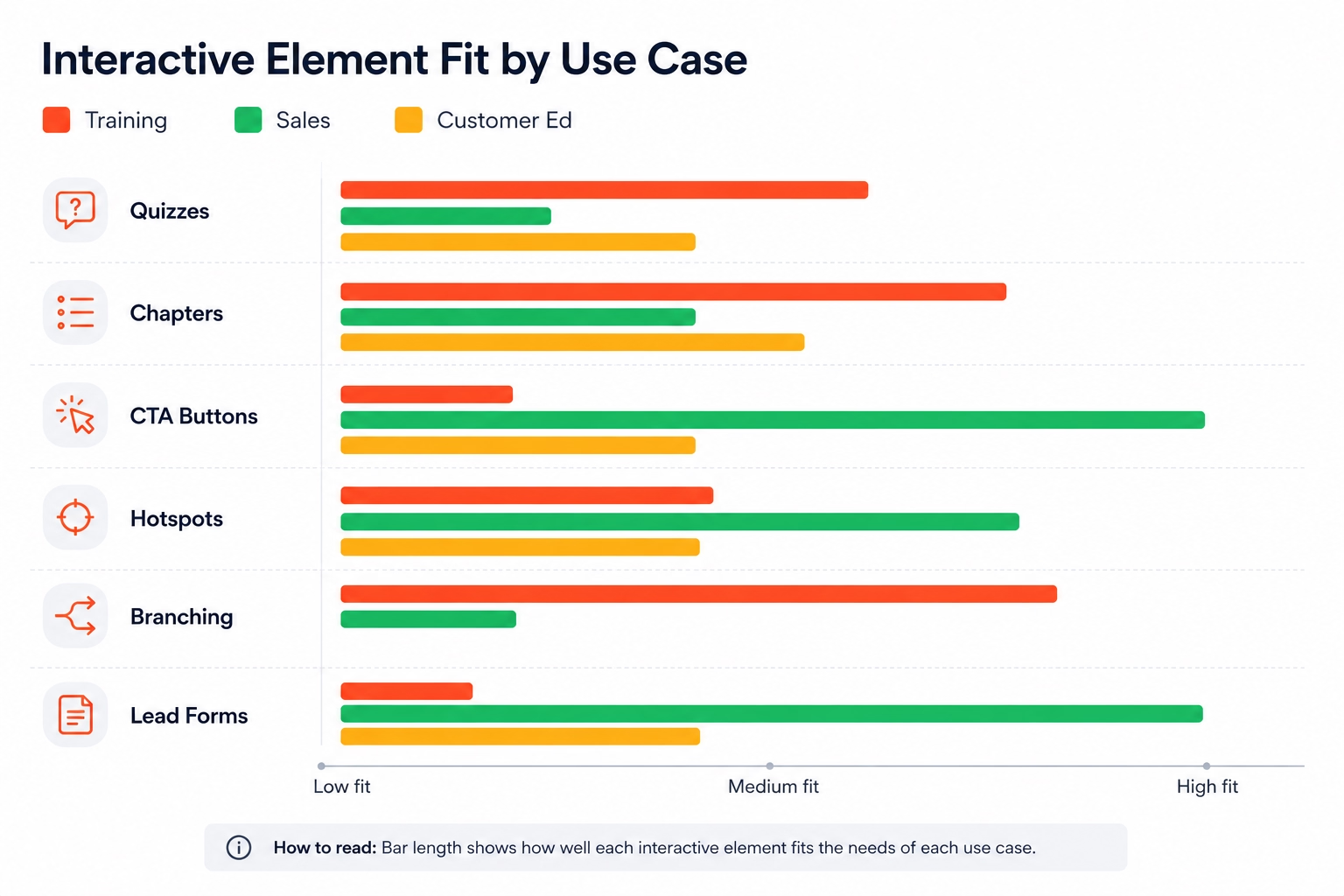
Not every video needs interactivity. The highest-return candidates share one trait: they ask something of the viewer after the watch, a decision, a knowledge check, an action, a purchase. In 2026, research from Synthesia and TechSmith consistently shows that training and sales enablement videos produce the strongest measurable lift from interactivity, while brand storytelling content performs well enough as passive video. For a structured approach to your corporate training video strategy, Clixie's training use-case page covers the full workflow from upload to LMS deployment.
Run this question against every video in your library: Does this video require the viewer to understand, decide, or act? If the answer is yes, it's a candidate.
Tier 1: Highest ROI Candidates
These videos have the most to gain from interactivity, and the business case pays back quickly:
- Onboarding and compliance training: new hires who answer embedded knowledge checks retain procedures at significantly higher rates than those who watch passively. Completion tracking also becomes enforceable.
- Product training videos: sales reps who click through feature hotspots and answer scenario questions during a training video are better prepared for live demos than those who watch a walkthrough once.
- Sales enablement recordings: a product demo video with a mid-video lead form captures qualified intent signals. The prospect who watches 80% of a 12-minute demo and submits a contact form is a fundamentally different lead than one who watched the same video passively.
- Zoom and Teams meeting recordings: most organizations have archives of expert knowledge captured in cloud recordings that nobody revisits. This is the biggest untapped asset in most L&D libraries.
Tier 2: Strong ROI
These benefit from interactivity, though the lift is less dramatic:
- Webinar recordings: chapter navigation and timestamp links dramatically improve on-demand viewership because viewers can jump to the section relevant to them. Engagement drops sharply for long passive replays.
- Customer education content: LMS-hosted or in-app training videos with embedded quizzes reduce support ticket volume when customers actually understand what they watched.
Tier 3: Lower Priority
Brand storytelling, culture videos, and event highlight reels are meant to be watched passively. Adding interactivity to them rarely improves outcomes and can feel intrusive.
The Zoom Recording Opportunity
This deserves its own section because it's the most commonly overlooked asset in mid-to-large organizations.
Most companies record Zoom sessions routinely, internal training calls, product walkthroughs, customer onboarding sessions, SME interviews, town halls. These recordings typically end up in a shared drive or Zoom cloud storage, where they collect dust. Attendance for the live session was reasonable. Replay rates are near zero.
Clixie AI imports cloud recordings directly from Zoom, Cisco Webex, and Microsoft Teams. Once imported, Clixie's AI automatically transcribes the audio and generates searchable chapter suggestions based on the content structure. A 60-minute onboarding call becomes a navigable, interactive knowledge asset in under an hour, without anyone recording a new video. This makes it one of the fastest ways to build a scalable interactive video for employee onboarding library from content your team is already creating.
Clixie is an official Zoom Partner with a dedicated integration, which means the import is native: connect your Zoom account, select the recording, and Clixie handles the rest.
What Interactive Elements Can You Add to an Existing Video?
You can add seven types of interactive elements to an existing video without touching the original file. Each serves a different outcome. In 2026, Clixie customer data shows that knowledge-check quizzes and clickable chapter navigation produce the strongest lift in training completion rates, while CTA buttons and lead capture forms drive the most measurable impact in sales and marketing contexts.
Here's what each element does and when to use it:
1. Quizzes and knowledge checks
Embedded at specific timestamps, these pause the video and require a response before playback continues. Use them at the end of a key concept block, not just at the end of the video. Front-loading the first quiz within 90 seconds establishes the expectation that this is an active experience, not a passive one.
2. Clickable chapter navigation
Viewers jump to the section relevant to their role, experience level, or question. This is especially powerful for long Zoom recordings, a 45-minute all-hands session becomes navigable by topic in minutes.
3. CTA buttons
"Book a demo," "Download the guide," "Start your free trial", triggered at the moment of maximum relevance inside the video, not buried in a description field below it. Timing matters: a CTA placed immediately after a product feature demonstration converts at a meaningfully different rate than one placed at the end of the video.
4. Hotspot overlays
Viewers click on a specific object, person, or area within the video frame to reveal additional information. Useful in product demos, safety training, and technical walkthroughs where you want to attach context to a visual without interrupting playback.
5. Branching paths
At a decision point, the viewer chooses a path and the video routes them accordingly. This works for scenario-based compliance training ("you receive this email, what do you do?") and personalized product tours ("are you in sales or in customer success?").
6. Lead capture and contact forms
Gate content behind a form, or collect contact information mid-video at the moment of peak interest. In sales enablement contexts, this turns a product demo into a qualified lead pipeline.
7. Polls and sentiment checks
Lightweight engagement tools, useful for post-training pulse checks or live webinar replay experiences. They don't gate content, they just invite a response.
What Clixie Calls These Elements
Inside Clixie AI, interactive bookmarks are called Clixie Cards: timestamped overlays that can carry quiz questions, navigation anchors, embedded resources, or form triggers. The naming is worth knowing because Clixie's documentation refers to them consistently, and you'll see the term throughout the interface when you build your first interactive story. For a deeper look at every element type and how each one works mechanically, the complete guide to interactive video element types covers hotspots, branching, forms, polls, and chapters in full detail.
How to Make an Existing Video Interactive with Clixie AI
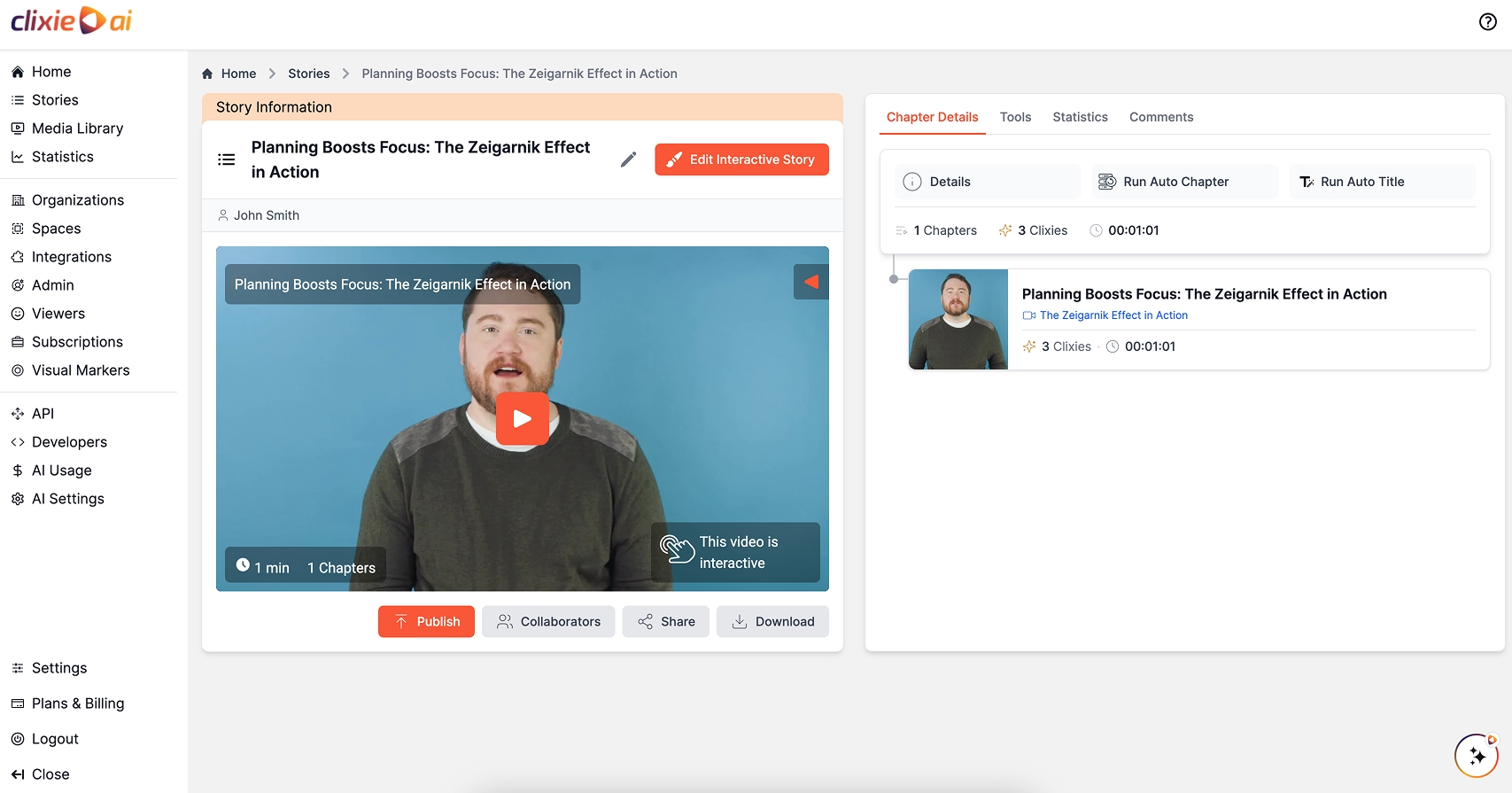
To make an existing video interactive in Clixie AI, you upload or import your video, let the AI generate chapters and a transcript, then place interactive elements at specific timestamps. There is no video editing software, no developer, and no production rework required. In 2026, Clixie customer data shows that most users complete their first interactive video in under 60 minutes, with experienced users finishing in under 15.
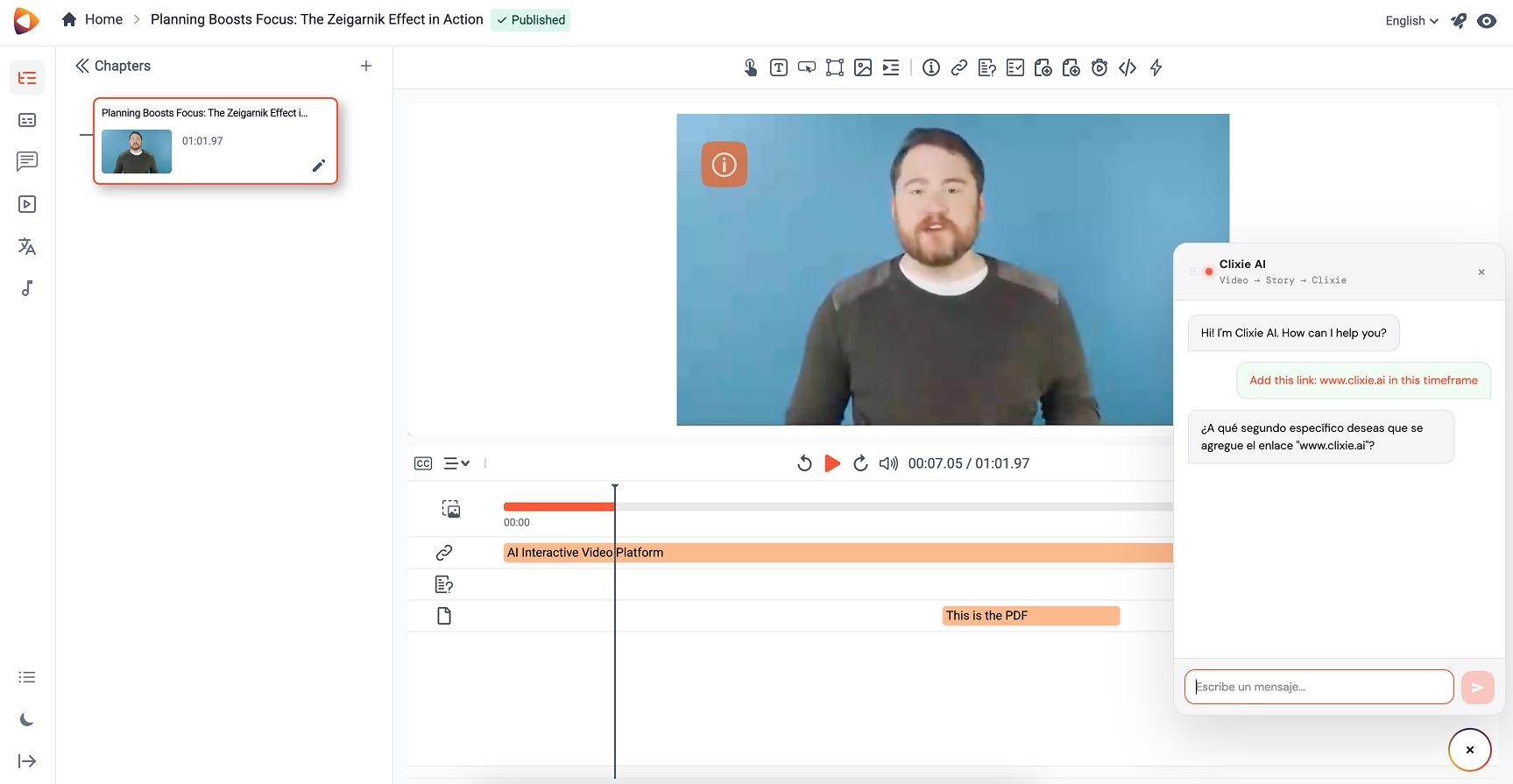
Here's the full workflow, step by step:
Step 1: Import your video
Upload an MP4 directly from your device, or connect your Zoom, Microsoft Teams, or Cisco Webex account to pull cloud recordings without downloading anything. Clixie also accepts YouTube and Vimeo URLs, paste the link and the platform handles the rest.
Step 2: Let AI transcribe and structure the content
Once your video is imported, Clixie's AI automatically transcribes the audio and generates chapter suggestions based on the content's natural structure. Review the suggested chapters, adjust any that don't match your intent, and confirm. This step typically takes 3–5 minutes for a 30-minute recording.
Step 3: Place interactive elements at timestamps
Open the timeline editor. Drag your playhead to the moment where you want an interaction to appear, say, right after a key concept is explained, and click to add an element. Choose from quiz, CTA button, hotspot, navigation card, poll, or lead form. Each element type has a configuration panel; fill in the question text or CTA copy, set the behavior (pause and require a response, or display as a floating overlay), and save.
Step 4: Configure branching or conditional logic (optional)
For training videos with scenario-based learning, set routing rules based on quiz answers. A learner who answers a compliance question incorrectly can be routed to a short remediation clip before continuing. A learner who selects "I'm in customer success" on a branching card gets a different chapter sequence than one who selects "I'm in sales." None of this requires any code.
Step 5: Preview as a viewer
Use Clixie's preview mode to experience the video exactly as a learner or prospect will, interactions fire, branches route, forms appear. Check that each element triggers at the right moment and that the flow makes sense end to end.
Step 6: Publish and distribute
Publish to Clixie's hosted player, embed on any webpage with a standard iframe snippet, or push directly to your LMS. Clixie supports 20+ LMS platforms natively, including Canvas, Moodle, Blackboard, Brightspace, Docebo, and iSpring. SCORM and xAPI export for LMS integration is available for compliance tracking in legacy systems — every learner interaction, quiz score, and completion event flows directly into your LMS gradebook.
Step 7: Track results with analytics
Clixie's analytics dashboard shows play rates, completion rates, per-timestamp interaction rates, quiz scores, drop-off points, and CTA click rates. You can see exactly where viewers stop watching and which interactive elements drive the most engagement, data that lets you iterate and improve over time.
How Long Does This Take?
The single biggest misconception about interactive video is that it's a production project. It isn't. The first time through Clixie's interface, most users complete a fully interactive version of an existing video in 30–60 minutes. Experienced users working on a familiar recording type, say, a weekly Zoom onboarding call, often finish in under 15 minutes.
The math changes the calculus entirely: if you have 40 training videos sitting passively in your LMS, you don't need a 40-video production sprint. You need 40 configuration sessions, most of which take less time than your morning standup. If you're still evaluating which platform to use, the best interactive video tools for corporate training buyer's guide compares Clixie against the leading alternatives on price, LMS compatibility, and feature depth.
Does Making a Video Interactive Require Technical Skills?
No. If you can build a slide deck, you can make your videos interactive. In 2026, the tooling has matured to the point where L&D professionals, enablement managers, and marketing teams work in interactive video platforms daily without writing a single line of code.
The overlay model is key to understanding why. You're not editing video, you're configuring a layer above it. The difference is the same as the difference between redesigning a building's layout and putting up new signage. The underlying asset stays intact. The interactive layer is what changes.
What About Your IT Team?
For most deployments, IT is not involved at the configuration stage at all. Clixie's LMS connectors handle the technical integration with platforms like Canvas, Moodle, and Blackboard through standard SCORM or xAPI packages that any LMS administrator can import in minutes. The full Clixie platform and LMS integration directory lists every supported system, including single sign-on configurations and API options for custom environments.
For organizations with stricter requirements, SSO authentication, data residency, custom domain hosting, Clixie supports those configurations. But for the vast majority of L&D and enablement teams deploying interactive training videos, the process is self-serve from day one.
The most common objection we hear from L&D teams isn't technical at all. It's this: "Our videos are scattered across Zoom, SharePoint, YouTube, and a shared drive, we'd have to find them all first." Clixie's multi-source import addresses exactly this. You don't need to consolidate your video library before you start. You import from wherever the video lives, build the interactive layer in Clixie, and distribute from there. For teams at larger organizations comparing vendor options, the best enterprise interactive video platform comparison for 2026 covers security, SSO, and scale requirements in detail.
If you're comparing platforms before committing, the interactive video platform comparison for L&D and enablement teams article benchmarks Clixie and its main competitors across pricing, LMS support, and feature coverage.
What Results Can You Expect After Making Videos Interactive?
In Clixie customer deployments, teams have reported completion-rate improvements between 60% and 85% in video completion rates and 40% higher overall engagement within 3–6 months, according to Clixie customer data from 2026. Sales teams report 15% higher win rates when interactive product demos replace passive video links in outreach sequences. These aren't hypothetical projections, they're outcomes from real deployments with existing video assets, not new productions.
The results break down by use case:
Training and L&D:
Completion rates improve because interactive videos create accountability loops passive video can't. A learner who must answer a quiz to advance can't click the completion checkbox without demonstrating at least minimal engagement. Time-to-competency for new hires also shortens when learners can navigate directly to their role-specific sections rather than watching a 60-minute recording end to end.
Sales enablement:
A product demo video with a mid-video lead capture form generates qualified intent signals that passive video never could. The prospect who pauses to fill out a form at the 8-minute mark of a 12-minute demo has shown intent that's far more actionable than a "video view" event in your analytics. Sales teams that replace passive video links with Clixie-hosted interactive demos report measurable pipeline impact within one quarter.
Customer education:
Interactive onboarding videos with embedded knowledge checks reduce support ticket volume. When customers actually understand what they just watched, because they answered questions about it, they ask fewer follow-up questions.
What the Engagement Curve Looks Like
Passive video engagement follows a predictable decay curve: viewers start engaged, drop off steadily through the middle, and very few reach the end. Interactive video breaks this curve. Each interaction point creates a re-engagement moment, a quiz that fires at the 4-minute mark pulls viewers who were beginning to drift back into active attention.
Clixie platform data (2026): Across training video deployments on the Clixie platform, videos with at least three interaction points placed in the first half of the runtime show 70%+ completion rates, compared to under 35% for the same organizations' passive video baselines before switching.
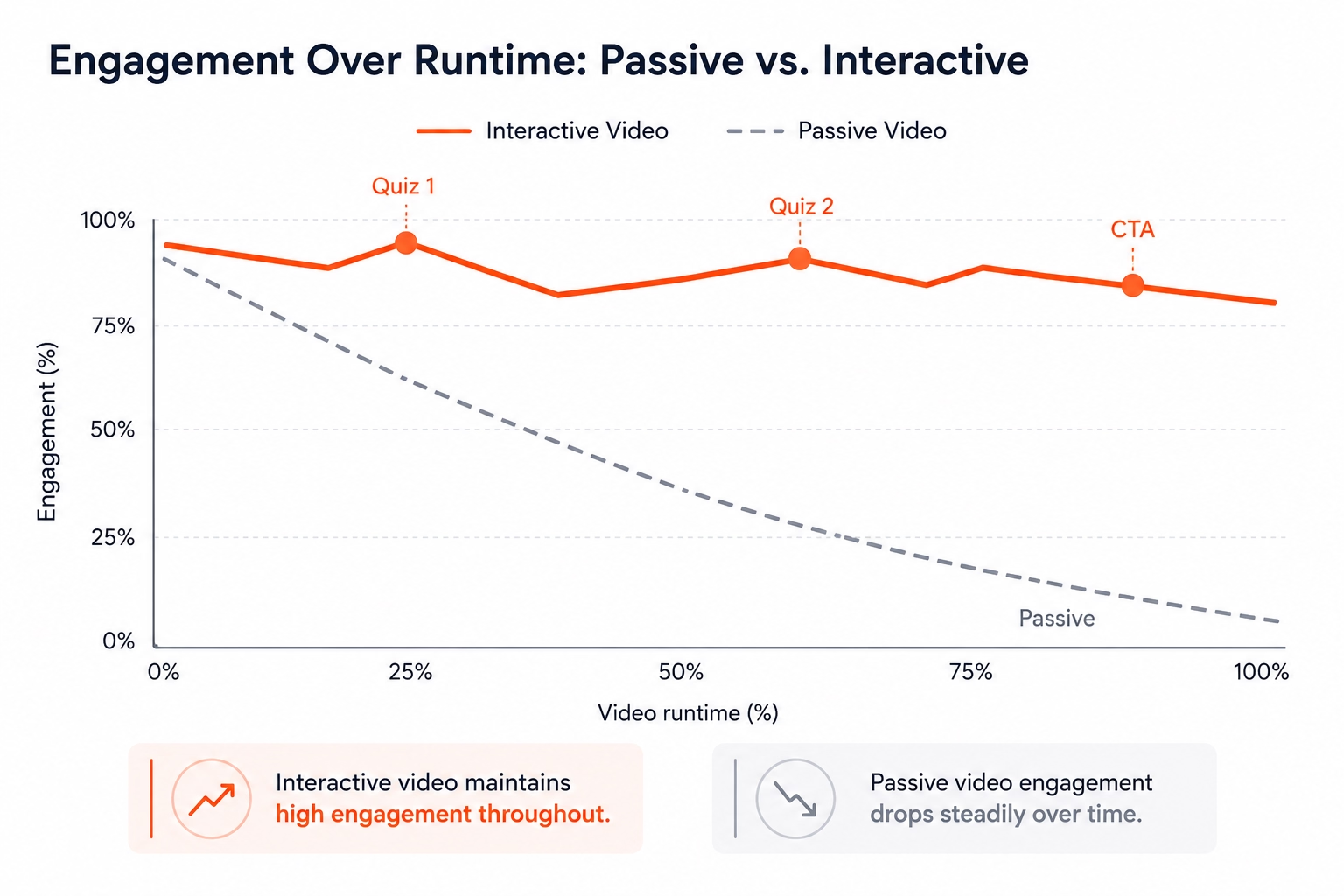
The numbers behind these curves are documented in Clixie's interactive video training ROI data, which includes Google's 3,500% learner engagement increase on Android partner training and Blox University's 42% completion rate lift after switching from passive to interactive video.
Frequently Asked Questions
Can I make a YouTube video interactive without downloading it?
Yes. Platforms like Clixie accept a YouTube URL directly, paste the link and the platform builds the interactive layer on top of the hosted video. The original YouTube file stays where it is; you're configuring an overlay that sits above the player. No download, no re-upload, no copyright complication with your own content.
Do I need to re-record my video to add quizzes or clickable elements?
No. Interactive video platforms use an overlay model: your existing video plays as normal, and the interactive elements appear on top at the timestamps you configure. The original file is never modified. This applies whether your video is a Zoom recording, an MP4 on your server, a YouTube upload, or a Vimeo-hosted file.
Can I make my Zoom or Teams recordings interactive?
Yes. Clixie AI connects directly to Zoom, Cisco Webex, and Microsoft Teams accounts and imports cloud recordings without requiring a manual download. Once imported, Clixie's AI transcribes the audio and generates chapter suggestions automatically. You then add quizzes, navigation cards, CTAs, or forms on top, turning a passive 45-minute meeting recording into a structured, trackable interactive module.
What's the difference between interactive video and a link in the video description?
A link in the description is passive, the viewer has to decide to scroll down, leave the video, and click separately. Interactive video embeds the action inside the viewing experience at a specific moment. A CTA button that appears at the 7-minute mark of a product demo, timed to the feature reveal, captures intent in context. That's a fundamentally different conversion mechanism than a link in a description field.
Do interactive videos work inside an LMS?
Yes. Most interactive video platforms export SCORM or xAPI packages that import into any major LMS. Clixie natively integrates with more than 20 LMS platforms, including Canvas, Moodle, Blackboard, Brightspace, Docebo, and iSpring, no custom development required. For compliance-focused training, SCORM and xAPI tracking in Clixie ensures completion tracking and quiz scores flow directly into your LMS gradebook as legally defensible audit data.
Making Your Video Library Work Harder
Your organization's existing video library is one of its most underused assets. The recordings are already made. The knowledge is already captured. The production budget is already spent.
What's missing is the interactive layer that turns passive watching into active learning, measurable engagement, and trackable outcomes. You don't need a new production budget, a video editor, or a developer. You need a platform that adds interactivity on top of what you already have.
Clixie AI is built specifically for this: import from Zoom, Teams, Webex, YouTube, or your local drive; let AI structure the content; add interactive elements in a no-code editor; distribute to any LMS or webpage; and track results at the interaction level.
The first video you make interactive will change how you think about every video in your library.
Try Clixie AI free — no credit card required. Your first interactive video takes less than an hour.
For teams starting with regulated or high-stakes content, the guide to branching video for compliance training covers how to build scenario-based quiz logic and remediation paths without writing any code.
.png)
.png)