Branching Scenarios in Corporate Video: A Step-by-Step Guide
Build branching scenarios in corporate training videos without re-recording. Get our 5-step design method, 3 real examples, and a Clixie AI walkthrough.



Most corporate training videos tell employees what to do. They show the right way to handle a difficult customer, the correct response to a compliance situation, the proper steps in a sales conversation. Then they ask a multiple-choice question to confirm the employee was paying attention.
The problem is that knowing and deciding are different skills. Branching scenarios fix this by making employees actually choose — and then showing them what happens as a result of that choice, good or bad.
In 2026, eLearning improves knowledge retention by 25–60% over traditional training methods (iSpring Solutions, eLearning Statistics 2026 rather than). Scenario-based approaches sit at the top of that range because they activate decision-making, not just recall. This guide walks through exactly how to build them — including how to add branching to training videos you already have, without re-shooting a frame.
Key Takeaways
- Branching scenarios route learners to different video segments based on their choices, replicating real-world consequences in a zero-risk environment.
- The most effective design sequence starts at the end: define 2–3 outcomes first, then reverse-engineer the decisions that produce them.
- You don't need to re-record footage to add branching — overlay platforms let you branch within existing video.
- 3–5 decision points per scenario is the practical ceiling before complexity starts hurting completion rates (Clixie AI, 2026).
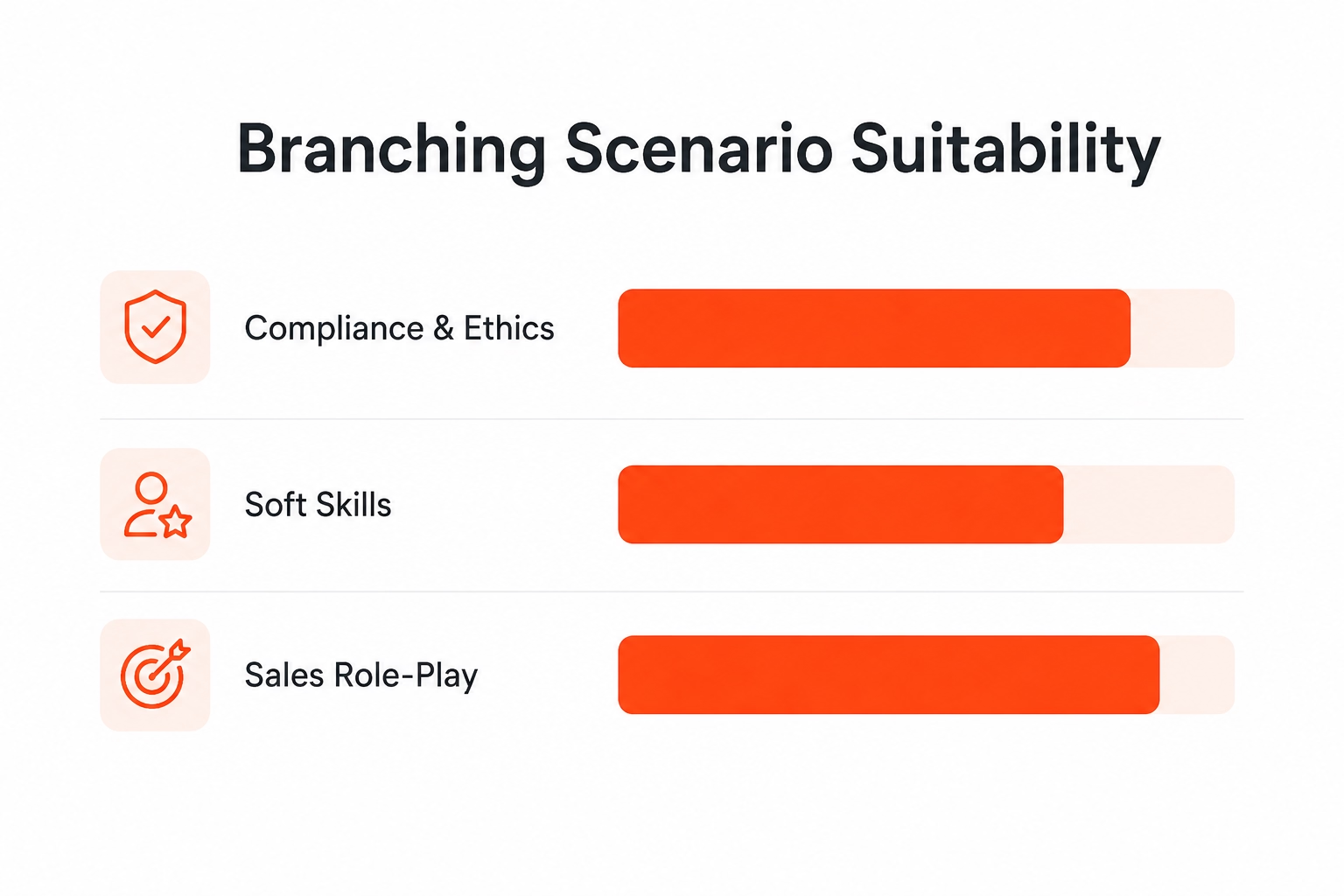
- Compliance, soft skills, and sales role-play consistently deliver the highest ROI from branching video scenarios.
What Is a Branching Scenario in Corporate Video Training?
A branching scenario in corporate video training is a decision-point structure where learner choices determine which video segment plays next — replicating the cause-and-effect logic of real workplace situations. In 2026, 85% of learners report better comprehension when using interactive or multimedia content (iSpring Solutions, eLearning Statistics 2026, and branching is the format that most directly requires active decision-making rather than passive watching.
TL;DR
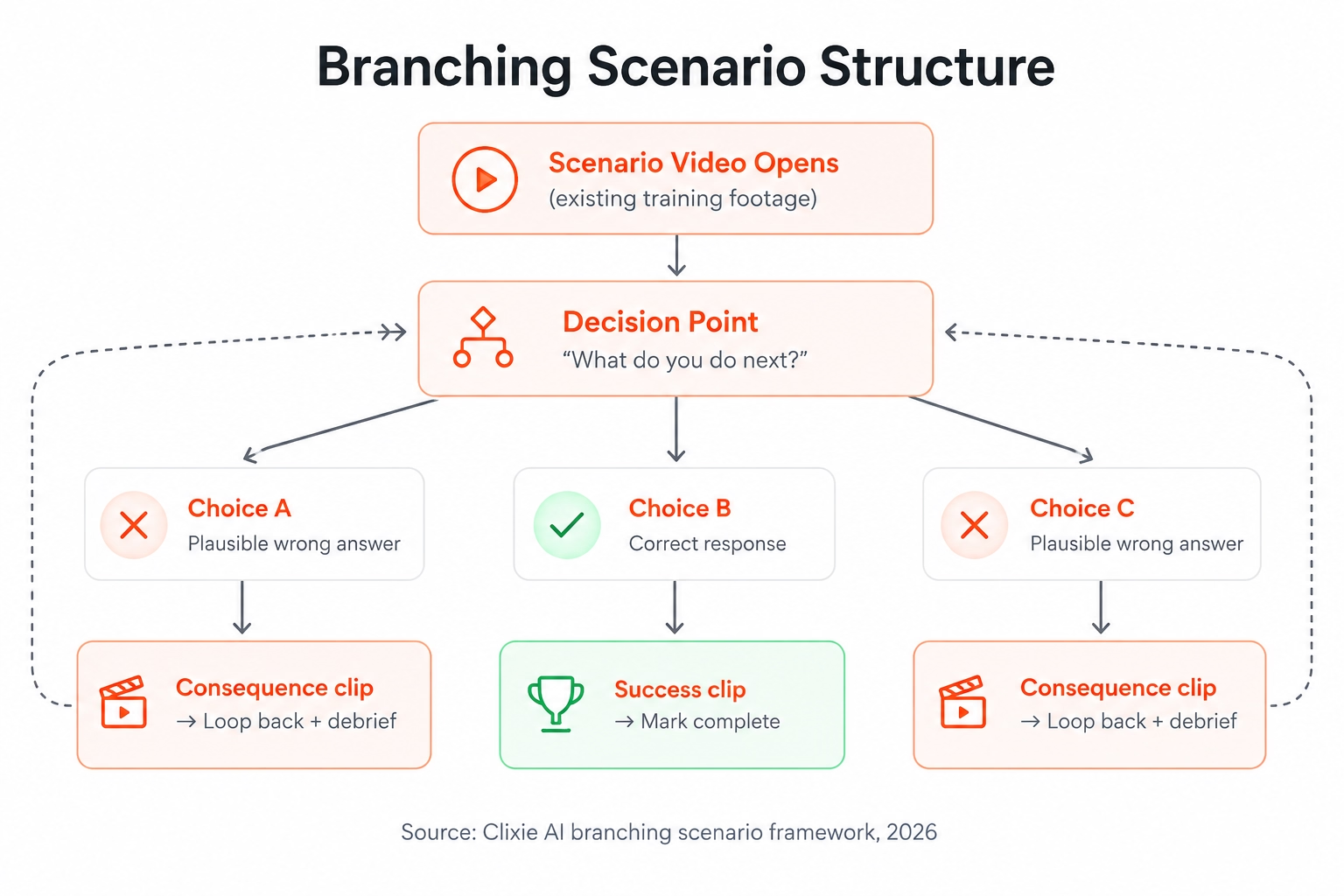
A branching scenario is a decision-point structure where learner choices determine which video segment plays next. Each choice routes to a consequence clip showing the realistic outcome of that decision. Failed paths loop back to the decision point; successful paths advance to completion.
The structure has four components. First, the decision point: a moment in the video where the learner is presented with 2–4 choices. Second, the consequence clips: short video segments (30–90 seconds each) showing the realistic outcome of each choice. Third, the loop-back: a failed path returns the learner to the decision point with a brief debrief rather than dead-ending. Fourth, the endpoint: a successful path advances to the next module or marks the scenario complete.
None of this is abstract. When a new manager watches a training video about handling a harassment complaint, the branching scenario pauses the video at the moment of decision and asks: "What do you do first?" Three choices appear. Each routes to a different clip. The manager who talks to the accused colleague before HR sees the legal exposure that creates. The one who escalates immediately sees the conversation go smoothly.
According to the Ebbinghaus forgetting curve, people forget 50% of new information within 20 minutes without active reinforcement (eLearning Industry, Microlearning Statistics, 2025). The repeated decision-making inside a branching scenario is one of the most effective counters to that forgetting curve — because learners aren't just watching. They're choosing, and then watching what their choice produces. For more on why passive video training fails and what replaces it, see why employees forget training videos.
Linear vs Branching: When Does Branching Actually Add Value?
Not every training topic benefits from branching. The decision comes down to whether context shapes the right answer.
The practical rule: if there's only one right answer and no meaningful consequence to error, branching adds complexity without benefit. If context changes the right answer, branching is the right format.
What Types of Corporate Training Benefit Most from Branching Scenarios?
Three training categories consistently produce the highest ROI from branching: compliance and ethics, soft skills and communication, and sales role-play. These are domains where context determines the right action — and where getting it wrong in real life carries real cost. By 2025, incorporating LMS features like gamification and learning scenarios increased employee engagement by up to 92% (Teachfloor, eLearning Statistics 2025), and branching video scenarios are among the most effective implementations of that principle.
Compliance and ethics training works well with branching because the stakes of the wrong choice are concrete and defensible in scenario form. An employee who chooses incorrectly doesn't see a red X and a score. They watch the consequence — the HR investigation that follows, the performance review conversation that results, the reputational cost to the team. That specificity is what makes the training stick. It's also what organizations are investing in: 72% of organizations are making moderate-to-heavy investments to improve compliance training, according to the Brandon Hall Group HCM Outlook 2024 Study — and learner-centered, scenario-based approaches are the design shift driving that spend.
Soft skills — conflict resolution, customer empathy, difficult conversations — are notoriously hard to teach through lecture. The right response depends on reading tone and context. Branching replicates the ambiguity of real interactions. A customer service rep practicing an escalating complaint call learns more from watching their deflection response make the customer angrier than from reading a best-practice list. In 2024, the global soft skills training market was valued at $33.39 billion and is projected to reach $92.59 billion by 2033 (IMARC Group, Soft Skills Training Market — a growth rate driven precisely by the recognition that lecture-based approaches don't transfer to behavior.
Sales role-play and objection handling maps directly to branching's structure. A prospect raises a price objection. The rep has three paths: defend value, ask a discovery question, or offer a discount. Each routes to a realistic next step in the conversation. Over dozens of repetitions, the pattern becomes instinct. For teams building video-based sales training at scale, see our roundup of best interactive sales enablement platforms in 2026.
Onboarding for judgment-heavy roles — customer-facing positions, compliance-sensitive departments, client services — is the fourth strong use case. New hires need to practice the decision logic of their role before they're live. Branching gives them reps without real-world risk.
What branching is not right for: pure procedural content (how to submit an expense report), basic knowledge recall, or fixed-sequence orientation content. Use linear video with knowledge check quizzes for those. If you're still evaluating which interactive video tool fits your L&D stack, see our guide to the best interactive video tools for corporate training.
How Do You Design a Branching Scenario? Start at the End.
The most common mistake in branching scenario design is starting at the beginning — scripting the opening scene before knowing where each path leads. The correct sequence is to define your outcomes first, then reverse-engineer the decisions that produce them. This "start at the end" method is recommended by instructional design practitioners and documented in eLearning Industry's branching scenario guides precisely because it prevents the exponential branching explosion that makes most scenarios unmanageable.
The "start at the end" method also exposes whether your scenario has a meaningful instructional purpose before you invest in production — if you can't articulate what "good", "acceptable", and "poor" outcomes look like, the scenario isn't ready to build.
- Step 1 — Define 2–3 outcomes. Name them concretely. Not "pass" or "fail" — but "Customer purchases the upgraded plan," "Customer leaves undecided and doesn't respond to follow-up," and "Customer escalates to a complaint." Make the consequences specific enough that a learner watching each outcome clip understands exactly what went wrong and why.
- Step 2 — Identify 1–2 key decisions. What single choice most determines which outcome is reached? That's your primary branch point. A scenario with one well-designed decision point teaches more than one with five poorly designed ones.
- Step 3 — Write the decision options. Give learners 2–4 choices per decision point. The wrong answers must be plausible — not obviously bad. If every learner picks the correct path on the first try, the scenario isn't doing its job. Plausible wrong answers are what create the learning moment.
- Step 4 — Map the consequence clips. Each choice routes to a 30–90 second clip showing what happens next. The clips don't need high production value. They need specificity: the follow-up call that doesn't come, the manager conversation that results, the customer who posts a review.
- Step 5 — Design the loop-back. Failed paths should not dead-end. Return the learner to the decision point — ideally with a one-sentence debrief that reframes the situation without giving away the answer. "That approach puts the organization in a difficult legal position. What would you try instead?"
Clixie AI Expert Tip: Do not oversupply your consequence clips. Based on our experience working with large company L&D programs, we have seen how “raw” consequence clips—such as those taken from a video recording of a Zoom reprimand from a supervisor or a straightforward webcam clip—are actually more emotionally resonant than highly produced clips filmed in a studio setting.
How Many Decision Points Is Too Many?
Clixie AI analytics data shows that branching scenarios with more than 5 decision points see completion rate drop-off approaching that of long-form linear video — the cognitive load of tracking "where am I in this scenario?" becomes the primary experience rather than the learning itself.
Three to five decision points is the practical ceiling for most corporate branching scenarios. Each additional branch point roughly doubles the number of consequence clips you need to produce and maintain. A scenario with 8 decision points requires up to 256 possible paths in a fully branched tree — which is neither producible nor maintainable.
The better approach for complex topics: chain two or three shorter scenarios rather than building one with many branches. A two-scenario sequence covering the opening conversation and the follow-up call is more learnable than a single scenario trying to do everything at once.
Clixie AI Expert Tip: Don’t Fall for “Branching Fatigue.” From analyzing millions of interactions through the Clixie AI platform, we’ve seen that there’s always a steep drop in completion rates when you exceed five branching points in your scenario. When you’re delivering a complex process involving a 10-point sales process, don’t create a huge branching tree but instead split up into three mini-scenes (such as The Opening, The Objection, and The Close).
Step-by-Step: How to Add Branching to an Existing Video with Clixie AI
Adding branching to an existing corporate video in Clixie AI takes five steps. No re-recording, no authoring tool license, no developer required. Based on customer workflow data, the average time to add branching to a 10-minute existing training video is 45–90 minutes using an overlay platform, compared to 4–8 hours to rebuild equivalent content inside an authoring tool like Articulate or iSpring.
Clixie AI customer workflow benchmark: median setup time for a 2-branch-point scenario on a 10-minute existing training video is 52 minutes, including consequence clip upload and loop-back configuration.
Step 1 — Audit your existing video for natural decision points
Watch the video with a notepad. Mark every moment where a real employee would face a judgment call — a customer objection, a compliance question, a team conflict moment. Those are your branch candidates. Pick 2–3 for a first scenario. Trying to branch every possible decision in your first build is how scenarios become unmanageable.
Step 2 — Shoot or source your consequence clips
You need one short clip per branch path — 30–90 seconds showing what happens next after each choice. These clips don't need production polish. Webcam recordings, screen recordings, or existing B-roll footage all work. What they do need: specificity. "That approach resulted in an HR investigation" lands harder than a vague "things went badly."
If consequence clips don't exist in your library, script and record them. At 30–90 seconds each, a 3-branch scenario requires roughly 5–10 minutes of total new footage.
Step 3 — Import your videos into Clixie AI
Paste the URL of your main training video — YouTube, Vimeo, Wistia, Loom, or a hosted MP4 — into Clixie AI's importer. Upload your consequence clips the same way. The original video file stays untouched.
Step 4 — Set branch triggers on the timeline
Scrub to the decision point timestamp in the main video. Add a Branching Decision element — this pauses playback and presents the learner with 2–4 choice buttons. Write the choice labels specifically and realistically: "Escalate to HR immediately," "Speak privately with the accused colleague first," and "Ask the complainant for written documentation" — not "Good response" and "Bad response." Vague labels break the immersion and telegraph the correct answer. Link each choice button to the appropriate consequence clip.
.avif)
Step 5 — Set the loop-back and endpoint
On failed-path consequence clips: add a "Try again" button at the end. This returns the learner to the decision point — ideally with a one-sentence debrief surfaced as an overlay before the video rewinds. On success-path clips: add a "Continue" button that advances to the next section or triggers SCORM completion.
.avif)
If you need SCORM tracking on your branching scenario — completion status, path data, and quiz scores flowing to your LMS — see our guide on adding SCORM interactivity to existing training videos.
Do You Need to Re-Shoot Footage to Build a Branching Scenario?
Not necessarily. If your existing video already contains reaction shots, follow-up scenes, or multiple recorded takes showing different responses, those clips can be repurposed directly as consequence segments. Many corporate training libraries are full of unused footage that works perfectly for branching outcomes.
What you almost always need to produce new: the 2–3 short consequence clips for each decision path, if they don't already exist. That's typically 5–10 minutes of footage for a full scenario. At 30–90 seconds each, the production lift is significantly lower than re-recording the main training video.
Three Branching Scenario Examples from Corporate Training
The best way to understand branching video scenarios is through concrete examples. The three below represent the highest-ROI training categories. Each uses existing video footage with branches added via an overlay platform — no re-recording of the core content. Decision-making scenarios are consistently cited as producing stronger knowledge transfer to actual on-the-job behavior than lecture-format equivalents (eLearning Industry, Top Scenario-Based Learning Providers, 2025). For a broader collection of what these scenarios look like in practice, see top 10 interactive video examples for corporate training.
Compliance: The Harassment Complaint
A manager receives a complaint from a team member about a colleague's behavior in a team chat. The training video plays through the complaint being raised. At the decision point, the video pauses: "How do you respond first?"
Three choices appear: escalate to HR immediately and document the conversation, speak privately with the accused colleague before taking further steps, or ask the complainant to put the complaint in writing and come back with more evidence.
The HR escalation path plays the correct-outcome clip — a brief, professional HR meeting, documentation filed, no further escalation. The other two paths each route to consequence clips showing the legal exposure and cultural damage of mishandling the situation, then loop back to the decision point with a debrief.
Customer Service: The Escalating Billing Complaint
A customer calls frustrated about a charge they don't recognize. The video plays through the opening of the call. Decision point: "What do you say next?"
Three choices: lead with empathy and confirm you'll investigate the charge, ask the customer to check their account settings first, or immediately offer a refund before verifying the account.
The empathy-first path de-escalates the call and resolves the issue. The "check your settings" path makes the customer angrier and routes to a supervisor escalation clip. The premature refund path routes to a consequence clip about unauthorized account adjustments — and a follow-up conversation with a manager.
Sales: The Price Objection
A prospect on a demo call says: "Your pricing is higher than what competitors quoted us." Decision point: "How do you respond?"
Three choices: defend your pricing by listing product features, ask a discovery question ("What's driving the budget number — is it a hard ceiling or a comparison point?"), or offer a discount to keep the conversation going.
The discovery question path advances the deal — the prospect clarifies their real concern, the rep addresses it, and the conversation moves to next steps. The feature defense path loses the call. The discount path closes at reduced margin, with a debrief clip on the long-term cost of anchoring on price rather than value.
For a deeper dive into building compliance-specific branching scenarios with no-code tools, see our guide on adding interactive quizzes and branching paths to compliance training videos.
How Do You Measure Whether a Branching Scenario Is Working?
A branching scenario is only as useful as the data it generates. Organizations using blended eLearning approaches — of which scenario-based learning is a core component — report a 28% increase in overall knowledge retention compared to lecture-only training (Electroiq, eLearning Statistics 2025, 2025). But aggregate retention numbers don't tell you whether your specific scenario is working. Three metrics do.
Path distribution tells you whether your scenario is calibrated correctly. If 90%+ of learners pick the same branch on their first attempt, your wrong answers aren't plausible enough — the scenario is too easy. Healthy path distribution looks more like 50–60% choosing correctly on the first attempt, with the rest distributing across plausible-but-wrong options.
Drop-off by branch identifies broken consequence clips. A failed-path clip with abnormally high drop-off means learners are abandoning rather than looping back. The clip is likely too long, too punishing, or unclear about how to try again. Trim it, add a clearer loop-back button, or soften the consequence framing.
Pre/post knowledge check is the cleanest measure of actual learning. Run a 5-question assessment before and after the scenario. A 15%+ score improvement confirms the scenario is transferring knowledge, not just generating activity.
Clixie AI's analytics layer surfaces path-level drop-off and choice frequency data without requiring a full LMS integration. For teams that need SCORM-based completion reporting — scores and path data flowing into Cornerstone, Docebo, or SAP SuccessFactors — the branching scenario can be exported as a SCORM 1.2 package. Full walkthrough in the SCORM and xAPI analytics guide.
Clixie AI Expert Tip: Zero clicks on a wrong answer is an instructional red flag. When reviewing your Clixie AI analytics dashboard, look out for "ghost paths" (options that nobody chooses). If a choice gets 0% engagement across 100 learners, it’s too obviously wrong and isn't testing judgment. Rewrite that specific button label to make it a more plausible distractor.
Frequently Asked Questions
What is a branching scenario in corporate training?
A branching scenario is a structured training activity where learners choose between options at decision points, and each choice routes them to a different video segment or outcome. It replicates real workplace consequences in a zero-risk environment. Compliance, customer service, and sales role-play deliver the highest ROI because context genuinely determines the right response in each domain.
How many decision points should a branching scenario have?
Three to five decision points is the practical ceiling for most corporate training scenarios. Each additional branch doubles the content you need to produce and maintain. For complex topics, chaining two or three shorter scenarios is more effective — and more completable — than building one scenario with eight or more branches.
Do I need to re-record my training videos to add branching?
No. Interactive video overlay platforms like Clixie AI let you add branching decision points to existing video footage without touching the original file. You set a trigger at the decision timestamp, connect each choice to a consequence clip, and the platform handles the routing logic. The only new footage required is the short consequence clips — typically 30–90 seconds each.
What's the difference between a branching scenario and a quiz?
A quiz tests recall — true or false, multiple choice, right or wrong. A branching scenario tests judgment — the learner chooses an action and then watches a realistic consequence play out. Branching is harder to shortcut and produces stronger transfer to on-the-job behavior because it mimics the structure of real decisions: context, choice, consequence.
Which training topics work best with branching scenarios?
Compliance and ethics, soft skills (conflict resolution, difficult conversations, customer empathy), and sales objection handling deliver the highest ROI. Procedural training — content with one correct sequence of steps and no meaningful judgment involved — is better served by linear video with embedded knowledge check quizzes.
What to Do Next
Branching scenarios work because they force a decision, not just a response. In corporate training, the gap between knowing the right answer and making the right call under pressure is exactly where most skill development happens — and linear video can't bridge it.
The build sequence is straightforward: define your outcomes first, identify the one or two decisions that most determine those outcomes, write plausible wrong answers, shoot short consequence clips, and use an overlay platform to add the branching logic to footage you already have.
For teams building branching scenarios that need full SCORM completion tracking and LMS reporting, start with the how to add SCORM interactivity to existing training videos guide. For a broader view of how to activate your existing video library — branching, quizzes, hotspots, and more — see our complete guide on how to convert existing training materials into interactive videos.
.png)
.png)