Applied Learning in the Age of AI: From Knowing to Doing
Students who practiced with unguarded GPT-4 scored 17% lower once AI was removed. Why applied learning in the age of AI now needs practice and feedback.
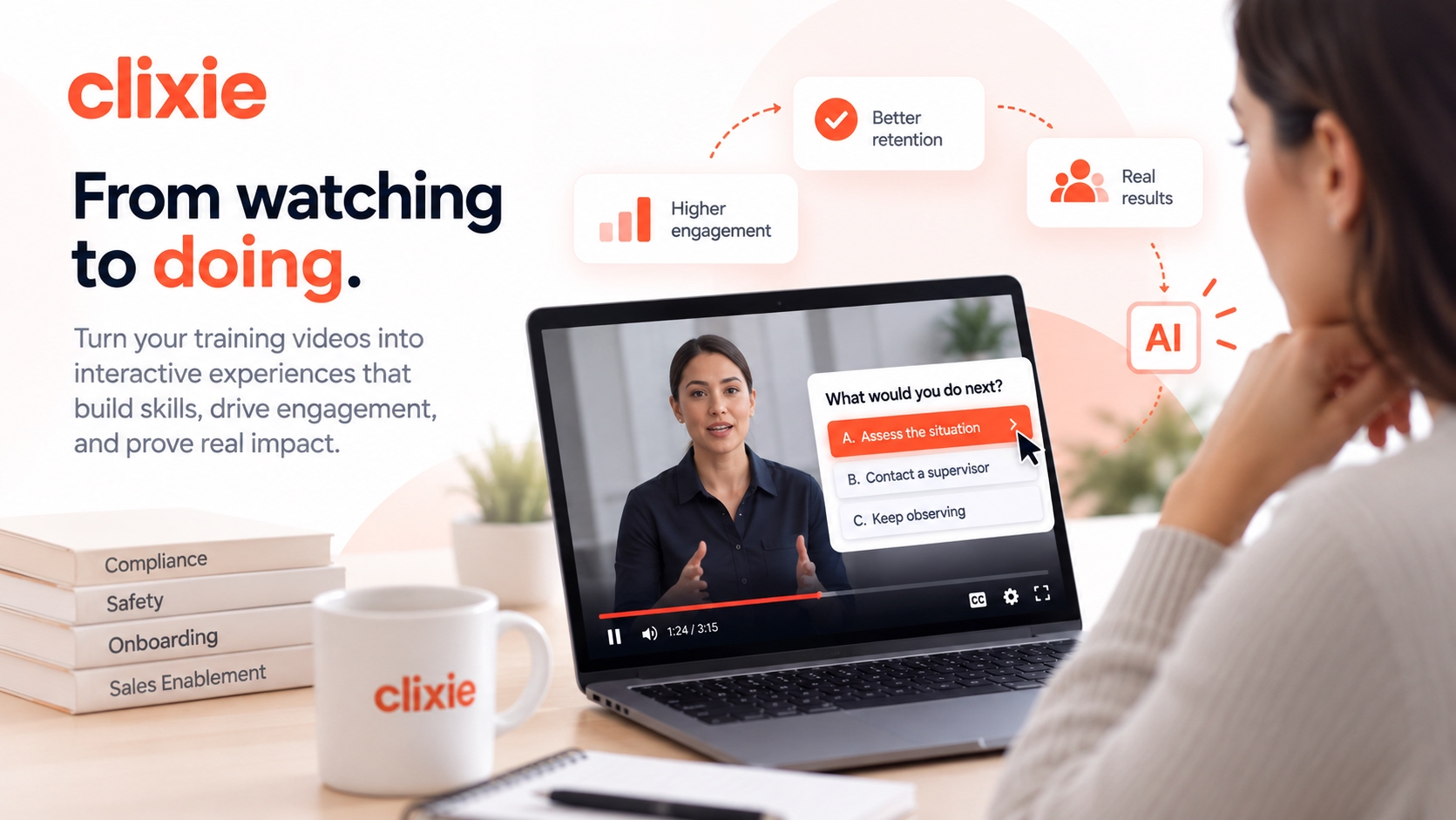


AI can already explain a compliance policy, summarize a product manual, draft a sales email, and write working code. So what's left for training to do? Quite a lot, actually. The value of learning is shifting from knowing things to doing things with knowledge.
That doesn't make knowledge optional. It makes content delivery, on its own, a weaker bet than it used to be. This article lays out a working model for applied learning in the age of AI: Knowledge → Practice → Feedback → Reflection → Application. It's built for L&D teams who need people ready to act, not just able to pass a quiz. For background on the format behind much of this approach, see our complete guide to interactive video elements.
Key Takeaways
- In 2025, a PNAS field study found students who practiced with unguarded GPT-4 scored 17% lower once AI was removed (Bastani et al.).
- Foundational knowledge still matters. It's how people judge AI output.
- Replace content-heavy courses with practice, feedback, and reflection.
- Measure decisions, not completions.
Why Is AI Making Content Delivery Less Valuable on Its Own?
When a clear explanation is free and instant, a course that only explains things has lost its edge. Employees now take their questions straight to an AI tool, and BCG described the resulting shift as an "existential moment" for L&D (BCG, AI Is Moving Corporate Learning Out of the Classroom and Into Workflows, June 2026).
Think about what today's AI tools do well. They retrieve information, explain concepts, summarize long documents, write first drafts, generate code, and solve structured problems. That's a big share of what traditional e-learning was built to deliver.
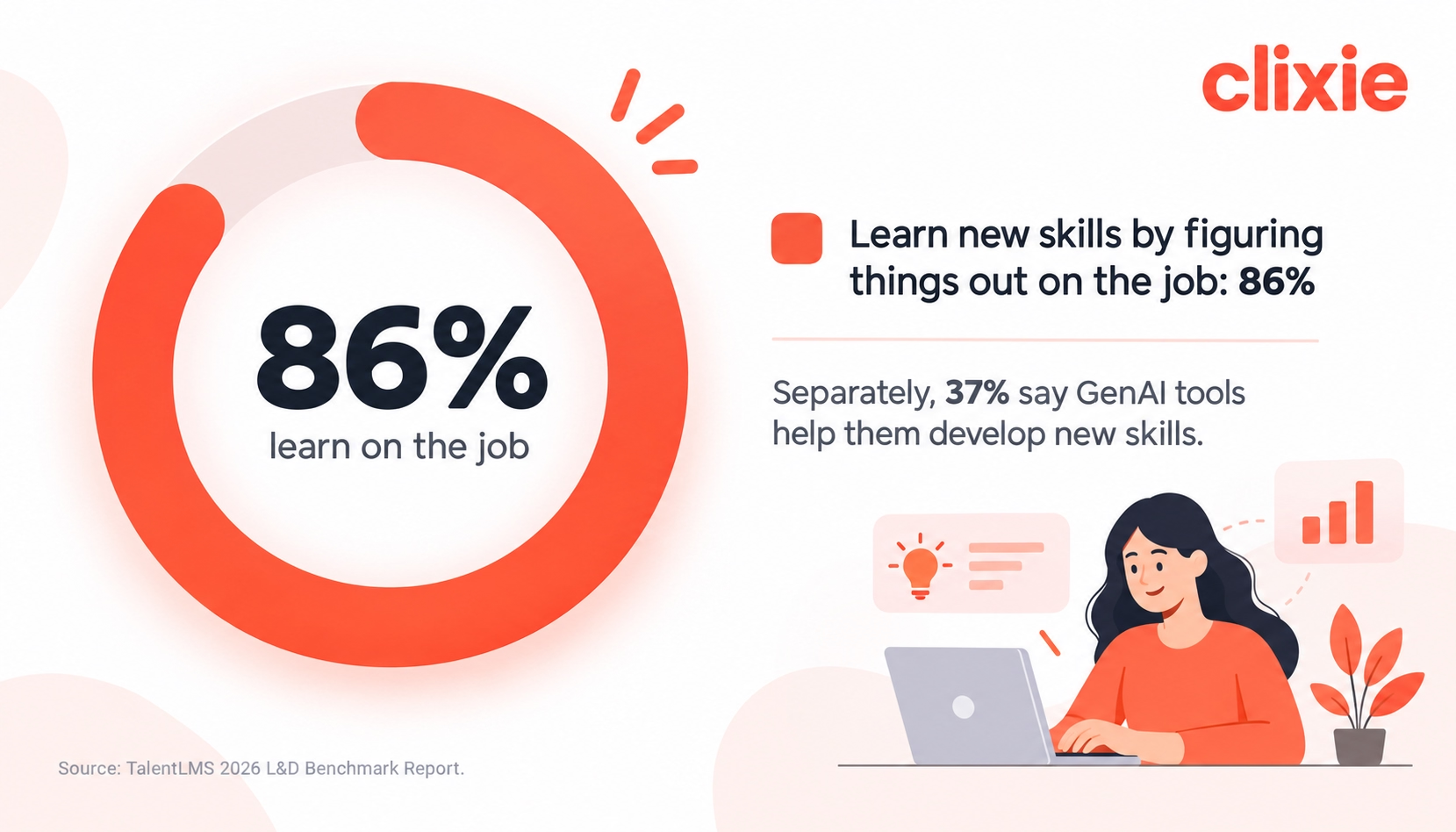
Employees have noticed. The TalentLMS 2026 L&D Benchmark Report found that 86% of employees pick up new skills or knowledge by figuring things out on the job, and 37% say generative AI tools help them develop new skills. Formal courses now compete with on-the-job problem solving and AI tools as sources of learning.
BCG's analysis goes further. As content creation becomes a commodity, the value of an L&D team shifts toward AI fluency, solution design, and business partnership. In other words, the thing that used to be expensive (producing content) is getting cheap. The thing that's still hard (building capability) is where the value moved.
For L&D teams, that means formal training no longer wins by explaining things. It wins by giving people something they can't get from a chatbot: structured practice with feedback.
The real risk isn't that AI replaces training. It's that training built purely as information transfer stops being worth anyone's time. For the practical side of rolling out AI tools in L&D, see our guide on how to use AI in corporate learning.
Does Foundational Knowledge Still Matter If AI Can Answer Anything?
Yes. In 2026, the OECD Digital Education Outlook 2026 recommended that learners build core knowledge and skills first without GenAI, then with educational GenAI, and only after that with general-purpose tools. The reason is practical. You can't judge whether an AI answer is reasonable in a field you don't understand.
Knowledge is the filter for AI output. A compliance analyst reading an AI summary of a new regulation only spots the missing exception if they know the exception exists. A sales rep only catches a wrong pricing claim if they know the pricing. Without that base, AI output looks equally convincing whether it's right or wrong. So who's checking the checker?
Does this pattern appear at work? There is evidence pointing in the same direction. In 2025, Microsoft Research and Carnegie Mellon surveyed 319 knowledge workers, who described 936 real AI-assisted tasks (Lee et al., The Impact of Generative AI on Critical Thinking, CHI 2025). Higher confidence in GenAI was linked to less critical thinking. Higher confidence in one's own ability was linked to more.
That second finding matters for L&D, but it needs careful interpretation. The study measured task-specific self-confidence, not objectively tested expertise. Separate research points to a related "expertise duality": AI can help novices perform better on some tasks, while people with greater domain expertise are better positioned to identify weak or incorrect AI output (The extended hollowed mind: why foundational knowledge is indispensable in the age of AI, PMC, 2025). A 2025 preprint by Barbara Oakley, Terrence Sejnowski, and colleagues makes a similar case in The Memory Paradox, arguing that internal knowledge remains important for evaluating and directing AI output.
The performance vs. learning trap
In 2025, a PNAS field experiment with nearly 1,000 high school math students tested what happens when AI does the thinking (Bastani et al., Generative AI without guardrails can harm learning). Students using a standard GPT-4 interface scored 48% higher on practice problems. When access was removed, they scored 17% lower on the exam than students who never had AI.
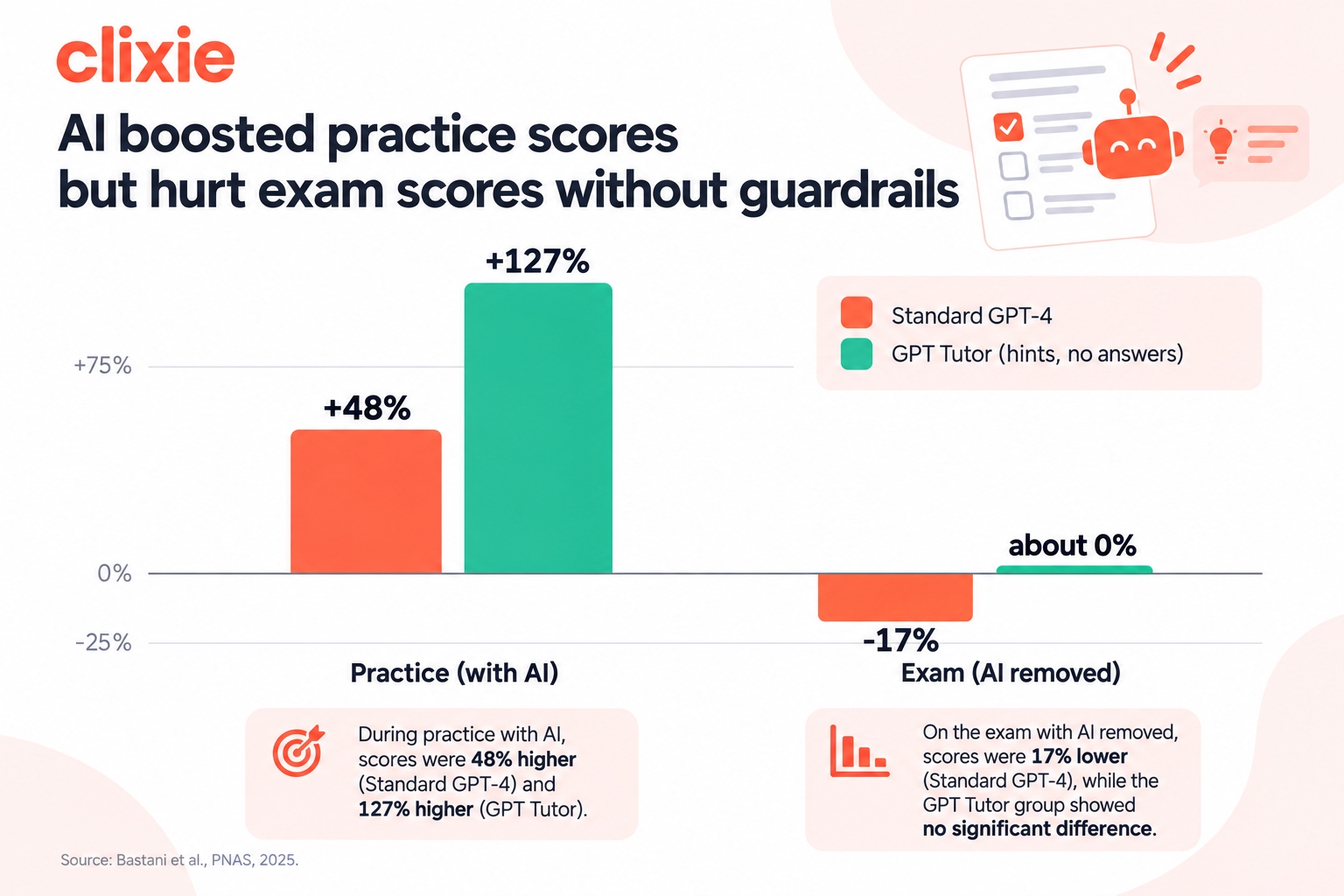
There's a second, more hopeful result. A tutor version designed to give teacher-written hints instead of answers lifted practice scores by 127% and essentially erased the exam penalty. It didn't produce a gain, but it stopped the damage. Design, not access, made the difference.
Now picture the workplace version. An employee with a copilot drafts a flawless client response or policy summary. They look competent. But could they do it without the tool, or spot the error when the tool gets it wrong? The OECD Digital Education Outlook 2026 describes a related risk as "metacognitive laziness": when learners offload cognitive work to general-purpose AI, task performance can improve without producing equivalent learning (OECD Digital Education Outlook 2026).
The lesson for corporate training is direct. AI that hands over answers can raise performance while quietly lowering capability, and nobody notices until the tool isn't there or gets it wrong.
What Does the Applied Learning Model Look Like?
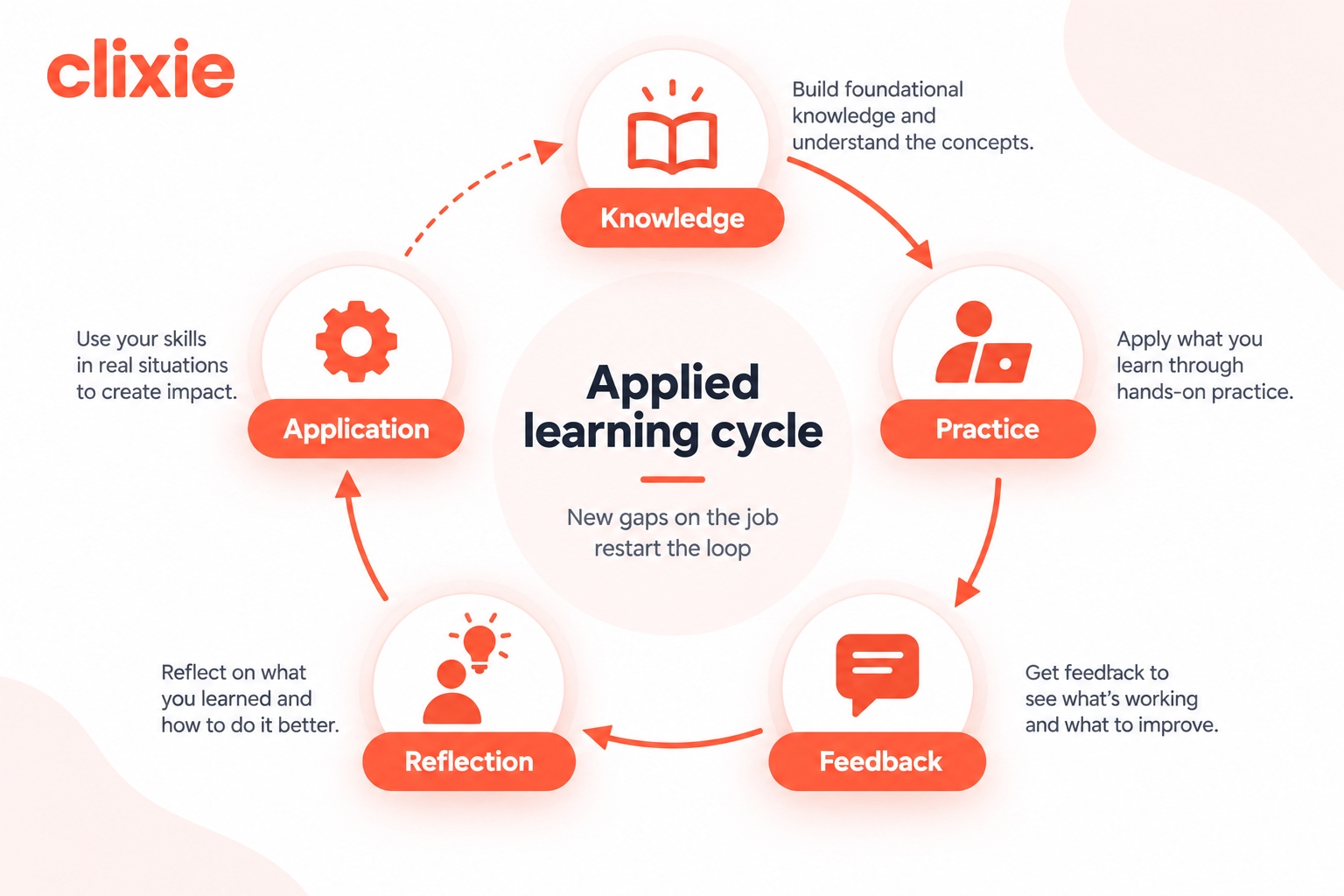
The applied learning model has five stages: Knowledge → Practice → Feedback → Reflection → Application. It builds on a 2013 review by Dunlosky and colleagues, which examined 10 common learning techniques and rated only two as high utility: practice testing and distributed practice (Dunlosky et al., Improving Students' Learning With Effective Learning Techniques, 2013). It treats knowledge as the entry point, then moves every learner into doing something with it.
Knowledge
Keep it lean. Teach the concepts people need to act and to judge AI output, and cut the rest. This is where the OECD's advice applies most: build this layer before handing learners a general-purpose AI that can answer for them.
Practice
Practice means realistic decisions, not recall questions. Put the learner in a scenario: a customer pushing back on price, an ambiguous expense claim, a safety step that someone skipped. Ask them what they'd do next.
Feedback
Feedback should arrive right after the choice, and it should explain why. "Incorrect" teaches very little. Compare that with this: "This response would breach the gifts policy because the value exceeds the reporting threshold" teaches the rule and the reasoning at once.
Reflection
Ask learners to explain their reasoning or connect the scenario to their own role. It takes 30 seconds and it's the step most courses skip.
Application
Learning has to reach the job. That means on-the-job tasks, manager check-ins, and performance signals that show whether the new behavior stuck. When a new gap shows up at work, the loop starts again.
Clixie's interpretation: AI belongs in some stages more than others. It's risky in the Knowledge stage when it acts as an answer machine, which is exactly the Bastani finding. It's valuable inside Practice and Feedback, where it can generate scenario variations, play a skeptical customer, or draft explanations for a human to review. Map AI to the stage, not to the whole course.
Content, Content, Content, Test: Why the Old Model Falls Short
The same 2013 Dunlosky review rated rereading, highlighting, and summarization as low utility techniques. Much of traditional e-learning is those techniques at scale: slides, a video, more slides, then a quiz at the end. It measures whether people consumed and remembered content, which is the part AI now does best.
To be fair, the old model exists for good reasons. Content libraries are easy to build, easy to assign, and easy to track. Regulators often want proof that employees saw the material. Consistency across thousands of learners matters. None of that goes away.
The problem is what the model measures. An end-of-course recall quiz rewards remembering facts that any employee can now look up in seconds. It says little about whether they'll make the right call on a Tuesday afternoon with a customer waiting. And when a course doesn't work, the default fix is usually more content, which repeats the same mistake.
Content → Content → Content → TestKnowledge → Practice → Feedback → Reflection → ApplicationGoalCover the materialBuild the ability to actLearner's roleWatch, read, click nextDecide, get it wrong, try againWhere AI fitsGenerating more content fasterScenario variations, role-play, draft feedbackAssessmentRecall quiz at the endDecisions inside realistic scenariosSuccess metricCompletion rateDecision accuracy and on-the-job behaviorEvidence producedContent exposure and recallApplied decision performance
Which of those two columns would you rather report to your leadership team? For a deeper look at practice formats, see 10 learning assessment strategies that actually work.
Why Does This Shift Matter More in Corporate Learning?
In school, the outcome is a grade. At work, the outcome is a decision, and recall isn't the same as readiness. Nearly half of L&D and talent leaders, 49% in LinkedIn's 2025 Workplace Learning Report, said their executives worry employees lack the skills to execute business strategy (LinkedIn, Workplace Learning Report 2025).
Completion data tells you who clicked through a module. It doesn't tell you who's prepared. Realistic practice with feedback shifts readiness from assumption to evidence, and managers can see who's actually prepared. Cornerstone makes the same point (Cornerstone, What do AI learning assistants actually change about corporate learning?, 2026).
The stakes vary by use case, but the pattern holds across them:
- Compliance: the question isn't whether someone read the policy. It's whether they recognize a conflict of interest when it doesn't look like the examples. See our ranking of the best compliance training platforms.
- Sales: reps need rehearsal on objections, not a product fact sheet they could ask a chatbot for. See the best interactive sales enablement platforms.
- Customer support: escalation calls depend on judgment under time pressure.
- Onboarding: new hires need to practice real tasks early, when mistakes are cheap.
There's one more reason this matters at work. Employees already use AI on the job, often daily. So training now has a second job: building the judgment to check what the AI produces. The Microsoft and Carnegie Mellon finding applies directly here. People who trust their own knowledge keep verifying. People who trust the tool more tend to stop.
How Can L&D Teams Redesign Training Around Practice and Feedback?
Start by turning passive video into decision points. In a University of Michigan deployment reported by Clixie, students who used an interactive review video scored 12.4% higher on their final exam than a cohort without it (Clixie AI, Interactive Video Training ROI, 2026). Twelve lecture recordings were combined into one chaptered sequence, with chapters under three minutes. Each chapter ended with a quiz pulled from Canvas, and students who missed a checkpoint looped back to that segment.
The comparison used the same exam and curriculum across two cohorts, one with Clixie and one without. It was not a randomized trial, and the sample size isn't published, so treat it as Clixie first-party evidence rather than independent research. The deployment illustrates the design principle used throughout this article: turn passive segments into opportunities to retrieve knowledge, make decisions, and receive feedback.
Where do you start? Here's a practical sequence for redesigning an existing course:
- Audit what you have. Flag every section that only transfers information. Those are candidates for trimming or for a practice moment.
- Cut to what people need to act. Could a learner get it from an AI assistant in 10 seconds? Do they need it to judge a situation? If not, it probably doesn't belong in the course.
- Put decisions inside the video. Replace the end-of-course quiz with decision points and branching scenarios at the moments where a real choice happens. A learner who picks the wrong response should see the consequence play out. Our step-by-step guide to branching scenarios walks through the build.
- Write feedback that explains the why. One or two sentences on the reasoning. This is where AI can help draft, as long as a subject matter expert reviews it.
- Add one reflection prompt. "How would this play out with your largest account?" is enough.
- Space it out. Distributed practice was one of Dunlosky's two high utility techniques. Reuse scenarios as short refreshers weeks later.
- Use AI to support practice, not replace it. Let it generate scenario variations or act as a role-play partner. Keep humans responsible for accuracy, context, and judgment. The Bastani study's hint-based tutor is the model: guide, don't answer.
What We See in Practice
At Clixie AI, we work with organizations converting existing training videos into interactive learning experiences. A recurring pattern is that the original material is usually not short on information. The missing layer is practice.
Instead of adding more content, we identify the moments where an employee would need to make a decision on the job. Those moments become questions, checkpoints, or branching scenarios inside the video. The learner makes a choice, sees the consequence, receives feedback, and continues.
This has changed how we think about interactive video. The interaction itself is not the goal. The goal is to create opportunities for learners to retrieve knowledge, make decisions, receive feedback, and demonstrate that they can apply what they learned.
If your content lives in an LMS, you don't need to rebuild the stack. Interactive video can be packaged as SCORM and dropped into the system you already use. See how to add SCORM interactivity to existing training videos.
What Should You Measure When Learning Is About Doing?
When learning is about doing, measure decisions, not completions. Most organizations don't get that far: ATD's 2009 evaluation study found that 92% measured learner reaction, but use of each deeper Kirkpatrick level dropped off sharply (ATD, New Study Shows Training Evaluation Efforts Need Help). The organizations that did reach business results saw a positive link to market performance.
What does a completion rate actually tell you? That someone reached the last screen. It says nothing about the next customer call. The chart below maps each Kirkpatrick level to a signal that applied learning can produce.
%20mapped%20to%20applied%20learning%20signals.avif)
Useful signals include:
- Decision accuracy on realistic scenarios, comparing first attempts with attempts after feedback.
- Reflection quality, plus whether learners' confidence matches their accuracy.
- Time to proficiency for new hires or people moving into new roles.
- Business metrics tied to the behavior: error rates, escalations, audit findings, win rates, or sales cycle length.
When practice happens inside the content, those interactions can also produce useful learning data. Depending on the implementation, quiz results, completion status, learner responses, and other interactions can be passed to an LMS through standards such as SCORM or xAPI. xAPI can support more granular activity data when deeper behavioral tracking is required. For the technical side, see our guide to interactive video, SCORM, and xAPI analytics.
How Did We Develop This Framework?
The applied learning model in this article combines published research with our experience designing interactive training.
We reviewed evidence on retrieval practice, distributed practice, AI-assisted learning, critical thinking, workplace learning, and training evaluation. We then mapped those findings against the practical requirements we see in corporate training: employees need enough knowledge to recognize a problem, opportunities to practice decisions, immediate feedback, time to reflect, and a way to transfer the behavior to their work.
The resulting Knowledge → Practice → Feedback → Reflection → Application framework is a Clixie AI working model, not an established academic framework. Its individual components are supported by the research cited throughout this article, but the five-stage structure itself represents our synthesis of that evidence and practical experience.
Where the Applied Learning Model Has Limits
This approach isn't free. Designing good scenarios takes more time than recording a lecture, and it needs subject matter experts. Some compliance requirements still call for documented exposure to specific content, so content won't disappear from every course. And much of the strongest evidence, including the Bastani study and the OECD report, comes from schools rather than workplaces. Does that mean every course needs a rebuild? No. The direction is clear, but teams should test it on one course, measure the results, and scale what works.
A Note on the Evidence
Not all evidence cited here comes from corporate learning environments. The Bastani study involved high school mathematics students, Dunlosky's review focused primarily on student learning, and the OECD report addresses education broadly. We use these findings to inform learning design principles, not as proof that identical effects will occur in every workplace.
Where workplace-specific evidence is available, including research from Microsoft and Carnegie Mellon, LinkedIn, TalentLMS, BCG, Cornerstone, and ATD, we identify it separately. Organizations should validate these principles against their own learners, tasks, and business outcomes.
Frequently Asked Questions
Will AI replace corporate training?
AI is reducing the value of training whose main function is information delivery. It can already explain concepts, answer questions, generate examples, and provide some forms of tutoring and feedback. The stronger role for structured training is to create reliable practice, assessment, feedback, and application around the knowledge employees need for their jobs. See why employees forget training videos.
Should employees still memorize information if AI can look it up?
Core concepts, yes. In 2025, Microsoft Research and Carnegie Mellon found that workers with more confidence in their own ability applied more critical thinking to AI output. Knowledge is what lets people check an AI answer quickly and catch the errors that matter. Trivia they'll rarely use can stay in the reference docs.
What's the difference between task performance and learning?
Task performance is how well someone completes a task in the moment, with or without help. Learning is a more durable change in knowledge that transfers to later situations. Better AI-assisted performance doesn't automatically mean the underlying skill improved. In a 2025 PNAS study, students using standard GPT-4 scored 48% higher in practice but 17% lower on the exam without it.
How do you add practice to video-based training?
Add decision points, branching scenarios, and in-video questions at the moments a real choice happens, followed by feedback that explains why. In a University of Michigan deployment reported by Clixie, students using interactive lecture review with checkpoint quizzes scored 12.4% higher on the final exam than a cohort without it. See our branching scenarios guide.
How can L&D prove training changed behavior?
Track decisions inside scenarios, then connect them to on-the-job metrics like error rates or time to proficiency. That's Kirkpatrick Level 3 (behavior) and Level 4 (results). In ATD's 2009 study, 92% of organizations measured learner reaction, but far fewer reached those deeper levels. Completion rates alone can't show either.
Conclusion
AI didn't make knowledge worthless. It made knowledge the starting point instead of the finish line.
- Foundational knowledge is how people judge AI output, so keep it lean but solid.
- Practice, feedback, and reflection are where learning actually happens.
- AI can support practice and feedback, while answer-first designs can reduce the cognitive effort required for learning.
- Measure decisions and behavior, not completions.
The fastest way to test this is small. Pick one training video you already have. Add three decision points, feedback that explains the reasoning, and one reflection prompt. Then compare the results against the old version.
Turn one of your existing training videos into a practice-based interactive experience. Start free with Clixie AI →
Next, read how to convert existing training materials into interactive videos.
.png)
.png)